Used for storyboarding user experiences, Story-lang is a verbal and notation language with an addressing scheme. Like any spoken or sign language, it is a framework to imagine, annotate and communicate. It also brings precision and clarity to the collaborative process for people involved in UX design and front-end development.
Story-lang is JSON-compatible.
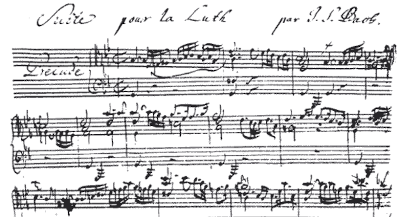
Inspiration to create this was drawn from music notations.
Above: Hand-written musical notation by J. S. Bach (1685–1750).
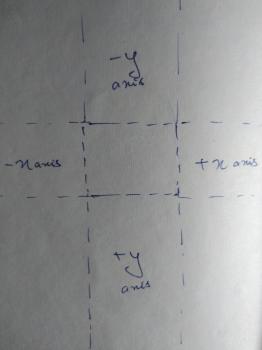
A single layout, with a single defined purpose. Scroll (y-axis) or swipe (x-axis) from 0% to 100% (or infinite, in the case of endless scrolling pages). Could also go to -100% or minus-infinity while scrolling upwards or swiping left.
There are 4 types of storyboards, as explained below.
- A single object, usually defined by a single data model object.
- File naming scheme: <content-type>-<url-slug>
- Example name: page-about-us
- Listing objects within the same type.
- File naming scheme: archive-<content-type>
- Example name: for listing book titles use: archive-book
- Single or multi-type listing of objects.
- File naming scheme: use name search for overall search, and search-<content-type> for type-based search layout.
- Example name: search or for only searching through videos use: search-video
- An entirely curated experience, might have hard-coded components. Usually home page or landing pages.
- File naming scheme: use name index or index-<url-slug>
- Example name: index or for a campaign specific landing page: index-act-now
Y-axis thumb movement. Scrolling up or down can be:
- Continuous type, that has a base scroll speed.
- Snap-to-fit one full frame or component per scroll up or down.
- It could have a custom transition on scroll up or down.
X-axis thumb movement. Swiping left or right can be:
- Snap-to-fit one full frame or component per swipe, like a slideshow.
- Continuous type, that has a base scroll speed.
- It could have a custom transition on swipe.
- Naming scheme: Bx for base speed, Bx:0.5
- Bx means Base speed on X-axis.
you can angle your story-line or swipe-line to experiment with user experience.
whatever is in one viewport, 100% height and 100% width. in css terms - 100vh and 100vw.
addressing scheme: F0, F1, F2 and so on downwards. to go upwards, use rF1, rF2 and so on upwards. F0 and rF0 lead to the same central frame.
frames are placed one below the other, tied to a thread.
you can place multiple threads one behind the other.
when you scroll down, each thread can have a different scroll speed.
addressing scheme: T0, T1, T2 and so on, going deeper into the Z axis. rT1, rT2 and so on, can be used for layering on top of the base thread T0.
defined in number of times it should be faster or slower than base scroll speed of the story-line.
addressing scheme: x1, x2, x1.3, x0.3 for faster scroll speed, and rx2, rx1.2 for slower scroll speed. relative to story-line base scroll speed. x0 will result in a thread fixed on it's first frame.
elements within a frame. story-lang covers:
- placement of components
- transitions, how each component loads and unloads
- priority of display, which helps handling multiple screen sizes
note: story-lang does not have a vocabulary to define things inside components. typically that's something content brief and brand-guidelines have - things like heading text, description text, image, typography, letter-spacing and so on. we use bootstrap extensively, which gives a robust language for intra-component consistency.
immersive experience within a component, like watching a video or drawing on a canvas.
menus, navbars other navigation buttons are components. story-lang covers:
- how navs unroll and roll-back, their animation and transition.
- positioning them in the storyboard.
a component used to describe a unit that encapsulates a restricted content experience, something that can package a single content piece and it's metadata. like a post, a tweet card or a swipe-story.
parts of the addressing scheme have to be separated by hyphen.
- component address: thread-frame-component:(x,y)
- frame address: thread-frame.
- thread address: thread:<thread-speed> // examples: T1:x2, T0:rx1.1, T0, rT1.
- if thread is not defined, assume value T0.
- if frame is not defined, assume value F0.
- if thread-speed is not defined, assume value x1. addressing scheme example: a fixed to top navbar component would be on address rT1:x0-F0-C0:(0,0).