
eufs_description: contains the urdf of the modeleufs_gazebo: contains all the gazebo worlds and simulation requirementsrobot_control: contains nodes to actuate the model in simulationgmapping: openSLAM-gmapping packagepure_pursuit: Lateral controller
- Ubuntu 20.04
- Install ros-noetic
- Cuda 11.0
wget https://developer.download.nvidia.com/compute/cuda/repos/ubuntu2004/x86_64/cuda-ubuntu2004.pin
sudo mv cuda-ubuntu2004.pin /etc/apt/preferences.d/cuda-repository-pin-600
wget http://developer.download.nvidia.com/compute/cuda/11.0.2/local_installers/cuda-repo-ubuntu2004-11-0-local_11.0.2-450.51.05-1_amd64.deb
sudo dpkg -i cuda-repo-ubuntu2004-11-0-local_11.0.2-450.51.05-1_amd64.deb
sudo apt-key add /var/cuda-repo-ubuntu2004-11-0-local/7fa2af80.pub
sudo apt-get update
sudo apt-get -y install cuda-11-0
Add following commands in .bashrc
export PATH=/usr/local/cuda-11.0/bin${PATH:+:${PATH}}
export LD_LIBRARY_PATH=/usr/local/cuda-11.0/lib64\
${LD_LIBRARY_PATH:+:${LD_LIBRARY_PATH}}-
CUDNN 8.0.5
Install the cudnn 8.0.5 from the official website

After installation, open the terminal and extract the file using the following commands:
cd Downloads
tar -zxf <copy the file name>.tgz
A folder named cuda will be built, transfer it to home, the execute the following commands:
  cd cuda/
  sudo cp lib64/* /usr/local/cuda/lib64/
  sudo cp include/* /usr/local/cuda/include/
  sudo reboot
After reboot to check if the cudnn has been installled correctly, give th following command:
dpkg -l libcudnn8-
cmake minimum version 3.19.0 (https://answers.ros.org/question/293119/how-can-i-updateremove-cmake-without-partially-deleting-my-ros-distribution/)

To check the cmake version give the following command:
cmake --version
-
OpenCV4 4.5.5 from source
mkdir ~/opencv_build && cd ~/opencv_build
git clone https://github.com/opencv/opencv.git
git clone https://github.com/opencv/opencv_contrib.git
cd opencv
git checkout 4.5.5
cd ..
cd opencv_contrib
git checkout 4.5.5
Once the download is complete, create a temporary build directory, and switch to it:
cd ~/opencv_build/opencv
mkdir build && cd build
Set up the OpenCV build with CMake:
cmake -D CMAKE_BUILD_TYPE=RELEASE \
    -D CMAKE_INSTALL_PREFIX=/usr/local \
    -D INSTALL_C_EXAMPLES=ON \
    -D INSTALL_PYTHON_EXAMPLES=ON \
    -D OPENCV_GENERATE_PKGCONFIG=ON \
    -D OPENCV_EXTRA_MODULES_PATH=~/opencv_build/opencv_contrib/modules \
    -D BUILD_EXAMPLES=ON \
    -D WITH_CUDA=ON ..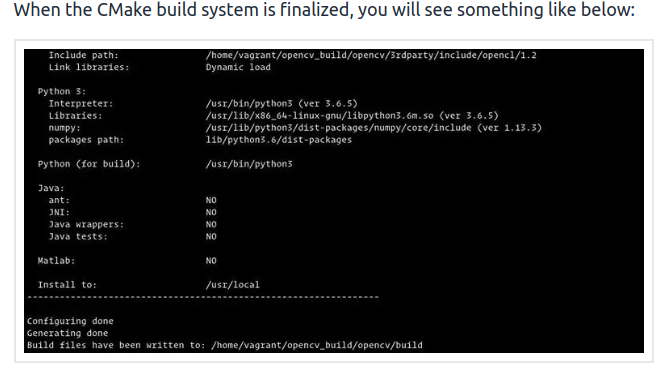
Install OpenCV with:
sudo make installTo verify whether OpenCV has been installed successfully, type the following command and you should see the OpenCV version:
pkg-config --modversion opencv4-
Darknet (https://github.com/AlexeyAB/darknet)
-
libfreenect (https://github.com/OpenKinect/libfreenect.git) see libfreenect.md (In addition to the instructions given in the repository, see the command below)
sudo apt-get install freenect- Python Packages:
- pcl
- scipy
sudo apt install python3-pcl
sudo apt install python3-scipy- ROS Packages:
- ros-noetic-ackermann-msgs
- ros-noetic-twist-mux
- ros-noetic-joy
- ros-noetic-controller-manager
- ros-noetic-robotnik-msgs
- ros-noetic-velodyne-simulator
- ros-noetic-effort-controllers
- ros-noetic-velocity-controllers
- ros-noetic-joint-state-controller
- ros-noetic-gazebo-ros-control
- ros-noetic-navigation
- ros-noetic-gmapping
- ros-noetic-rgbd-launch
- ros-noetic-nmea-navsat-driver
- ros-noetic-ros-numpy
Here's a direct terminal command to install all of them at once:
sudo apt install ros-noetic-ackermann-msgs ros-noetic-twist-mux ros-noetic-joy ros-noetic-controller-manager ros-noetic-velodyne-simulator ros-noetic-effort-controllers ros-noetic-velocity-controllers ros-noetic-joint-state-controller ros-noetic-gazebo-ros-control ros-noetic-navigation ros-noetic-gmapping ros-noetic-rgbd-launch ros-noetic-nmea-navsat-driver ros-noetic-ros-numpymkdir -p ~/catkin_ws/src
cd ~/catkin_ws/src
git clone https://github.com/TDR-SDC/fsd_simulator
cd ..
catkin_make- Source the workspace:
source ~/catkin_ws/devel/setup.bash
- Enter the three given commands in different terminals after using the sourcing the workspace
roslaunch eufs_gazebo small_track.launch                 # launch eufs simulator
roslaunch gmapping gmapping.launch                       # launch gmapping
roslaunch pure_pursuit pure_pursuit.launch               # launch pure_pursuit controller
roslaunch perception_pipeline perception_pipeline.launch # launch perception YOLOv4 tiny pipeline
roslaunch eufs_gazebo sensor_integration.launch # launch integrated pipeline- To Launch Complete Pipeline in Simulator:
roslaunch eufs_gazebo sensor_integration.launch # launch Complete Pipeline- To Launch Complete Pipeline Physically:
roslaunch eufs_gazebo complete_pipeline.launch # launch Complete Pipeline