This project demonstrates ETL process for a Loan Application dataset and a Credit Card dataset.
1.Python 3.10.6, Python modules like Pandas and advanced modules like Matplotlib, MariaDB, Heidi SQL, Apache Spark (Spark Core, Spark SQL), VS Code, git and git bash for source control.
2.Setting up Virtual environment in Python, install all the required packages and add all the dataset files, virtual environment files and files with usernames and passwords to gitignore.
1.ETL: Extracting, transforming according to mapping document and Loading Credit Card dataset.
2.API: Getting data as response from given API link, transforming according to mapping document and loading into MariaDB database.
3.Front End: After the data is loaded into Maria DB database, need to develop front end console to display data as per requirements.
4.Visualizations: Visualizations has two sub modules.
4.1. Customer Visualizations: Plot customer data as per requirements using the loaded data from MariaDB database.
4.2. Loan application Visualizations: Plot loan applications data as per requirements using the loaded data from Maria DB database.
Credit Card data is JSON data from Google drive, which is extracted, cleansed and transformed using Python and PySpark data frames and loaded to MariaDB database.
Capstone_project database is created in Maria DB using HeidiSQL and loaded the transformed JSON data into created Capstone_project database using spark data frames.
Loan Application data from REST API is extracted in python as list using response.json() method.
Resultant list is converted to spark data frames and loaded to Capstone_project database.
Using PyInputplus package and regex package in python front end menu program is developed with input validations, where upon selection of an item in menu, user can view the data as per requirements.
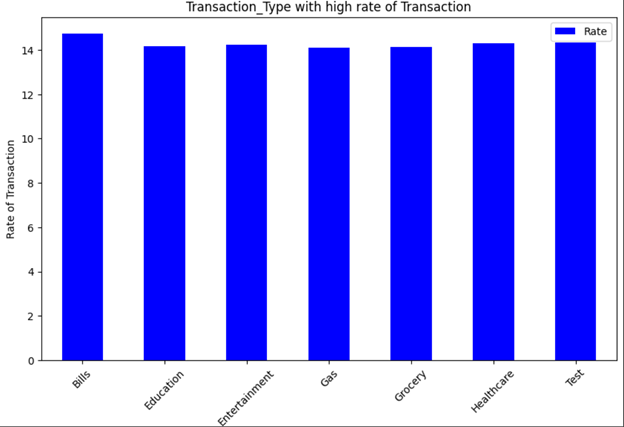
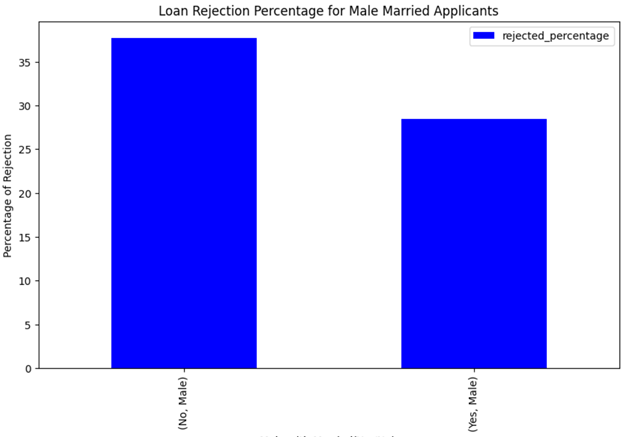
Data is extracted from database using Spark and SQL as spark data frames and then converted spark data frames to pandas data frames to plot the chart using matplotlib module in Python.
Few of the visualizations are shown below.


1.Installing Apache Spark, Python Pyspark and setting up environment variables.
2.Using Spark dataframe methods during transformations in ETL process.
3.Develop front end menu according to requirements for both data display and Visualizations.
1.Run each python file in ETL folder and API folder to transform and load the data to database.
2.Run each file with function definitions for front end and Visualizations.
3.Run Front end Menu and Visualization Menu for required output.