BuildPallet
The Pallet Packing process bundles the contents of your Pallet into a usable mod format that can be installed locally into your Bonelab Mods folder or distributed to an online resource, like Mods.io or Thunderstore.
- Open the Asset Warehouse window if it is not already visible using the Asset Warehouse button in the upper-left of the Unity window or navigate to
Stress Level Zero → Asset Warehouse. - Select your working Pallet in the Asset Warehouse
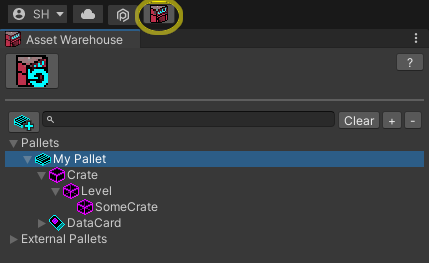
- In the Pallet's inspector window, click the Pack Pallet button to expand the
Pack for PCandPack for Questbuttons.

If the Pallet inspector detects that a mod has been built for the PC platform, a Install for BONELAB on PC button appears and will copy the packed pallet content to your game's MODs folder when clicked.
- To install on PC manually, once your Pallet is packed, a File Explorer window will appear. Copy the folder ("AuthorName.PalletName") into your Bonelab
Modsfolder.- The PC default is
C:\Users\[username]\AppData\LocalLow\Stress Level Zero\BONELAB\MODS.
- The PC default is
(Click image to see its full-size version, use the browser Back button to return)

- If installing locally to Quest 2, connect the headset with a Link cable, and then from within the headset, you must Allow Files from the connected device when prompted. Meta requires you to perform this Allow confirmation every time the headset is plugged in to a PC. On the PC, navigate to:
This PC\Quest 2\Internal shared storage\Android\data\com.StressLevelZero.BONELAB\files\Modsand copy the folder generated during the Pack Pallet process to the Quest2 Mods direcotry.
- Launch the game and enter the Hub. If you've already completed the game, you can simply enter the Mods menu and navigate to the level.
- Otherewise, Hold B or Y (Index) to bring up the in-game Menu.
- If the mod contained a level, you can enter it by selecting
Levels, then selecting your custom map. If the mod contained an Avatar, you can switch to it by selectingAvatars, and then selecting your custom avatar from the list. If the mod included aSpawnablecustom item, you can find the item in the Utility Gun's menus.
Review the Sharing Packed Content guide to ensure your Marrow content is ready.