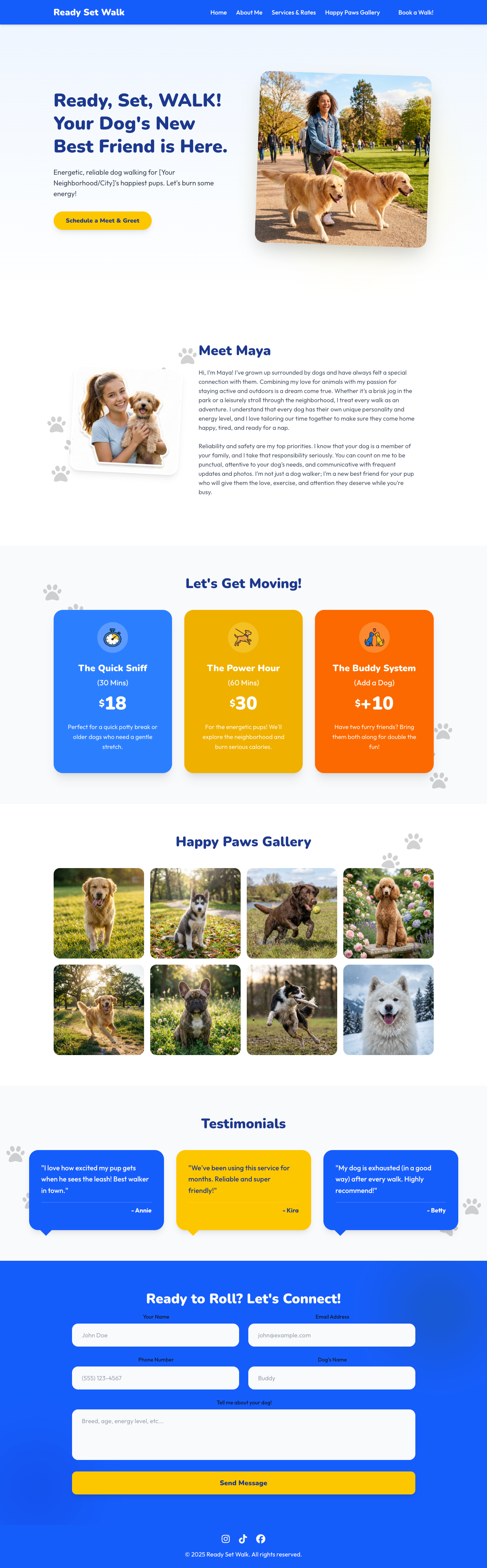
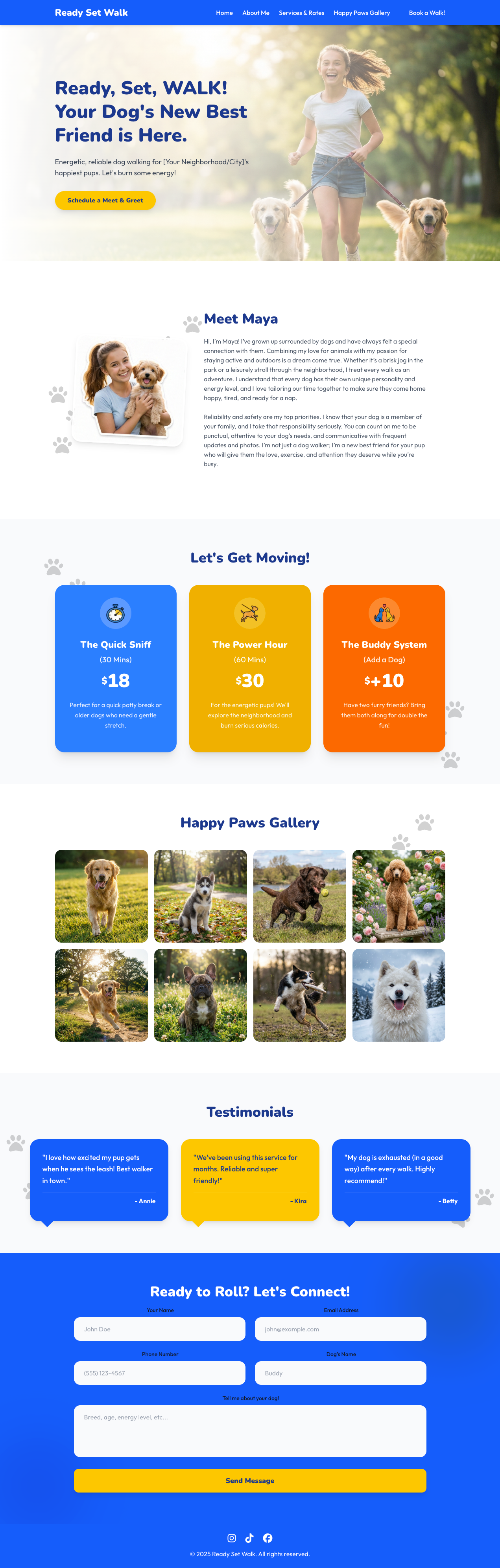
Welcome to Ready Set Walk! This is a vibrant, easy-to-use website theme designed specifically for teen dog walkers (and pet sitters!). It helps you look professional, show off your furry clients, and get new bookings.
If you already have Hugo installed:
-
Create a new site:
hugo new site my-dog-walking-biz cd my-dog-walking-biz -
Install the theme:
git init
git submodule add https://github.com/StaticDesigns/ready-set-walk.git themes/ready-set-walk
-
Install dependencies: Copy
themes/ready-set-walk/package.jsonto your root folder and run:cp themes/ready-set-walk/package.json . npm installNote: The theme handles Tailwind CSS configuration automatically via
assets/css/main.css. -
Copy the example config: Copy
themes/ready-set-walk/hugo.tomlto your root folder (replace the default one).cp themes/ready-set-walk/hugo.toml . -
Copy the example content: Run the following commands to copy the example content to your root folder:
cp -r themes/ready-set-walk/exampleSite/content .
cp -r themes/ready-set-walk/exampleSite/data .
-
Run it!
hugo serve
Open
http://localhost:1313to see your new site!
Almost everything can be changed in the hugo.toml file. Think of this file as your site's control panel.
Set your name and bio in the [params.about] section.
[params.about]
  name = "Maya"  # Your Name
  title = "Meet {{name}}" # Required title
  # You can write multiple paragraphs for your bio!
  content = """Hi, I'm Maya! I love dogs...

  Reliability is my #1 priority..."""
image = "/images/about-me2.png" # Place your photo in static/images/You have two styles to choose from!
- Hero 1 (Default): Image on the right, text on the left.
- Hero 2: Full-width background image with text overlay.
To switch, change the layout setting:
[params.hero]
  layout = "hero2" # Options: "hero" or "hero2"
  title = "Ready, Set, WALK!"
  subtitle = "Energetic dog walking for [Your City]..."
See the screenshots below in the Theme Layout section.
Add your links, and the icons will automatically appear in the footer.
[params.social]
  instagram = "https://instagram.com/yourhandle"
  tiktok = "https://tiktok.com/@yourhandle"
facebook = "" # Leave empty to hideThis theme supports 3 ways to handle form submissions.
- Set
provider = "formsubmit"inhugo.toml. - Set your
emailaddress in[params.contact]. - CRITICAL STEP:
- Start your site and send a test message using the contact form.
- Check your email inbox. You will receive an activation email from FormSubmit.
- Click "Activate".
- Until you do this, the form will not redirect to the "Thank You" page.
- Copy the example Thank You page from
themes/ready-set-walk/exampleSite/content/thank-you.mdto your site'scontent/folder. This is the page that will be shown after the form is submitted.
- Register at formspree.io and create a new form.
- Get your Form ID (e.g.,
xmqbonzq). - Update
hugo.toml:[params.contact.form] provider = "formspree" action = "YOUR_FORM_ID"
If you host your site on Netlify, just set:
[params.contact.form]
provider = "netlify"Want to see how many people visit your site?
- Get your Measurement ID (starts with
G-) from Google Analytics. - Add it to
hugo.toml:[params] googleAnalyticsID = "G-1234567890"
You can choose whether the navigation bar stays at the top of the screen while scrolling (sticky) or scrolls away (static).
[params.navbar]
sticky = true # Set to false for a static navbarManage up to three services and rates.
Edit data/services.yaml:
- title: "Quick Potty Break"
  price: "$15"
  duration: "15 mins"
  description: "Perfect for older dogs or puppies."
  icon: "fa-clock" # Use any FontAwesome icon name
popular: falseManage up to 12 photos of the pets you walk.
- Put your dog photos in
static/images/gallery/. - Edit
data/gallery.yaml:- image: "/images/gallery/dog1.jpg" alt: "Buddy the Golden Retriever" name: "Buddy"
Manage up to 6 testimonials.
Edit data/testimonials.yaml:
- text: "Maya is the best! My dog goes crazy when she arrives."
  author: "Sarah J."
dog: "Cooper"Ready-Set-Walk uses an icon set for different devices. Default icons are available in themes/ready-set-walk/static/.
site.webmanifest(for PWA)apple-touch-icon.png(for iOS)android-chrome-192x192.png(for Android)android-chrome-512x512.png(for Android)favicon-32x32.png(for desktop)favicon-16x16.png(for desktop)
To change the icons, replace the files in themes/ready-set-walk/static/ with your own.
The theme uses Nunito (headings) and Outfit (body text) from Google Fonts. To change the fonts, edit themes/ready-set-walk/static/css/main.css.
- Push your code to GitHub.
- Log in to Netlify and click "Add new site" -> "Import an existing project".
- Select your repository.
- Netlify will detect it's a Hugo site. Click "Deploy".
- Go to your repository Settings > Pages.
- Under Build and deployment, change Source to GitHub Actions.
- Click Configure on the suggested "Hugo" workflow (or create
.github/workflows/hugo.yaml). - Important: Update
baseURLinhugo.tomlto your GitHub Pages URL (e.g.,https://yourname.github.io/my-dog-walking-biz/).
The theme uses a simple layout system with two hero section options. Your site will look like this when you use this theme: