
Secure Your PDFs with AI-powered Redaction


PDF Redaction Studio is a powerful web-based application for redacting sensitive information from PDF documents. This is the backend container for the Studio edition.
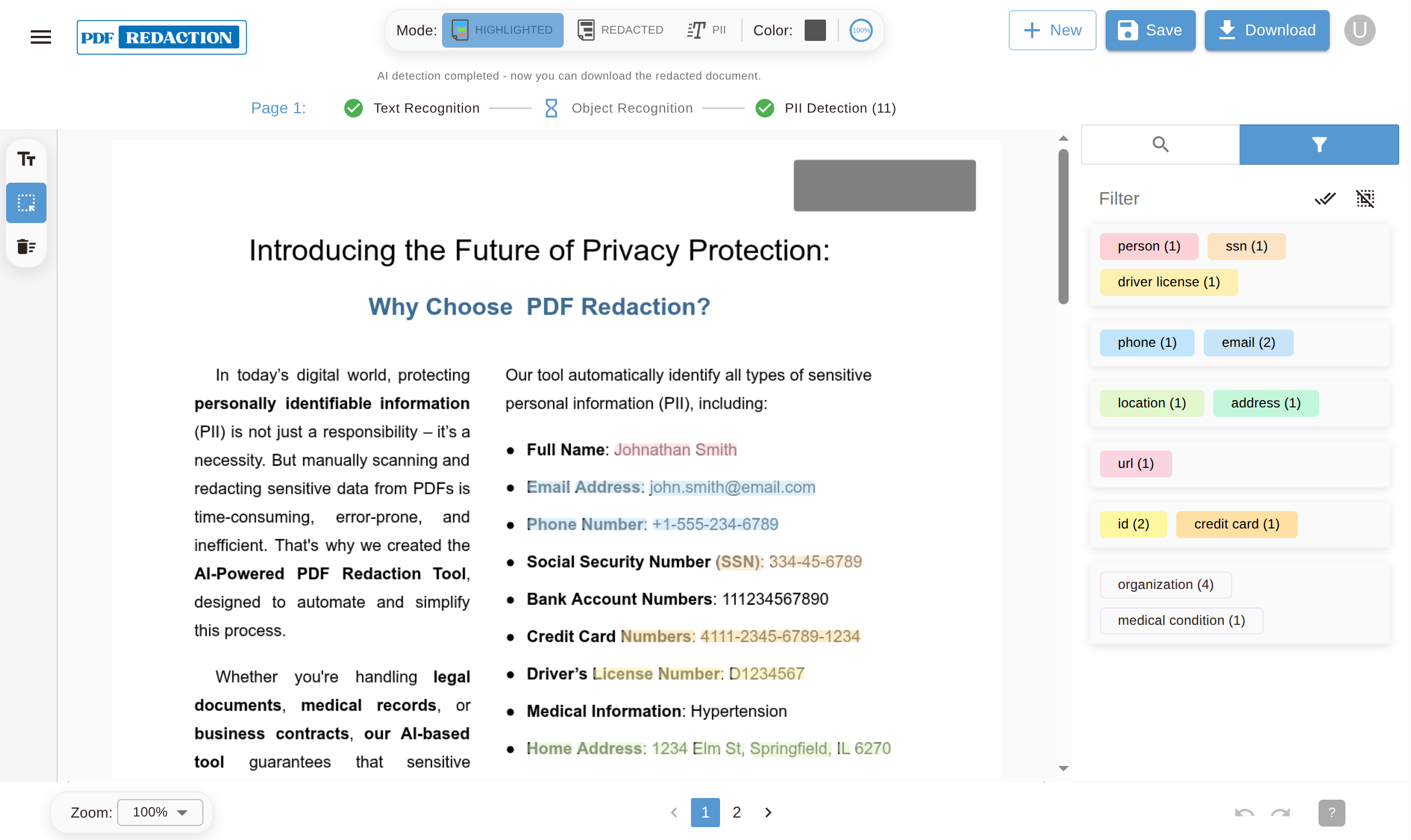
- Professional PDF Redaction: Advanced tools for redacting text, images, and metadata from PDFs
- AI-Powered Detection: Automatic detection of PII, sensitive data, and custom patterns
- Custom Redaction Rules: Define your own redaction patterns and rules
- User-Friendly Interface: Intuitive drag-and-drop interface built with React and Next.js
- Real-time Preview: See redactions in real-time before applying changes
- Secure Processing: All processing happens on your own infrastructure
- Flexible Licensing: Free trial available, with pay-as-you-go and subscription options
You can try it out for free before start local installation at https://studio.pdf-redaction.com
For quick redaction online for free at https://pdf-redaction.com
- Free Trial: Get started with a 14-days free trial to explore all features
- Pay-as-you-go: Flexible licensing option that scales with your usage
- Subscription Plans: Volume-based subscriptions for teams and enterprises
For detailed pricing information, visit https://pdf-redaction.com/pricing/
Valid license key is required to start the service. You can obtain a free trial or a commercial license at pdf-redaction.com.
-
Option A (curl):
/bin/bash -c "$(curl -fsSL https://raw.githubusercontent.com/StabRise/pdf-redaction-studio/main/install.sh)" -
Option B (wget):
/bin/bash -c "$(wget -qO- https://raw.githubusercontent.com/StabRise/pdf-redaction-studio/main/install.sh)"
If you prefer manual setup or want to customize the installation:
-
Clone or download the repository files:
Option A - Clone the repository:
git clone https://github.com/StabRise/pdf-redaction-studio.git
cd pdf-redaction-studio
Option B - Download individual files:
mkdir pdf-redaction-studio && cd pdf-redaction-studio
curl -O https://raw.githubusercontent.com/StabRise/pdf-redaction-studio/main/docker-compose.yaml
curl -O https://raw.githubusercontent.com/StabRise/pdf-redaction-studio/main/.env.example
-
Configure environment variables:
cp .env.example .env # Edit .env and add your license key from https://pdf-redaction.com/licenses/ -
Start the services:
docker compose up -d
-
Access the application: Open http://localhost:3000 in your browser
Useful Docker Compose commands:
docker compose logs -f- Follow logs in real-timedocker compose down- Stop and remove containersdocker compose restart- Restart the servicesdocker compose ps- Show running containers
This project uses the following Docker images:
- postgres - Official PostgreSQL database image
- stabrise/pdf-redaction-studio-backend - Backend API server
- stabrise/pdf-redaction-studio-frontend - Frontend web interface
- stabrise/pdf-redaction-api - PDF Redaction API server
You can pull individual images separately:
docker pull stabrise/pdf-redaction-studio-backend:latest
docker pull stabrise/pdf-redaction-studio-frontend:latest
docker pull stabrise/pdf-redaction-api:latestFor full documentation, visit https://pdf-redaction.com/docs/studio/
- Website: https://pdf-redaction.com
- Documentation: https://pdf-redaction.com/docs/studio/
- Contact: https://pdf-redaction.com/contact-us/
- Email: support@pdf-redaction.com