Volkszähler Android App
Eine moderne Android-App für das Volkszähler-Projekt, entwickelt mit Jetpack Compose, Kotlin und Clean Architecture.
Features
Kanal-Übersicht: Anzeige aller verfügbaren Volkszähler-Kanäle Suchfunktion: Schnelles Filtern von Kanälen Interaktive Diagramme: Visualisierung von Messdaten mit verschiedenen Zeitbereichen Offline-Support: Lokales Caching mit Room Database Material Design 3: Moderne UI mit Dynamic Colors Dark Mode: Automatische Unterstützung für helle und dunkle Themes
Technologie-Stack
Core Kotlin - Programmiersprache Jetpack Compose - Deklaratives UI Framework Material Design 3 - UI/UX Design System Coroutines & Flow - Asynchrone Programmierung
Architecture MVVM - Model-View-ViewModel Pattern Clean Architecture - Separation of Concerns Repository Pattern - Datenabstraktion Dependency Injection - Hilt/Dagger
Networking Retrofit - REST API Client OkHttp - HTTP Client Moshi - JSON Serialisierung
Database Room - Lokale SQLite Datenbank Flow - Reaktive Datenströme
UI Components Navigation Compose - App-Navigation YCharts - Diagramm-Bibliothek Material Icons - Icon-Set
Utilities Timber - Logging Framework SharedPreferences - Einstellungen
Projektstruktur
app/ ├── data/ │ ├── local/ │ │ ├── AppDatabase.kt │ │ └── ChannelDao.kt │ ├── model/ │ │ ├── Channel.kt │ │ ├── ChannelData.kt │ │ └── DataTuple.kt │ ├── remote/ │ │ └── VolkszaehlerApiService.kt │ └── repository/ │ └── VolkszaehlerRepository.kt ├── di/ │ ├── NetworkModule.kt │ └── DatabaseModule.kt ├── ui/ │ ├── channellist/ │ │ ├── ChannelListScreen.kt │ │ └── ChannelListViewModel.kt │ ├── chart/ │ │ ├── ChartScreen.kt │ │ └── ChartViewModel.kt │ ├── navigation/ │ │ └── Navigation.kt │ └── theme/ │ ├── Theme.kt │ └── Type.kt ├── util/ │ ├── NetworkResult.kt │ └── PreferencesManager.kt ├── MainActivity.kt └── VolkszaehlerApplication.kt
Installation
Voraussetzungen
Android Studio Hedgehog (2023.1.1) oder neuer JDK 17 Android SDK 34 Minimum SDK: 24 (Android 7.0)
Setup
Repository klonen git clone https://github.com/yourusername/volkszaehler-app.git cd volkszaehler-app
Projekt in Android Studio öffnen
- File → Open → Projektordner auswählen
Gradle Sync durchführen
- Android Studio synchronisiert automatisch die Dependencies
App starten
- Emulator oder physisches Gerät verbinden
- Run → Run 'app'
Konfiguration
API Endpoint
Die Standard-API-URL ist http://demo.volkszaehler.org/middleware.php/
Zum Ändern der URL: // In PreferencesManager.kt private const val DEFAULT\BASE\URL = "https://your-volkszaehler-instance.com/middleware.php/"
Build Variants
Debug: Aktiviertes Logging, keine Code-Optimierung Release: Deaktiviertes Logging, ProGuard-Optimierung
API Endpoints
Die App nutzt folgende Volkszähler-API-Endpoints:
Kanäle abrufen GET /entity.json
Kanal-Daten abrufen GET /data/{uuid}.json?from={timestamp}&to={timestamp}&group={grouping}
Parameter: uuid: Kanal-UUID from: Start-Timestamp (Millisekunden) to: End-Timestamp (Millisekunden) group: Gruppierung (hour, day, week, month, year)
Verwendung
Kanal-Liste
App öffnen → Kanal-Liste wird automatisch geladen Suchen: Suchfeld nutzen zum Filtern Aktualisieren: Refresh-Button in der TopBar Kanal auswählen: Checkbox aktivieren für Favoriten Details öffnen: Auf Kanal tippen für Diagramm
Diagramm-Ansicht
Kanal in der Liste antippen Zeitbereich wählen: Chips oben (1h, 1d, 1w, 1m, 1y) Interaktion: Diagramm-Punkte antippen für Details Statistiken: Scrollen für Min/Max/Durchschnitt Zurück: Back-Button oder Geste
Dependencies
// Core androidx.core:core-ktx:1.12.0 androidx.lifecycle:lifecycle-runtime-ktx:2.6.2
// Compose androidx.compose.ui:ui androidx.compose.material3:material3 androidx.navigation:navigation-compose:2.7.5
// Hilt com.google.dagger:hilt-android:2.48.1 androidx.hilt:hilt-navigation-compose:1.1.0
// Networking com.squareup.retrofit2:retrofit:2.9.0 com.squareup.okhttp3:okhttp:4.12.0
// Database androidx.room:room-runtime:2.6.1 androidx.room:room-ktx:2.6.1
// Charts co.yml:ycharts:2.1.0
// Utilities com.jakewharton.timber:timber:5.0.1
Testing
Unit Tests ./gradlew test
Instrumented Tests ./gradlew connectedAndroidTest
Build
Debug Build ./gradlew assembleDebug
Release Build ./gradlew assembleRelease
APK-Datei: app/build/outputs/apk/release/app-release.apk
Troubleshooting
Netzwerkfehler Problem "Netzwerkfehler" beim Laden der Kanäle Lösung Internetverbindung prüfen API-URL in PreferencesManager.kt überprüfen usesCleartextTraffic="true" in AndroidManifest.xml (für HTTP)
Build-Fehler Problem Gradle Sync fehlgeschlagen Lösung ./gradlew clean ./gradlew build --refresh-dependencies
Room Database Fehler Problem Schema-Änderungen führen zu Crashes Lösung App deinstallieren und neu installieren Oder: fallbackToDestructiveMigration() ist bereits aktiviert
Roadmap
[ ] Multi-Channel Diagramme [ ] Export-Funktion (CSV, PDF) [ ] Push-Benachrichtigungen bei Schwellwerten [ ] Widget für Homescreen [ ] Tablet-Optimierung [ ] Wear OS Support
Contributing
Contributions sind willkommen! Bitte:
Fork das Repository Feature Branch erstellen (git checkout -b feature/AmazingFeature) Änderungen committen (git commit -m 'Add AmazingFeature') Branch pushen (git push origin feature/AmazingFeature) Pull Request öffnen
Lizenz
Dieses Projekt ist unter der GPL-3.0 License lizenziert - siehe LICENSE Datei für Details.
Kontakt
Projekt Volkszähler Android App
Website https://volkszaehler.org
GitHub https://github.com/volkszaehler
Danksagungen
Volkszähler-Team - Für das großartige Backend-System YCharts - Für die Chart-Bibliothek Android Community - Für Jetpack Compose und moderne Tools
Hinweis Diese App ist ein Community-Projekt und nicht offiziell vom Volkszähler-Team unterstützt.
App Language: english, deutsch
(English description below)
Download: https://github.com/volkszaehler/app-android/releases/latest
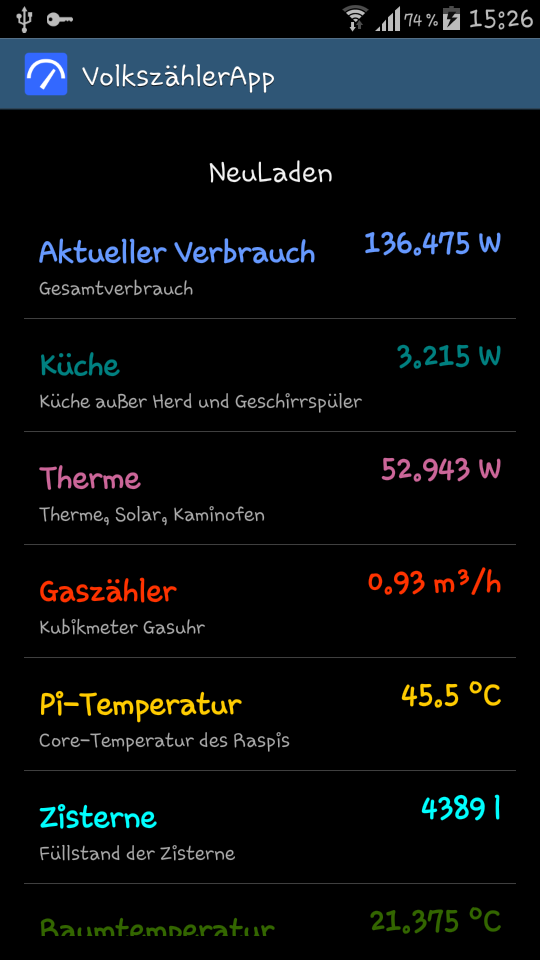


Funktionen:
- Abrufen der Channelinformationen und Anzeige der letzten Werte
- Anzeigen von Details zu jedem Channel
- Tabellarische Ansicht der Verbrauchswerte
- Anzeigen von Charts zu einzelnen Channels, incl. Zoom, auch mit „Touch and Move“ im Diagramm
- Anzeigen von Gruppen-Charts und Hinzufügen weiterer Graphen ist möglich ("Long Touch" im Chart)
- Unterstützung von Basic Authentication und HTTPS, ABER das Zertifikat wird nicht wirklich geprüft , es werden auch ungültige oder Man-in-the-Middle-Zertifikate akzeptiert
- Einstellungen können (z.B. vor einem Update) gesichert und (nach dem Update/Neuinstallation) wieder eingespielt werden
Benötigte Android Berechtigungen:
- android.permission.INTERNET für den Zugriff auf die Volkszähler-Installation
- android.permission.WRITE_EXTERNAL_STORAGE für das Schreiben (und Lesen) des Backups
Wenn das Clonen bzw. das Öffnen des Projektes wegen eines ausgegrauten "Use default gradle wrapper (not configured for the current project)" nicht möglich ist, dann
- das Projekt nochmal normal als "Open an existing Android Studio project" öffnen und im "Gradle Sync" Dialog einfach OK klicken
- Wenn nötig unter Settings => Version Control das "Unregistered Root" auswählen und auf das grüne "+" klicken, fertig
English:
Features:
- Download of Channel Information and Display of recent Values
- Shows Details for all Channels
- Shows Values in TableView
- Shows Charts for every Channel, supports Zoom, (Touch and Move)
- Shows Charts of Groups, it is possible to add further graphs (use "Long Touch" in chart screen)
- Supports Basic Authentication und HTTPS, BUT the certificate is not really checked, the app accepts also invalid or Man-in-the-Middle certificates
- Settings can be saved (e.g. before updating) and can be restored (after the Update/Re-installation)
Needed Android Permissions:
- android.permission.INTERNET for accessing the Volkszaehler installation
- android.permission.WRITE_EXTERNAL_STORAGE for writing (and reading) of settings backups
If the cloning resp. opening of the project fails due to a grayed "Use default gradle wrapper (not configured for the current project)", then
- open the Project again as "Open an existing Android Studio project" and clock "OK" in the "Gradle Sync" Dialog
- If necessary, choose the "Unregistered Root" in Settings => Version Control and click the green plus "+"
- Asks for Permission to store/read backups (starting with Android 6)
- Backups work also with Android 6 and newer (volkszaehler#38)
- Backup file is stored in download folder now
- small optimizations
- Custom time ranges can be selected now for table view. Please note, the larger the time range the imprecise the values are, especially the Min and Max values. 'Grouping' makes it faster, but increases the imprecision even more.
- Costs are not correctly displayed in table view when type 'water' is used (volkszaehler#36)
- small optimizations
- When reading the channels the very first time all channels are checked by default (volkszaehler#32)
- now 3 Sorting modes: Off, Sorting of Channels in Groups, or Sorting all Channles independend of Groups (volkszaehler#29)
- the backup of settings now also saves the "checked state" of the channels
- small bugs
- Sorting of channels now also for Popup in chart view (volkszaehler#30)
- small optimizations
- Channels can be sorted in Preferences, channels must be relaoded once after changing the preference
- error message in table view for groups (there is no table view for groups)
- small optimizations, Colors in table view, naming
- new TabelView of Values
- fixed display issues with Channel of type "heat" and consumption
- small optimizations
- fixed style issues with Android 7 (volkszaehler#21)
- fixed unhandled UnknownHostException (volkszaehler#22)
- better styles for date dialog in chartview
- fixed exception "Getting data is not supported for groups"
- ChartEngine update
- Private channels can be manually added in preferences, if there are more than one, add them comma separated like uuid1,uuid2,uuid3
- better error handling, works with older Volkszaehler version now
- small optimizations (Font Size, Values can be copied)
- It is now possible to have several graphs in one chart, use "Long Press" in chart view, Limitation: there is only one y-Axis
- ChannelDetails show now the total value if an initial value is set for the channel
- Number of Tuples can be set now (default is 1000), a higher number makes the Charts more detailled (as long as there are enough values in the database), but slows down the charts
- fixed display issues with Channels of type "water" and costs
- small optimizations
- ChannelInfo popup can't be closed when clicking twice or more
- changed image URLs in README.md to match the new Wiki image URL pattern
- empty Channel Color causes crash
- Umlauts in host name cause crash
- Extended Chart Details Dialog
- Improved Chart, especially when using Groups
- Buttons instead of Text in Details
- Completed README.md, removed history.txt
- small improvmenets
- Consumption and Cost values in ChartDetails Dialog visible again, also fixed for "Gas" channel
- Unit correctly displayed now with Channels from Group
- Chart-Range keeps the same after orientation change
- Details now can be scrolled
- improved logging
- No Costs in Chart Details for type "gas"
- Mixed decimal format in Chart Details
- Now graph skipped when no data in time range, useful especially with empty channel in groups
- Backup/Restore of Settings
- Details background not transparent anymore
- Calculation and display of costs in Details dialog
- Date/Time selection dialog
- Cost for power meters no correct in "Channel Details"
- Some small fixes and optimizations
- Group support
- Several lines in one chart (when using groups)
- Start and end date/time can be set to define a range to display in chart
- Automatic reload can be configured
- Chart info now when clicking on the graph line
- Single touch in chart doesn't cause zoom anymore, 50px move is necessary to zoom
- "About" is now translated in German version
- From/to translated below chart
- Some small fixes
- Initial BETA version