- This fork modernizes and adapts the original ConnectHolland CookieConsentBundle to be fully compatible with Symfony 7 and PHP 8.2+. The following improvements have been made:
- Replaced deprecated method calls (e.g., getRootAlias()) to comply with Symfony 7 and Doctrine ORM updates.
- Migrated all constructor property assignments to PHP 8+ promoted properties for cleaner and more concise code.
- Added native type declarations for all class properties and method signatures across the codebase.
- Replaced Doctrine annotations with native PHP 8 attributes for entity mapping.
- Added a doctrine.yaml example to the documentation for manually configuring Doctrine mapping, as the bundle is not treated as a traditional Symfony bundle (is_bundle: false).
- Optimized Doctrine entity fields by reducing string lengths where appropriate to limit unnecessary database resource consumption.
- Verified and updated all event subscriber method signatures to match Symfony 7’s event dispatching system.
- Maintained full feature parity with the original bundle while aligning the codebase with modern Symfony and PHP best practices.
- Applied light CSS refinements for improved margin and border rendering in the UI.
- See the "Doctrine mapping example for persisting cookie consent".
To enable the CookieConsentLog entity and persist logs in your database, update your doctrine.yaml with the following configuration:
mappings:
    CHCookieConsentBundle:
        type: attribute
        dir: "%kernel.project_dir%/vendor/connectholland/cookie-consent-bundle/Entity"
        prefix: 'ConnectHolland\CookieConsentBundle\Entity'
        alias: ch_cookie_consent_bundle
is_bundle: false- Then update your database schema:
bin/console doctrine:schema:update --forceTo use this fork instead of the official connectholland/cookie-consent-bundle, follow these steps:
- Fork the repository
- Create your own fork of the repository on GitHub by clicking the "Fork" button at the top right of this repo.
- Add your fork repository to your
composer.json
{
    "repositories": [
        {
            "type": "vcs",
            "url": "https://github.com/YourGitHubUsername/cookie-consent-bundle.git"
        }
    ]
}- Require the forked package in your
composer.json
composer require connectholland/cookie-consent-bundle:dev-master--------------------------------------# Cookie Consent Bundle for Symfony Original README #--------------------------------


Symfony bundle to append Cookie Consent to your website to comply to AVG/GDPR for cookies.
In a Symfony application run this command to install and integrate Cookie Consent bundle in your application:
composer require connectholland/cookie-consent-bundleWhen not using symfony flex, enable the bundle in the kernel manually:
<?php
// app/AppKernel.php

public function registerBundles()
{
    $bundles = array(
        // ...
        new ConnectHolland\CookieConsentBundle\CHCookieConsentBundle(),
        // ...
    );
}When not using symfony flex, enable the bundles routing manually:
# app/config/routing.yml
ch_cookie_consent:
resource: "@CHCookieConsentBundle/Resources/config/routing.yaml"Configure your Cookie Consent with the following possible settings
ch_cookie_consent:
    theme: 'light' # light, dark
    categories: # Below are the default supported categories
        - 'analytics'
        - 'tracking'
        - 'marketing'
        - 'social_media'
    use_logger: true # Logs user actions to database
    position: 'top' # top, bottom
    simplified: false # When set to true the user can only deny or accept all cookies at once
    http_only: true # Sets HttpOnly on cookies
    form_action: $routeName # When set, xhr-Requests will only be sent to this route. Take care of having the route available.
csrf_protection: true # The cookie consent form is csrf protected or notLoad the cookie consent in Twig via render_esi ( to prevent caching ) at any place you like:
{{ render_esi(path('ch_cookie_consent.show')) }}
{{ render_esi(path('ch_cookie_consent.show_if_cookie_consent_not_set')) }}
If you want to load the cookie consent with a specific locale you can pass the locale as a parameter:
{{ render_esi(path('ch_cookie_consent.show', { 'locale' : 'en' })) }}
{{ render_esi(path('ch_cookie_consent.show_if_cookie_consent_not_set', { 'locale' : app.request.locale })) }}
Displaying the banner in hidden state
To allow users to reopen the consent banner later, load the fragment containing the manage button everywhere but keep the banner itself hidden. The bundled JavaScript will reveal the banner when the Manage cookie preferences button is clicked.
{# Hidden fragment providing the manage button #}
<div style="display:none">
    {{ render_esi(path('ch_cookie_consent.show')) }}
</div>

{# Visible banner for first time visitors only #}
{{ render_esi(path('ch_cookie_consent.show_if_cookie_consent_not_set')) }}When a user submits the form the preferences are saved as cookies. The cookies have a lifetime of 1 year. The following cookies are saved:
- Cookie_Consent: date of submit
- Cookie_Consent_Key: Generated key as identifier to the submitted Cookie Consent of the user
- Cookie_Category_[CATEGORY]: selected value of user (true or false)
AVG/GDPR requires all given cookie preferences of users to be explainable by the webmasters. For this we log all cookie preferences to the database. IP addresses are anonymized. This option can be disabled in the config.

The following TwigExtension functions are available:
chcookieconsent_isCategoryAllowedByUser check if user has given it's permission for certain cookie categories
{% if chcookieconsent_isCategoryAllowedByUser('analytics') == true %}
    ...
{% endif %}
chcookieconsent_isCookieConsentSavedByUser check if user has saved any cookie preferences
{% if chcookieconsent_isCookieConsentSavedByUser() == true %}
    ...
{% endif %}You can add or remove any category by editing config/packages/ch_cookie_consent.yaml.
Every entry in the categories array will automatically appear in the consent banner,
so new cookie groups can be introduced without modifying any PHP code. Make sure
translations exist for the keys ch_cookie_consent.<category>.title and
ch_cookie_consent.<category>.description.
All texts can be altered via Symfony translations by overwriting the CHCookieConsentBundle translation files.
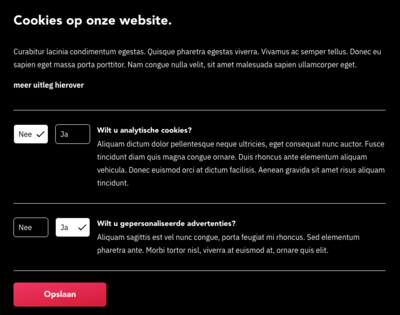
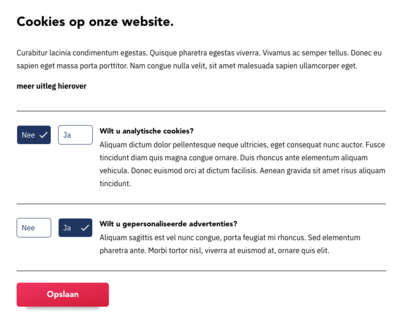
CHCookieConsentBundle comes with a default styling. A sass file is available in Resources/assets/css/cookie_consent.scss and a build css file is available in Resources/public/css/cookie_consent.css. Colors can easily be adjusted by setting the variables available in the sass file.
To install these assets run:
bin/console assets:installAnd include the styling in your template:
{% include "@CHCookieConsent/cookie_consent_styling.html.twig" %}By loading Resources/public/js/cookie_consent.js the cookie consent will be submitted via ajax and the cookie consent will be shown on top of your website while pushing down the rest of the website.
When a form button is clicked, the event of cookie-consent-form-submit-successful is created. Use the following code to listen to the event and add your custom functionality.
document.addEventListener('cookie-consent-form-submit-successful', function (e) {
    // ... your functionality
    // ... e.detail is available to see which button is clicked.
}, false);You can override the templates by placing templates inside your project (except for Symfony 5 projects):
# app/Resources/CHCookieConsentBundle/views/cookie_consent.html.twig
{% extends '@!CHCookieConsent/cookie_consent.html.twig' %}

{% block title %}
    Your custom title
{% endblock %}You can override the templates by placing templaces inside you project as below. Be careful, it is important to place templates at this location: "app/templates/bundles/CHCookieConsentBundle/" .
# app/templates/bundles/CHCookieConsentBundle/cookie_consent.html.twig
{% extends '@!CHCookieConsent/cookie_consent.html.twig' %}

{% block intro %}
    Your custom intro
{% endblock %}