An MCP Server for Natural Language Search over RDBMS Schemas. Find exact tables you need, with all their relationships mapped out, in milliseconds. No vector database setup is required.
You have 200 tables in your database. Someone asks "where are user refunds stored?"
You could:
- Grep through SQL files for 20 minutes
- Pass the full schema to an LLM and watch it struggle with 200 tables
Or build schematic embeddings of your tables, store in-memory, and query in natural language in an MCP server.
- No vector database setup is required
- Small memory footprint -- easily scales up to 1000 tables and 10,000+ columns.
- Millisecond query latency
Fast by default - Base install uses only BM25/fuzzy search (no PyTorch):
# Minimal install (BM25 + fuzzy only, ~10MB)
pip install "schema-search[postgres]"

# With semantic/hybrid search support (~500MB with PyTorch)
pip install "schema-search[postgres,semantic]"

# With LLM chunking
pip install "schema-search[postgres,semantic,llm]"

# With MCP server
pip install "schema-search[postgres,semantic,mcp]"

# Other databases
pip install "schema-search[mysql,semantic]"      # MySQL
pip install "schema-search[snowflake,semantic]"  # Snowflake
pip install "schema-search[bigquery,semantic]"   # BigQuery
pip install "schema-search[databricks,semantic]" # Databricks
Extras:
[semantic]: Enables semantic/hybrid search and CrossEncoder reranking (adds sentence-transformers)[llm]: Enables LLM-based schema chunking (adds openai)[mcp]: MCP server support (adds fastmcp)
Edit config.yml:
logging:
  level: "WARNING"

embedding:
  location: "memory" # Options: "memory", "vectordb" (coming soon)
  model: "multi-qa-MiniLM-L6-cos-v1"
  metric: "cosine" # Options: "cosine", "euclidean", "manhattan", "dot"
  batch_size: 32
  show_progress: false
  cache_dir: "/tmp/.schema_search_cache"

chunking:
  strategy: "raw" # Options: "raw", "llm"
  max_tokens: 256
  overlap_tokens: 50
  model: "gpt-4o-mini"

search:
  # Search strategy: "semantic" (embeddings), "bm25" (BM25 lexical), "fuzzy" (fuzzy string matching), "hybrid" (semantic + bm25)
  strategy: "bm25"
  initial_top_k: 20
  rerank_top_k: 5
  semantic_weight: 0.67 # For hybrid search (bm25_weight = 1 - semantic_weight)
  hops: 1 # Number of foreign key hops for graph expansion (0-2 recommended)

reranker:
  # CrossEncoder model for reranking. Set to null to disable reranking
  model: null # "Alibaba-NLP/gte-reranker-modernbert-base"

schema:
  include_columns: true
  include_indices: true
  include_foreign_keys: true
  include_constraints: true

output:
  format: "markdown" # Options: "json", "markdown"
limit: 5 # Default number of results to returnIntegrate with Claude Desktop or any MCP client.
Add to your MCP config (e.g., ~/.cursor/mcp.json or Claude Desktop config):
Using uv (Recommended):
{
  "mcpServers": {
    "schema-search": {
      "command": "uvx",
      "args": [
        "schema-search[postgres,mcp]",
        "postgresql://user:pass@localhost/db",
        "optional/path/to/config.yml",
        "optional llm_api_key",
        "optional llm_base_url"
      ]
    }
  }
}
Using pip:
{
  "mcpServers": {
    "schema-search": {
      // conda: /Users/<username>/opt/miniconda3/envs/<your env>/bin/schema-search",
      "command": "path/to/schema-search",
      "args": [
        "postgresql://user:pass@localhost/db",
        "optional/path/to/config.yml",
        "optional llm_api_key",
        "optional llm_base_url"
      ]
    }
  }
}
The LLM API key and base url are only required if you use LLM-generated schema summaries (config.chunking.strategy = 'llm').
schema-search "postgresql://user:pass@localhost/db" "optional/path/to/config.yml"Optional args: [config_path] [llm_api_key] [llm_base_url]
The server exposes two tools:
schema_search(query, schemas, catalogs, limit)- Search tables using natural languageget_schema(schemas, catalogs)- Get full database schema structure
from sqlalchemy import create_engine
from schema_search import SchemaSearch

# PostgreSQL
engine = create_engine("postgresql://user:pass@localhost/db")


sc = SchemaSearch(
  engine=engine,
  config_path="optional/path/to/config.yml", # default: config.yml
  llm_api_key="optional llm api key",
  llm_base_url="optional llm base url"
  )

sc.index(force=False) # default is False
results = sc.search("where are user refunds stored?")

# Default output is markdown - render with str()
print(results)  # Formatted markdown with schemas, relationships, and scores

# Access underlying data as dictionary
result_dict = results.to_dict()
for result in result_dict['results']:
    print(result['table'])           # "public.refund_transactions" (qualified name)
    print(result['schema'])           # Full column info, types, constraints
    print(result['related_tables'])   # ["public.users", "public.payments"]

# Override output format explicitly
json_results = sc.search("where are user refunds stored?", output_format="json")
print(json_results)  # JSON formatted string

# Override hops, limit, search strategy, and output format
results = sc.search("user_table", hops=1, limit=5, search_type="hybrid", output_format="markdown")

# Filter by specific schemas
results = sc.search("user accounts", schemas=["public", "billing"])

# Get the full schema structure (useful for backends)
db_schema = sc.get_schema()  # Returns {schema_key: {table_name: TableSchema}}
public_schema = sc.get_schema(schemas=["public"])  # Filter to specific schemas
sc.index() automatically detects schema changes and refreshes cached metadata, so you rarely need to force a reindex manually.
Schema Search uses SQLAlchemy connection strings:
# PostgreSQL
engine = create_engine("postgresql://postgres:mypass@localhost:5432/mydb")

# MySQL
engine = create_engine("mysql+pymysql://root:mypass@localhost:3306/mydb")

# Snowflake (key-pair auth required - see "Snowflake Key-Pair Authentication" section below)
engine = create_engine("snowflake://myuser@xy12345/MYDB?warehouse=COMPUTE_WH&private_key_path=~/.snowflake/rsa_key.p8")

# BigQuery
engine = create_engine("bigquery://my-project/my-dataset")

# Databricks (indexes all catalogs, filter at search time)
token = "dapi..."
host = "dbc-xyz.cloud.databricks.com"
http_path = "/sql/1.0/warehouses/abc123"

engine = create_engine(
    f"databricks://token:{token}@{host}?http_path={http_path}",
    connect_args={"user_agent_entry": "schema-search"}
)

# Filter by catalog/schema at search time
results = sc.search("users", catalogs=["main"], schemas=["default", "analytics"])Schema Search supports four search strategies:
- bm25: Lexical search using BM25 ranking algorithm (no ML dependencies)
- fuzzy: String matching on table/column names using fuzzy matching (no ML dependencies)
- semantic: Embedding-based similarity search using sentence transformers (requires
[semantic]) - hybrid: Combines semantic and bm25 scores (default: 67% semantic, 33% bm25) (requires
[semantic])
Each strategy performs its own initial ranking, then optionally applies CrossEncoder reranking if reranker.model is configured (requires [semantic]). Set reranker.model to null to disable reranking.
We benchmarked on the Spider dataset (1,234 train queries across 18 databases) using the default config.yml.
Memory: The embedding model requires ~90 MB and the optional reranker adds ~155 MB. Actual process memory depends on your Python runtime.
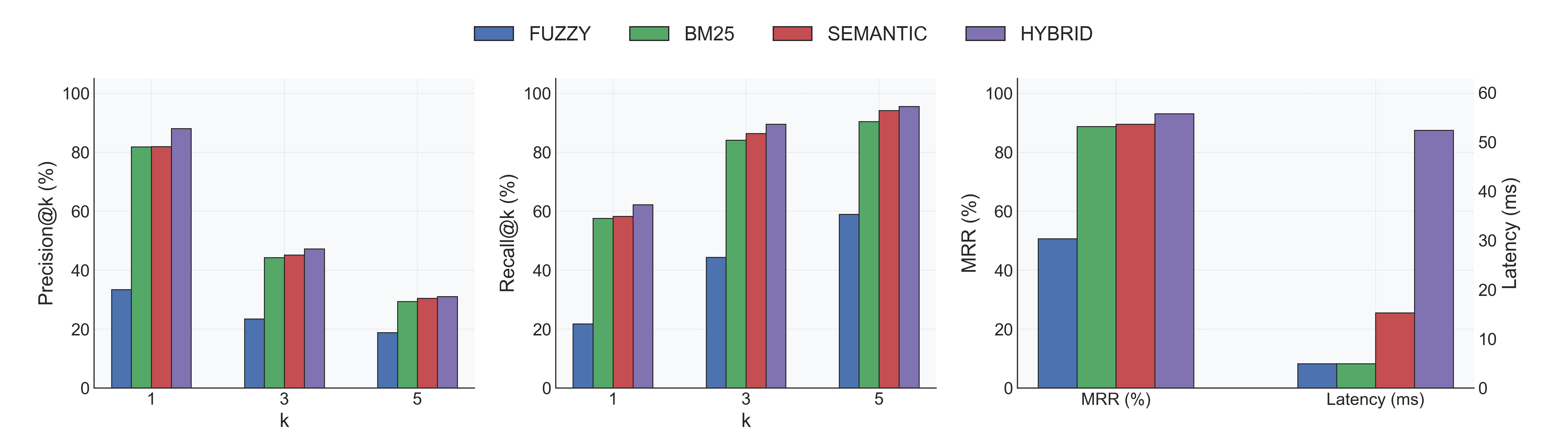
- Indexing: 0.22s ± 0.08s per database (18 total).
- Accuracy: Hybrid leads with Recall@1 62% / MRR 0.93; Semantic follows at Recall@1 58% / MRR 0.89.
- Latency: BM25 and Fuzzy return in ~5ms; Semantic spends ~15ms; Hybrid (semantic + fuzzy) averages 52ms.
- Fuzzy baseline: Recall@1 22%, highlighting the need for semantic signals on natural-language queries.
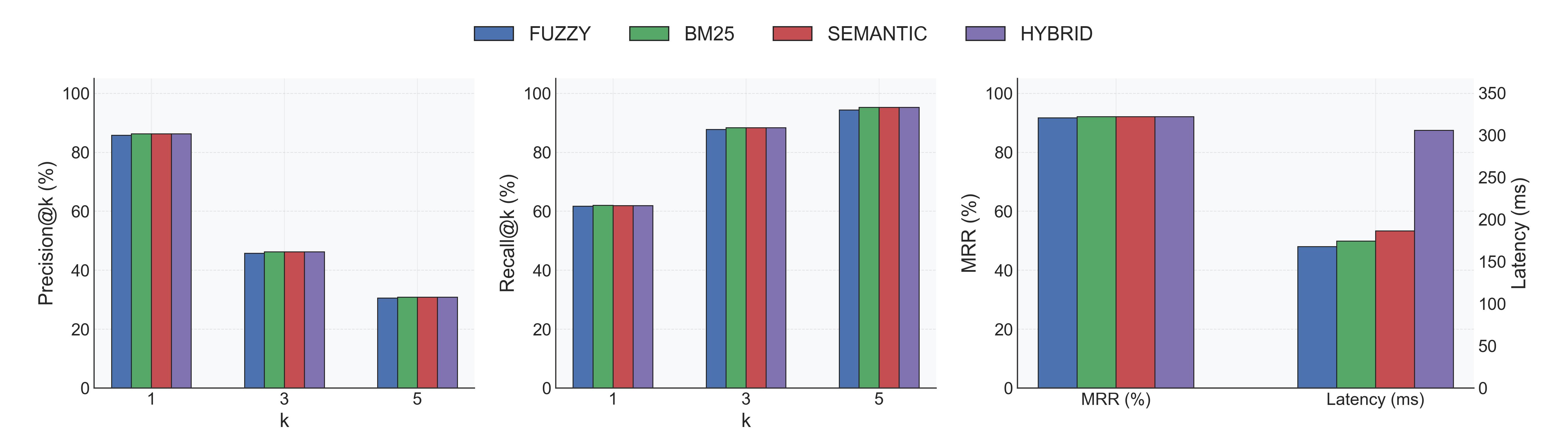
- Indexing: 0.25s ± 0.05s per database (same 18 DBs).
- Accuracy: All strategies converge around Recall@1 62% and MRR ≈ 0.92; Fuzzy jumps from 51% → 92% MRR.
- Latency trade-off: Extra CrossEncoder pass lifts per-query latency to ~0.18–0.29s depending on strategy.
- Recommendation: Enable the reranker when accuracy matters most; disable it for ultra-low-latency lookups.
You can override the search strategy, hops, and limit at query time:
# Use fuzzy search instead of default
results = sc.search("user_table", search_type="fuzzy")

# Use BM25 for keyword-based search
results = sc.search("transactions payments", search_type="bm25")

# Use hybrid for best of both worlds
results = sc.search("where are user refunds?", search_type="hybrid")

# Override hops and limit
results = sc.search("user refunds", hops=2, limit=10)  # Expand 2 hops, return 10 tables

# Disable graph expansion
results = sc.search("user_table", hops=0)  # Only direct matches, no foreign key traversal

# Filter by database schemas
results = sc.search("user accounts", schemas=["public"]) # Search only public schemaSchema Search returns a SearchResult object that can be rendered in multiple formats:
- markdown (default): Formatted markdown with hierarchical table schemas
- json: Structured JSON output
The SearchResult object has:
__str__()method: Renders using the configured format (markdown or json).to_dict()method: Returns raw dictionary for programmatic access
Configure the default format in config.yml:
output:
  format: "markdown"  # or "json"
  limit: 5            # Default number of results
Override at query time:
# Default markdown output - just print the object
results = sc.search("user payments")
print(results)  # Formatted markdown

# Access underlying data as dictionary
data = results.to_dict()
print(data['results'][0]['table'])  # "public.users" (qualified name)

# Override to JSON format
json_results = sc.search("user payments", output_format="json")
print(json_results)  # JSON formatted string
Markdown output includes:
- Qualified table name (
schema.table) and relevance score - Primary keys and columns with types/constraints
- Foreign key relationships (with qualified references)
- Indices and constraints
- Related tables from graph expansion
- Matched content chunks
Use LLM to generate semantic summaries instead of raw schema text (requires [llm] extra):
- Install:
pip install "schema-search[postgres,llm]" - Set
strategy: "llm"inconfig.yml - Pass API credentials:
sc = SchemaSearch(
    engine,
    llm_api_key="sk-...",
    llm_base_url="https://api.openai.com/v1/"  # optional
)- Extract schemas from database using SQLAlchemy inspector
- Chunk schemas into digestible pieces (markdown or LLM-generated summaries)
- Initial search using selected strategy (semantic/BM25/fuzzy)
- Expand via foreign keys to find related tables (configurable hops)
- Optional reranking with CrossEncoder to refine results
- Return top tables with full schema and relationships
Cache stored in /tmp/.schema_search_cache/ (configurable in config.yml)
Snowflake accounts typically require MFA, so key-pair authentication is needed for programmatic access.
1. Generate RSA key pair:
mkdir -p ~/.snowflake
openssl genrsa 2048 | openssl pkcs8 -topk8 -inform PEM -out ~/.snowflake/rsa_key.p8 -nocrypt
openssl rsa -in ~/.snowflake/rsa_key.p8 -pubout -out ~/.snowflake/rsa_key.pub
2. Get public key and add to Snowflake:
cat ~/.snowflake/rsa_key.pub | grep -v "PUBLIC KEY" | tr -d '\n'ALTER USER YOUR_USERNAME SET RSA_PUBLIC_KEY='paste_key_here';3. Use private_key_path in connection URL:
snowflake://USER@ACCOUNT/DB?warehouse=WH&private_key_path=~/.snowflake/rsa_key.p8
MIT