This project creates a TCP server that listens on port 8080 and serves a file with placeholders for the current day of the week and date. It uses Docker to run the Python script and Nginx to forward traffic from port 80 to the TCP server.
The purpose of this project is to demonstrate how to create a TCP server that serves dynamic content using placeholders for the current day of the week and date. By using Docker and Nginx, the server can be easily deployed and accessed from any web browser.
To run this project, you will need to have Docker and git installed on your machine. You will also need to have basic knowledge of how to use the command line to navigate directories and run commands.
To use the TCP server, follow these steps:
- Clone the repository to your local machine.
git clone https://github.com/SharonLeviDevops/DateAndTimeWebApp.git
- Navigate to the project directory.
cd DateAndTimeWebApp
- Create Docker network in order to link the two containers togheter for communicating with each other.
docker network create my-network
- Create nginx image from nginx dockerfile:
docker build -t my-nginx-image -f nginx.dockerfile .
- Create python app image from a dockerfile:
docker build -t my-python-app-image .
- Then, when you run the Python app container and the Nginx container, you can use the --network option to attach them to the my-network network:
docker run -d --name my-python-app --network my-network my-python-app-image
docker run -d --name my-nginx-server --network my-network -p 80:80 my-nginx-server-image
- Access the server by opening a web browser and navigating to http://localhost/hello.
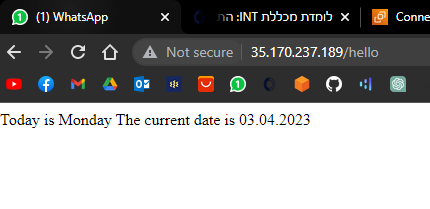
This project provides a simple example of how to create a TCP server with Docker and Nginx. By following the steps outlined in the README file, you can easily create and deploy your own server with dynamic content.