| Name | Student ID | XP Core Value |
|---|---|---|
| Harshit Chouksey | 016099083 | Feedback |
| Sankalp Tiwari | 016598140 | Communication |
| Rafic Hasbini | 011243466 | Simplicity |
| Zaber Ahmed | 015277548 | Respect |
The Gang of Four team has implemented a new iteration of the famous Space Invaders game for this project. The game includes the traditional components: Aliens, Spaceship, Alien-Bombs and additional features implemented by our team for this new version. The team will enhance the traditional game with new features to create a more exhilarating player experience. The game objective is for the player to destroy all the aliens before they either destroy the player or invade the player in the fastest time.
As a starting point, source code was found, reviewed, and tested so that it may be used. The source code, implemented in java, provided a bare implementation of only the component mechanics and interaction. Those included, movement of player, shot from player to destroy alien, alien movement, alien dropping bombs. This limited implementation served as the perfect base to expand on, especially because the implementation was already fairly loosely coupled. The refactoring step was not too tedious to create the best base to expand on and build features. The team implemented features to provide the player with three lives, created feature for leveling up the player shot to destroy multiple aliens, a scoreboard to display the player score, a timer to display the time it took to beat the game, buttons to restart, pause, toggle music, and cheat-codes to increase the player's abilities. As the code base increased, the code was organized into packages based on the design and feature being implemented. By doing so, it was easier to troubleshoot and merge contributions from other teammates.
The Gang of Four team functioned as an agile team and completed the project in a four week sprint period. The team followed and maintained the core XP values when developing the game, created a Kanban board to track the tasks and progress, took part in daily scrum meetings (either virtual or in person), and worked together to complete blockers, plan and design features, and maintain a realistic and value adding sprint backlog. Each team member maintains a weekly journal to document what was completed, what is planned to be completed, any blockers, and how the team is staying true to the XP core values to work as an effective team.
- User Advertisement Story
- Gameplay Demo
- Rafic Hasbini's Journal - Week1, Week2, Week3, Week4
- Zaber Ahmed's Journal - Week1, Week2, Week3, Week4
- Sankalp Tiwari's Journal - Week1, Week2, Week3, Week4
- Harshit Chouksey's Journal - Week1, Week2, Week3, Week4
The traditional gameplay and rules for Space Invaders have been maintained. The player will attempt to destroy all the aliens, while avoiding their bombs, before they are able to invade. Once the game is started up, the player is able to move the ship left and right only using the left and right arrow buttons. The player is able to fire a shot from the ship's gun using the spacebar. When the game starts up, the Aliens will begin at the top of the screen, and gradually move down towards the player while they move from the left edge to the right edge of the screen. While the Aliens move, they will drop a rain of bombs and the player must avoid them or risk losing lives and eventually dying. The cluster of aliens is built by creating an array of alien objects. Each object will occupy a space made up of x and y coordinates.
Based on the x and y coordinates properties of aliens and shots, aliens will be destroyed upon collision with the shot sent by the player. The base player shoots a shot that can kill only one alien at a time. The leveled up player is able to destroy up to three aliens with a single shot. The leveled up player is activated by destroying the green level up icon on the screen. The collision of the player shot with the icon will automatically level up the player. As the player destroys the aliens, they will receive one point per alien. The score is displayed on the gameplay screen. The timer is also implemented for the player to see how fast they are able to destroy the aliens. The timer is also displayed on the gameplay screen. This adds competitiveness to the game as players can compare how fast they were able to beat the came.
The player is also able to set the difficulty level for the game. By Toggling the difficulty button on the gameplay screen, the player may switch between easy and difficult states for gameplay. The difficulty level feature will switch the background of the game to make gameplay more difficult. The contrast of the colors in the hard setting makes it difficult for the player to aim the shot, as the bullets are no longer being seen. This feature allows even more competitiveness and fun to be gained from playing the game.
During game play, the player is able to activate cheat codes which will help the player beat the game as fast as possible. Cheat codes may be toggled by providing keyboard input of numbers 1 through 9. The numbers 1-9 implement player speed, 1 being the slowest and 9 being the fastest. The player is able to change the spaceship speed to their preference or to dodge certain bombs. Pressing small letter 'b' or capital letter 'B' will level up the player's shot without needing to destroy the level up icon. Pressing the small letter 'l' or capital letter 'L' increases life by one.
On the gameplay screen, buttons have been implemented to pause the game and restart the game during gameplay. This feature has been added to empower the player to have control over the game. The player is able to restart the game which will refresh the game as if the game was starting up from scratch. Pause will hold the game until the player clicks the button again to continue.
To enhance player experience further, music has been added to create a fun player environment. Sound effects have also been added for the shot. The background music may be toggled by a button on the screen. The background song may also be changed by toggling the next button.
The system architecture has been designed in a way to maintain loose coupling of components and enable developers to understand the code easily. Features have been added to the code base in the form of packages. By reviewing the architectural diagram below, it becomes easy to expand on features, fix bugs, and add new features by following the feature-package approach. The Board.java class is essentially what ties together all packages by implementing how the objects will interact to create the gameplay.
The Sprite package consists of all the components which make up the game play: Aliens, player, shot, bombs. Since all of these components have the same base movements and jobs. Aliens, Player, and bombs extend the Sprite.java class, However, to implement the decortor pattern for the shot level up feature, it was necessary to create the IShot interface in the Sprite package and implement the decorator separate from the Sprite class. By implementing the IShot interface, it was possible to include it in the Board.java and switch between the different types of shots.
Architectural Diagram

Diagram depicting underlying components:

UI Wireframe Combined:

UI Wireframe Components:


The features implemented for this new Space Invaders version are listed with their respective developers:
Sankalp Tiwari
- Score display - observer pattern
- Music Feature - Strategy pattern
- Restart Buttons - Command pattern
Harshit Chouksey
- Difficulty mode setting - State design pattern
- Multi-lives Feature - observer pattern
Rafic Hasbini
- Player shot level up - decorator pattern
- Timer display - observer pattern
Zaber Ahmed
- Cheat codes - chain of responsibility pattern
- SpaceInvaders - Main Screen - Singleton pattern
The feature was decided to make the gameplay more challenging. A player can now switch between easy and hard modes. The easy mode continues to have the regular gameplay, but the hard mode leads to the player shots being invisible. The player now has to estimate the position of the alien and play accordingly. To switch between the modes a Button has been added which toggles between easy and hard mode based on the current mode of play. When you press the button the state pattern is invoked which changes the state of the game from easy to hard; and the other way around.
The player shot level up is implemented by using a decorator pattern. The IShot interface class provides the template for the Shot classes to implement and decorate. The Shot.java class is the base shot. The ShotDecorator.java class implements the IShot interface and does that by passing commands to the Shot.java base. The concrete decorator class, DoubleShot.java, then changes whichever methods it wishes to change and implements additional behavior as well. In Board.java class a flag is set for the shot type. Based on that flag, the IShot variable will either represent an object of DoubleShot.java or the base Shot.java class.
The cheat codes have been implemented using the chain of responsibility pattern. The event key handler is updated to watch different key inputs. If 1 - 9, or l or b is pressed, the key input is passed to the object that may satisfy the request. By implementing a chain of responsibility, it allows for cleaner code by allowing objects to handle requests that they can only.
Live Score in the gameplay is tracked using the observer pattern. It has two interfaces, ‘ILiveScoreObserver’ and ‘ILiveScoreSubject’. The concrete observer and Concrete subject are ‘LiveScoreObserver’ and ‘LiveScoreSubject’ respectively. We have a scoreState variable that will handle the current score status and the update method will update the player’s score based on the number of aliens killed. We use the attach method to attach the observer and notifyObservers method to notify the observers about the current score.
Timer display in gameplay utilizes an observer pattern. Timer being displayed is a reflection of the subject observing the observer. Every second the time changes and increments by one, and the observer is watching the subject. In return the updated time will show up on the screen.
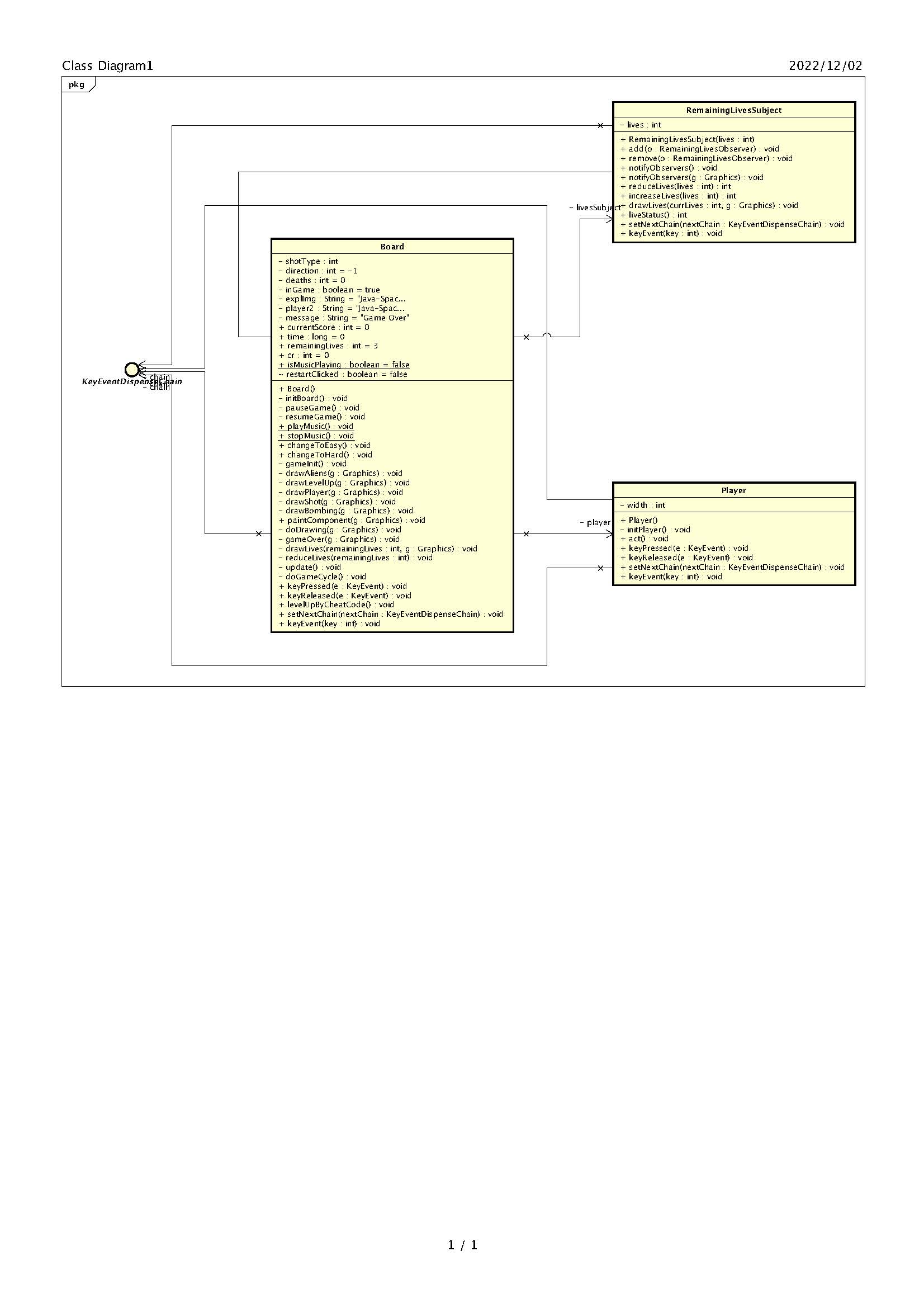
This feature was introduced to make the gameplay more enjoyable, where the player does not have to begin the game by getting shot just once. Therefore, the number of lives were increased to 3 and one life was reduced by getting hit by alien missiles once. To display and keep track of the number of lives left, an observer pattern has been used.
The restart button uses a command pattern to implement its logic. Whenever the button is pressed the gameplay restarts, this is done by using the ActionListener method in the Java awt library. ButtonControl Invoker is instantiated along with the RestartButton receiver. The RestartButtonPressed method instantiates the receiver and sets the command to restart. The restart function works when the pressbutton is called in the codebase.
Strategy pattern is implemented to change the background music for the gameplay when a button is clicked. The IMusicStrategy is the interface for the strategy and is implemented by ‘Music1’, ‘Music2’ and ‘Music3’ classes. By default, the strategy is to play a music file and when the Next Music button is pressed, then the music should change to the next one.
Space Invader Starter code class diagram:

GOF version Space invaders Simplified class diagram:

GOF version Space Invaders Detailed Class Diagram:

Asta file available at Asta
Shot Level Up Decorator Class Diagram:

Live Score Observer Class Diagram:

Multi Life Observer Class Diagram:

Timer Observer Class Diagram:

Cheat code Chain of Responsibility Diagram:
Background Music Strategy Class Diagram:

Difficulty Mode State Class Diagram:

Difficulty Mode State Machine Diagram:

Restart Button Command Class Diagram:

Sprint Task Sheet

Sprint Burndown Chart

Agile Retrospective

Standup Meeting
Retrospective Meeting
To analyze and conclude on this project and the outcome of our sprint, working as an agile team has proven to be beneficial in the development cycle of our game. By using the standard approaches and tools, like the scrum meetings, and kanban board, along with maintaining core XP values, we have been able to develop a product which meets our goals and maintains a constant mission for the team.
Looking at the final product architecture, the code is loosely coupled and provides a good base for organic growth. However, the Sprite class could be broken down further to meet the same feature-package approach that was used to implement other features. Generally, the use of packages for each feature allowed us to maintain loosely coupled code.
Moving forward, the code base could be increased by adding more features by maintaining the current architecture and approach. Also building on current features is possible due to the design patterns currently being used and implemented.