To detect motion in a camera feed or video/recording
A project in python using open cv to detect motion in a camera feed or video/recording .
This project is to detect motion in camera feed or video recording .
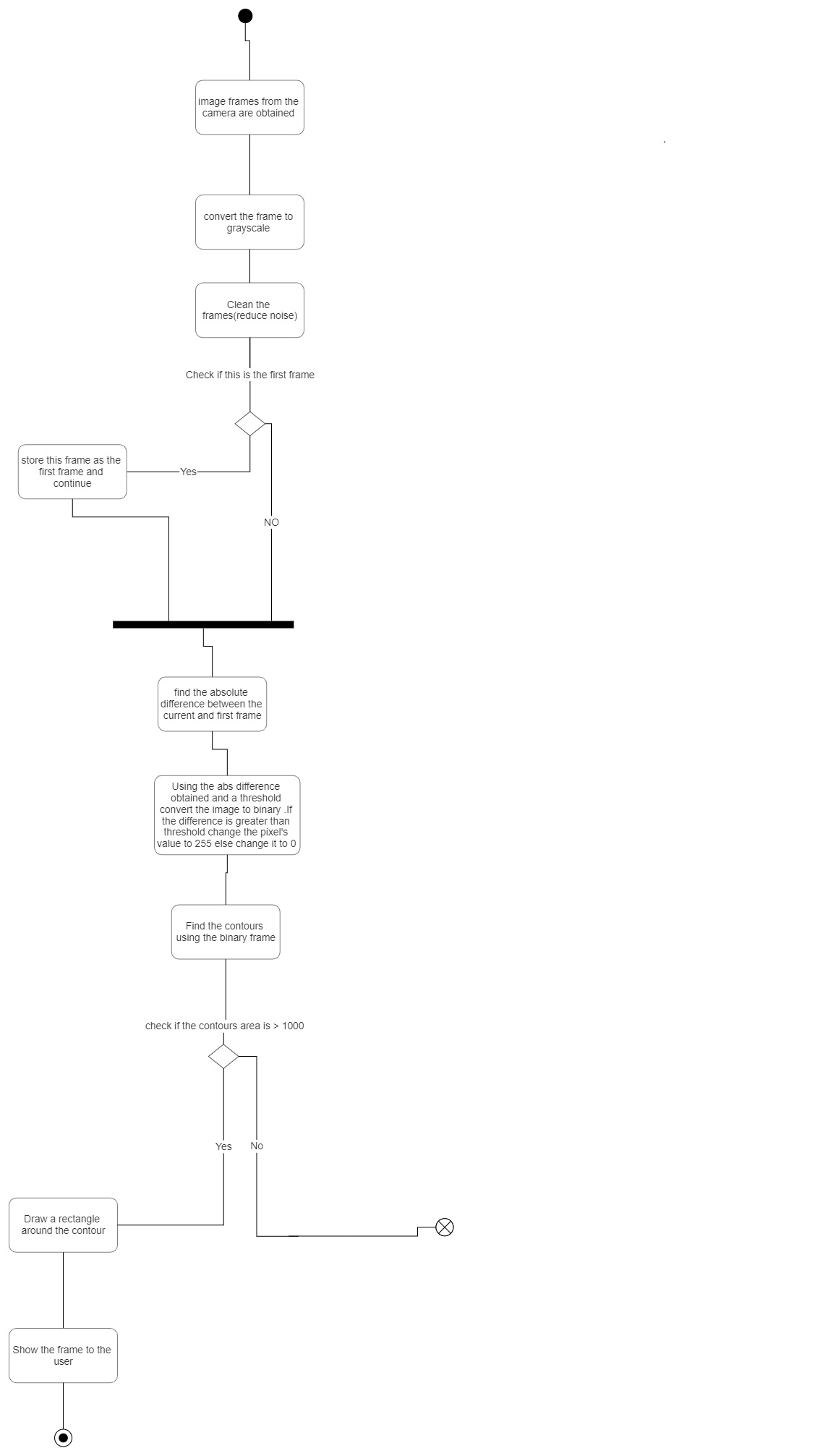
It detects motion by storing a frame where there is no motion or the intial frame say i_frame ,and it takes the current frame say cur_frame(from the camera feed or recording) now it compares the i_frame and cur_frame for difference and when the difference of a set of pixels is higher than the threshold it considers it to be motion and marks it with a rectangle.
Motion detection can be used in various feilds.Its used in Intruder alarms,Automatic ticket gates,Entry way lighting,Security lighting,Automated sinks/toilet flusher,Hand dryers,Automatic doors
import cv2
cv2.VideoCapture
video.read()-its used to either read the live camera feed or recording.
cv2.cvtColor()-its used to convert color from one format to another depending on the given input
cv2.GaussianBlur()-Its used to imporve the image accuracy and reduce the noise present
cv2.absdiff()-Its used to obtain the absolute difference between the pixels of the two image arrays. By using this we will be able to extract just the pixels of the objects that are moving.
cv2.threshold()-In this function each pixel value is compared with the threshold value. If the pixel value is smaller than the threshold, it is set to 0, otherwise, it is set to a maximum value
cv2.findContours()-Its used to find countours in the image(usually binary images are used)
https://docs.opencv.org/4.x/d4/d73/tutorial_py_contours_begin.html
cv2.contourArea()-Its used to find the area of the countours
cv2.boundingRect()-Its used draw a rectangle in an image
cv2.imshow()-Its used to show the image to the user
cv2.waitKey(1)-It used for a key press event
- Python
- cv2
- video recording
These changes should be made in the parameters of the function cv2.VideoCapture() in line 5
-To detect motion in a video ,the video's location must be passed as a parameter in this function cv2.VideoCapture("location")
-To detect motion in a camera , 0 should be passed as a parameter in the function cv2.VideoCapture()::- cv2.VideoCapture(0)
##References:
-udemy :https://www.udemy.com/?utm=8da151da695eb887f7bf2f6a110377a6&track=1&pt=2
-google :https://www.google.co.in/
-opencv :https://opencv.org/
-pyimagesearch: https://pyimagesearch.com/