
💜 Qwen Chat |
🤗 HuggingFace(T2I) |
🤗 HuggingFace(Edit) | 🤖 ModelScope-T2I | 🤖 ModelScope-Edit | 📑 Tech Report | 📑 Blog(T2I) | 📑 Blog(Edit)
🖥️ T2I Demo | 🖥️ Edit Demo | 💬 WeChat (微信) | 🫨 Discord

We are thrilled to release Qwen-Image, a 20B MMDiT image foundation model that achieves significant advances in complex text rendering and precise image editing. Experiments show strong general capabilities in both image generation and editing, with exceptional performance in text rendering, especially for Chinese.

-
2025.12.31: We released Qwen-Image-2512 weights! Check at Huggingface and ModelScope!
-
2025.12.31: We released Qwen-Image-2512! Check our Blog for more details! 🚀 Our December upgrade to Qwen-Image, just in time for the New Year.
✨ What’s new: • More realistic humans — dramatically reduced “AI look,” richer facial & age details • Finer natural textures — sharper landscapes, water, fur, and materials • Stronger text rendering — better layout, higher accuracy in text–image composition
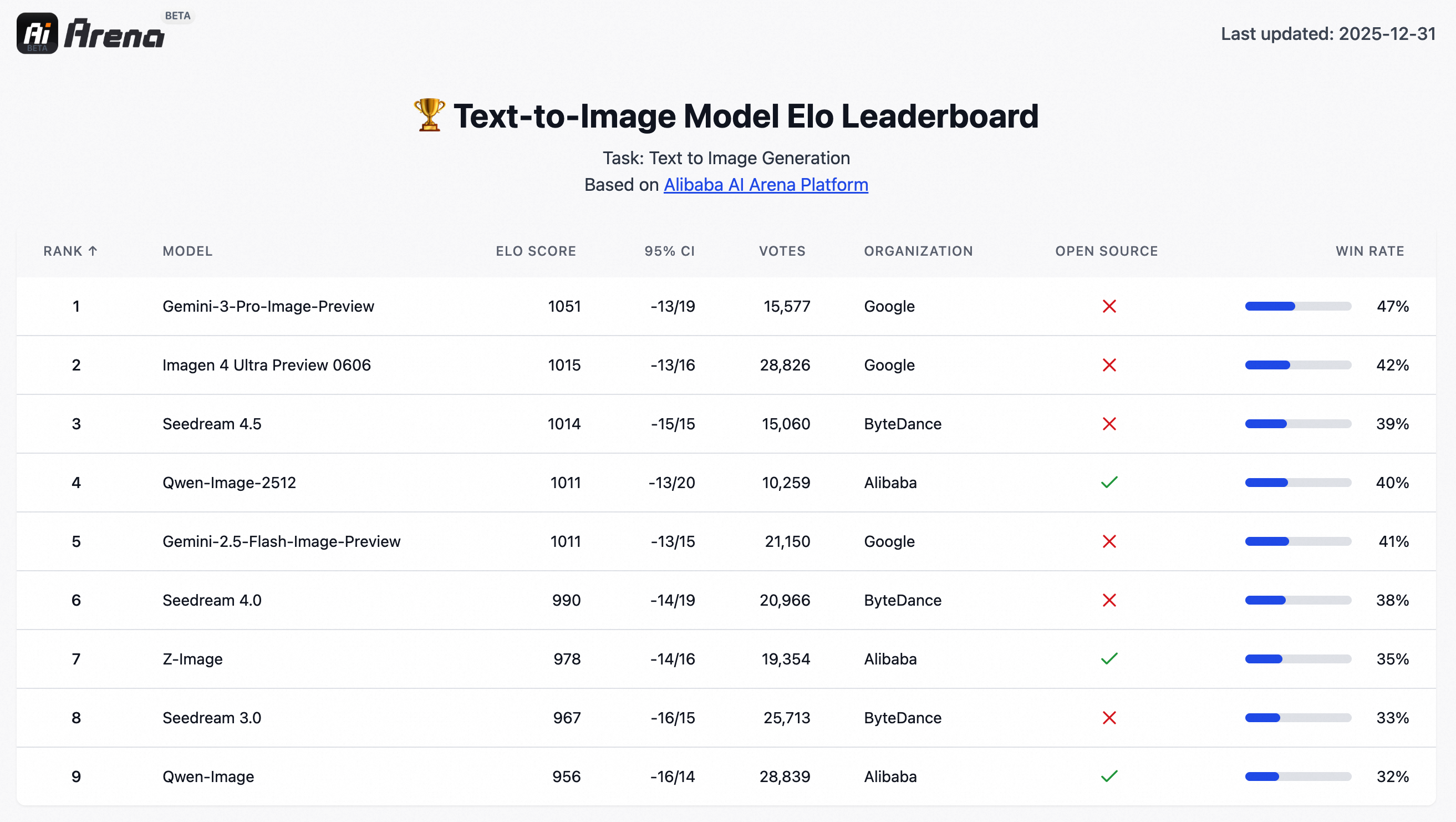
🏆 Tested in 10,000+ blind rounds on AI Arena, Qwen-Image-2512 ranks as the strongest open-source image model, while staying competitive with closed-source systems.
-
2025.12.31: Qwen-Image-Lightning, developed by Lightx2v, provides Day 0 acceleration support for Qwen-Image-2512.
-
2025.12.31:vLLM-Omni supports high performance Qwen-Image-2512 inference from Day-0, with long sequence parallelism, cache acceleration and fast kernels, please check here for details.
-
2025.12.23: We released Qwen-Image-Edit-2511 weights! Check at Huggingface and ModelScope!
-
2025.12.23: We released Qwen-Image-Edit-2511! Check our Blog for more details!
-
2025.12.23: LightX2V delivers Day 0 acceleration for Qwen-Image-Edit-2511, with native support for a wide range of hardware, including NVIDIA, Hygon, Metax, Ascend, and Cambricon. By combining diffusion distillation with cutting-edge inference optimizations, LightX2V achieves a 25x reduction in DiT NFEs and an order-of-magnitude 42.55x overall speedup, enabling real-time image editing across diverse AI accelerators.
-
2025.12.23: vLLM-Omni supports high performance
Qwen-Image-Edit-2511,Qwen-Image-Layeredinference from Day-0, with long sequence parallelism, cache acceleration and fast kernels, please check here for details. -
2025.12.23: SGLang-Diffusion provides day-0 support for Qwen-Image models. To play with
Qwen-Image-Edit-2511in SGlang, please check community supports section for details. -
2025.12.19: We released Qwen-Image-Layered weights! Check at Huggingface and ModelScope!
-
2025.12.19: We released Qwen-Image-Layered! Check our Blog for more details!
-
2025.12.18: We released our Research Paper on Arxiv!
-
2025.11.11: T2I-CoreBench offers a comprehensive and complex evaluation of T2I models in real-world scenarios. On this benchmark, Qwen-Image achieves state-of-the-art performance under real-world complexities in both composition and reasoning T2I tasks, surpassing other open-source models and showing comparable results to closed-source ones.
-
2025.11.07: LeMiCa is a diffusion model inference acceleration solution developed by China Unicom Data Science and Artificial Intelligence Research Institute. By leveraging cache-based techniques and global denoising path optimization, LeMiCa provides efficient inference support for Qwen-Image, achieving nearly 3x lossless acceleration while maintaining visual consistency and quality. For more details, please visit the homepage: https://unicomai.github.io/LeMiCa/
-
2025.09.22: This September, we are pleased to introduce Qwen-Image-Edit-2509, the monthly iteration of Qwen-Image-Edit. To experience the latest model, please visit Qwen Chat and select the "Image Editing" feature. Compared with Qwen-Image-Edit released in August, the main improvements of Qwen-Image-Edit-2509 include:
-
2025.08.19: We have observed performance misalignments of Qwen-Image-Edit. To ensure optimal results, please update to the latest diffusers commit. Improvements are expected, especially in identity preservation and instruction following.
-
2025.08.18: We’re excited to announce the open-sourcing of Qwen-Image-Edit! 🎉 Try it out in your local environment with the quick start guide below, or head over to Qwen Chat or Huggingface Demo to experience the online demo right away! If you enjoy our work, please show your support by giving our repository a star. Your encouragement means a lot to us!
-
2025.08.09: Qwen-Image now supports a variety of LoRA models, such as MajicBeauty LoRA, enabling the generation of highly realistic beauty images. Check out the available weights on ModelScope.
-
2025.08.05: Qwen-Image is now natively supported in ComfyUI, see Qwen-Image in ComfyUI: New Era of Text Generation in Images!
-
2025.08.05: Qwen-Image is now on Qwen Chat. Click Qwen Chat and choose "Image Generation".
-
2025.08.05: We released our Technical Report on Arxiv!
-
2025.08.04: We released Qwen-Image weights! Check at Huggingface and ModelScope!
-
2025.08.04: We released Qwen-Image! Check our Blog for more details!

Note
Due to heavy traffic, if you'd like to experience our demo online, we also recommend visiting DashScope, WaveSpeed, and LibLib. Please find the links below in the community support.
-
Make sure your transformers>=4.51.3 (Supporting Qwen2.5-VL)
-
Install the latest version of diffusers
pip install git+https://github.com/huggingface/diffusers
We recommand use the latest prompt enhancing tools for Qwen-Image-2512, please check src/examples/tools/prompt_utils_2512.py
from diffusers import QwenImagePipeline
import torch
# Load the pipeline
if torch.cuda.is_available():
    torch_dtype = torch.bfloat16
    device = "cuda"
else:
    torch_dtype = torch.float32
    device = "cpu"

pipe = QwenImagePipeline.from_pretrained("Qwen/Qwen-Image-2512", torch_dtype=torch_dtype).to(device)

# Generate image
prompt = '''A 20-year-old East Asian girl with delicate, charming features and large, bright brown eyes—expressive and lively, with a cheerful or subtly smiling expression. Her naturally wavy long hair is either loose or tied in twin ponytails. She has fair skin and light makeup accentuating her youthful freshness. She wears a modern, cute dress or relaxed outfit in bright, soft colors—lightweight fabric, minimalist cut. She stands indoors at an anime convention, surrounded by banners, posters, or stalls. Lighting is typical indoor illumination—no staged lighting—and the image resembles a casual iPhone snapshot: unpretentious composition, yet brimming with vivid, fresh, youthful charm.'''

negative_prompt = "低分辨率,低画质,肢体畸形,手指畸形,画面过饱和,蜡像感,人脸无细节,过度光滑,画面具有AI感。构图混乱。文字模糊,扭曲。"


# Generate with different aspect ratios
aspect_ratios = {
    "1:1": (1328, 1328),
    "16:9": (1664, 928),
    "9:16": (928, 1664),
    "4:3": (1472, 1104),
    "3:4": (1104, 1472),
    "3:2": (1584, 1056),
    "2:3": (1056, 1584),
}

width, height = aspect_ratios["16:9"]

image = pipe(
    prompt=prompt,
    negative_prompt=negative_prompt,
    width=width,
    height=height,
    num_inference_steps=50,
    true_cfg_scale=4.0,
    generator=torch.Generator(device="cuda").manual_seed(42)
).images[0]

image.save("example.png")import os
import torch
from PIL import Image
from diffusers import QwenImageEditPlusPipeline
from io import BytesIO
import requests
pipeline = QwenImageEditPlusPipeline.from_pretrained("Qwen/Qwen-Image-Edit-2511", torch_dtype=torch.bfloat16)
print("pipeline loaded")
pipeline.to('cuda')
pipeline.set_progress_bar_config(disable=None)
image1 = Image.open(BytesIO(requests.get("https://qianwen-res.oss-accelerate-overseas.aliyuncs.com/Qwen-Image/edit2511/edit2511input.png").content))
prompt = "这个女生看着面前的电视屏幕,屏幕上面写着“阿里巴巴”"
inputs = {
"image": [image1],
"prompt": prompt,
"generator": torch.manual_seed(0),
"true_cfg_scale": 4.0,
"negative_prompt": " ",
"num_inference_steps": 40,
"guidance_scale": 1.0,
"num_images_per_prompt": 1,
}
with torch.inference_mode():
output = pipeline(**inputs)
output_image = output.images[0]
output_image.save("output_image_edit_2511.png")
print("image saved at", os.path.abspath("output_image_edit_2511.png"))Previous Version
The following contains a code snippet illustrating how to use the model to generate images based on text prompts:
from diffusers import DiffusionPipeline
import torch

model_name = "Qwen/Qwen-Image"

# Load the pipeline
if torch.cuda.is_available():
    torch_dtype = torch.bfloat16
    device = "cuda"
else:
    torch_dtype = torch.float32
    device = "cpu"

pipe = DiffusionPipeline.from_pretrained(model_name, torch_dtype=torch_dtype).to(device)

positive_magic = {
    "en": ", Ultra HD, 4K, cinematic composition.", # for english prompt
    "zh": ", 超清,4K,电影级构图." # for chinese prompt
}

# Generate image
prompt = '''A coffee shop entrance features a chalkboard sign reading "Qwen Coffee 😊 $2 per cup," with a neon light beside it displaying "通义千问". Next to it hangs a poster showing a beautiful Chinese woman, and beneath the poster is written "π≈3.1415926-53589793-23846264-33832795-02384197".'''

negative_prompt = " " # Recommended if you don't use a negative prompt.


# Generate with different aspect ratios
aspect_ratios = {
    "1:1": (1328, 1328),
    "16:9": (1664, 928),
    "9:16": (928, 1664),
    "4:3": (1472, 1104),
    "3:4": (1104, 1472),
    "3:2": (1584, 1056),
    "2:3": (1056, 1584),
}

width, height = aspect_ratios["16:9"]

image = pipe(
    prompt=prompt + positive_magic["en"],
    negative_prompt=negative_prompt,
    width=width,
    height=height,
    num_inference_steps=50,
    true_cfg_scale=4.0,
    generator=torch.Generator(device="cuda").manual_seed(42)
).images[0]

image.save("example.png")[!NOTE] Qwen-Image-Edit-2509 has better consistency than Qwen-Image-Edit; it is recommended to use Qwen-Image-Edit-2509 directly,for both single image input and multiple image inputs.
import os
from PIL import Image
import torch

from diffusers import QwenImageEditPipeline

pipeline = QwenImageEditPipeline.from_pretrained("Qwen/Qwen-Image-Edit")
print("pipeline loaded")
pipeline.to(torch.bfloat16)
pipeline.to("cuda")
pipeline.set_progress_bar_config(disable=None)

image = Image.open("./input.png").convert("RGB")
prompt = "Change the rabbit's color to purple, with a flash light background."


inputs = {
    "image": image,
    "prompt": prompt,
    "generator": torch.manual_seed(0),
    "true_cfg_scale": 4.0,
    "negative_prompt": " ",
    "num_inference_steps": 50,
}

with torch.inference_mode():
    output = pipeline(**inputs)
    output_image = output.images[0]
    output_image.save("output_image_edit.png")
    print("image saved at", os.path.abspath("output_image_edit.png"))
[!NOTE] We have observed that editing results may become unstable if prompt rewriting is not used. Therefore, we strongly recommend applying prompt rewriting to improve the stability of editing tasks. For reference, please see our official demo script or Advanced Usage below, which includes example system prompts. Qwen-Image-Edit is actively evolving with ongoing development. Stay tuned for future enhancements!
import os
import torch
from PIL import Image
from diffusers import QwenImageEditPlusPipeline
from io import BytesIO
import requests

pipeline = QwenImageEditPlusPipeline.from_pretrained("Qwen/Qwen-Image-Edit-2509", torch_dtype=torch.bfloat16)
print("pipeline loaded")

pipeline.to('cuda')
pipeline.set_progress_bar_config(disable=None)
image1 = Image.open(BytesIO(requests.get("https://qianwen-res.oss-cn-beijing.aliyuncs.com/Qwen-Image/edit2509/edit2509_1.jpg").content))
image2 = Image.open(BytesIO(requests.get("https://qianwen-res.oss-cn-beijing.aliyuncs.com/Qwen-Image/edit2509/edit2509_2.jpg").content))
prompt = "The magician bear is on the left, the alchemist bear is on the right, facing each other in the central park square."
inputs = {
    "image": [image1, image2],
    "prompt": prompt,
    "generator": torch.manual_seed(0),
    "true_cfg_scale": 4.0,
    "negative_prompt": " ",
    "num_inference_steps": 40,
    "guidance_scale": 1.0,
    "num_images_per_prompt": 1,
}
with torch.inference_mode():
    output = pipeline(**inputs)
    output_image = output.images[0]
    output_image.save("output_image_edit_plus.png")
print("image saved at", os.path.abspath("output_image_edit_plus.png"))For enhanced prompt optimization and multi-language support, we recommend using our official Prompt Enhancement Tool powered by Qwen-Plus .
You can integrate it directly into your code:
from tools.prompt_utils import rewrite
prompt = rewrite(prompt)
Alternatively, run the example script from the command line:
cd src
DASHSCOPE_API_KEY=sk-xxxxxxxxxxxxxxxxxxxx python examples/generate_w_prompt_enhance.pyFor enhanced stability, we recommend using our official Prompt Enhancement Tool powered by Qwen-VL-Max.
You can integrate it directly into your code:
from tools.prompt_utils import polish_edit_prompt
prompt = polish_edit_prompt(prompt, pil_image)Qwen-Image supports Multi-GPU API Server for local deployment:
The Multi-GPU API Server will start a Gradio-based web interface with:
- Multi-GPU parallel processing
- Queue management for high concurrency
- Automatic prompt optimization
- Support for multiple aspect ratios
Configuration via environment variables:
export NUM_GPUS_TO_USE=4          # Number of GPUs to use
export TASK_QUEUE_SIZE=100        # Task queue size
export TASK_TIMEOUT=300           # Task timeout in seconds
# Start the gradio demo server, api key for prompt enhance
cd src
DASHSCOPE_API_KEY=sk-xxxxxxxxxxxxxxxxx python examples/demo.py For previous showcases, click the following links:
Enhanced Huamn Realism
In Qwen-Image-2512, human depiction has been substantially refined. Compared to the August release, Qwen-Image-2512 adds significantly richer facial details and better environmental context. For example:
A Chinese female college student, around 20 years old, with a very short haircut that conveys a gentle, artistic vibe. Her hair naturally falls to partially cover her cheeks, projecting a tomboyish yet charming demeanor. She has cool-toned fair skin and delicate features, with a slightly shy yet subtly confident expression—her mouth crooked in a playful, youthful smirk. She wears an off-shoulder top, revealing one shoulder, with a well-proportioned figure. The image is framed as a close-up selfie: she dominates the foreground, while the background clearly shows her dormitory—a neatly made bed with white linens on the top bunk, a tidy study desk with organized stationery, and wooden cabinets and drawers. The photo is captured on a smartphone under soft, even ambient lighting, with natural tones, high clarity, and a bright, lively atmosphere full of youthful, everyday energy.
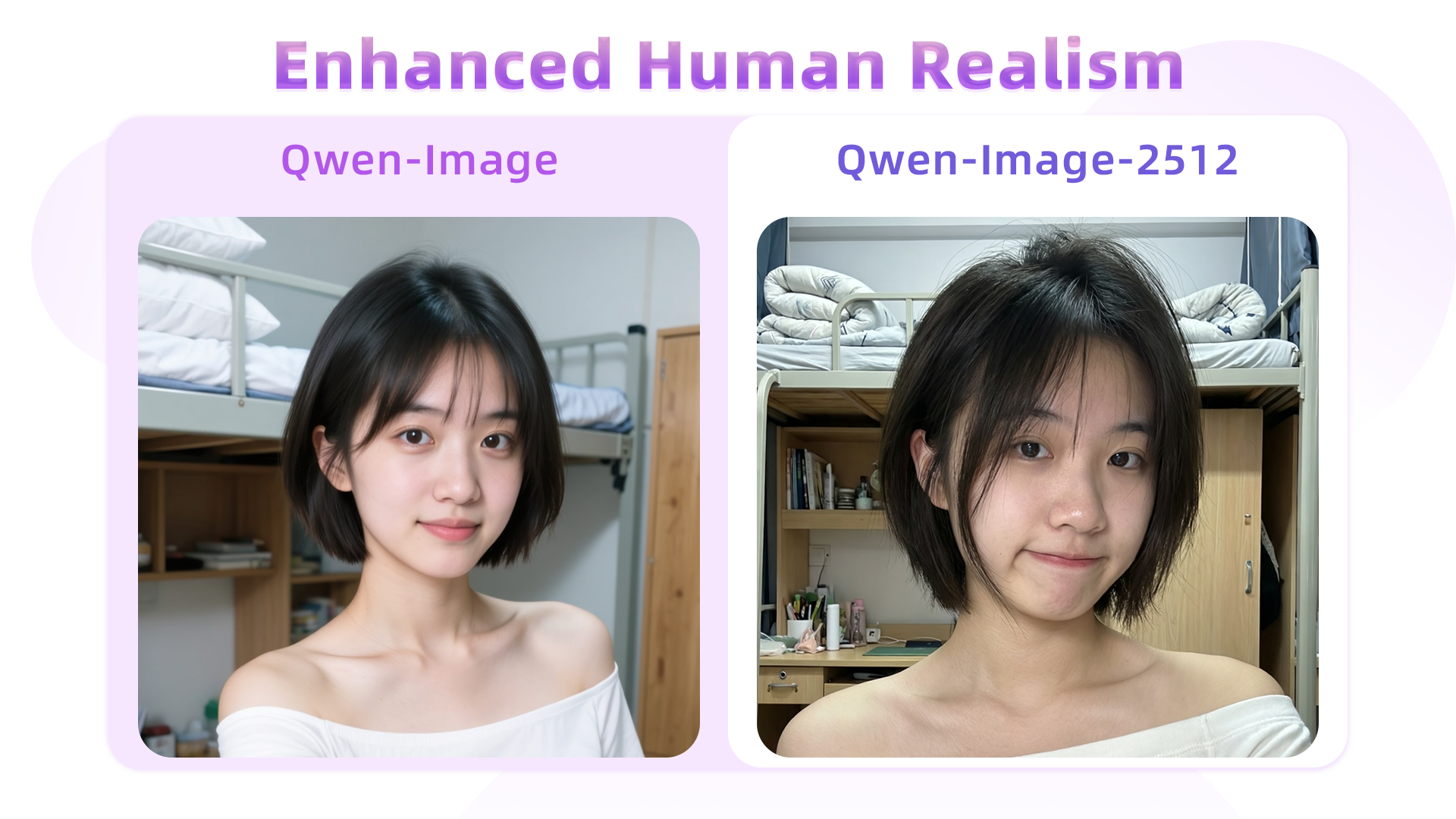
For the same prompt, Qwen-Image-2512 yields notably more lifelike facial features, and background objects—e.g., the desk, stationery, and bedding—are rendered with significantly greater clarity than in Qwen-Image.
A 20-year-old East Asian girl with delicate, charming features and large, bright brown eyes—expressive and lively, with a cheerful or subtly smiling expression. Her naturally wavy long hair is either loose or tied in twin ponytails. She has fair skin and light makeup accentuating her youthful freshness. She wears a modern, cute dress or relaxed outfit in bright, soft colors—lightweight fabric, minimalist cut. She stands indoors at an anime convention, surrounded by banners, posters, or stalls. Lighting is typical indoor illumination—no staged lighting—and the image resembles a casual iPhone snapshot: unpretentious composition, yet brimming with vivid, fresh, youthful charm.
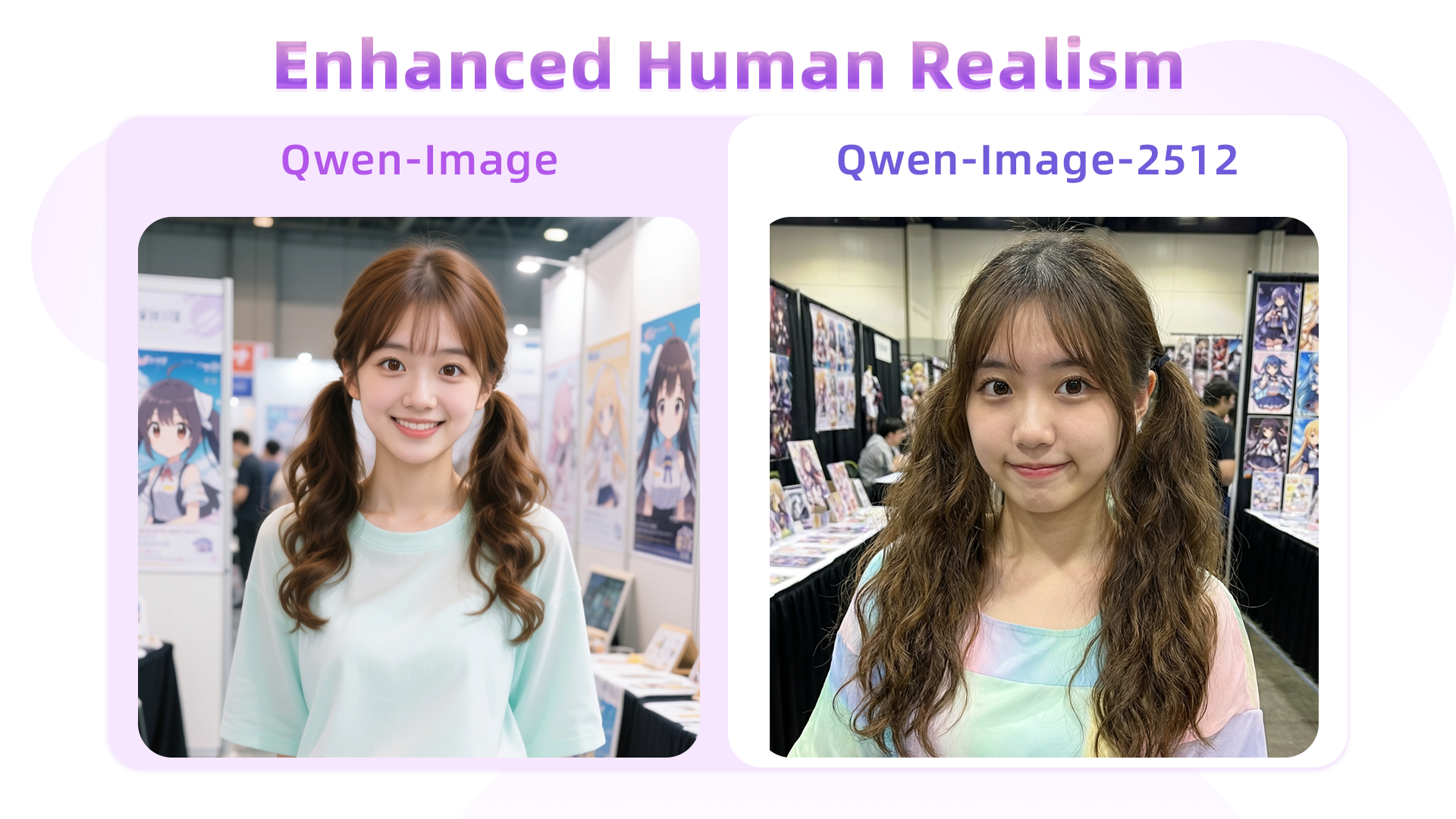
Here, hair strands serve as a key differentiator: Qwen-Image’s August version tends to blur them together, losing fine detail, whereas Qwen-Image-2512 renders individual strands with precision, resulting in a more natural and realistic appearance.
Another case:
An East Asian teenage boy, aged 15–18, with soft, fluffy black short hair and refined facial contours. His large, warm brown eyes sparkle with energy. His fair skin and sunny, open smile convey an approachable, friendly demeanor—no makeup or blemishes. He wears a blue-and-white summer uniform shirt, slightly unbuttoned, made of thin breathable fabric, with black headphones hanging around his neck. His hands are in his pockets, body leaning slightly forward in a relaxed pose, as if engaged in conversation. Behind him lies a summer school playground: lush green grass and a red rubber track in the foreground, blurred school buildings in the distance, a clear blue sky with fluffy white clouds. The bright, airy lighting evokes a joyful, carefree adolescent atmosphere.
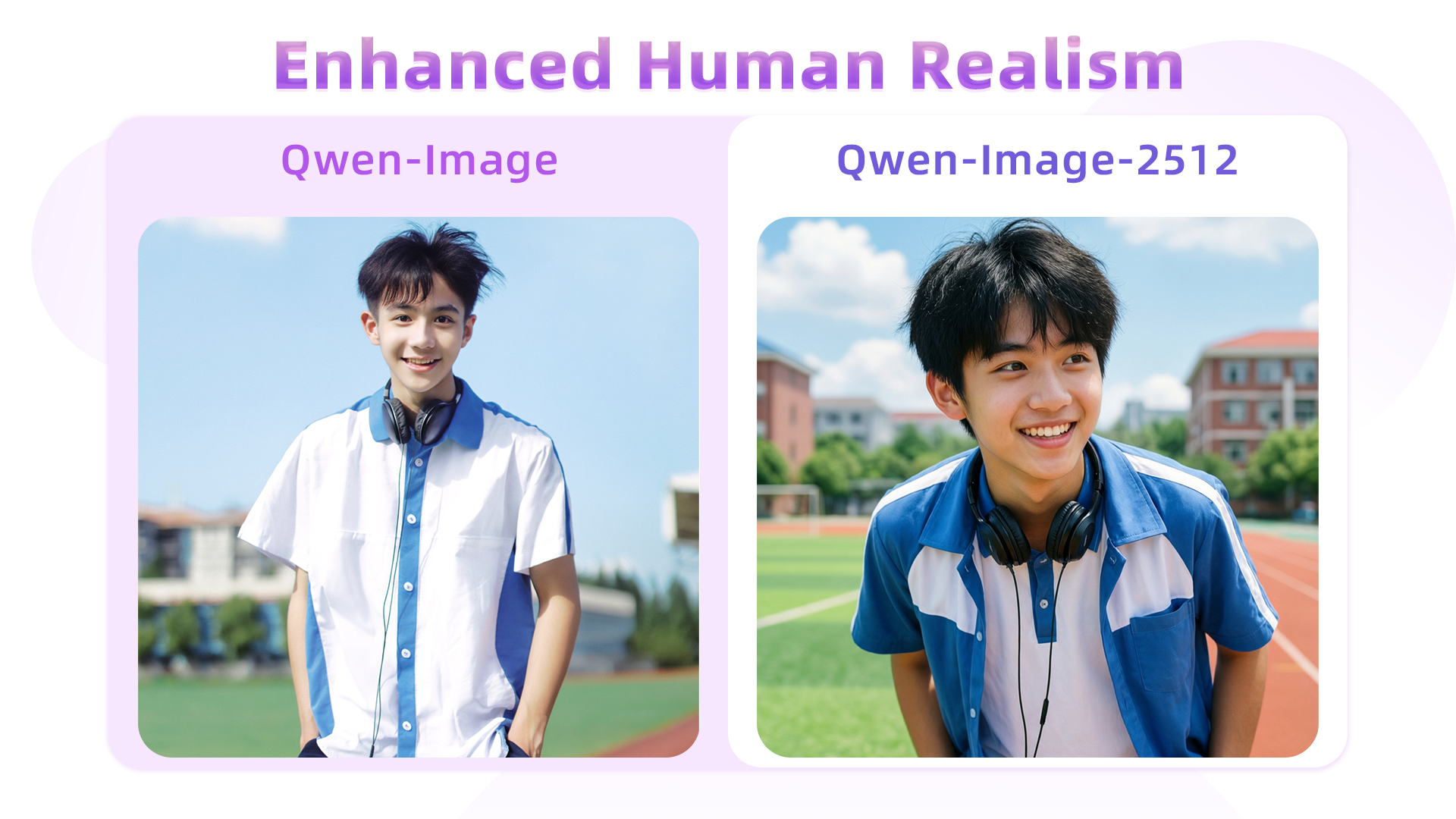
In this example, Qwen-Image-2512 better adheres to semantic instructions—for instance, the prompt specifies “body leaning slightly forward,” and Qwen-Image-2512 accurately captures this posture, unlike its predecessor.
An elderly Chinese couple in their 70s in a clean, organized home kitchen. The woman has a kind face and a warm smile, wearing a patterned apron; the man stands behind her, also smiling, as they both gaze at a steaming pot of buns on the stove. The kitchen is bright and tidy, exuding warmth and harmony. The scene is captured with a wide-angle lens to fully show the subjects and their surroundings.
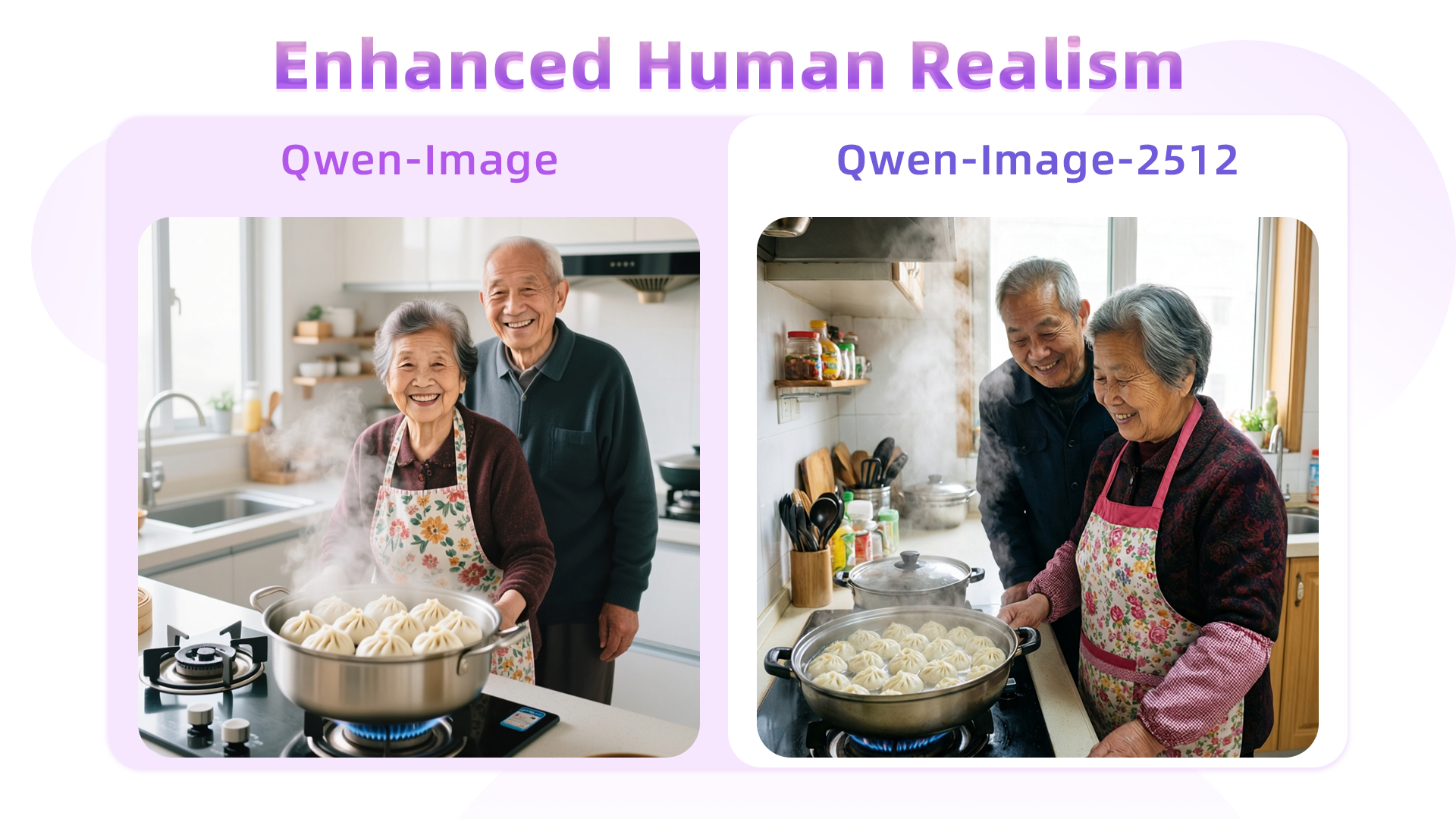
This comparison starkly highlights the gap between the August and December models. The original Qwen-Image struggles to accurately render aged facial features (e.g., wrinkles), resulting in an artificial “AI look.” In contrast, Qwen-Image-2512 precisely captures age cues, dramatically boosting realism.
Finer Natural Detail
Qwen-Image-2512’s enhanced detail rendering extends beyond humans—to landscapes, wildlife, and more. For instance:
A turquoise river winds through a lush canyon. Thick moss and dense ferns blanket the rocky walls; multiple waterfalls cascade from above, enveloped in mist. At noon, sunlight filters through the dense canopy, dappling the river surface with shimmering light. The atmosphere is humid and fresh, pulsing with primal jungle vitality. No humans, text, or artificial traces present.
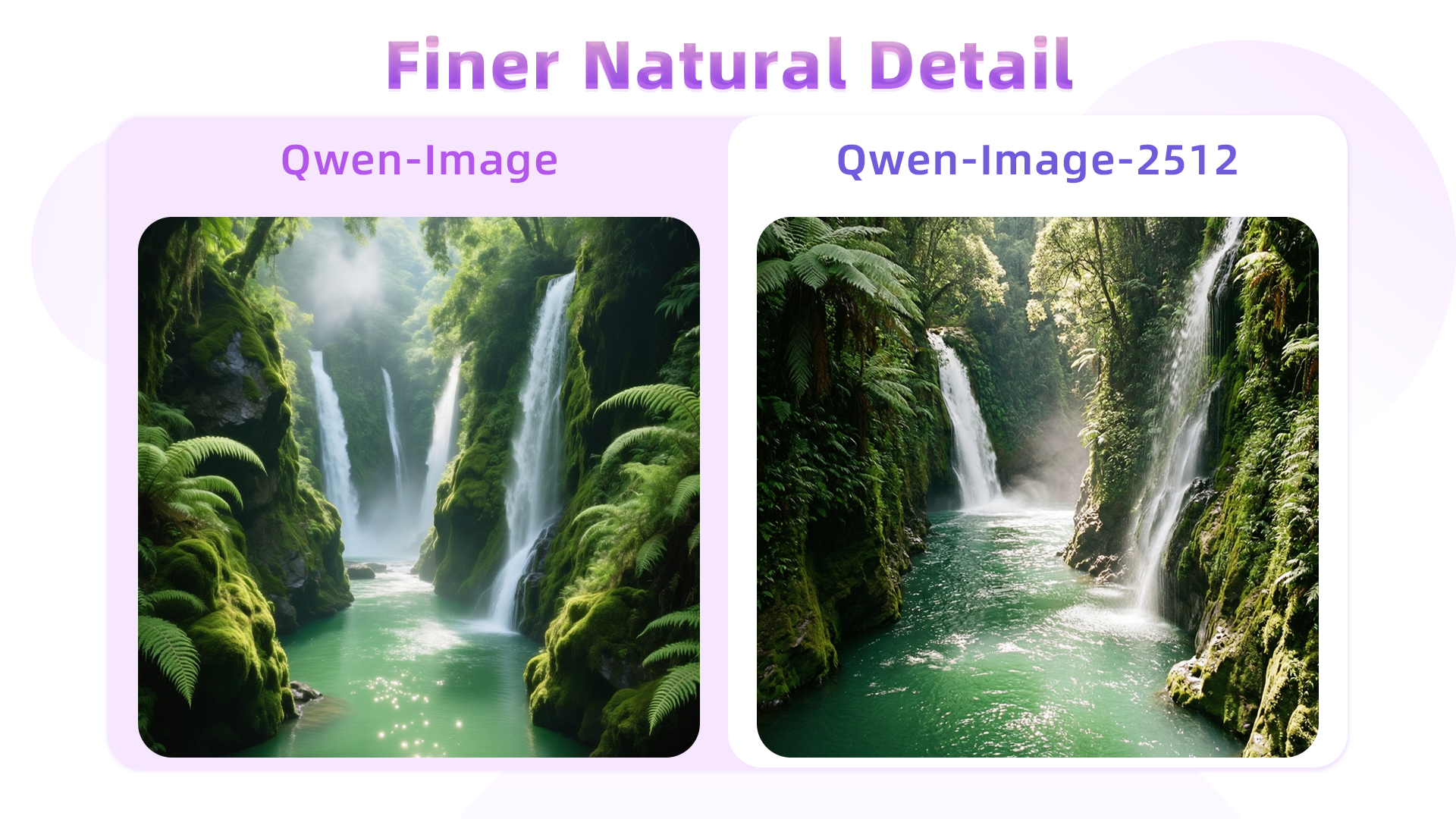
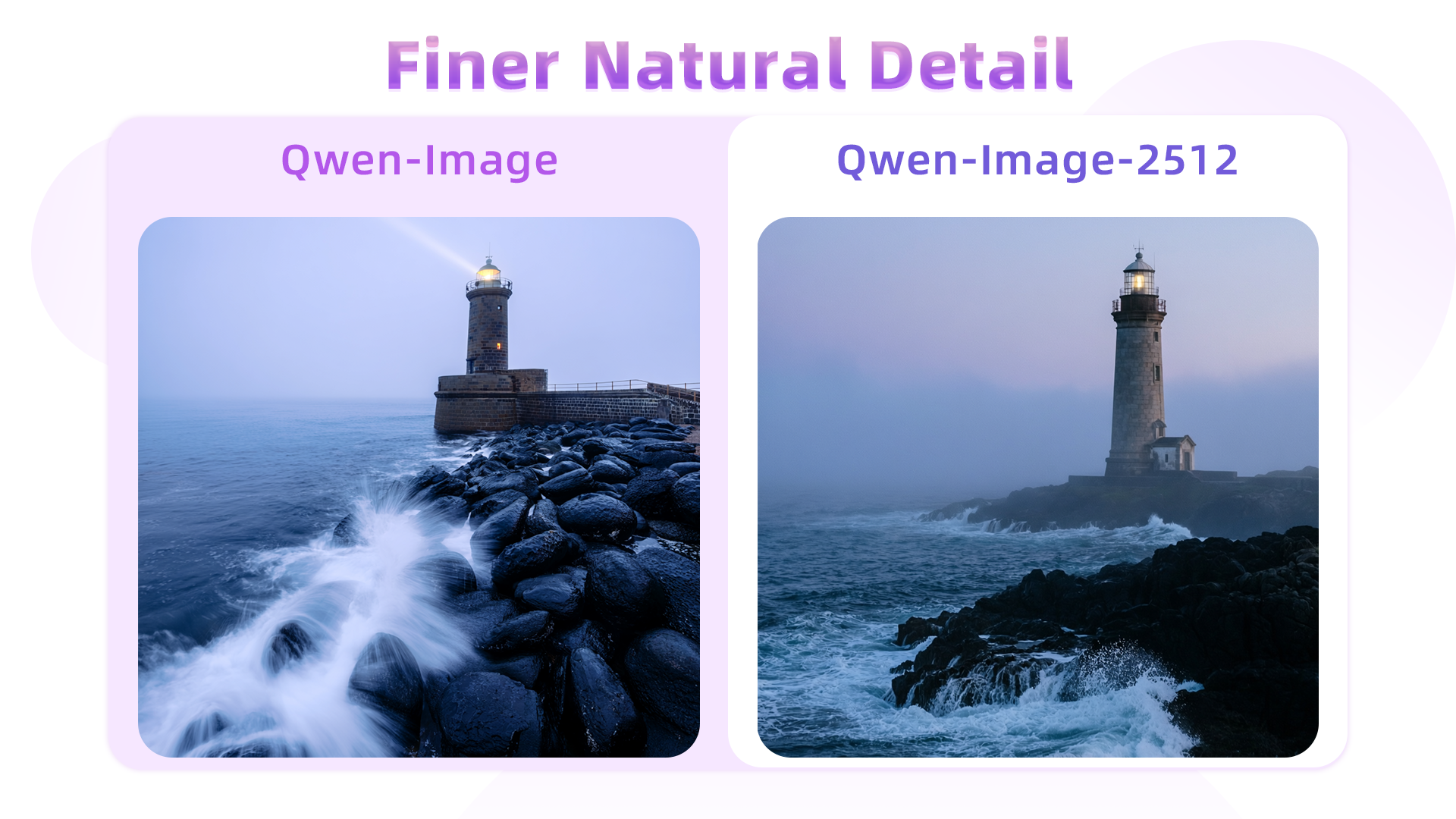
Side-by-side, Qwen-Image-2512 exhibits superior fidelity in water flow, foliage, and waterfall mist—and renders richer gradation in greens. Another example (wave rendering):
At dawn, a thin mist veils the sea. An ancient stone lighthouse stands at the cliff’s edge, its beacon faintly visible through the fog. Black rocks are pounded by waves, sending up bursts of white spray. The sky glows in soft blue-purple hues under cool, hazy light—evoking solitude and solemn grandeur.
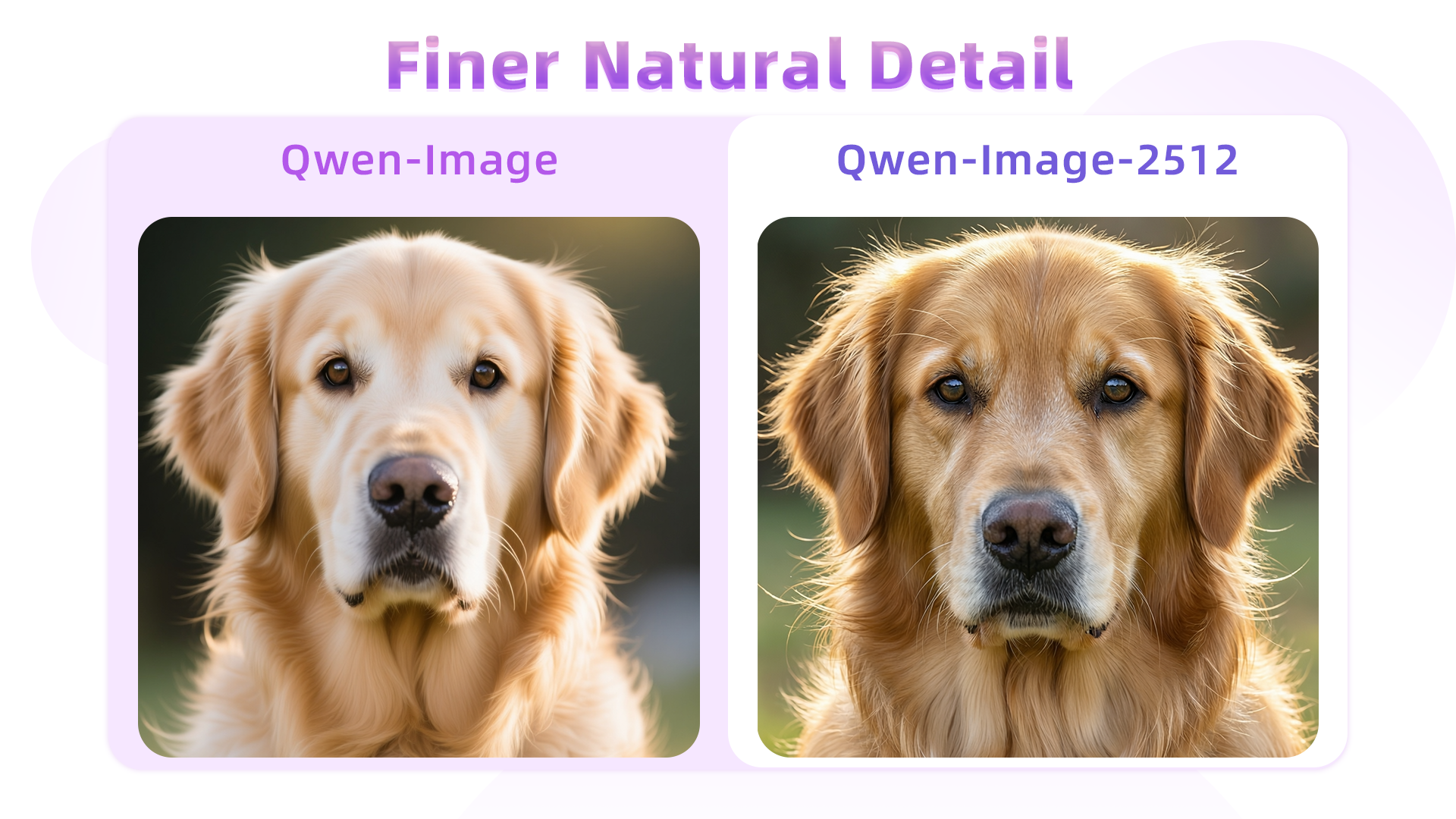
Fur detail is another highlight—here, a golden retriever portrait:
An ultra-realistic close-up of a golden retriever outdoors under soft daylight. Hair is exquisitely detailed: strands distinct, color transitioning naturally from warm gold to light cream, light glinting delicately at the tips; a gentle breeze adds subtle volume. Undercoat is soft and dense; guard hairs are long and well-defined, with visible layering. Eyes are moist, expressive; nose is slightly damp with fine specular highlights. Background is softly blurred to emphasize the dog’s tangible texture and vivid expression.
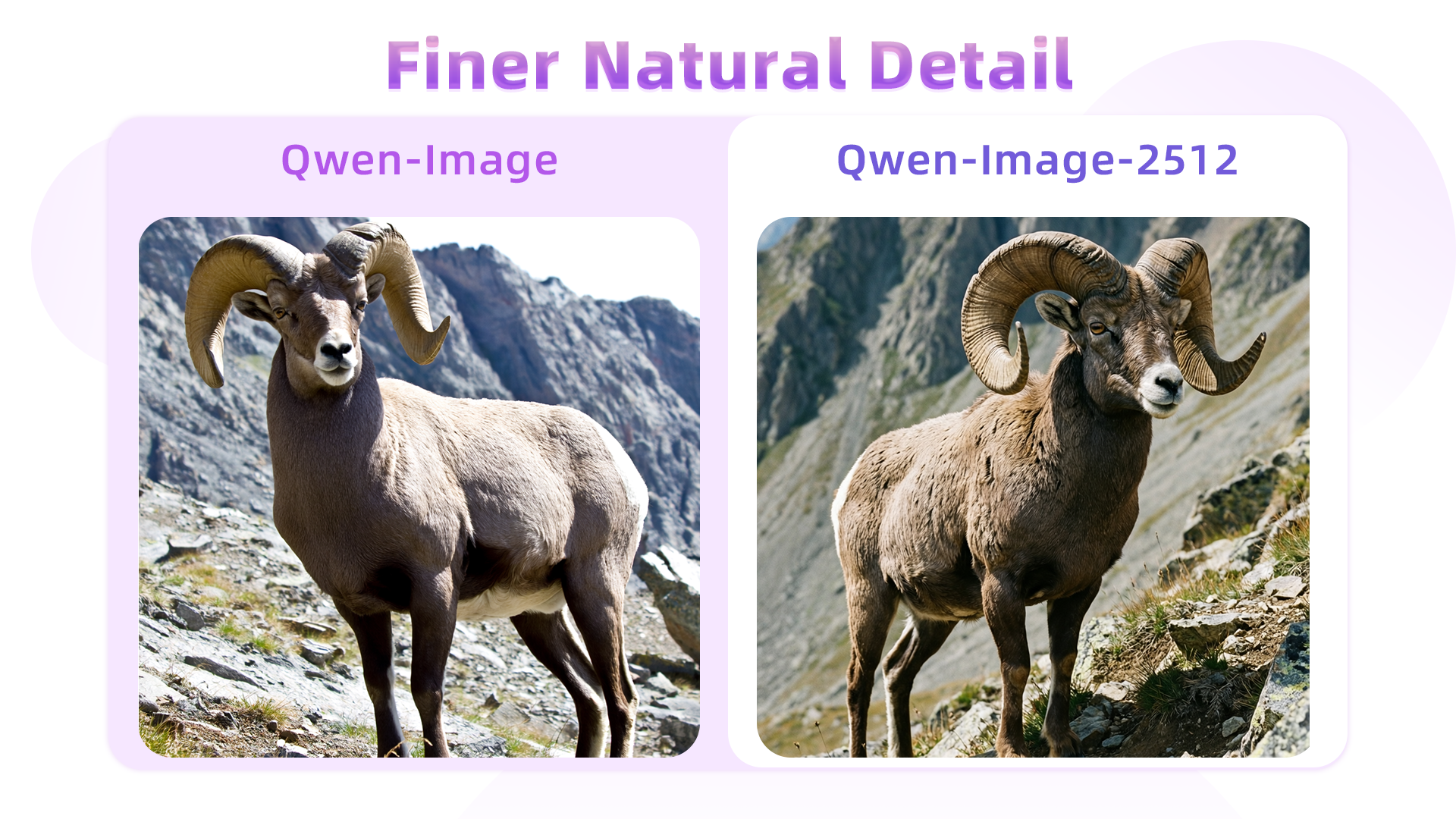
Similarly, texture quality improves in depictions of rugged wildlife—for example, a male argali sheep:
A male argali stands atop a barren, rocky mountainside. Its coarse, dense grey-brown coat covers a powerful, muscular body. Most striking are its massive, thick, outward-spiraling horns—a symbol of wild strength. Its gaze is alert and sharp. The background reveals steep alpine terrain: jagged peaks, sparse low vegetation, and abundant sunlight—conveying the harsh yet majestic wilderness and the animal’s resilient vitality.
Improved Text Rendering
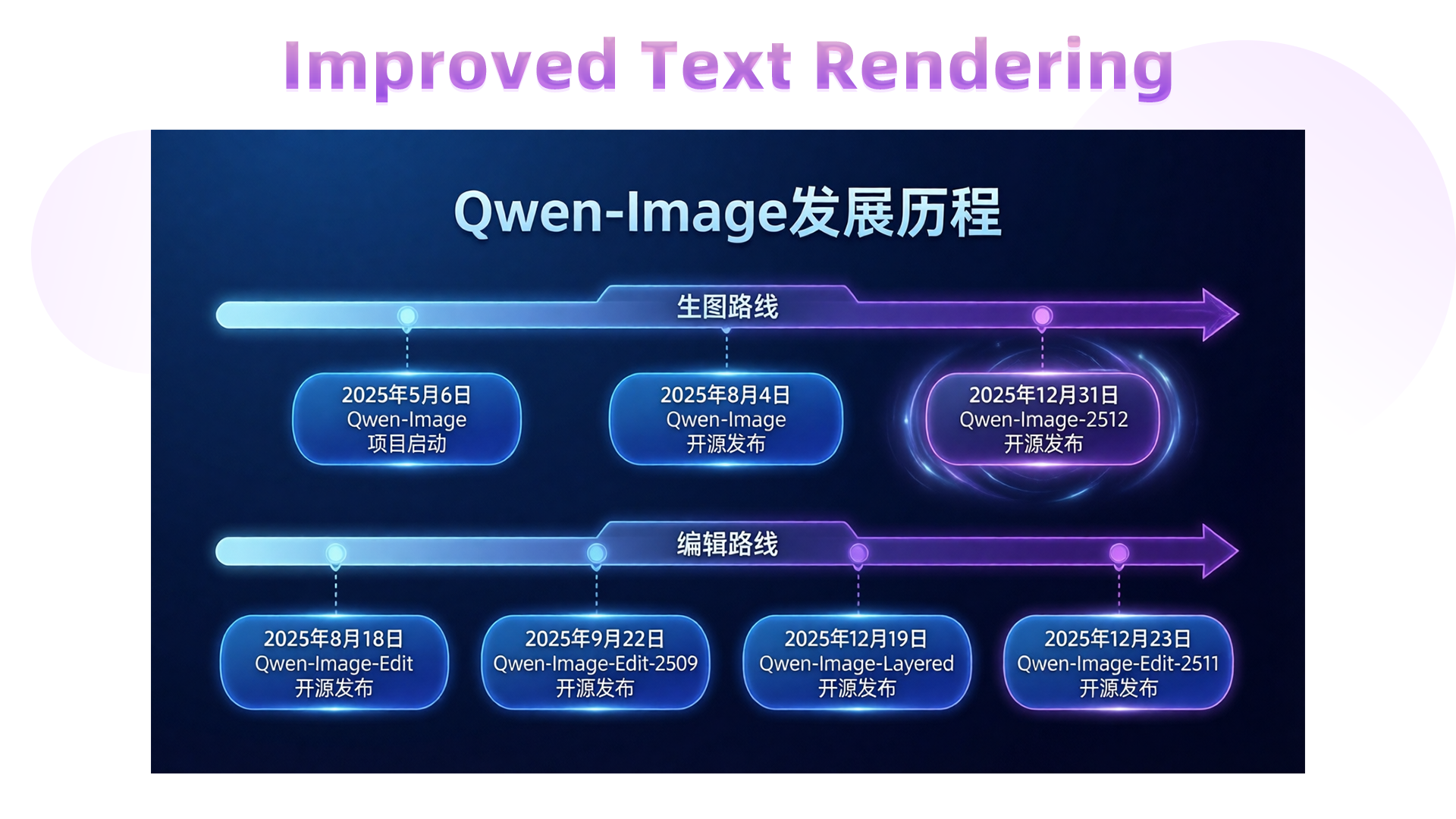
Qwen-Image-2512 further elevates text rendering—already a strength of the original—by improving accuracy, layout, and multimodal integration.
For instance, this prompt requests a complete PPT slide illustrating Qwen-Image’s development roadmap (generation and editing tracks):
这是一张现代风格的科技感幻灯片,整体采用深蓝色渐变背景。标题是“Qwen-Image发展历程”。下方一条水平延伸的发光时间轴,轴线中间写着“生图路线”。由左侧淡蓝色渐变为右侧深紫色,并以精致的箭头收尾。时间轴上每个节点通过虚线连接至下方醒目的蓝色圆角矩形日期标签,标签内为清晰白色字体,从左向右依次写着:“2025年5月6日 Qwen-Image 项目启动”“2025年8月4日 Qwen-Image 开源发布”“2025年12月31日 Qwen-Image-2512 开源发布” (周围光晕显著)在下方一条水平延伸的发光时间轴,轴线中间写着“编辑路线”。由左侧淡蓝色渐变为右侧深紫色,并以精致的箭头收尾。时间轴上每个节点通过虚线连接至下方醒目的蓝色圆角矩形日期标签,标签内为清晰白色字体,从左向右依次写着:“2025年8月18日 Qwen-Image-Edit 开源发布”“2025年9月22日 Qwen-Image-Edit-2509 开源发布”“2025年12月19日 Qwen-Image-Layered 开源发布”“2025年12月23日 Qwen-Image-Edit-2511 开源发布”
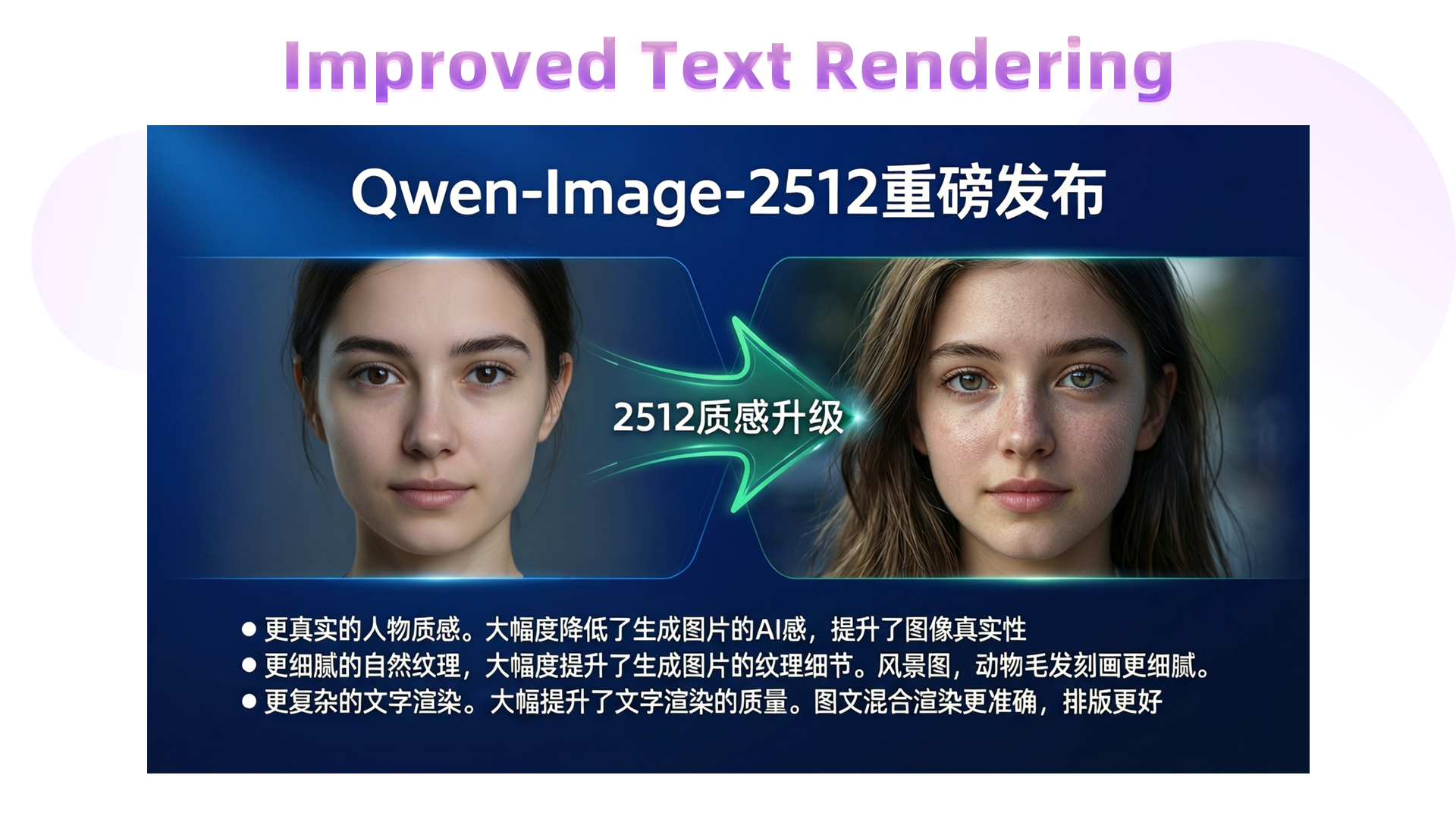
We can even generate a before-and-after comparison slide to highlight the leap from “AI-blurry” to “photorealistic”:
这是一张现代风格的科技感幻灯片,整体采用深蓝色渐变背景。顶部中央为白色无衬线粗体大字标题“Qwen-Image-2512重磅发布”。画面主体为横向对比图,视觉焦点集中于中间的升级对比区域。左侧为面部光滑没有任何细节的女性人像,质感差;右侧为高度写实的年轻女性肖像,皮肤呈现真实毛孔纹理与细微光影变化,发丝根根分明,眼眸透亮,表情自然,整体质感接近写实摄影。两图像之间以一个绿色流线型箭头链接。造型科技感十足,中部标注“2512质感升级”,使用白色加粗字体,居中显示。箭头两侧有微弱光晕效果,增强动态感。在图像下方,以白色文字呈现三行说明:“● 更真实的人物质感。大幅度降低了生成图片的AI感,提升了图像真实性 ● 更细腻的自然纹理。大幅度提升了生成图片的纹理细节。风景图,动物毛发刻画更细腻。● 更复杂的文字渲染。大幅提升了文字渲染的质量。图文混合渲染更准确,排版更好”
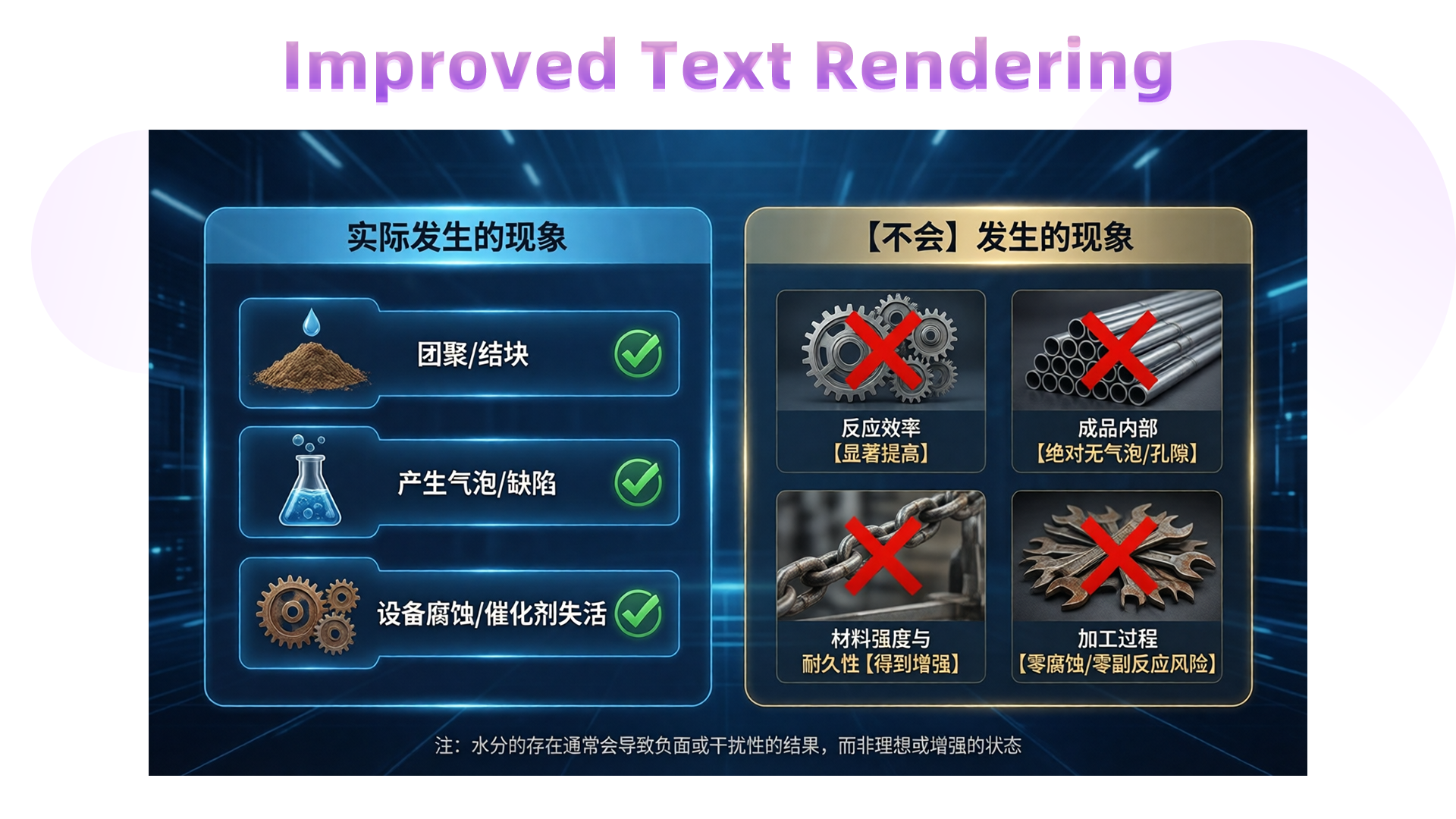
A more complex infographic example:
这是一幅专业级工业技术信息图表,整体采用深蓝色科技感背景,光线均匀柔和,营造出冷静、精准的现代工业氛围。画面分为左右两大板块,布局清晰,视觉层次分明。左侧板块标题为“实际发生的现象”,以浅蓝色圆角矩形框突出显示,内部排列三个深蓝色按钮式条目,第一个条目展示一堆棕色粉末状原料上滴落水滴的图标,文字为“团聚/结块”,后面配有绿色对钩;第二个条目为一个装有蓝色液体并冒出气泡的锥形瓶,文字为“产生气泡/缺陷”,后面配有绿色对钩;第三个条目为两个生锈的齿轮,文字为“设备腐蚀/催化剂失活”,后面配有绿色对钩。右侧板块标题为“【不会】发生的现象”,使用米黄色圆角矩形框呈现,内部四个条目均置于深灰色背景方框中。图标分别为:一组精密啮合的金属齿轮,文字为“反应效率【显著提高】”,上方覆盖醒目的红色叉号;一捆整齐排列的金属管材,文字为“成品内部【绝对无气泡/孔隙】”,上方覆盖醒目的红色叉号;一条坚固的金属链条正在承受拉力,文字为“材料强度与耐久性【得到增强】”,上方覆盖醒目的红色叉号;一堆腐蚀的扳手,文字为“加工过程【零腐蚀/零副反应风险】”,上方覆盖醒目的红色叉号。底部中央有一行小字注释:“注:水分的存在通常会导致负面或干扰性的结果,而非理想或增强的状态”,字体为白色,清晰可读。整体风格现代简约,配色对比强烈,图形符号准确传达技术逻辑,适合用于工业培训或科普演示场景。
Or even a full educational poster:
这是一幅由十二个分格组成的3×4网格布局的写实摄影作品,整体呈现“健康的一天”主题,画面风格简洁清晰,每一分格独立成景又统一于生活节奏的叙事脉络。第一行分别是“06:00 晨跑唤醒身体”:面部特写,一位女性身穿灰色运动套装,背景是初升的朝阳与葱郁绿树;“06:30 动态拉伸激活关节”:女性身着瑜伽服在阳台做晨间拉伸,身体舒展,背景为淡粉色天空与远山轮廓;“07:30 均衡营养早餐”:桌上摆放全麦面包、牛油果和一杯橙汁,女性微笑着准备用餐;“08:00 补水润燥”:透明玻璃水杯中浮有柠檬片,女性手持水杯轻啜,阳光从左侧斜照入室,杯壁水珠滑落;第二行分别是:“09:00 专注高效工作”:女性专注敲击键盘,屏幕显示简洁界面,身旁放有一杯咖啡与一盆绿植;“12:00 静心阅读时光”:女性坐在书桌前翻阅纸质书籍,台灯散发暖光,书页泛黄,旁放半杯红茶;“12:30 午后轻松漫步”:女性在林荫道上漫步,脸部特写;“15:00 茶香伴午后”:女性端着骨瓷茶杯站在窗边,窗外是城市街景与飘动云朵,茶香袅袅;第三行分别是:“18:00 运动释放压力”:健身房内,女性正在练习瑜伽;“19:00 美味晚餐”:女性在开放式厨房中切菜,砧板上有番茄与青椒,锅中热气升腾,灯光温暖;“21:00 冥想助眠”:女性盘腿坐在柔软地毯上冥想,双手轻放膝上,闭目宁静;“21:30 进入睡眠”:女性躺在床上休息。整体采用自然光线为主,色调以暖白与米灰为基调,光影层次分明,画面充满温馨的生活气息与规律的节奏感。
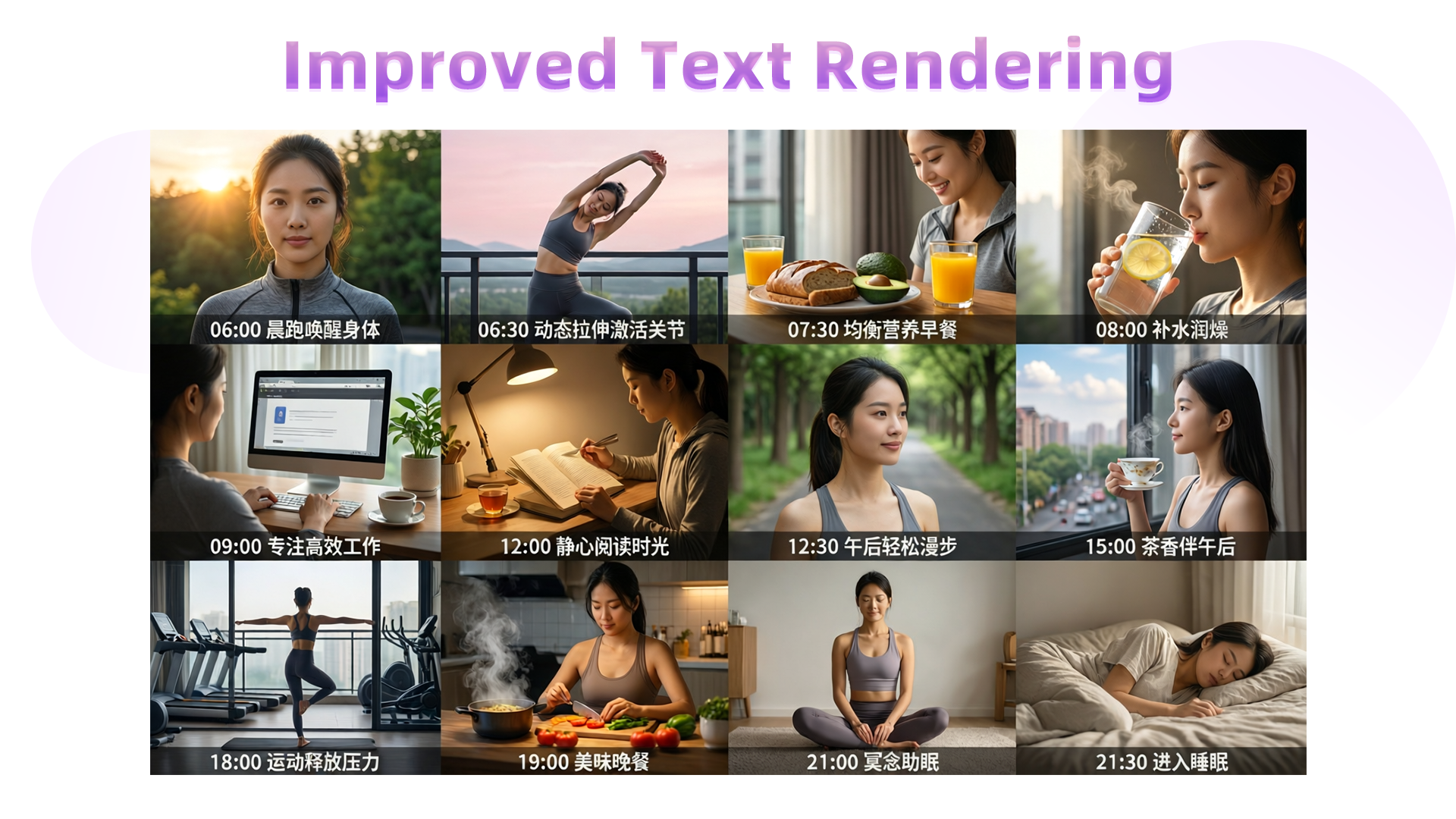
These are the core enhancements in this update. We hope you enjoy using Qwen-Image-2512!
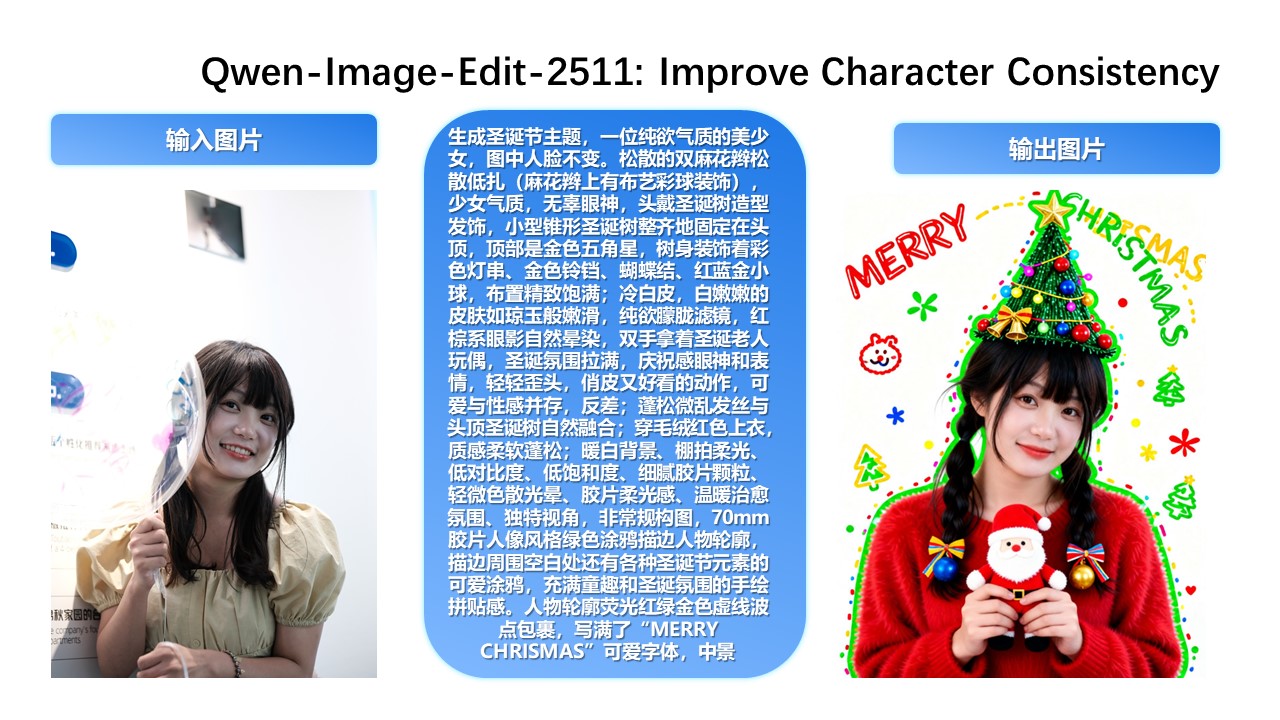
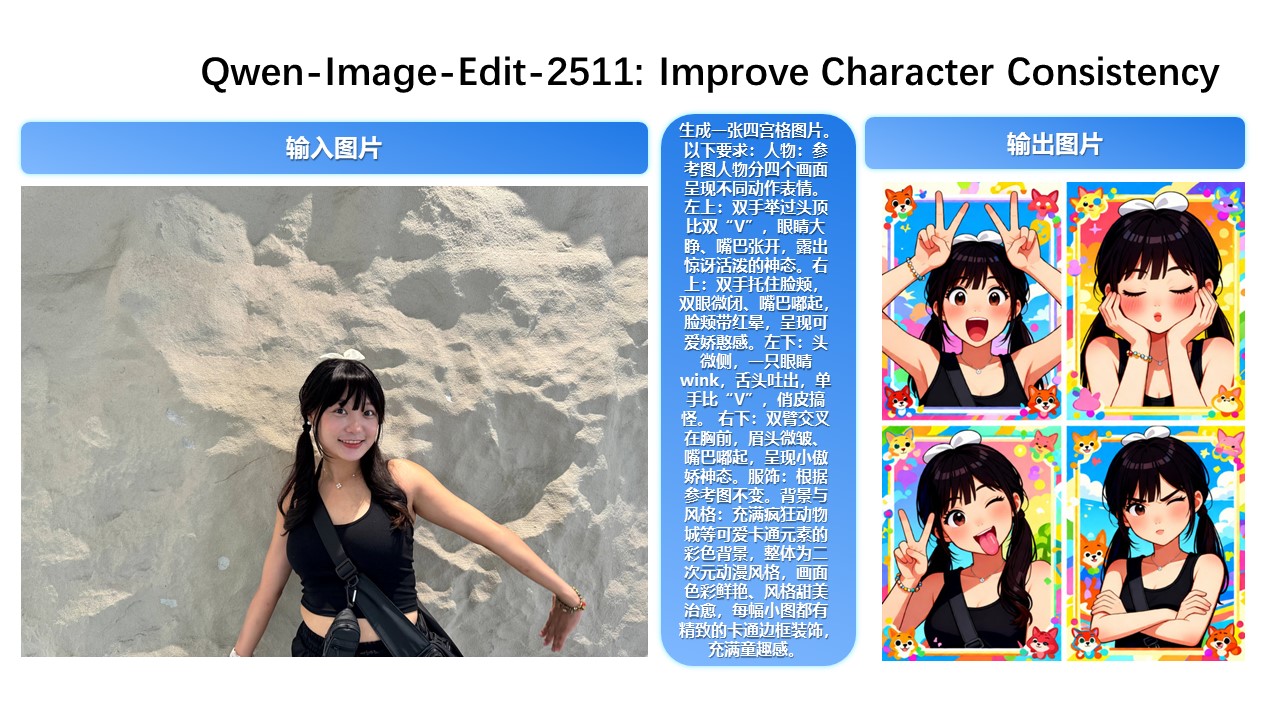
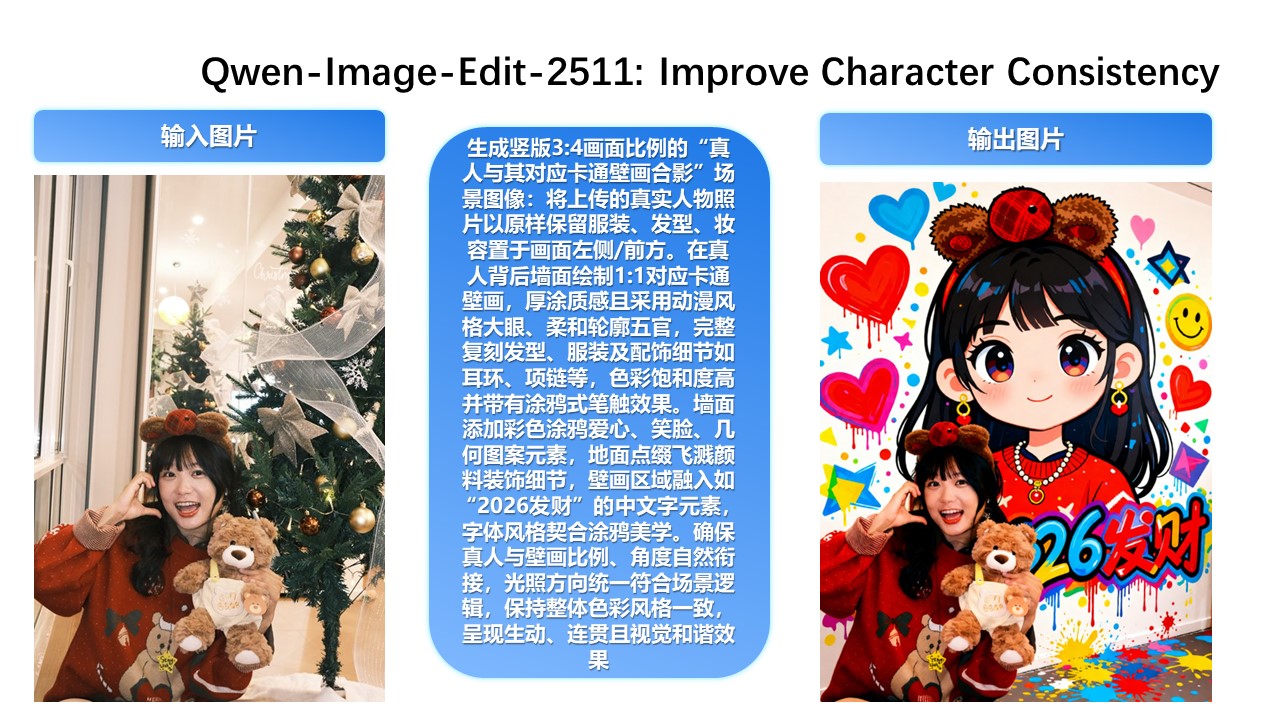
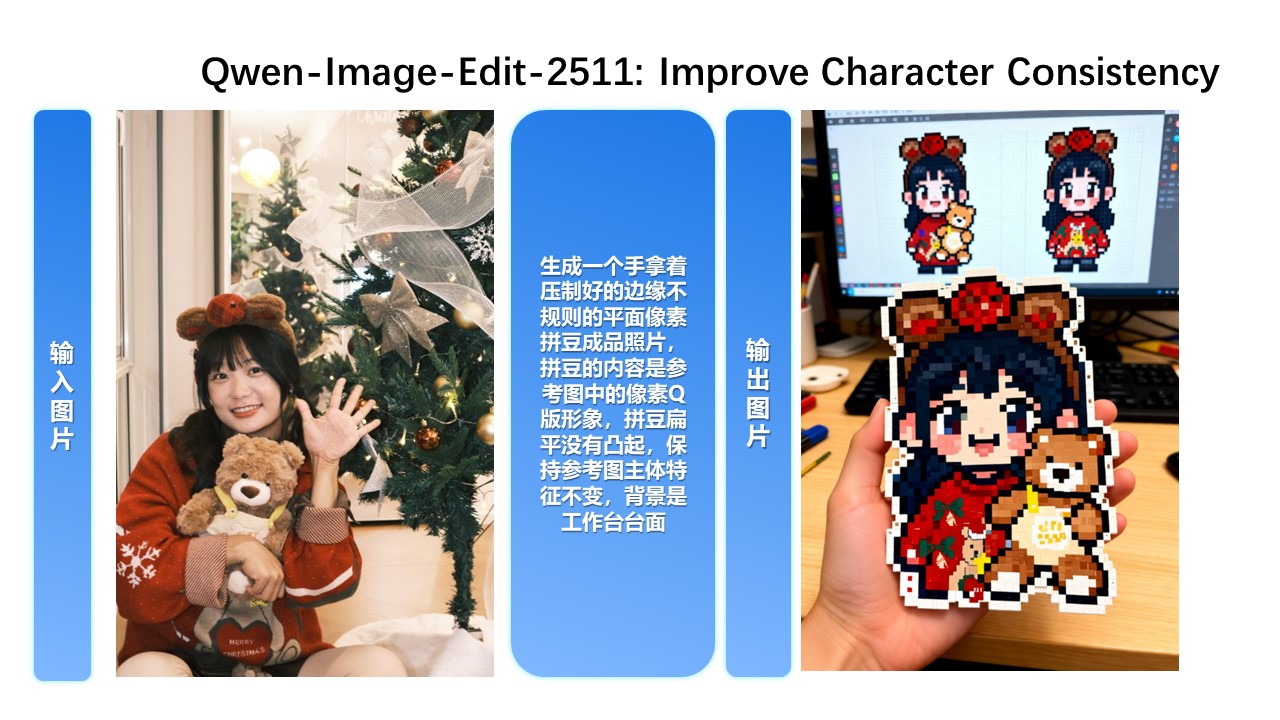
Qwen-Image-Edit-2511 Enhances Character Consistency In Qwen-Image-Edit-2511, character consistency has been significantly improved. The model can perform imaginative edits based on an input portrait while preserving the identity and visual characteristics of the subject.
Improved Multi-Person Consistency
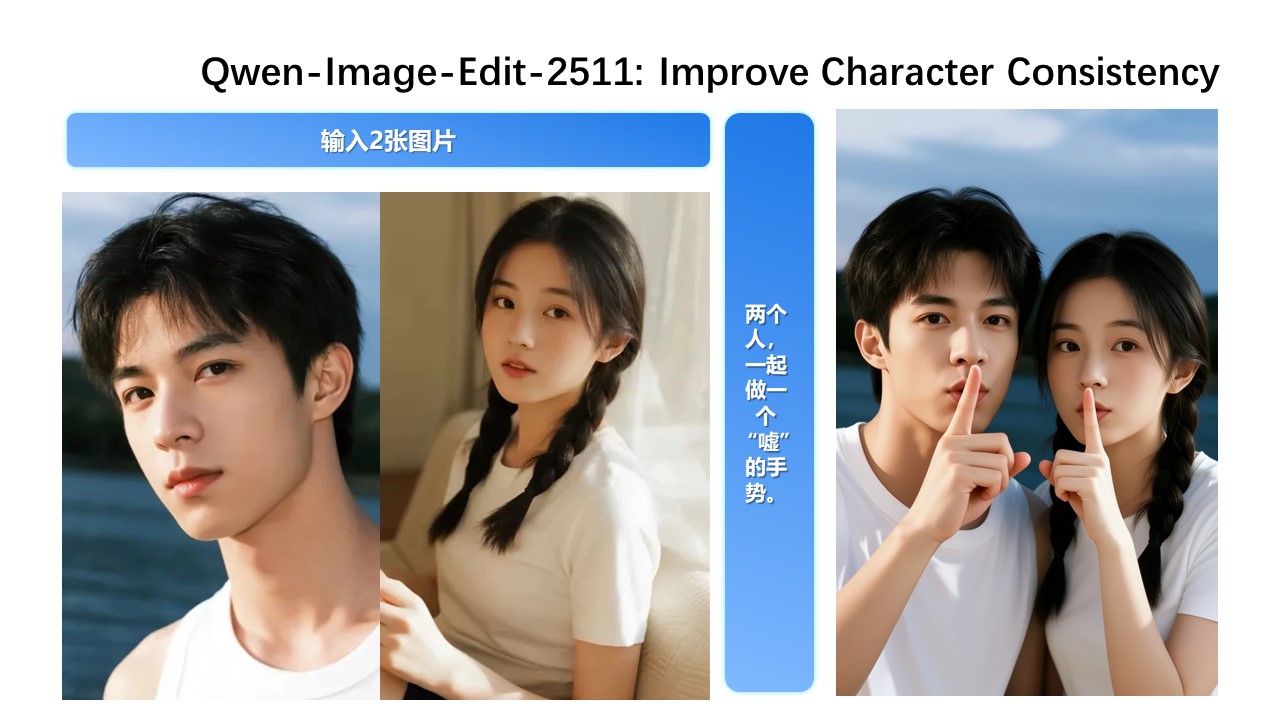
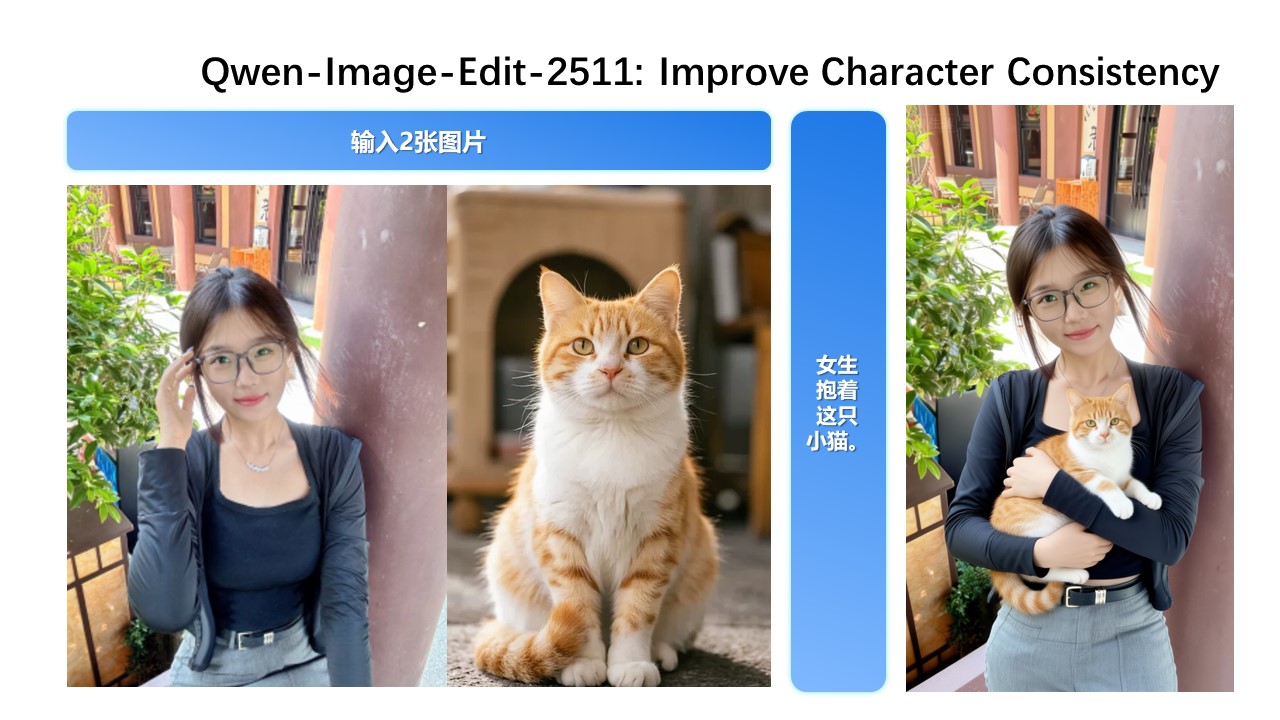
While Qwen-Image-Edit-2509 already improved consistency for single-subject editing, Qwen-Image-Edit-2511 further enhances consistency in multi-person group photos—enabling high-fidelity fusion of two separate person images into a coherent group shot:
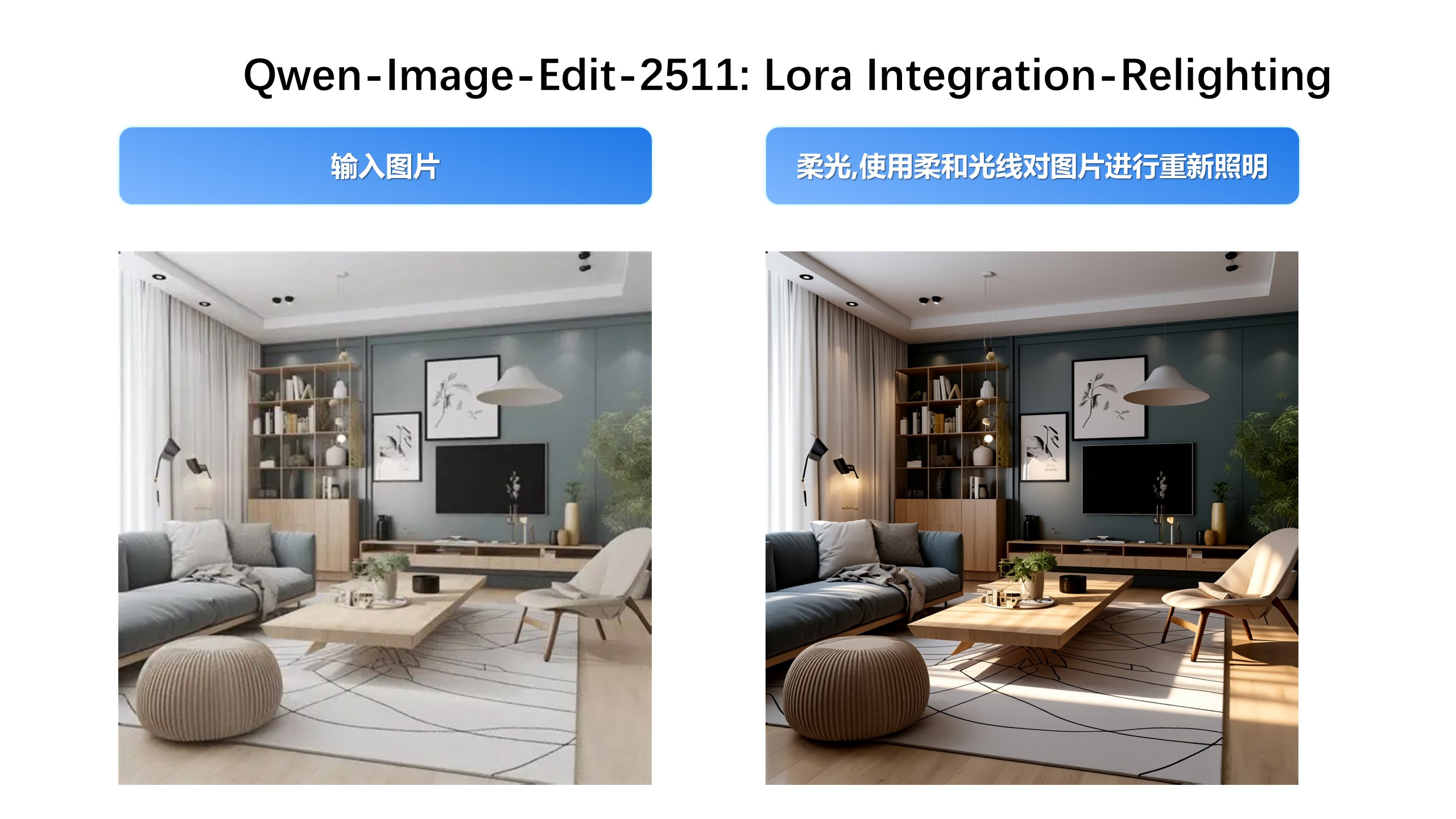
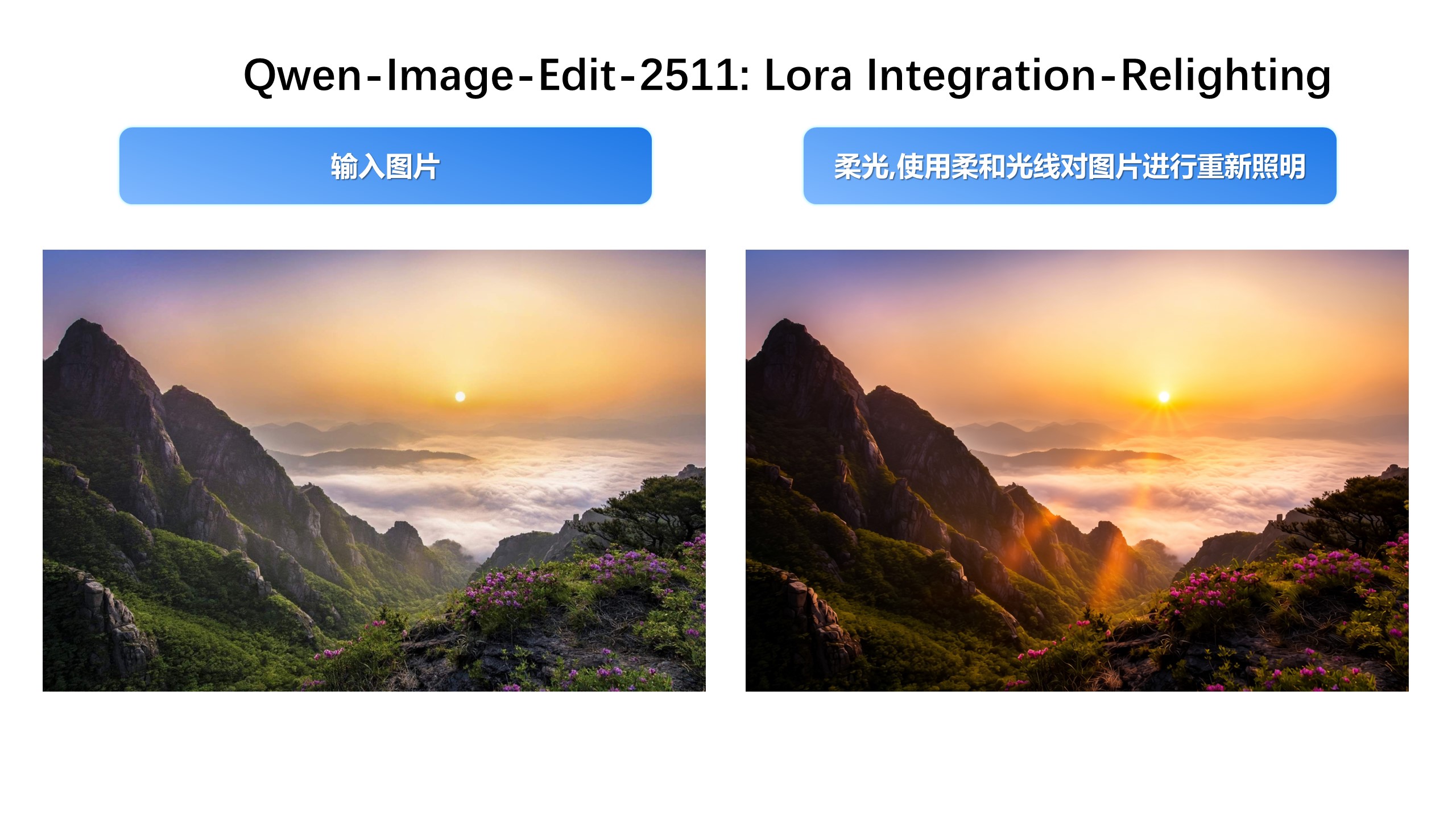
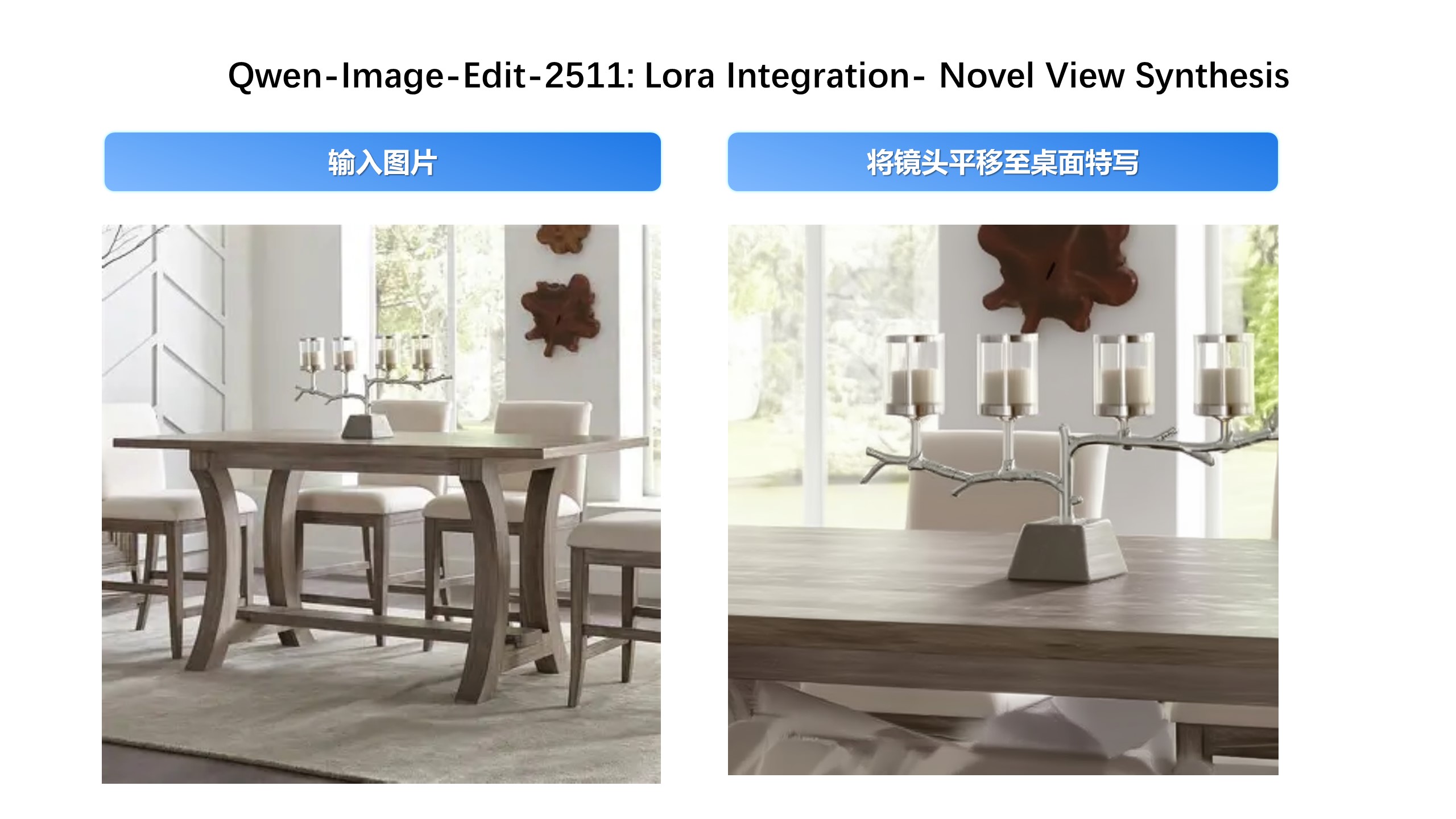
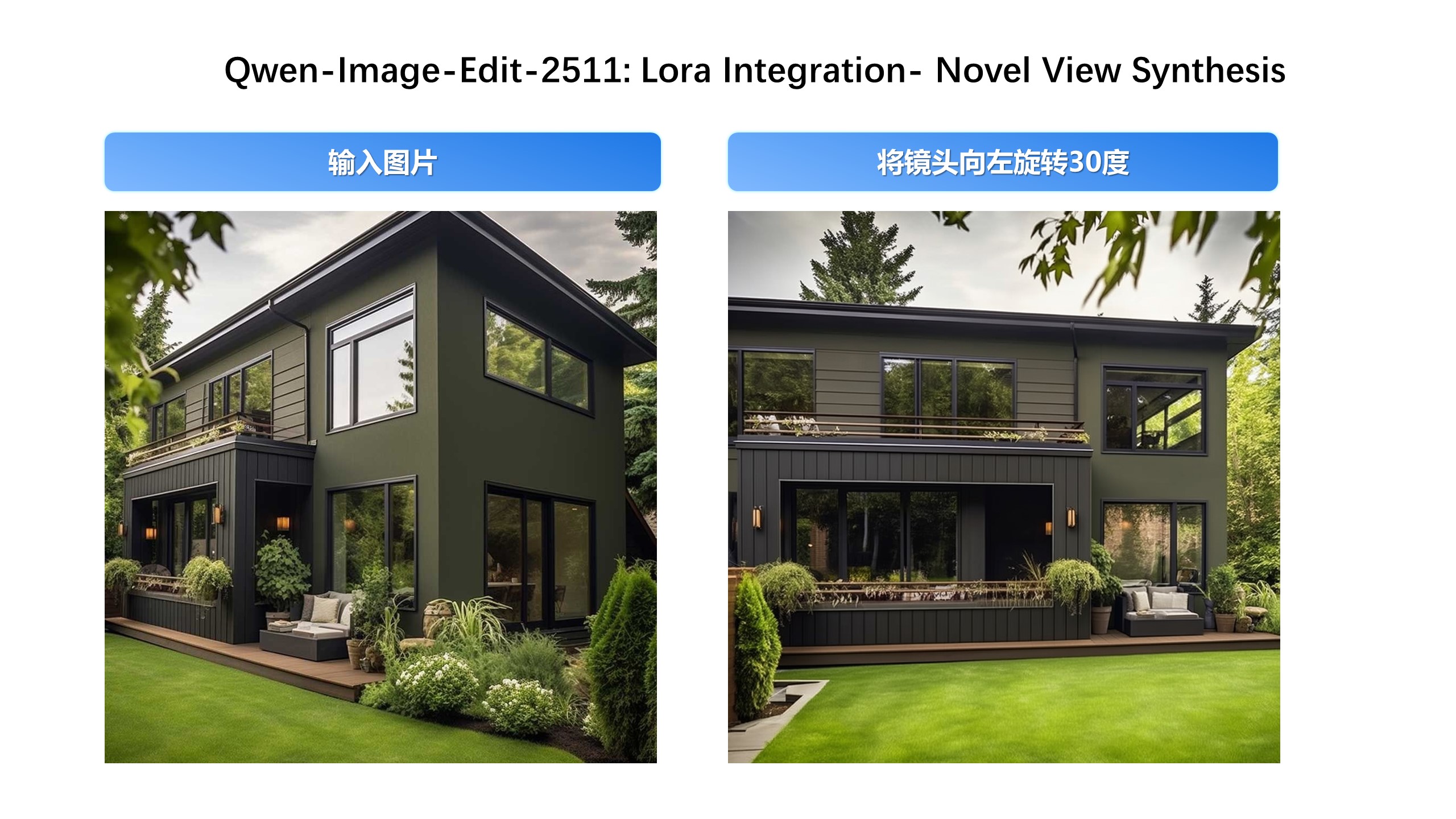
Built-in Support for Community-Created LoRAs Since Qwen-Image-Edit’s release, the community has developed many creative and high-quality LoRAs—greatly expanding its expressive potential. Qwen-Image-Edit-2511 integrates selected popular LoRAs directly into the base model, unlocking their effects without extra tuning.
For example, Lighting Enhancement LoRA
Realistic lighting control is now achievable out-of-the-box:
Another example, generating new viewpoints can now be done directly with the base model:
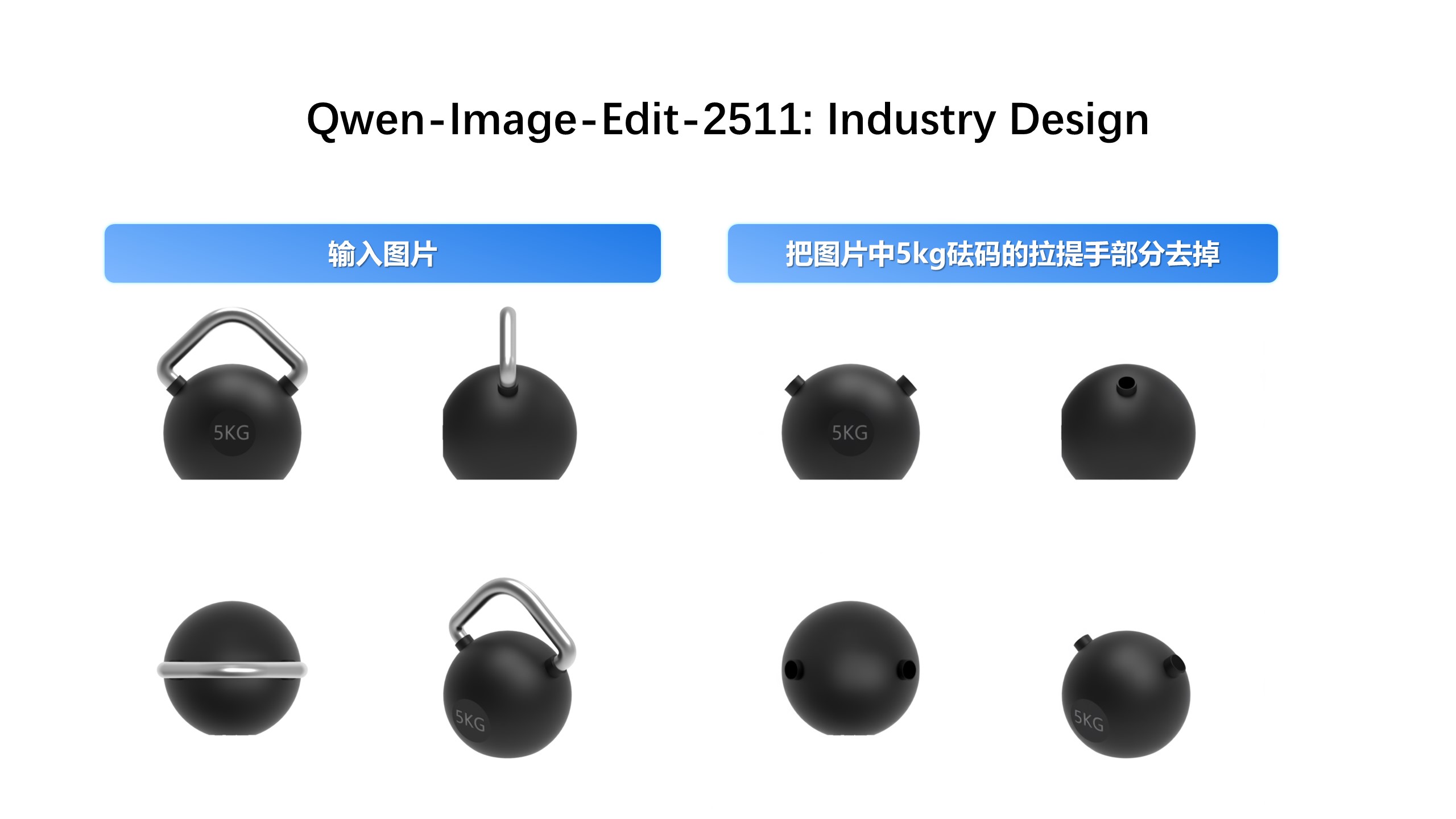
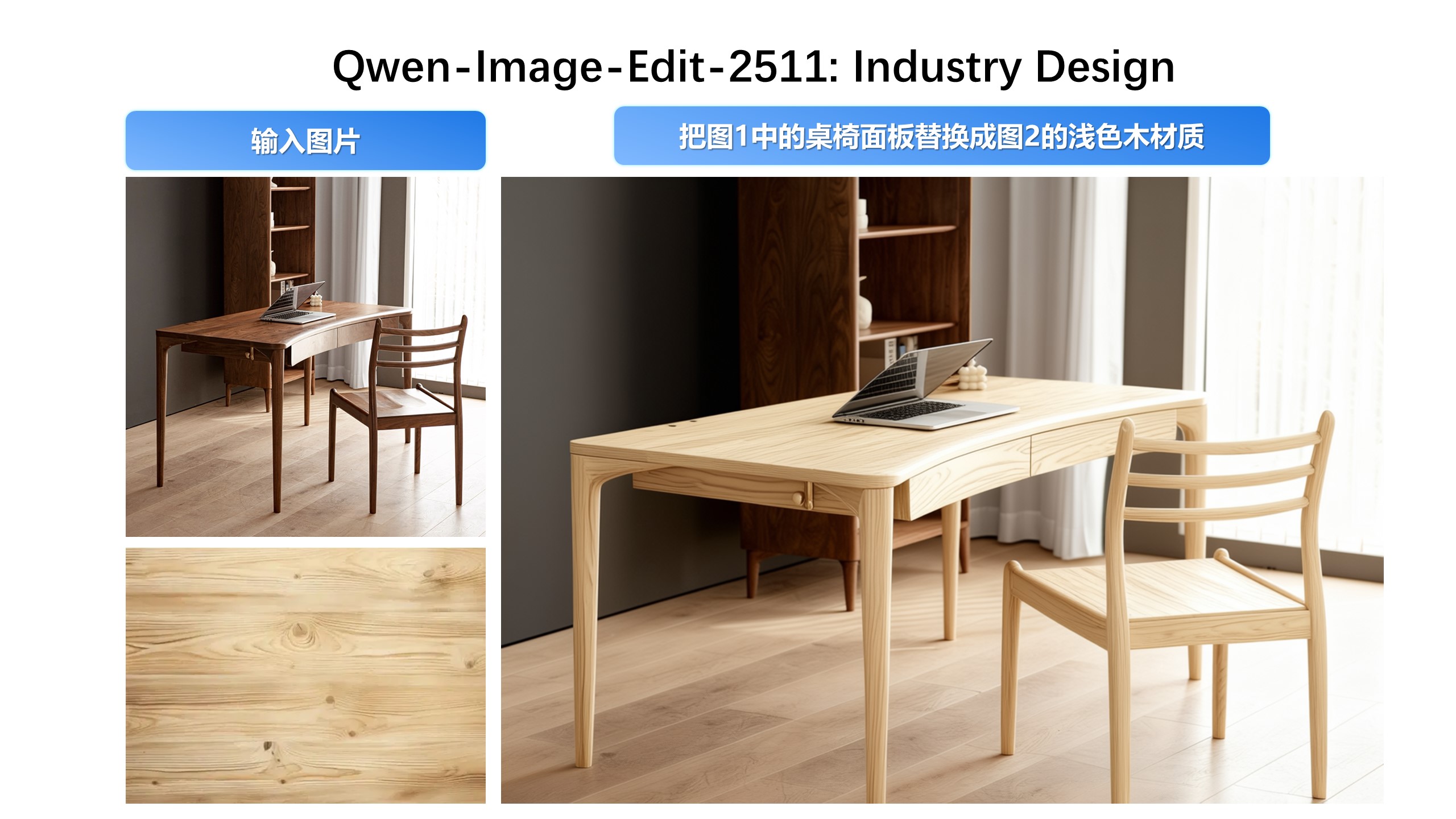
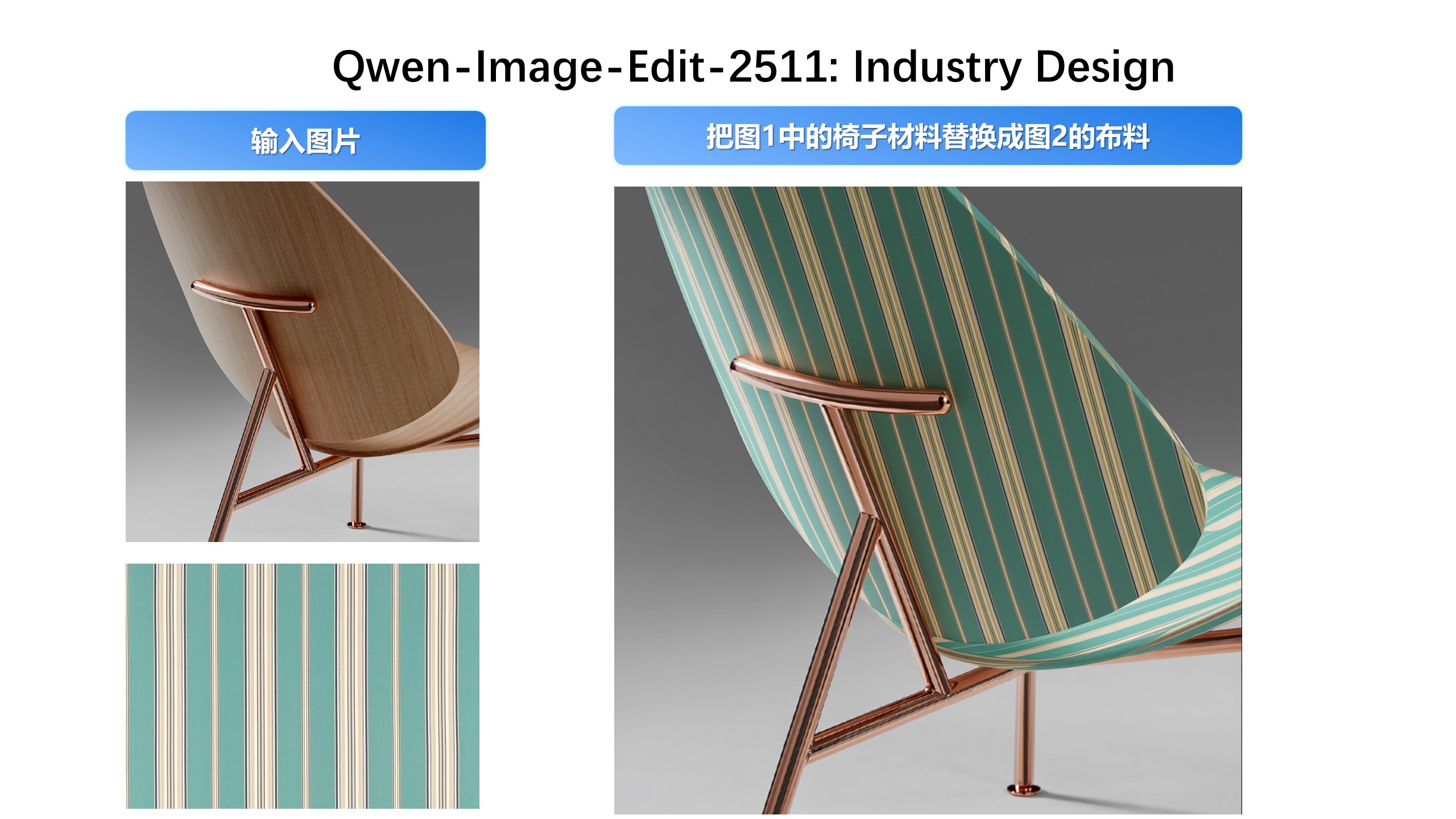
Industrial Design Applications
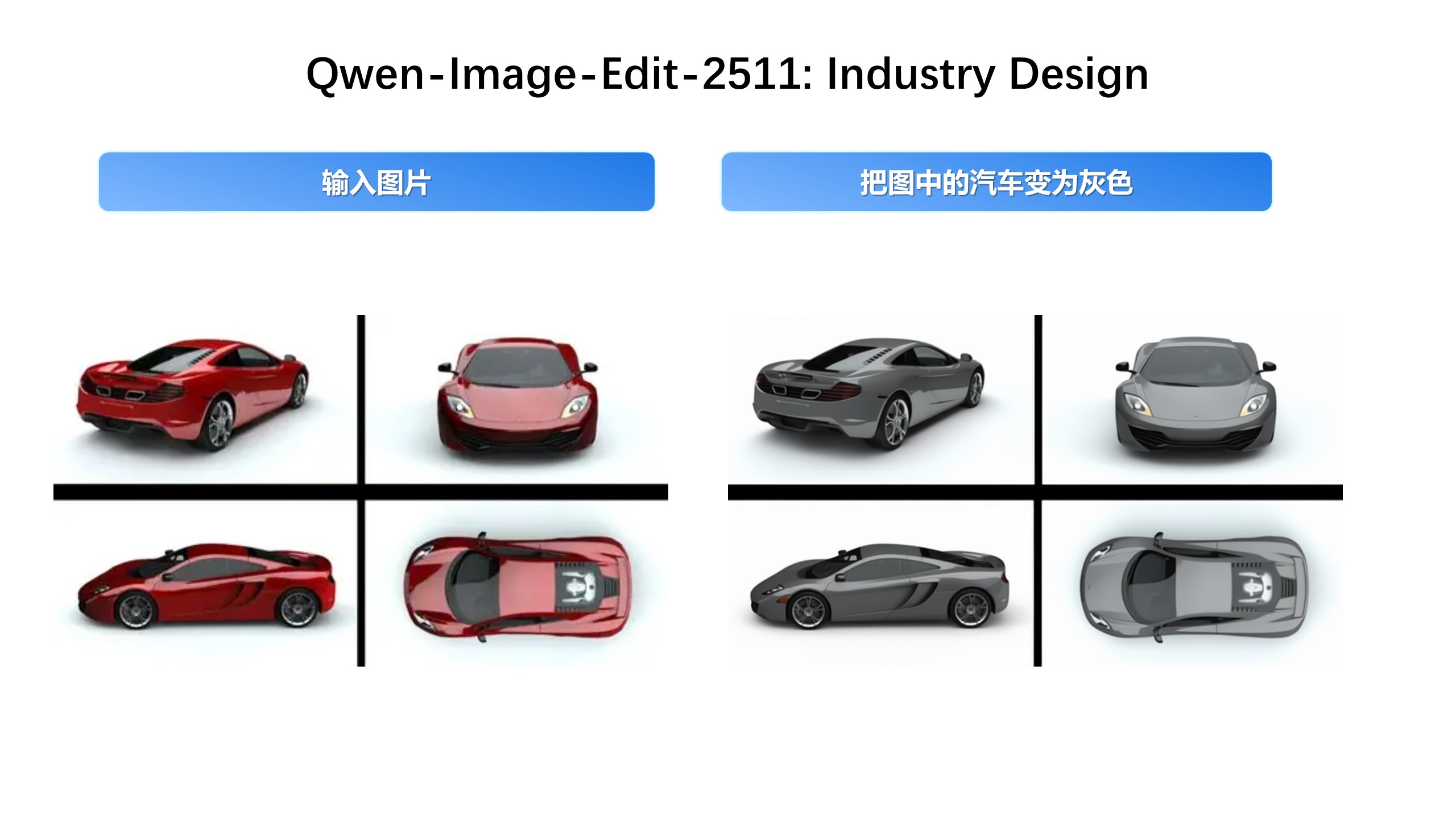
We’ve paid special attention to practical engineering scenarios—for instance, batch industrial product design:
…and material replacement for industrial components:
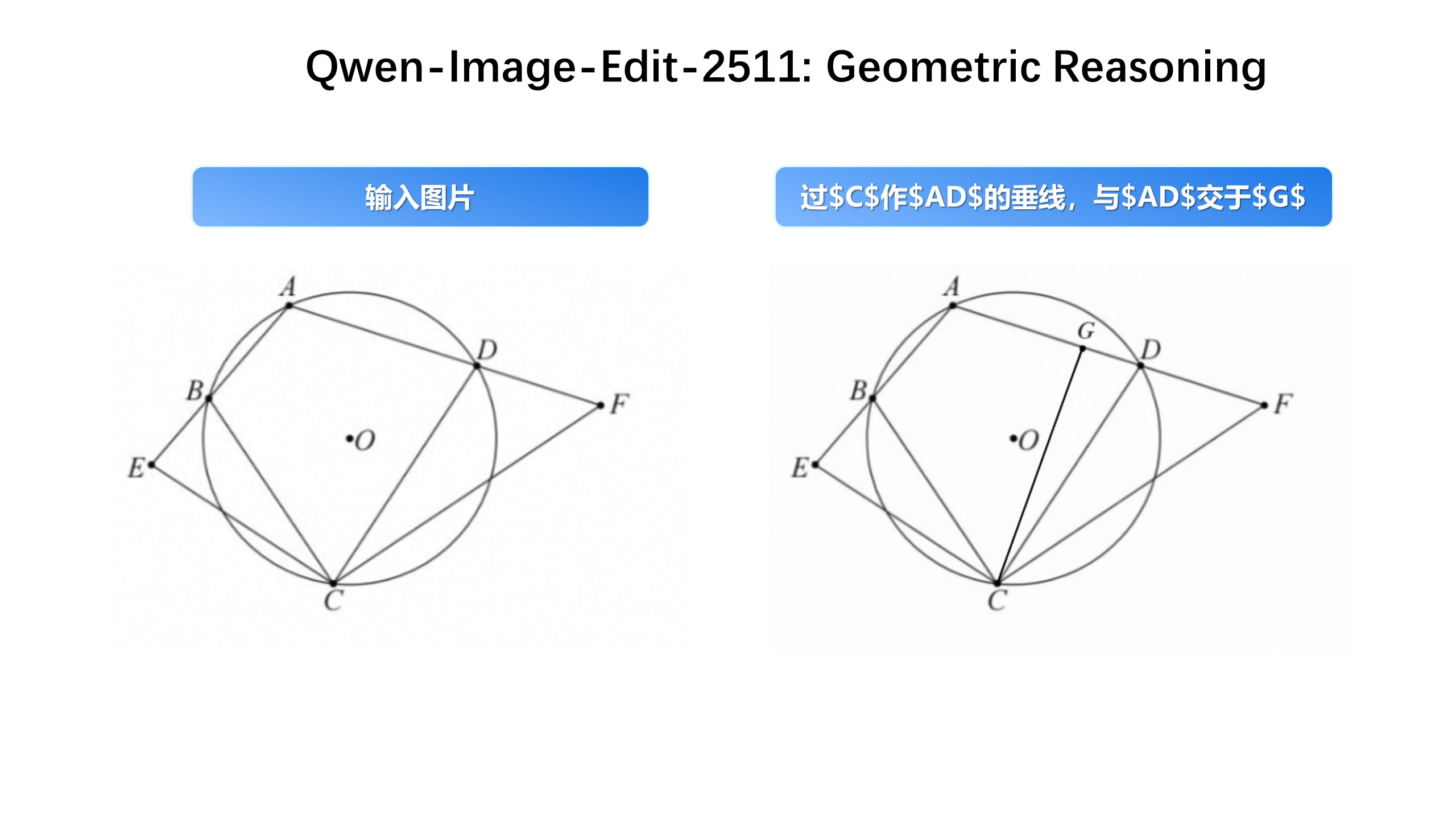
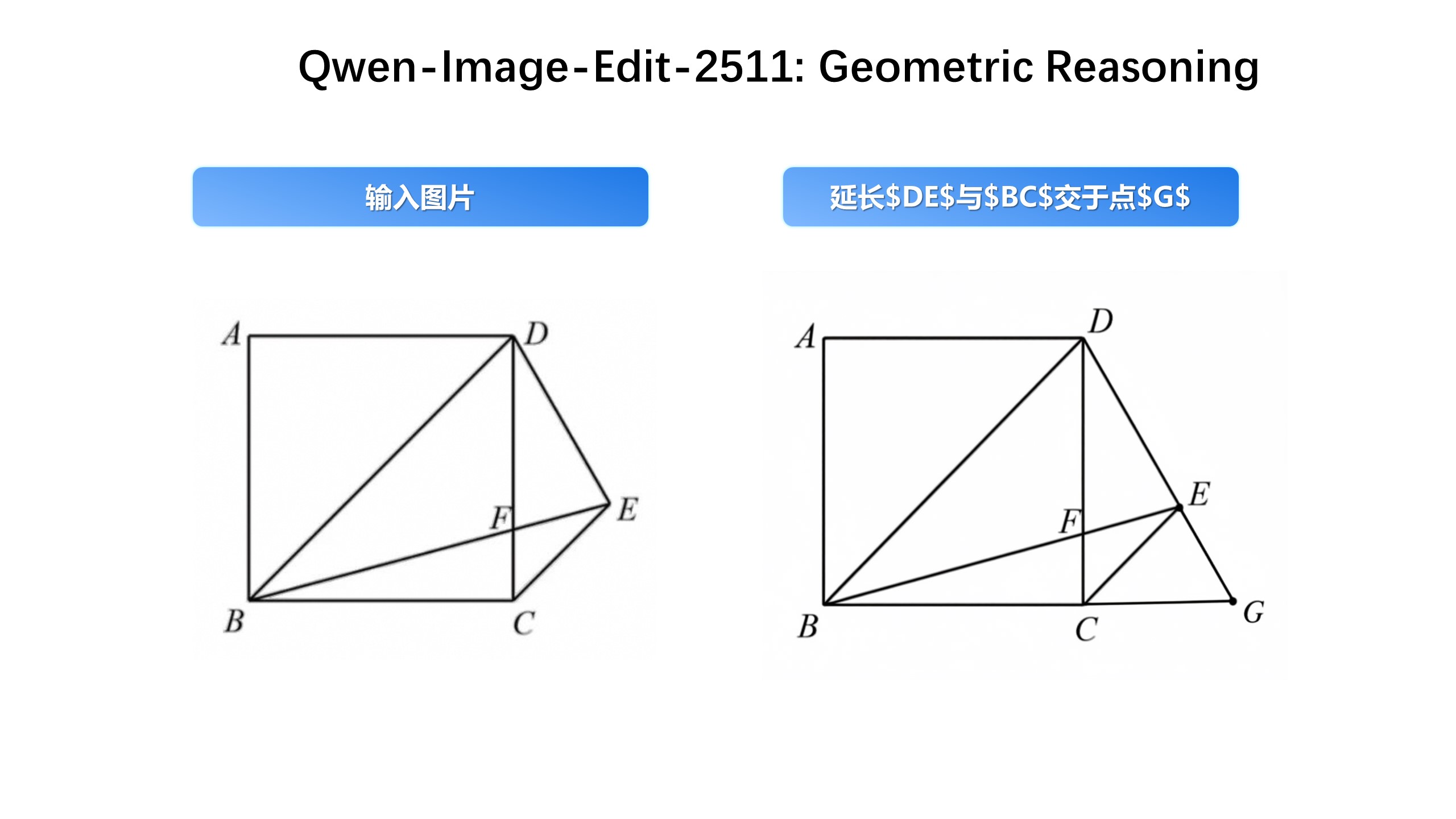
Enhanced Geometric Reasoning Qwen-Image-Edit-2511 introduces stronger geometric reasoning capability—e.g., directly generating auxiliary construction lines for design or annotation purposes:
To comprehensively evaluate the general image generation capabilities of Qwen-Image and objectively compare it with state-of-the-art closed-source APIs, we introduce AI Arena, an open benchmarking platform built on the Elo rating system. AI Arena provides a fair, transparent, and dynamic environment for model evaluation.
In each round, two images—generated by randomly selected models from the same prompt—are anonymously presented to users for pairwise comparison. Users vote for the better image, and the results are used to update both personal and global leaderboards via the Elo algorithm, enabling developers, researchers, and the public to assess model performance in a robust and data-driven way. AI Arena is now publicly available, welcoming everyone to participate in model evaluations.
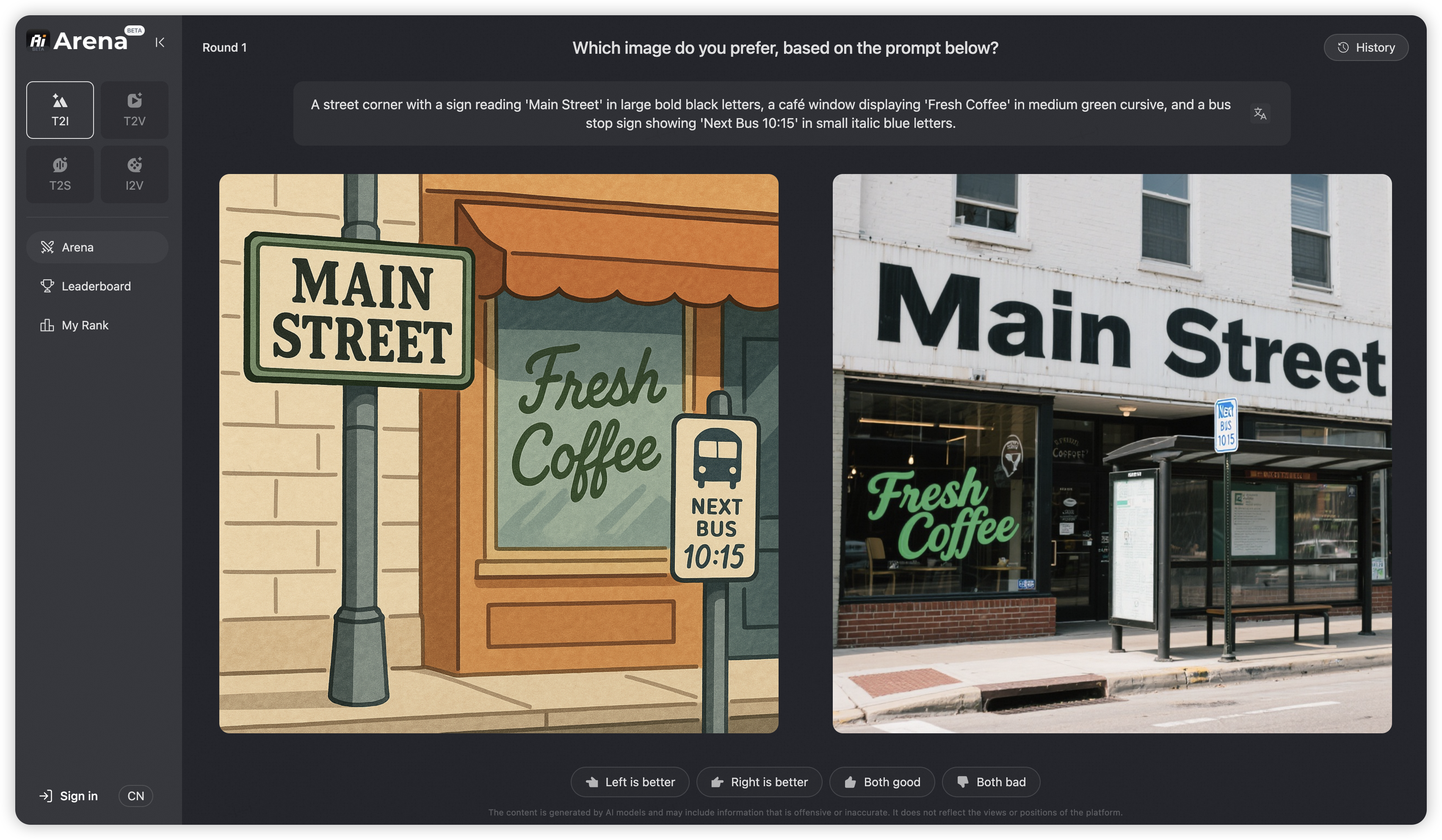
The latest leaderboard rankings can be viewed at AI Arena Learboard.
If you wish to deploy your model on AI Arena and participate in the evaluation, please contact weiyue.wy@alibaba-inc.com.
Diffusers has supported Qwen-Image since day 0. Support for LoRA and finetuning workflows is currently in development and will be available soon.
- DiffSynth-Studio provides comprehensive support for Qwen-Image, including low-GPU-memory layer-by-layer offload (inference within 4GB VRAM), FP8 quantization, LoRA / full training.
- DiffSynth-Engine delivers advanced optimizations for Qwen-Image inference and deployment, including FBCache-based acceleration, classifier-free guidance (CFG) parallel, and more.
- ModelScope AIGC Central provides hands-on experiences on Qwen Image, including:
- Image Generation: Generate high fidelity images using the Qwen Image model.
- LoRA Training: Easily train Qwen Image LoRAs for personalized concepts.
SGLang-Diffusion provides day-0 support for Qwen-Image models. To play with Qwen-Image-Edit-2511, use the following command:
sglang generate --model-path Qwen/Qwen-Image-Edit-2511 --prompt "make the girl in Figure 1 dance with the capybara in Figure 2." --image-path "https://github.com/lm-sys/lm-sys.github.io/releases/download/test/TI2I_Qwen_Image_Edit_Input.jpg" "https://qianwen-res.oss-cn-beijing.aliyuncs.com/Qwen-Image/edit2509/edit2509_2.jpg"
The output should be like

WaveSpeed has deployed Qwen-Image on their platform from day 0, visit their model page for more details.
LiblibAI offers native support for Qwen-Image from day 0. Visit their community page for more details and discussions.
cache-dit offers cache acceleration support for Qwen-Image with DBCache, TaylorSeer and Cache CFG. Visit their example for more details.
Qwen-Image is licensed under Apache 2.0.
We kindly encourage citation of our work if you find it useful.
@misc{wu2025qwenimagetechnicalreport,
      title={Qwen-Image Technical Report},
      author={Chenfei Wu and Jiahao Li and Jingren Zhou and Junyang Lin and Kaiyuan Gao and Kun Yan and Sheng-ming Yin and Shuai Bai and Xiao Xu and Yilei Chen and Yuxiang Chen and Zecheng Tang and Zekai Zhang and Zhengyi Wang and An Yang and Bowen Yu and Chen Cheng and Dayiheng Liu and Deqing Li and Hang Zhang and Hao Meng and Hu Wei and Jingyuan Ni and Kai Chen and Kuan Cao and Liang Peng and Lin Qu and Minggang Wu and Peng Wang and Shuting Yu and Tingkun Wen and Wensen Feng and Xiaoxiao Xu and Yi Wang and Yichang Zhang and Yongqiang Zhu and Yujia Wu and Yuxuan Cai and Zenan Liu},
      year={2025},
      eprint={2508.02324},
      archivePrefix={arXiv},
      primaryClass={cs.CV},
      url={https://arxiv.org/abs/2508.02324},
}If you'd like to get in touch with our research team, we'd love to hear from you! Join our Discord or scan the QR code to connect via our WeChat groups — we're always open to discussion and collaboration.
If you have questions about this repository, feedback to share, or want to contribute directly, we welcome your issues and pull requests on GitHub. Your contributions help make Qwen-Image better for everyone.
If you're passionate about fundamental research, we're hiring full-time employees (FTEs) and research interns. Don't wait — reach out to us at fulai.hr@alibaba-inc.com


