CSS stands for Cascading Style Sheets.
CSS describes how HTML elements are to be displayed on screen, paper, or in other media.
CSS saves a lot of work. It can control the layout of multiple web pages all at once.
External stylesheets are stored in CSS files.
CSS syntax contains a selector and declaration block
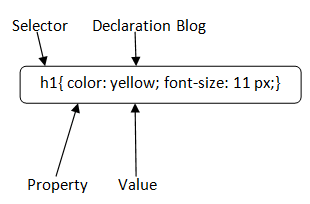
Selector: Selector indicates the HTML element you want to style.
Declaration Block: The declaration block can contain one or more declarations separated by a semicolon. For the above example, there are two declarations:
1- color: yellow;
2- font-size: 11 px;
Types of CSS Selector
1) CSS Element Selector:-
   The element selector selects the HTML element by name.

                          <!DOCTYPE html>
                          <html>
                          <head>
                          <style>
                          p{
                            text-align: center;
                            color: blue;
                           }
                          </style>
                          </head>
                          <body>
                              <p>This style will be applied on every paragraph.</p>
                              <p id="para1">Me too!</p>
                              <p>And me!</p>
                          </body>
                          </html>
2) CSS ID Selector:-
   The id selector selects the id attribute of an HTML element to select a specific element. An id is always unique within the page so it is chosen          to select a single, unique element.<br>


                      <!DOCTYPE html>
                      <html>
                      <head>
                      <style>
                        #para1
                        {
                         text-align: center;
                         color: blue;
                        }
                      </style>
                      </head>
                      <body>
                        <p id="para1">Hello Javatpoint.com</p>
                        <p>This paragraph will not be affected.</p>
                      </body>
                      </html>
 3) CSS Class Selector:-
   The class selector selects HTML elements with a specific class attribute. It is used with a period character . (full stop symbol) followed by the        class name.<br>


                    <!DOCTYPE html>
                    <html>
                    <head>
                    <style>
                        .center
                            {
                                text-align: center;
                                color: blue;
                            }
                    </style>
                    </head>
                    <body>
                         <h1 class="center">This heading is blue and center-aligned.</h1>
                         <p class="center">This paragraph is blue and center-aligned.</p>
                    </body>
                    </html>
 4) CSS Universal Selector:-
    The universal selector is used as a wildcard character. It selects all the elements on the pages.<BR>

                         <!DOCTYPE html>
                         <html>
                         <head>
                         <style>
                            * {
                                color: green;
                                font-size: 20px;
                              }
                        </style>
                        </head>
                        <body>
                            <h2>This is heading</h2>
                            <p>This style will be applied on every paragraph.</p>
                            <p id="para1">Me too!</p>
                            <p>And me!</p>
                        </body>
                        </html>
 5) CSS Group Selector:-
 The grouping selector is used to select all the elements with the same style definitions.<br>

                         <!DOCTYPE html>
                         <html>
                         <head>
                         <style>
                            h1, h2, p {
                                text-align: center;
                                color: blue;
                                      }
                         </style>
                         </head>
                         <body>
                            <h1>Hello Javatpoint.com</h1>
                            <h2>Hello Javatpoint.com (In smaller font)</h2>
                            <p>This is a paragraph.</p>
                         </body>
                         </html>