A device that helps people who recently got blind, to avoid bumping into objects in their homes, while they adapt to their new situation. It employs the use of BLE to detect proximity between two objects.
An ESP32 BLE device called the Beacon is worn by the blind user, which constantly advertises its UUID.
An ESP32 BLE device called the Node is placed on various objects around the home, whenever the blind user wearing a beacon comes close to any object with a Node, the Node beeps.
Below is a video demonstration
To read more on how to build this project click here.
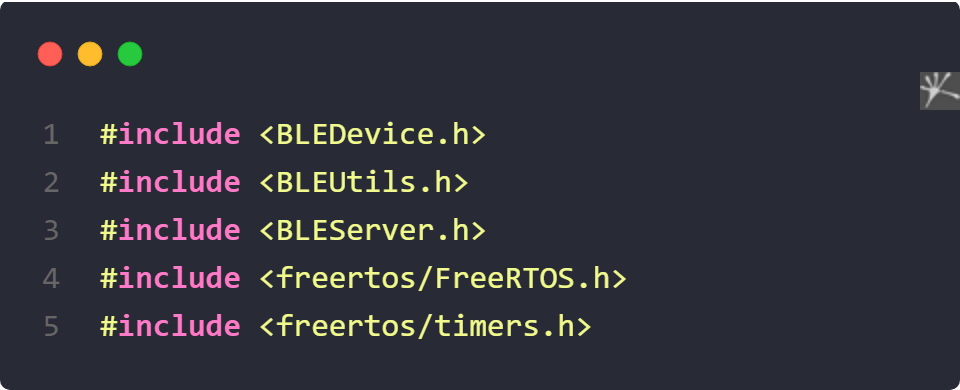
Including the needed Libraries
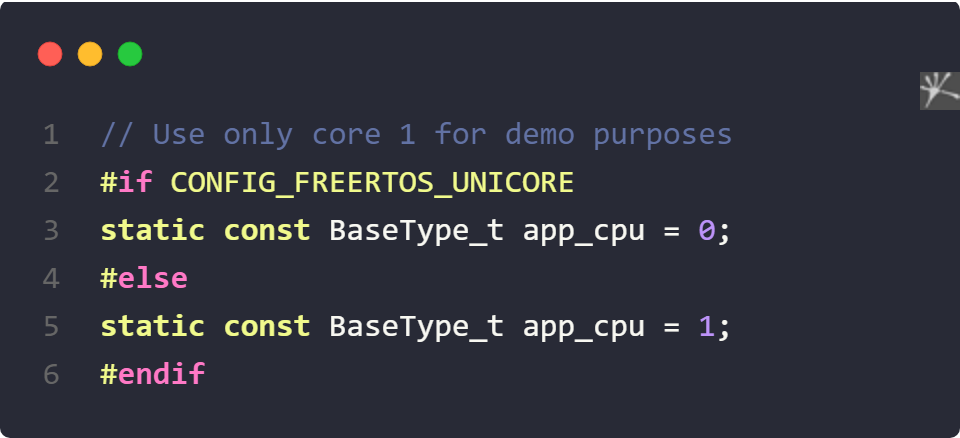
Restric FreeRTOS to use only one of the dual cores in ESP32
Create a FreeRtos Timer Handle and set your device service and characteristic UUIDS
// Globals
static TimerHandle_t timer = NULL;

#define SERVICE_UUID        "4fafc201-1fb5-459e-8fcc-c5c9c331914b"
#define CHARACTERISTIC_UUID "beb5483e-36e1-4688-b7f5-ea07361b26a8"
void wake_charger(TimerHandle_t xTimer) {
    Serial.println("wake up");
    digitalWrite(KEY_PIN, LOW);
    delay(1000);
    digitalWrite(KEY_PIN, HIGH);
}
I am using the CD42 lithium-ion battery charging module, the current consumption of the ESP32 is not enough to keep it on, so I need th send a LOW pulse to the KEY pin of the CD42; hence the timer.
    timer = xTimerCreate(
                         "Periodic timer",           //!< Name of timer
                         20000 / portTICK_PERIOD_MS,  //!< Period of timer (in ticks), wake the cd42 every 20 seconds
                         pdTRUE,                    //!< Auto-reload (false for one-shot)
                         (void *)0,                  //!< Timer ID
                         wake_charger);              //!< Callback function

    if (timer != NULL) {
        xTimerStart(timer, 0);
    }
    BLEDevice::init("Blind Assist Beacon");
    BLEServer *pServer = BLEDevice::createServer();
    BLEService *pService = pServer->createService(SERVICE_UUID);
    BLECharacteristic *pCharacteristic =
        pService->createCharacteristic(CHARACTERISTIC_UUID, BLECharacteristic::PROPERTY_READ | BLECharacteristic::PROPERTY_WRITE); //! allow reading and writing to the characteristics

    pCharacteristic->setValue("Hello World says Neil");
    pService->start();
    BLEAdvertising *pAdvertising = BLEDevice::getAdvertising();
    pAdvertising->addServiceUUID(SERVICE_UUID);
    pAdvertising->setScanResponse(true);
    pAdvertising->setMinPreferred(0x06);  //! functions that help with iPhone connections issue
    pAdvertising->setMinPreferred(0x12);
    BLEDevice::startAdvertising();
    Serial.println("Characteristic defined! Now you can read it in your phone!");

    vTaskDelete(NULL); //! delete setup task