





https://pay-crew.github.io/pay-crew2/
- いくつかのツールをインストール
- docker-compose
- Docker
- Node.js
- pnpm
- vscode
- vscode extensions
astro-build.astro-vscodeesbenp.prettier-vscodedbaeumer.vscode-eslintclinyong.vscode-css-modules
- このレポジトリをクローン
git clone https://github.com/Pay-Crew/pay-crew2.git
cd pay-crew2- レポジトリのルートに
.envファイルを作成
.env.exampleを参考に適当な値を設定してください。
- コンテナを起動
sudo docker compose up -d- 以下のコマンドを実行
pnpm i && pnpm run setup:generate && pnpm run backend:drizzle:generate && pnpm run backend:migrate- 起動
sudo docker compose up -d- コンテナに入る
sudo docker exec -it postgres psql -U <POSTGRES_USER> -d <POSTGRES_DB><POSTGRES_USER> と <POSTGRES_DB> には、.env ファイルで設定した値を入力する。
例: .env の設定例を使っている場合は以下のようになる。
sudo docker exec -it postgres psql -U postgres -d sample- 停止
sudo docker compose down- クリーンアップ
docker compose down --rmi all --volumesopenapi.jsonを更新
pnpm run backend:openapiopenapi-react-queryを実行して、コードを生成
pnpm run frontend:openapiDrizzle Studioというものを利用することで、ブラウザ上でデータベースの中身を確認することができる。
以下のコマンドでDrizzle Studioを起動できる。
pnpm run backend:studio-
products/backend/.envを本番環境のURLに変更 -
以下のコマンドを実行
pnpm run backend:migrateproducts/backend/.envを開発環境のURLに戻す
- TypeScript
- CSS Modules
- Vite + React
- React Router (for routing)
- react-hook-form (for form handling)
- validator: Zod (with @hookform/resolvers)
- typescript-react-query (type safe tiny wrapper for @tanstack/react-query)
- msw (mocking API)
- Sentry (for error tracking)
- TypeScript
- Hono (Web Framework)
- @hono/zod-openapi (for validation and OpenAPI spec generation)
- fetch API (for calling Webhook)
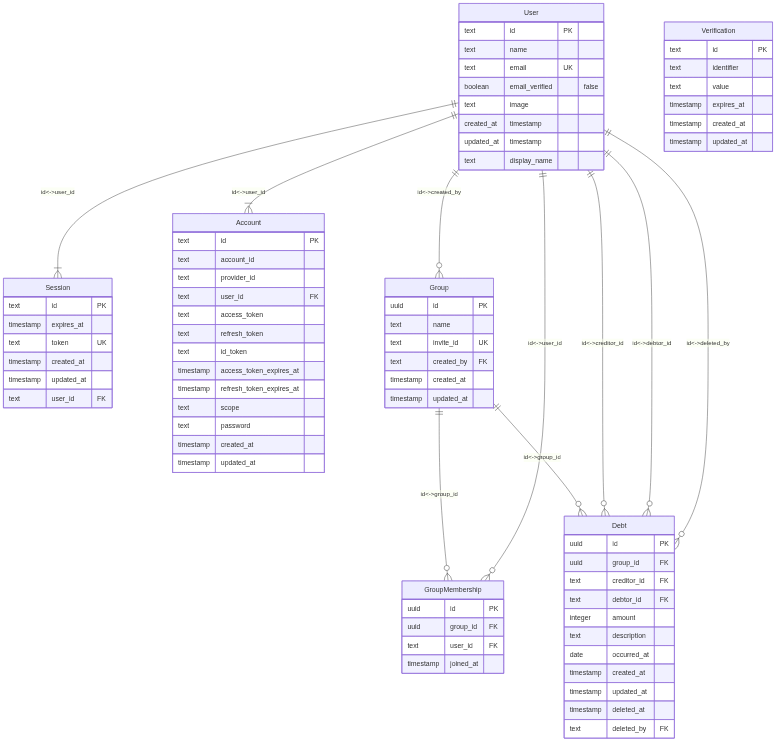
- Drizzle (ORM)
- TypeScript
- Zod
- development
- PostgreSQL with docker-compose
- production
- Xata Lite
- Astro
- TypeScript
- GitHub Actions with Nix
- Vitest
Warning
このプロジェクトは、 pnpmのみサポートしています。 npmやyarnなどはサポートしていません。
- pnpm (with workspace feature)
- turbo (monorepo management tool)
- Nix (optional tool)


main branch is the release branch.
dev branch is the development root branch.
-
feat/#[issue-number]-[issue-summary]
example) feat/#12-add-card-button-component
-
chore/#[issue-number]-[issue-summary]
example) chore/#12-add-prettier-config
-
fix/#[issue-number]-[issue-summary]
example) fix/#12-change-title
-
update/#[issue-number]-[issue-summary]
example) update/#12-update-dependencies
-
test/#[issue-number]-[issue-summary]
example) test/#12-add-unit-test
flowchart LR
    feature["feat/*"]
    chore["chore/*"]
    fix["fix/*"]
    update["update/*"]
    dev["dev"]
    test["test/*"]
    main["main"]
    feature --with checks--> dev
    chore --with checks--> dev
    fix --with checks--> dev
    update --with checks--> dev
    dev --with checks--> main
    test --with checks--> dev
    main --with checks (cron)--> main
- test (
pushandpull requests) - CodeQL Scanning
- docs (
push) - preview-frontend (
pull requests)
- test (
pull requests) - CodeQL Scanning
- deploy-frontend (
push) - deploy-backend (
push)
- test (
cron)