This is a fork of the pptx2md project, primarily focused on converting PowerPoint pptx files into Marp markdown, and now also LaTeX Beamer. Key enhancements and differences from the original pptx2md include:
- Marp Output: Dedicated
--marpoutput mode with specific features:- Automatic multi-column layout heuristics for Marp slides.
- Automatic font scaling classes for slides (
small,smaller,smallest) based on content density. - Included CSS for manual figure captions and absolute positioning.
- Optimized image handling for Marp, including working size preservation and positioning hints (
left,center,right).
- LaTeX Beamer Output: Dedicated
--beameroutput mode:- Automatic font scaling for slides (
small,footnotesize,scriptsize) based on content density. - Heuristic two-column layout for dense slides.
- Uses standard LaTeX packages:
booktabsfor tables,graphicxfor images (scaled and positioned),verbatimfor code blocks,amsmath/amssymbfor math,xcolorfor colors,hyperreffor links, andwrapfigfor text wrapping around images.
- Automatic font scaling for slides (
- Mathematical Formula Parsing: Conversion of PowerPoint equations into LaTeX, for display in Marp slides (
$...$or$$...$$) and Beamer (inline$...$or display\[...\]). - Enhanced Code Formatting: Improved detection and conversion for
inline codeand fenced code blocks (three backticks). - Image Processing Refinements: Includes fixes and improvements to image crop functionality and image conversion to PNG for unsupported image formats (e.g. wmf, tiff, etc.). Image positioning hints based on location heuristics (left/center/right alignment) are used by Marp and Beamer formatters to position images.
Right now the main functionality is working quite well, but there are some smaller problems left to be fixed, such as PowerPoint graphs not being converted to images.
Note that this functionality has required a huge fork of the python-pptx library in order to support equation parsing and tiff image processing, which is not yet merged with the original repo. Please refer to the python-pptx fork for more details.
A tool to convert Powerpoint pptx file into markdown.
Preserved formats:
- Titles. Custom table of contents with fuzzy matching is supported.
- Lists with arbitrary depth.
- Text with bold, italic, color and hyperlink
- Pictures. They are extracted into image file, with crop settings from PowerPoint applied, and a relative path is inserted.
- Tables with merged cells.
- Mathematical formulas (parsed and converted to LaTeX).
codeusing monospaced fonts.- Code blocks, where text boxes primarily styled with monospaced fonts are converted.
- Top-to-bottom then left-to-right block order.
- Notes from the presenter.
Supported output:
- Markdown
- Tiddlywiki's wikitext
- Madoko
- Quarto
- Marp (with many extra features, see above)
- LaTeX Beamer (with many extra features, see above)
Please star this repo if you like it!
You need to have Python with version later than 3.10 and pip installed on your system, then run in the terminal:
pip install -e git+https://github.com/OscarPellicer/pptx2marp.git
pip install -e git+https://github.com/OscarPellicer/python-pptx.git
Note: we need to install a forked version of python-pptx because the original library doesn't support equation parsing, and it fails to process tiff images. Same for pptx2md, since we have not yet submitted a PR to the original repo.
Once you have installed it, use the command pptx2md [pptx filename] to convert pptx file into markdown.
The default output filename is out.md, and any pictures extracted (and inserted into .md) will be placed in /img/ folder.
Note: older .ppt files are not supported, convert them to the new .pptx version first.
Remove:
pip uninstall pptx2marpBy default, this tool parse all the pptx titles into level 1 markdown titles, in order to get a hierarchical table of contents, provide your predefined title list in a file and provide it with -t argument.
This is a sample title file (titles.txt):
Heading 1
  Heading 1.1
    Heading 1.1.1
  Heading 1.2
  Heading 1.3
Heading 2
  Heading 2.1
  Heading 2.2
    Heading 2.1.1
    Heading 2.1.2
  Heading 2.3
Heading 3
The first line with spaces in the begining is considered a second level heading and the number of spaces is the unit of indents. In this case, Heading 1.1 will be outputted as ## Heading 1.1 . As it has two spaces at the begining, 2 is the unit of heading indent, so Heading 1.1.1 with 4 spaces will be outputted as ### Heading 1.1.1. Header texts are matched with fuzzy matching, unmatched pptx titles will be regarded as the deepest header.
Use it with pptx2md [filename] -t titles.txt.
Convert to Marp markdown with optimized settings for slide presentations:
pptx2md lecture.pptx --marp --disable-color --min-block-size 5 --keep-similar-titlesConvert to LaTeX Beamer format:
pptx2md slides.pptx --beamer --disable-color --min-block-size 5 --keep-similar-titlesGenerate all supported formats from a single PPTX file:
pptx2md everything.pptx -o outputs/everything --disable-color --md --wiki --mdk --qmd --marp --beamer --min-block-size 5 --keep-similar-titlesProcess all PPTX files in a directory:
pptx2md "/path/to/presentations/" -o "/path/to/output/" --marp --disable-color --min-block-size 5 --keep-similar-titlesSpecify custom output directory and image folder:
pptx2md course_materials.pptx -o "outputs/course.md" -i "outputs/images" --marp --disable-color-t [filename]provide the title file-o [filename]path of the output file-i [path]directory of the extracted pictures--image-width [width]the maximum width of the pictures, in px. If set, images are put as html img tag.--disable-imagedisable the image extraction--disable-escapingdo not attempt to escape special characters--disable-notesdo not add presenter notes--disable-wmfkeep wmf formatted image untouched (avoid exceptions under linux)--disable-colordisable color tags in HTML--enable-slidesdeliniate slides\n---\n, this can help if you want to convert pptx slides to markdown slides--try-multi-columntry to detect multi-column slides (very slow)--min-block-size [size]the minimum number of characters for a text block to be outputted--wiki/--mdkif you happen to be using tiddlywiki or madoko, this argument outputs the corresponding markup language--qmdoutputs to the qmd markup language used for quarto powered presentations--marpoutputs to the Marp markdown language for slide presentations.- Automatic Two-Column Layout: For slides classified as
smallerorsmallest(based on content length), if the average line length of list items and paragraphs is less than 40 characters, the content (excluding the main title, if any) will be automatically split into two columns using Marp's grid layout. The slide's class will also be adjusted tosmall. - Image Handling: Images are scaled to fit Marp's default 720p resolution (1280px width). Positional hints (left, center, right) derived from the image's placement in PowerPoint are translated into Marp's image syntax (e.g.,
). - Manual Figure Captions & Positioning: The generated Marp CSS includes styles for manually creating figures with captions and for absolute positioning of elements. Examples are provided as comments in the generated CSS block of your
.mdfile.
- Automatic Two-Column Layout: For slides classified as
--beameroutputs a LaTeX Beamer (.tex) file.- Automatic Font Scaling: Font size for the entire slide content (after the title) can be automatically adjusted (
\small,\footnotesize,\scriptsize) based on overall content density. - Automatic Two-Column Layout: Dense slides with short lines (not originally multi-column slides from PPTX) may be heuristically split into two Beamer columns (
\begin{columns}...\end{columns}). Original multi-column structures from PPTX are also preserved. - Image Handling: Images are placed using
figureorwrapfigenvironments.- Centering: Images not hinted as left/right are centered using
\begin{figure}\centering...\end{figure}. Their width is scaled proportionally to\textwidthbased on their original size relative to the PowerPoint slide width. - Floating/Wrapping: Images heuristically determined to be on the left or right (and not too wide) are placed using the
wrapfigpackage (\begin{wrapfigure}{l/r}{width}...\end{wrapfigure}), allowing text to flow around them. The width of thewrapfigenvironment is determined based on the image's original proportion of the slide width. - Captions are not automatically generated for images in Beamer.
- Centering: Images not hinted as left/right are centered using
- LaTeX Features: Uses
booktabsfor tables,graphicxfor images,verbatimfor code blocks,amsmathandamssymbfor mathematical formulas,xcolorfor text colors, andhyperreffor links. Nested lists are correctly generated using nesteditemizeenvironments. - Beamer Configuration: Generates a standard Beamer document with
aspectratio=169, navigation symbols disabled (\beamertemplatenavigationsymbolsempty), and no automatic\maketitleby default. The preamble includes common packages.
- Automatic Font Scaling: Font size for the entire slide content (after the title) can be automatically adjusted (
--page [number]only convert the specified page--keep-similar-titleskeep similar titles and add "(cont.)" to repeated slide titles
Note: install wand for better chance of successfully converting wmf images, if needed.
Data Link Layer Design Issues
  Services Provided to the Network Layer
  Framing
  Error Control & Flow Control
Error Detection and Correction
  Error Correcting Code (ECC)
  Error Detecting Code
Elementary Data Link Protocols
Sliding Window Protocols
  One-Bit Sliding Window Protocol
  Protocol Using Go Back N
  Using Selective Repeat
Performance of Sliding Window Protocols
Example Data Link Protocols
  PPP
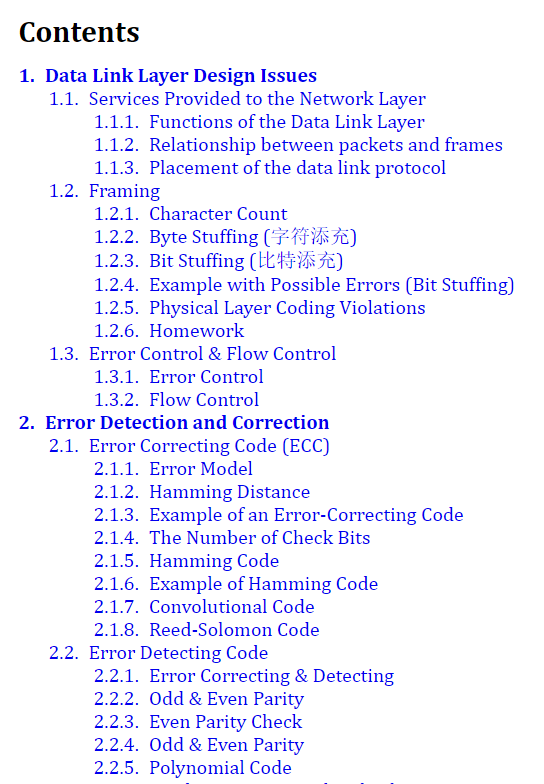
- Top: Title list file content.
- Bottom: The table of contents generated.
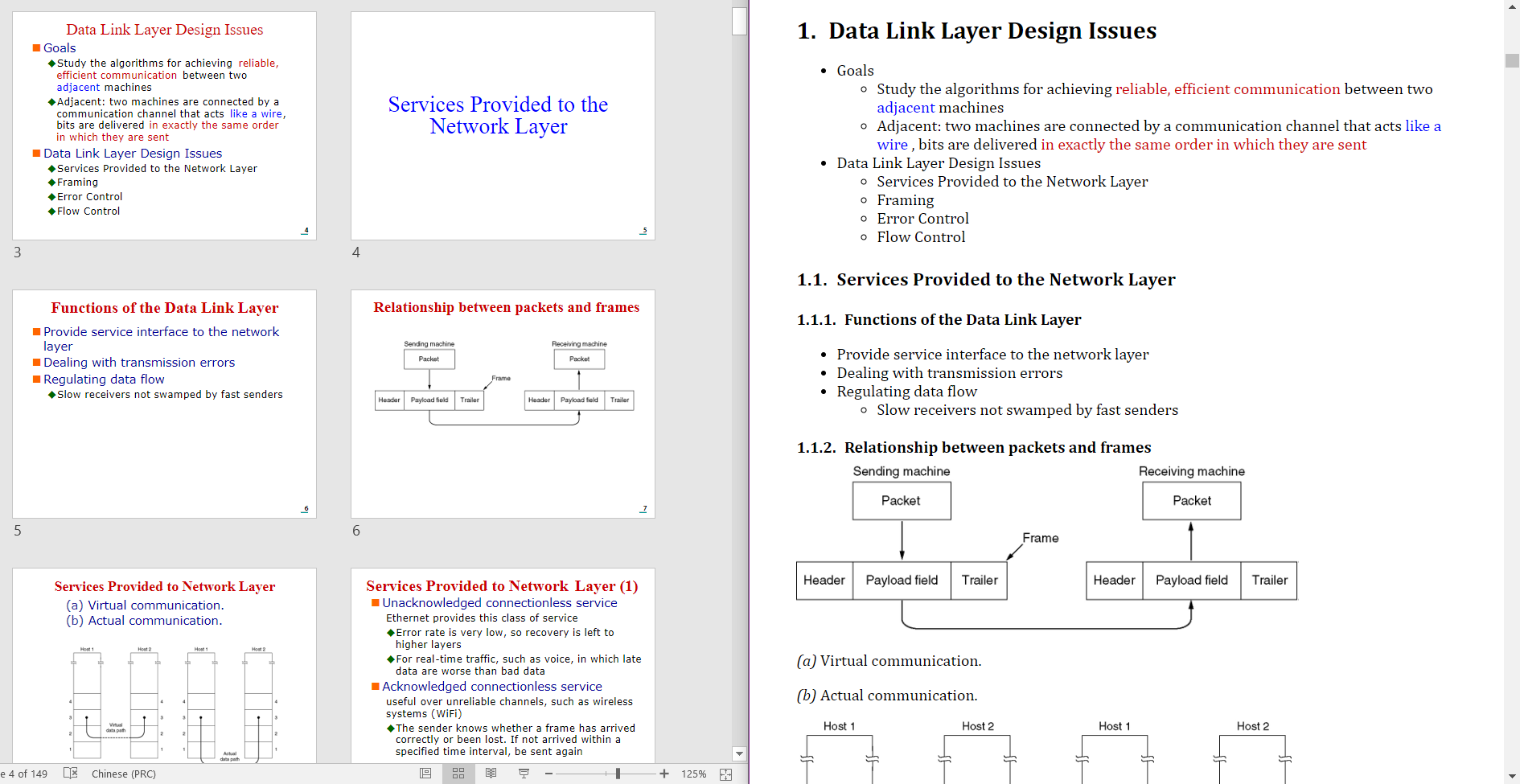
- Left: Source pptx file.
- Right: Generated markdown file (rendered by madoko).
You can also use pptx2md programmatically in your Python code:
from pptx2md import convert, ConversionConfig
from pathlib import Path

# Basic usage
convert(
    ConversionConfig(
        pptx_path=Path('presentation.pptx'),
        output_path=Path('output.md'),
        image_dir=Path('img'),
        disable_notes=True
    )
)
The ConversionConfig class accepts the same parameters as the command line arguments:
pptx_path: Path to the input PPTX file (required)output_path: Path for the output markdown file (required)image_dir: Directory for extracted images (required)title_path: Path to custom titles fileimage_width: Maximum width for images in pxdisable_image: Skip image extractiondisable_escaping: Skip escaping special charactersdisable_notes: Skip presenter notesdisable_wmf: Skip WMF image conversiondisable_color: Skip color tags in HTMLenable_slides: Add slide delimiterstry_multi_column: Attempt to detect multi-column slidesmin_block_size: Minimum text block sizewiki: Output in TiddlyWiki formatmdk: Output in Madoko formatqmd: Output in Quarto formatmarp: Output in Marp formatbeamer: Output in LaTeX Beamer formatpage: Convert only specified page numberkeep_similar_titles: Keep similar titles with "(cont.)" suffix
- Text blocks are identified in two ways:
- Paragraphs marked as "body" placeholders in the slide
- Text shapes containing more than the minimum block size (configurable)
- Lists are generated when paragraphs in a block have different indentation levels
- Single-level paragraphs are output as regular text blocks
- Multi-column layouts can be detected with
--try-multi-columnflag - Grouped shapes are recursively flattened to process their contents
- Shapes are processed in top-to-bottom, left-to-right order
- Inline Code: Text runs formatted with common monospaced fonts (e.g., Consolas, Courier New, Menlo) are converted to inline code using backticks (e.g.,
`code`). - Code Blocks:
- Text boxes where the majority of the text is styled with monospaced fonts are automatically detected and converted into fenced code blocks.
```language
code
```
Note: Language detection for syntax highlighting is not currently implemented; blocks are output with an empty language tag or no tag.
- When using custom titles:
- Fuzzy matching is used to match slide titles with the provided title list
- Matching score must be > 92 for a match to be accepted
- Unmatched titles default to the deepest header level
- Similar titles (matching score > 92) are omitted by default unless
--keep-similar-titlesis used
- Text formatting is preserved through markdown syntax:
- Bold text from PPT is converted to
**bold*** Italic text is converted to_italic_ - Hyperlinks are preserved as
[text](url) - Inline code is converted to
`code`(see Code Handling section)
- Bold text from PPT is converted to
- Color handling:
- Theme colors marked as "Accent 1-6" are preserved
- RGB colors are converted to HTML color codes
- Dark theme colors are converted to bold text
- Color tags can be disabled with
--disable-color
- Images:
- Extracted to specified image directory.
- Crop settings (e.g., crop left, right, top, bottom) defined within PowerPoint for a picture are automatically applied to the extracted image file.
- WMF images are converted to PNG when possible (this conversion happens before potential cropping).
- Image width can be constrained with
--image-width. - HTML img tags are used when width is specified.
- Tables:
- Merged cells are supported
- Complex formatting within cells is preserved
- Special characters are escaped by default (can be disabled with
--disable-escaping) - Presenter notes are included unless disabled with
--disable-notes