Releases: Nuzza/Radio-V
Radio V v0.2.0 Beta

What's New in Radio V v0.2.0 Beta:
Welcome to the brand-new version of Radio V. It has taken many months of development, but we are excited to announce the next version of Radio V. The app has had a complete redesign overhaul and we have added many new features and significantly improved existing ones. Page navigation is now a simpler process requiring less navigating to play/manage a station since the Main Menu page is now the select station page and has been updated with a new UI! Selecting a station will play that station straight away.
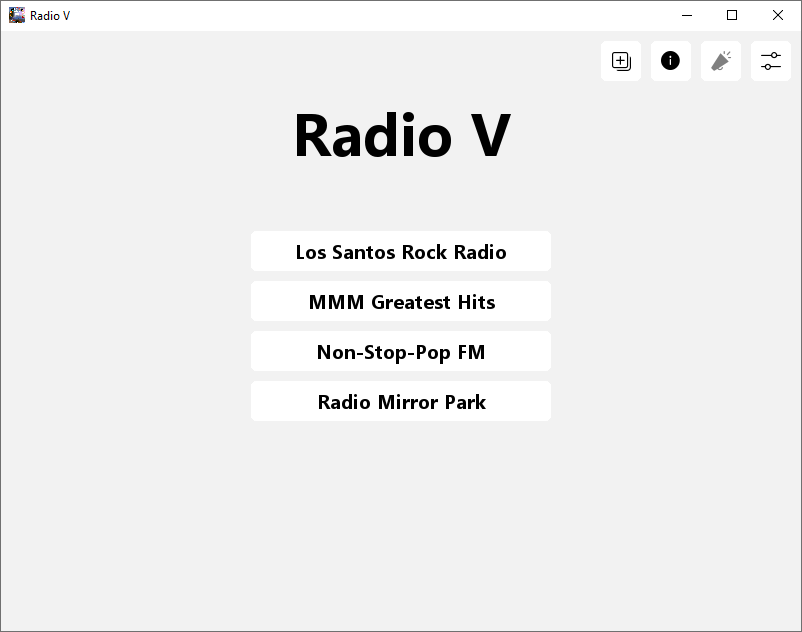
Many areas of Radio V have been updated to use an icon to represent their function. When launching Radio V for the first time, you will notice 4 buttons at the top. While 1 button is not yet available, the other 3 will either take you to the Add Station page, About page, or Settings page.
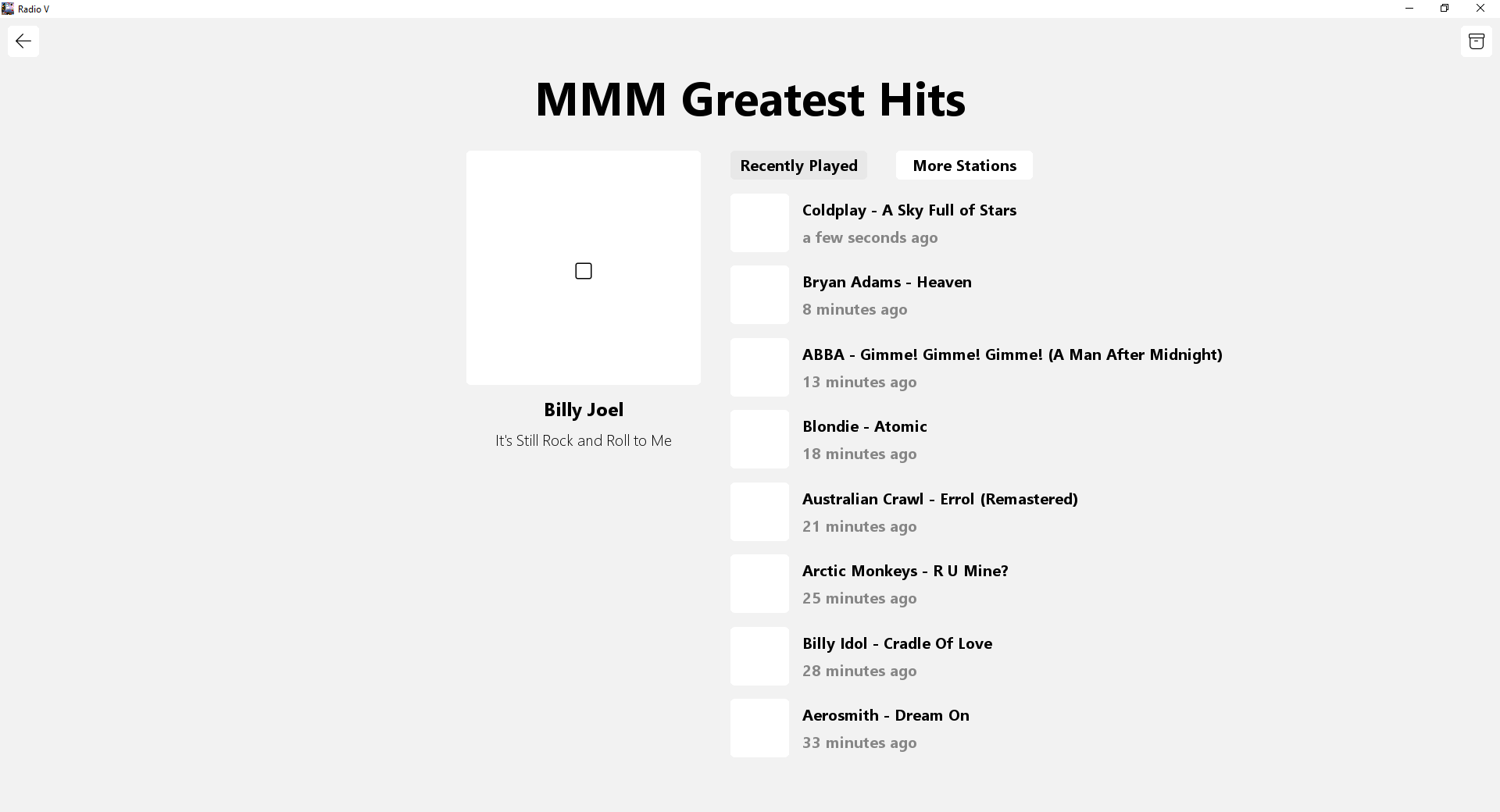
The now playing page has been completely redesigned to be more user friendly. It is still a work-in-progress but its current design allows you to switch view of recently played and more stations as well as stop/mute the currently playing station which is a new feature that v0.1.x didn't have.
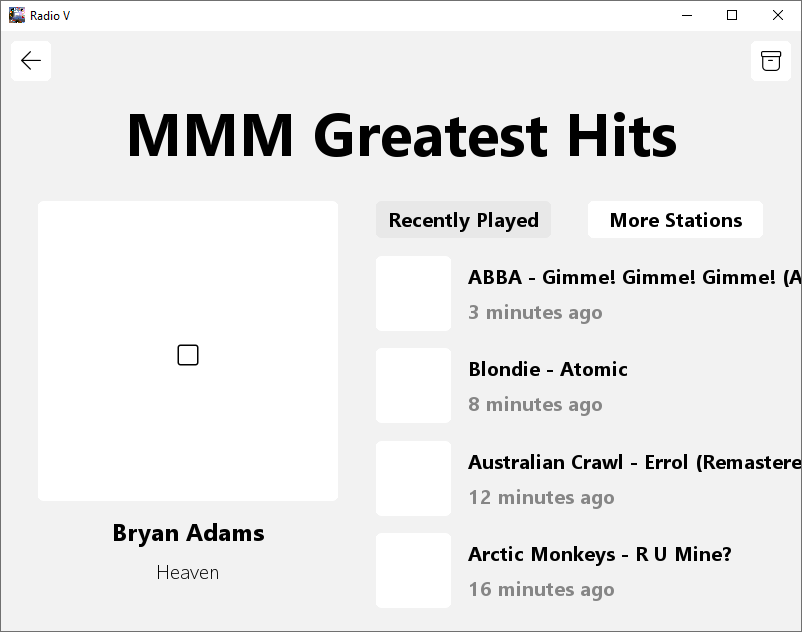
To manage the station on the now playing page, there is a button that looks like a package, selecting that button will take you to the station settings. Currently out of the 3 options, 1 is available allowing you to uninstall the station, in a future update, they will be enabled as well as displaying the station size underneath the version.
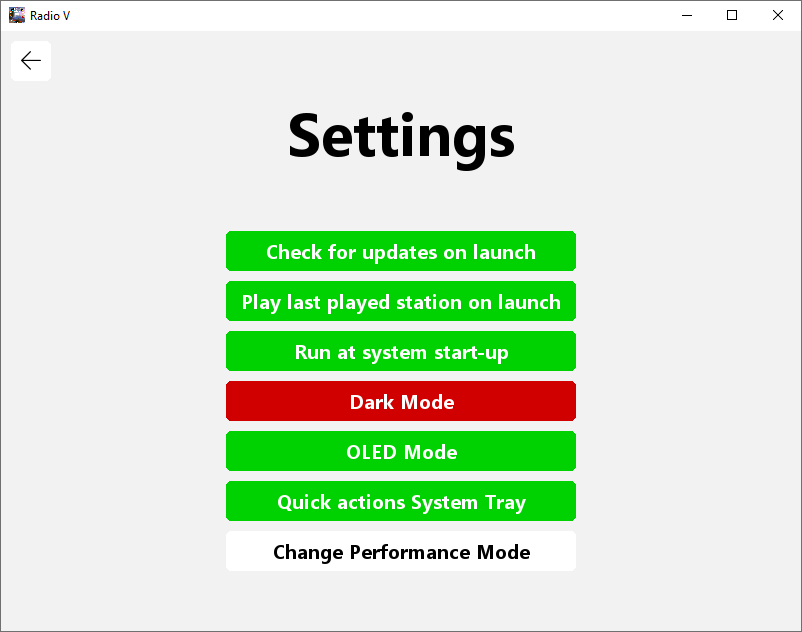
The Settings page has also been redesigned; you will notice new options such as:
- Run at system start-up - will launch Radio V automatically when signing into Windows
- OLED Mode - A darker variant of Dark Mode, more suitable for devices with OLED displays
- Quick actions System Tray - Adds a tray icon for Radio V, while this is still a WIP, you can quickly change settings/stations, mute, and go to the main menu when a station is playing
- Change Performance Mode - This will improve the app responsiveness, however, can cause an increase of CPU usage.
The existing options that still remain are: - Check for updates on launch
- Play last played station on launch
- Dark Mode
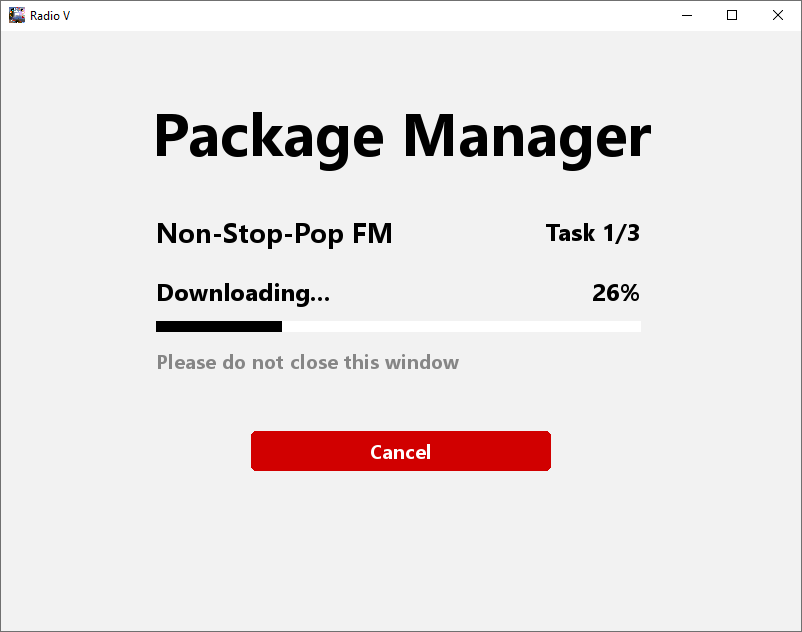
The Package Manager is one of the last pages to get a complete redesign and now includes a progress bar when Downloading/Installing/Uninstalling a package as well as other useful information all presented in very modern-designed interface.
The biggest change of all the new and improved features described above is the ability to change the size of the window! Yes, now it is possible to maximize the window or change it to whatever size you feel comfortable and the best part is, is that it is fully responsive. Adjusting the size of the window will also reposition or even resize elements to make sure they fit inside the new set window size!
We have also ditched the old way of installing Radio V requiring you to download Radio V Installer and install Radio V that way, now you can download Radio V directly from GitHub.
Known Issues:
- When cancelling the download of a package that is required by a station after the station has been installed may cause the station to become unplayable. To fix this, you will need to manually delete the station in Packages > Stations > STATIONNAME and install the station again.
Radio V v0.1.3 Beta
What's New in Radio V v0.1.3 Beta:
New Features:
- Added a log system which will log all fatal errors to help understand the cause of a crash.
Improved Features:
- Renamed the setting 'Smart Queue' to 'Smart Queue (Beta)' as the feature is very buggy and will be improved in the next few updates.
- When you experience a fatal crash, all settings will be reset back to default (this is to prevent crash loops where Radio V will continuously crash when launching).
Bug Fixes:
- Fixed a bug that would display an error message ('Failed to execute script Radio V') when attempting to close Radio V.
- Fixed the 'package not supported' error message which was not displaying the correct package that was unsupported.
- Fixed the slight delay of messages popping up.
Known Issues:
- GUI - Now Playing page - Song names can clip outside the window or behind buttons
- GUI - Many bugs and issues still currently exist within this complete design overhaul, I have managed to fix most of the crashes, but in terms of code optimization and efficiency, some areas may feel clunky and may use a lot of CPU. Over the next few updates, I will be working on optimizing the code to make it more efficient and perform better.
- GUI - Sometimes when clicking a button too fast, it won't register as being clicked, I recommend when clicking, holding down for 0.2 seconds and it should trigger the button every time.
Radio V v0.1.2.1 Beta
What's New in Radio V v0.1.2.1 Beta:
Bug Fixes:
- Fixed a bug which caused Reset Settings option to no longer work after resetting for the first time.
Radio V v0.1.2 Beta
What's New in Radio V v0.1.2 Beta:
New Features:
-
New Queue Smart Mode Update:
You can now enable Smart Queue, a new setting that changes the way the queue is built. It works by building the queue with tracks the user hasn't heard yet or haven't spent at least 10 seconds listening to it. When a song is listened to for more than 10m seconds, it won't be added to the queue the next time it is built allowing for less repetitiveness and gives the illusion of more variety with less of a chance of previous tracks being repeated. Once all tracks have been played once, Smart Queue will reset and start over. The next uipdate will add an option to toggle an expiry date where Smart Queue will automatically expire after a week regardless if all tracks have been played. -
New Mini Mode - You can now turn on mini mode while the Radio is playing which will shrink the window into a mini player only displaying the station and what's currently playing.
-
Added a Reset Settings option within Settings which will restore default settings
Improved Features:
- Completely reworked how messages were handled and added the ability to ignore non-severe messages such as checking for updates however is not recommended.
- Completely reworked how Station IDs are handled, they now function similar to how intros and outros function. NOTE: This will require a station update for all installed stations and consequently will require all station packages to be reinstalled. This will not be required in the future.
- Completely reworked the Database system as well as the Queue system once again and are now 100% more optimized, efficient, and stable. This should be the last change to the Database and Queue systems. NOTE: This will require a package update for all installed packages.
Bug Fixes:
- Reduced the number of played songs from 8 > 7 since only 7 were being displayed with the 8th one being cut off (off the screen)
- Fixed a bug that was causing intros, outros, and station ids to not be randomly chosen resulting in a pattern of the same track order.
- Many bug fixes, performance improvements/optimizations
Known Issues:
- When quitting Radio V, you will get a message saying 'Failed to execute script Radio V'. This will be fixed within the next few updates.
- GUI - Now Playing page - Song names can clip outside the window or behind buttons
- GUI - Many bugs and issues still currently exist within this complete design overhaul, I have managed to fix most of the crashes, but in terms of code optimization and efficiency, some areas may feel clunky and may use a lot of CPU. Over the next few updates, I will be working on optimizing the code to make it more efficient and perform better.
- GUI - Sometimes when clicking a button too fast, it won't register as being clicked, I recommend when clicking, holding down for 0.2 seconds and it should trigger the button every time.
Radio V v0.1.1 Beta
What's New in Radio V v0.1.1 Beta:
Bug Fixes:
- You can no longer uninstall the last installed station. The uninstall button is still present, but upon clicking the button will notify you that you cannot uninstall the station/station package.
- Fixed a bug which would cause Radio V to reinstall station packages from newly installed stations when checking for updates (this will only apply to newly installed stations that have been installed after applying this update, any previous station that was installed before this update will still be affected)
- Fixed a bug which would cause Radio V to crash when there are no stations installed.
- Fixed several bugs with downloading and installing packages via the Package Manager, it should now be a lot more stable and reliable.
- Code improvements and optimisations
Known Issues:
- GUI - Now Playing page - Song names can clip outside the window or behind buttons
- GUI - Many bugs and issues still currently exist within this complete design overhaul, I have managed to fix most of the crashes, but in terms of code optimization and efficiency, some areas may feel clunky and may use a lot of CPU. Over the next few updates, I will be working on optimizing the code to make it more efficient and perform better.
- GUI - Sometimes when clicking a button too fast, it won't register as being clicked, I recommend when clicking, holding down for 0.2 seconds and it should trigger the button every time.
Radio V v0.1.0 Beta
What's New in Radio V v0.1.0 Beta:
New Features:
- GUI Update! - A brand new GUI made using Pygame will make it a lot more simple and easy to navigate Radio V! It is still in the works and is far from being a complete GUI, but it a good start towards GUI for Radio V.
- OUT OF ALPHA STAGE! - We a proud to announce that we are officially out of ALPHA stages and into BETA (finally) thanks to the new GUI update! Only upwards progress from here. Yes, the GUI is very basic, but hey, it will improve over the upcoming BETA updates.
Bug Fixes:
- Improved the reliability of installing packages
Known Issues:
- GUI - Now Playing page - Song names can clip outside the window or behind buttons
- GUI - Many bugs and issues still currently exist within this complete design overhaul, I have managed to fix most of the crashes, but in terms of code optimization and efficiency, some areas may feel clunky and may use a lot of CPU. Over the next few updates, I will be working on optimizing the code to make it more efficient and perform better.
- GUI - Sometimes when clicking a button too fast, it won't register as being clicked, I recommend when clicking, holding down for 0.2 seconds and it should trigger the button every time.
- Uninstalling every station will cause Radio V to crash when trying to select a station, you will have to reinstall Radio V using Radio V Installer to fix this issue
- After installing a station and checking for updates, you will get an error saying that "The process was incomplete as Radio V could not determine the version of some packages...". Just press Ok and let Radio V reinstall that station package and the problem will be solved.
- There are currently issues involving downloading packages via the package manager as well as Radio V Installer. I am still working on improving this functionality to make it as efficient and optimised as possible.
Radio V v0.0.2.2 Alpha
What's New in Radio V v0.0.2.2 Alpha:
New Features:
- (PHASE 1) Stations will now non-stop play music from night all the way to morning with no ad or news interruption. Phase 2 will also disable SOLOs and track intros and outros during this time. IDs and SONGs will be the only ones that will be enabled.
- Small changes/optimisations to the Queue system.
Bug Fixes:
- Fixes issues with audio sometimes not working while the radio is playing. Other audio sources still worked fine, but there would be no audio coming from Radio V even though a station was playing.
Known Issues:
- There is currently a very rare bug in Radio V that will happen when launching the Radio and the very last song in the queue is playing and will simply cause that song to finish too early. If you are already listening to the radio and it gets to the last song in the queue or if the queue has already expired (meaning the last song in the queue has already been played), then the bug won't occur. (That's why this bug is classed a very rare and low severity bug).
- There is currently a layout issue on the Manage Packages page where local packages aren't organised correctly.
- There are currently issues involving downloading packages via the package manager as well as Radio V Installer. I am still working on improving this functionality to make it as efficient and optimised as possible.
Radio V v0.0.2.1 Alpha
What's New in Radio V v0.0.2.1 Alpha:
New Features:
- The build of Radio V now also depends on the Package_Info.dat file so it is essential that you DON'T delete the Package_Info.dat file.
- Moved the Version and Build of Radio V to a new section in the Menu which is labelled 'About'. Check for Updates option has also been moved there.
- (PHASE 1) The way that Radio V handles the end of the queue has been updated. Radio V now provides a seamless transition when switching from the old Queue to the new Queue (e.g. if the last thing in the queue is a song and the queue will be rebuilt after, it will carry over the last action from the old queue to the new queue so if there was meant to be an ad break, it will start with an ad break in the new queue). Phase 2 will make it so that when you run a station for the first time, instead of starting a TYPE at the start, it will fast forward until 8 SONG types have been played and will then start a track at a random position. This will also work if a station has been run once and the queue has run out (this will not trigger if the last 8 SONGs are still valid in the Played Songs).
- The length of adverts have been changed once again, they will now run for 2 and a half minutes instead of 3 minutes. The track length has remained the same (30 minutes before ad-break). In the future, the length of the ad-breaks will depend on the station configuration and this value will only serve as a default value for stations that don't have a configuration file.
- (PHASE 2) Adds full intro support for GTA V stations which will allow the host of the station to come in after the start and near the end of a song. Intros that will be supported: Local (Track specific), Time, To Advert, and To News. Full support will only be available to GTA V Default tracks, limited support which don't include local tracks will apply to tracks with no local intros.
- Improved the settings verification system which will now perform another check for any errors.
- Added the option to hide the controls view while the radio is playing. Hiding the Recently Played section is now controlled by the 'H' key. Pressing 'SPACE' will now show/hide the controls view.
- IDs for some stations are now sorted into groups. Basically, if an ID is tagged with 'BEFORE', it will trigger before an advert. If it is tagged with 'AFTER', it will trigger after the ad-break. If it has 'INBETWEEN', it will trigger in between songs. IDs can have more than one tag.
Bug Fixes:
- Fixed a bug when viewing Manage Packages page where an online package that wasn't installed would crash Radio V.
- Fixed a bug which would randomly cause the radio to crash when changing settings too fast while the radio was playing.
- Many other bug fixes and improvements