Skip to content

Nick2bad4u/GE-Filters

Folders and files

NameName
Last commit message
Last commit date

Latest commit

Β 

History

33 Commits
Β 
Β 
Β 
Β 
Β 
Β 
Β 
Β 
Β 
Β 
Β 
Β 
Β 
Β 
Β 
Β 
Β 
Β 
Β 
Β 
Β 
Β 
Β 
Β 
Β 
Β 
Β 
Β 
Β 
Β 
Β 
Β 
Β 
Β 
Β 
Β 
Β 
Β 
Β 
Β 
Β 
Β 
Β 
Β 

Repository files navigation

⭐ GE Filters - Runelite Plugin Repo

Badge: PRs Welcome (green, flat-square style) Badge: Contributions Accepted (dark green, flat-square style) Badge: Contributors (dynamic count, flat-square style) Badge: GitHub Stars (dynamic count, flat-square style) Badge: GitHub Issues (dynamic count, flat-square style) Badge: Last Commit (dynamic date, flat-square style) Badge: Repository Views (dynamic count, flat style) Badge: License (UnLicense, flat-square style) Badge: Code Style (Prettier, pink, flat-square style) Badge: Made with (Markdown, blue, flat-square style) Badge: Forks (dynamic count, flat-square style) Badge: GitHub Pages Status (dynamic, flat-square style)

πŸ’° GE Filters Features

Grand Exchange interface screenshot showing the GE Filters plugin in use. The main subject is the search panel with several filter options visible on the right side, including bank tags, inventory setups, and recent items. The interface displays a list of RuneScape items with icons and prices. The environment is a typical RuneLite client window with a clean, organized layout. The tone is informative and focused on usability. No visible text in the image requires transcription.

  • βž• Adds a set of filters to the Grand Exchange search interface.
  • πŸ‘† Some filters have multiple options which can be accessed by right clicking the filter.
  • πŸ” The filters are designed to help you quickly find items in the Grand Exchange.

✨ Filter Types

  • 🏷️ Bank Tags - Filter by bank tags, requires the Bank Tags plugin to be enabled.
  • πŸ› οΈ Inventory Setups - Filter by Inventory Setups, requires the Inventory Setups plugin to be enabled.
  • πŸͺ΅ Inventory Items - Filter by current inventory or equipped items.
  • πŸ•’ Recent Items - Filter by recently viewed items or recent buy/sell offers.

ℹ️ More Info

  • You can enable/disable each filter in the config menu.
  • The recent items filter will only keep track of your recent items when turned on.
  • The bank tags and inventory setups filters require the respective plugins to be enabled.

βš™οΈ Configuration

  • By default, every Bank Tag is included in the Bank Tags filter. To include/exclude tags, you can right-click the tag in the bank interface and select the corresponding menu option.
  • By default, every Inventory Setup is included in the Inventory Setups filter. To include/exclude setups, right-click the Worn Equipment button in the bank interface (where you typically view setups) and use the submenu to include/exclude setups.
  • Note: Changing the name of a Bank Tag or Inventory Setup will require you to configure that tag/setup again.

πŸ”„ Compatibility

  • This plugin is fully compatible with most Grand Exchange plugins, Quest Helper, Inventory Setups, and Bank Tabs/Tags.

πŸ–ΌοΈ Filter Examples

Bank Tabs Example
Recent Tabs Example
All Tabs Shown Gif

🧾 Credits

This plugin was originally created by Salverrs at and is now maintained by Nick2bad4u.

I took over the plugin after Salverrs went inactive and have made small changes to get it working again.

More features are planned for the future.

Contributors:

  • πŸ‘€ Salverrs β€” Original Author
  • πŸ‘€ Nick2bad4u β€” Current Maintainer
Repository Banner Line Animation Repository Banner Line Animation Repository Banner Line Animation

πŸ“ˆ Repository Statistics

ActionLint 🧹 Dependabot Updates πŸ€– Dependency Review (Nick2bad4u) πŸ•΅οΈ CodeQL πŸ”’ Deploy Jekyll with GitHub Pages πŸš€ DevSkim Security Scan πŸ›‘οΈ Generate XML Sitemap πŸ—ΊοΈ Greetings Workflow πŸ‘‹ Lint Code Base πŸ“ Mark Stale Issues & PRs ⏳ Repository Metrics πŸ“Š Scorecard Security Checks πŸ† Summarize New Issues πŸ“ TruffleHog Secret Scan πŸ”‘ Last commit πŸ•“ Total Commits πŸ“ˆ Contribs πŸ‘₯ Languages πŸ—£οΈ Branch Status 🌿 Issues ❗ License πŸ“„ Quality Gate Status 🚦 Bugs 🐞 Code Smells πŸ’¨ Reliability Rating βœ… Security Rating πŸ”’ Technical Debt πŸ—οΈ Maintainability Rating πŸ› οΈ Vulnerabilities 🚨

All Tabs Shown Gif
Repository Banner Line Animation
Repobeats Analytics Image
Repository Banner Line Animation
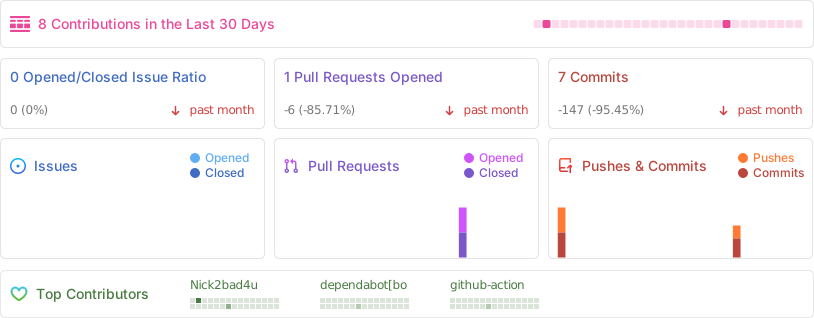
Github Metrics
Repository Banner Line Animation
Quality Gate Status SonarCloud Status
Repository Banner Line Animation Repository Banner Line Animation Repository Banner Line Animation

Releases

No releases published

Packages

No packages published

Contributors 5

Languages