
|
This repository is archived in the GitHub Arctic Code Vault. |
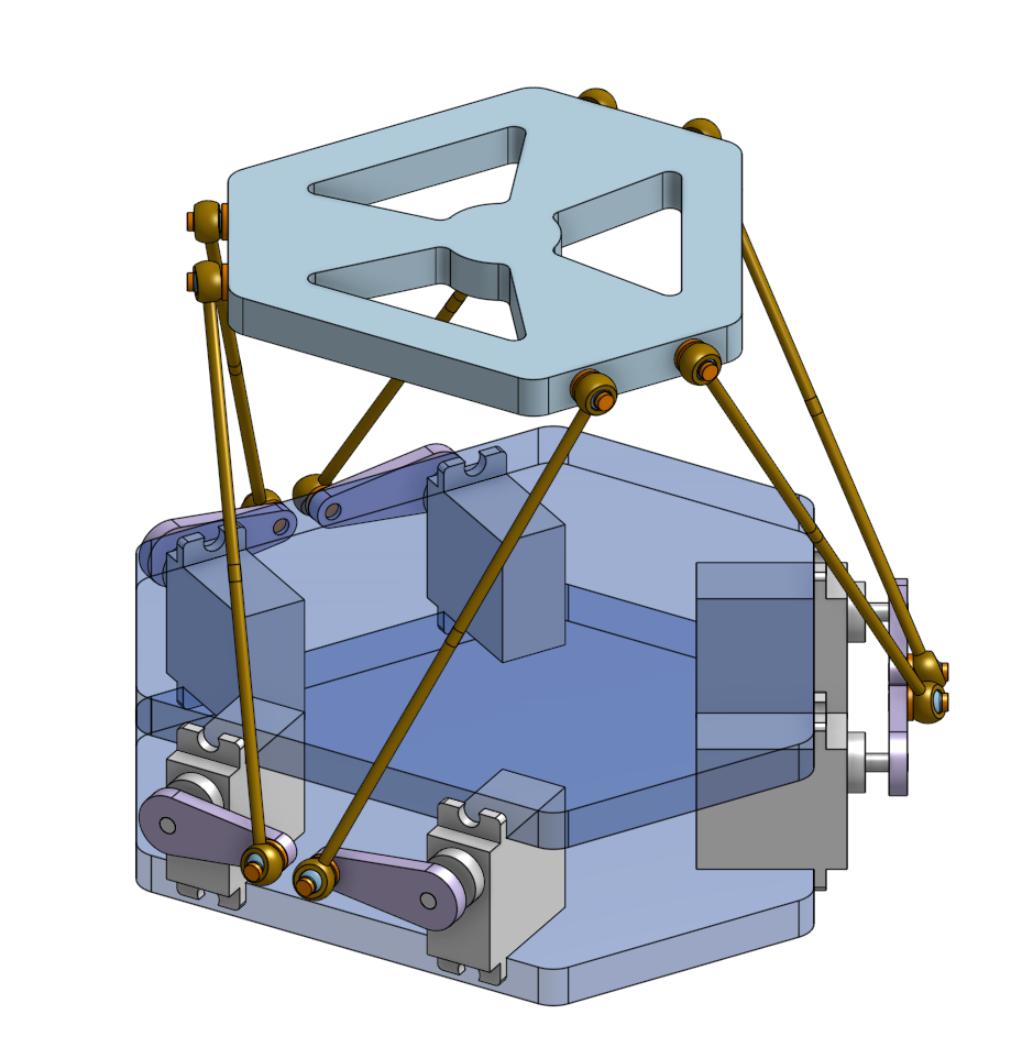
This is an ESP32 implementation of a six-degree-of-freedom hexapod — also called Stewart Platform, Gough-Stewart Platform or Parallel manipulator. The actuators are PWM rotary servo motors and the program is written in Arduino C compiled with PlatformIO. This project is done in the frame of the P19 project at the Microclub.
Currently the platform can be operated:
- With a Nunchuck.
- With Arduino C code (see
Hexapod_Demo.cpp). - With G-Code sent by a computer to the ESP through the serial port (see
python/gcode2serial.py).
The calculation of the kinematics is performed in Hexapod_Kinematics.cpp and can be also be compiled in a desktop C++ program to cross-check calculations (i.e. without actuating the servos).
I managed to compile it with g++ on macOS Mojave and macOS Monterey.
See hexapod_desktop_app/hexapod_desktop_app.cpp.
The home page is a work in progress, but the video shows what the platform can do. The original implementation used an analog joystick, but the current version uses a Wii Nunchuck.
The automatic translation in English can be read here:
https://ouilogique-com.translate.goog/plateforme-de-stewart-esp32/?_x_tr_sl=fr&_x_tr_tl=en
The original version in French is here:
https://ouilogique.com/plateforme-de-stewart-esp32/
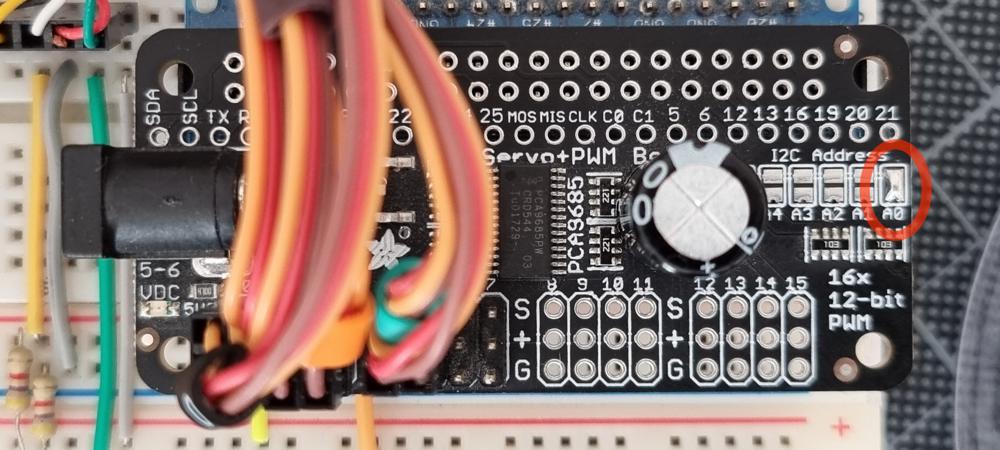
- Change the default I²C address of the PCA9685 driver from
0x40to0x41by shorting the A0 jumper beside the capacitor.
- Create a file called
src/WifiSettings.hcontaining:
#pragma once

const char *ssid = "";            // SSID of your WiFi router.
const char *password = "";        // Password of your WiFi router.
const char *ap_ssid = "STEW32-";  // SSID of the ESP32 WiFi network in soft-AP mode (15 char max).
const char *ap_password = "";     // Password of the ESP32 WiFi network in soft-AP mode.
// Must be 8 char min or empty for no password.Geometry settings are defined in
Hexapod_Config_1.h.
The meaning of the parameters is explained in
doc/hexapod-parameters.pdf.
The two base plates are identical and the DXF file to reproduce them is here (right-click + save as):
doc/hexapod-base-plate.dxf.

The top plate is 3D-printed (right-click + save as):
doc/hexapod-top-plate.stl.zip.
| QTY | PART |
|---|---|
| 1 | WeMos ESP32 WROOM |
| 1 | Adafruit PCA9685 16-Channel Servo I²C Driver |
| 1 | Breadboard adapter for PCA9685 |
| 1 | 5 V / 10 A power supply |
| 6 | Rods M3x100mm (140mm total) |
| 6 | ¹ Tower Pro MG996R servo (clone) |
| 1 | Nunchuck |
| 1 | ² Nunchuck cable extension |
| 1 | ³ Adafruit Wii Nunchuck Breakout Adapter |
| 1 | 6 pin Dupont connector to connect Nunchuck to breadboard |
| 1 | Set of cable markers |
| 6 | M3×5×6 Brass insert nuts |
| 12 | Small screws to hold the motors on the base plates |
| 6 | M3×12 screw |
| 6 | M3×12 nut |
| 1 | Breadboard |
| some | Breadboard wires |
| 2 | 4.7 kΩ resistor |
- ¹ I currently use clones of the Tower Pro MG996R servos, but they are bad and I don’t recommend them.
https://fr.aliexpress.com/item/32636102294.html
I formerly used clones of the Tower Pro MG90s Servos, but they were also bad and too small for this application. https://www.banggood.com/6X-Towerpro-MG90S-Metal-Gear-RC-Micro-Servo-p-1072260.html
In the future, I will probalbly use Parallax 900-00005 servos. It seems that these are the one used by fullmotiondynamics in their videos. https://www.parallax.com/product/900-00005 - ² The Nunchuck cable extension is not mandatory. The idea is not to have a longer cable but rather to use the extension as an adapter between the Nunchuck and the breadboard, that is to say that it allows to leave the Nunchunk cable uncut.
- ³ This breakout adapter is not mandatory, but it could simplify wiring. I haven’t used it myself.
The Nunchuck library uses
Wire.hand standard I²C connections internaly.Pins are seen from left to right and top to bottom looking at the Nunchuck connector.
Cut the cable extension to connect to the ESP32.
| color | signal | ESP32 pin |
|---|---|---|
| white | SCL | IO22 |
| NC | ||
| red | GND | GND |
| green | VCC | VCC |
| black | ATT | IO32 (or connect to 3.3V to force Nunchunk detection) |
| yellow | SDA | IO21 |
The external libraries are installed automatically during the first build because they are declared under lib_deps in platformio.ini.
By default, the PCA9685 driver and the Nunchuck share the same I²C address
0x40. Fortunately, the address of the PCA9685 driver can easily be changed to0x41by shorting the A0 jumper next to the capacitor.
| Default address | New address | Device |
|---|---|---|
| 0x40 | 0x41 | PCA9685 |
| 0x70 | = | PCA9685 (broadcast) |
| 0x40 | = | Nunchuck (IMU) |
| 0x52 | = | Nunchuck (joystick) |
| 0x68 | = | GY-91 (MPU9250) |
| 0x76 | = | GY-91 (BMP280) |
- San-José State University / Full Motion Dynamics:
- https://www.youtube.com/watch?v=j4OmVLc_oDw
fullmotiondynamics.com
- Hexapod kinematics of this project was originaly based on 6dof-stewduino, by Philippe Desrosiers, althought I reworked it in depth:
- He derived his implementation from the work of Daniel Waters:
- Kinematics calculation is also explained in this document by an unknown author from the Wokingham U3A Math Group:
- The project memememememememe was also an excellent source of inspiration. They share the code for RPi and a simulator in the Processing langage:
- Derived from MarginallyClever:
- The code for this project was used by Jakob Frabosilio for his Master’s thesis, which he presented in September 2024 at Cal Poly (Faculty of California Polytechnic State University), San Luis Obispo.
- Design and Implementation of an Inverted Short Baseline Acoustic Positioning System
- Some images and videos of his work are available here: #5
- PID Control System Analysis and Design, By YUN LI, KIAM HEONG ANG, and GREGORY C.Y. CHONG
- See Table 1, p.33 http://eprints.gla.ac.uk/3815/1/IEEE_CS_PID_01580152.pdf
- Understanding PID Control, Part 1: What is PID Control?
- Modern Robotics, Chapter 7: Kinematics of Closed Chains