This application takes in a loan applicants data then automatically filters through a list of lenders qualifications then it compiles and saves the list of lenders the loan applicant would qualify for. It is a quick and easy way to sort through potential loan data for applicants and choose the best fitting loans from a filtered list.
This project uses the Python Programming language as well as the following libraries
- Questionary
- Fire
- Sys
- Pathlib
- CSV
In this section, you should include detailed installation notes containing code blocks and screenshots.
To install you will want to pull the entire QUALIFIER folder from github including all of its subfolders
* Subfolders
    * data (folder)
    * qualifier (a qualifier subfolder, not the main folder)
    * tests (folder)
    * app.py (the application itself)
- First the user will open the app.py in the qualifier folder
- Then the user will enter the data source (./data/daily_rate_sheet.csv) A) this data will then be processed by the load_bank function and turned into a list
- The user will be prompted for the following A) Credit Score B) Monthly Debt C) Monthly Income D) Loan Amount E) Home Value
- The following data will be run through the calculator functions to determine the Debt to Income ratio and the Loan to Value Ratio
- Then the app will filter out the list of Lenders
- Requested Loan Amount must be less than or equal to the Lenders Maximum Loan Amount
- Users Credit Score must be greater than or equal to the Lenders Minimum Credit Score
- Users Debt to Income Ratio must be less than or equal to the Lenders Maximum DTI Ratio
- Users Loan to Value Ratio must be less than or equal to the Lenders Maximum LTV Ratio
- The user will be informed of the number of Lenders that meet all of the criteria in step 4 and asked if they would like to save the list of lenders
- If the user selects "Yes" then they will be asked to name the file which will then be saved as a CSV in the /data/output file
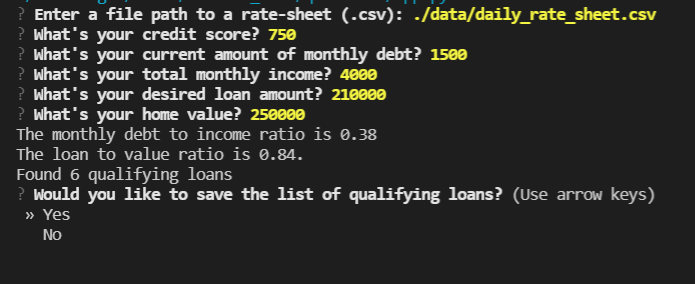
- If the user chooses not to save the data the application will close.
- Once the user has named their save file the application will confirm the name of the save file and close
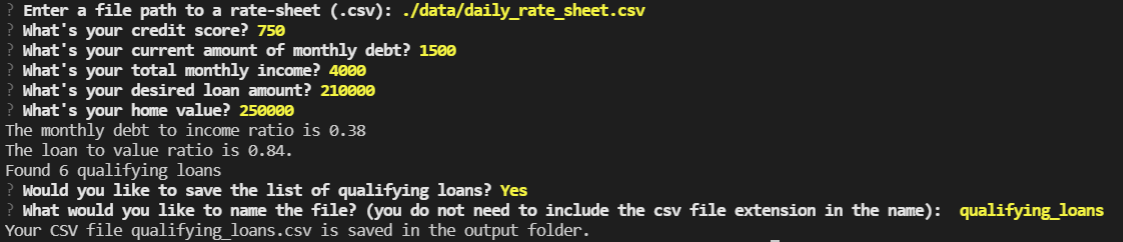
Overall it should be a very simple application to use, all you need to do is open the app.py in the qualifier folder and run the app.py program while following the prompts in the CLI.
- When asked for the CSV path to source the data (the first CLI prompt) type ./data/daily_rate_sheet.csv
- Once that has been entered the CLI will prompt you for the customers data
- Finally if you wish to save the data just type in the name you would like to save it under and the app will save it as a CSV file in the data/output folder.
Colin Benjamin
Linkedin: Colin Benjamin
email: cbenjamin33@gmail.com
MIT