Discover and collect stunning media from across the web - search millions of high-quality images, videos, and GIFs from Unsplash, Pexels, and Giphy, all in one place.
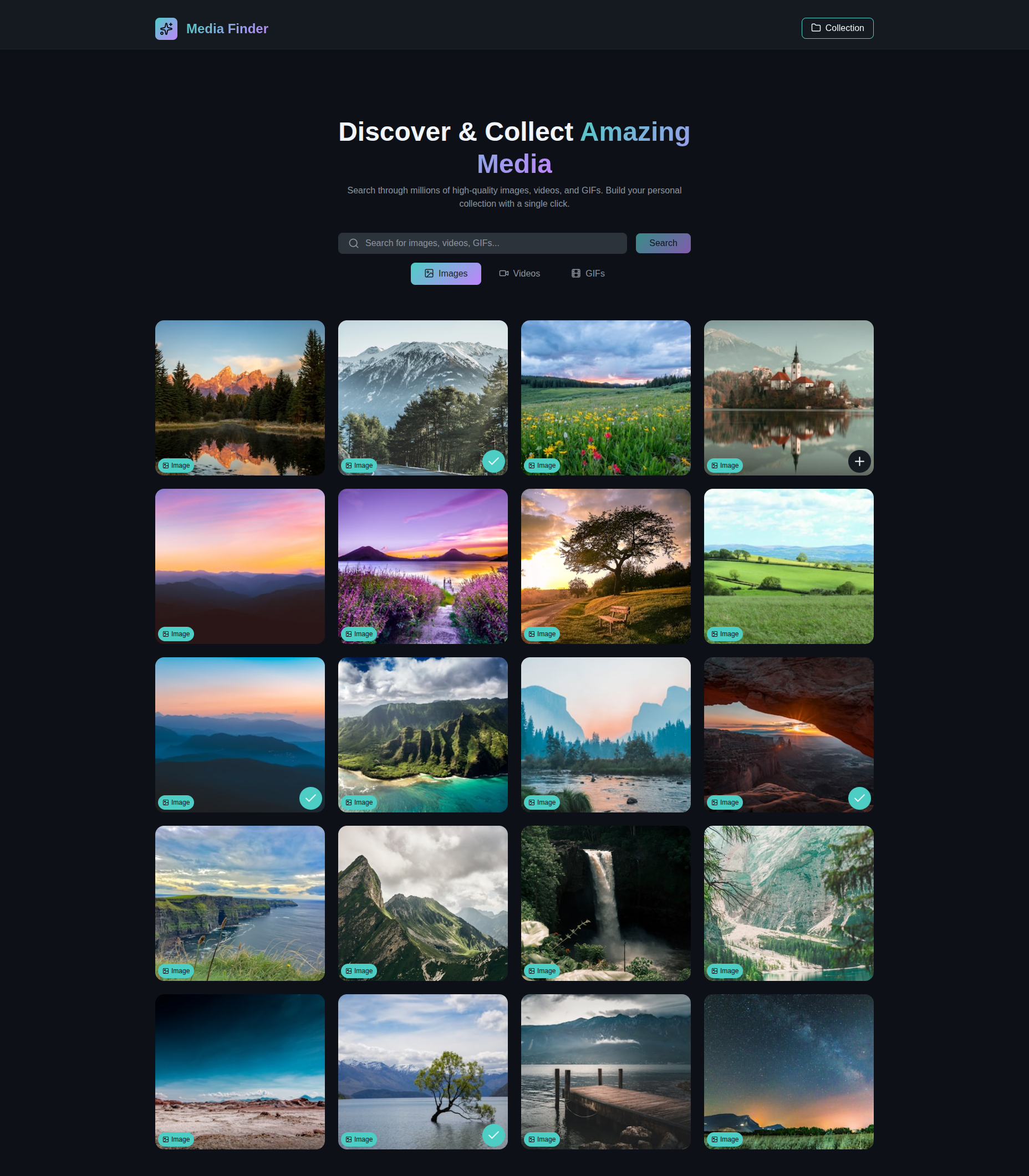
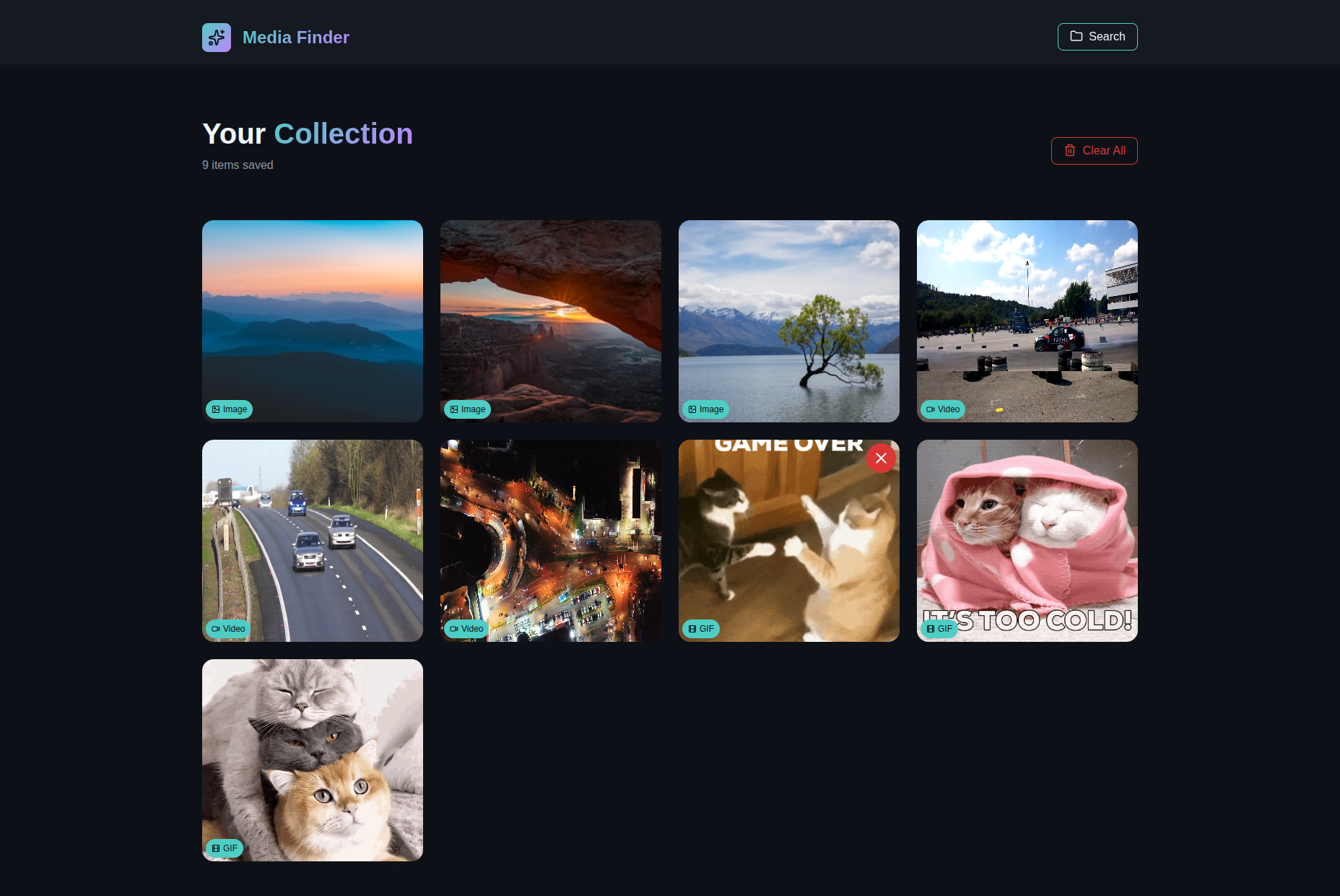

- 🔍 Multi-Source Search - Search across Unsplash (images), Pexels (videos), and Giphy (GIFs)
- 🎨 Beautiful UI - Modern dark theme with glassmorphism effects and gradient accents
- 💾 Personal Collection - Save your favorite media with one click, persisted across sessions
- 🎯 Smart Filtering - Switch between images, videos, and GIFs with tab-based navigation
- ⚡ Fast & Responsive - Optimized performance with loading skeletons and smooth animations
- 📱 Mobile-Friendly - Fully responsive design that works on all devices
- 🎭 Visual Indicators - Badge system to identify media types at a glance
- 🗑️ Easy Management - Remove individual items or clear entire collection with confirmation
- React.js - UI library with React Hooks
- Redux Toolkit - State management with async thunks
- Axios - HTTP client with custom interceptors
- React Router - Client-side routing
- Bootstrap 5 - Responsive grid system
- Lucide React - Modern icon library
- Vite - Next-generation build tool
- CSS3 - Custom properties and modern styling
- Node.js (v14 or higher)
- npm or yarn
- API keys for:
- Clone the repository:
git clone https://github.com/MuhammadSohaib-pro/media-finder.git
cd media-finder- Install dependencies:
npm install- Set up environment variables:
Create a .env file in the root directory:
VITE_UNSPLASH_URL=https://api.unsplash.com
VITE_UNSPLASH_KEY=your_unsplash_access_key

VITE_PEXEL_URL=https://api.pexels.com
VITE_PEXEL_API_KEY=your_pexels_api_key

VITE_GIPHY_URL=https://api.giphy.com
VITE_GIPHY_API_KEY=your_giphy_api_key- Run the development server:
npm run dev- Open your browser:
http://localhost:5173
- Enter your search query in the search bar
- Choose media type (Images, Videos, or GIFs) using the tabs
- Press "Search" to fetch results
- Browse through the results grid
- Hover over any media card
- Click the "+" icon to add to collection
- Added items show a checkmark icon
- Navigate to "Collection" page to view saved items
- Go to Collection page from header
- Click "X" icon on any card to remove individual items
- Use "Clear All" button to remove entire collection (with confirmation)
src/
├── components/
│   ├── Header.jsx              # Navigation header
│   ├── HeroSection.jsx         # Search interface
│   ├── MediaTabs.jsx           # Tab navigation
│   ├── MediaCard.jsx           # Media item display
│   ├── CollectionCard.jsx      # Collection item display
│   ├── EmptyState.jsx          # Empty state messages
│   ├── LoadingSkeleton.jsx     # Loading placeholders
│   └── ClearCollectionModal.jsx # Confirmation modal
├── views/
│   ├── Home.jsx                # Main search page
│   ├── collection/
│   │   └── Collection.jsx      # Saved items page
│   └── NotFound.jsx            # 404 page
├── store/
│   ├── store.js                # Redux store config
│   ├── searchMedia/
│   │   ├── searchMediaSlice.js # Search state management
│   │   └── searchMediaThunk.js # Async API calls
│   └── collection/
│       └── collectionSlice.js  # Collection state management
├── layout/
│   └── Main.jsx                # Main layout wrapper
├── utils/
│   └── axios.js                # Axios instances with interceptors
├── routes.js                   # Route configuration
├── App.jsx                     # Root component
└── assets/
    └── css/
        └── style.css           # Global styles and theme
Media Finder uses a modern dark theme inspired by GitHub's design:
- Background: Dark gradient (#0d1117 → #0a0d12)
- Primary: Turquoise (#4ecdc4)
- Accent: Purple (#c084fc)
- Card: Dark slate (#161b22)
- Text: Light gray (#f0f6fc)
npm run buildThe production-ready files will be in the dist/ directory.
- Unsplash provides high-quality professional photographs
- Pexels delivers premium stock videos
- Giphy offers extensive GIF library
- Redux Toolkit for predictable state updates
- Async thunks for API calls with loading states
- LocalStorage persistence for collection data
- Mobile-first approach with Bootstrap grid
- Adaptive layouts for all screen sizes
- Touch-friendly interactions
- Loading skeletons during API calls
- Error handling with user-friendly messages
- Empty states with helpful guidance
- Confirmation dialogs for destructive actions
Contributions are welcome! Please feel free to submit a Pull Request.
- Fork the repository
- Create your feature branch (
git checkout -b feature/AmazingFeature) - Commit your changes (
git commit -m 'Add some AmazingFeature') - Push to the branch (
git push origin feature/AmazingFeature) - Open a Pull Request
This project uses the following APIs:
- Unsplash API for images
- Pexels API for videos
- Giphy API for GIFs
Please ensure you have your own API keys and comply with their respective terms of service.
This project is open source and available under the MIT License.
Muhammad Sohaib
- GitHub: @MuhammadSohaib-pro
- Unsplash for beautiful photos
- Pexels for amazing videos
- Giphy for fun GIFs
- Lucide Icons for clean icons
- Bootstrap for responsive utilities
- Redux Toolkit for state management
- Vite for blazing fast development
⭐ If you found this project helpful, please give it a star!
Built with ❤️ while learning React.js and Redux