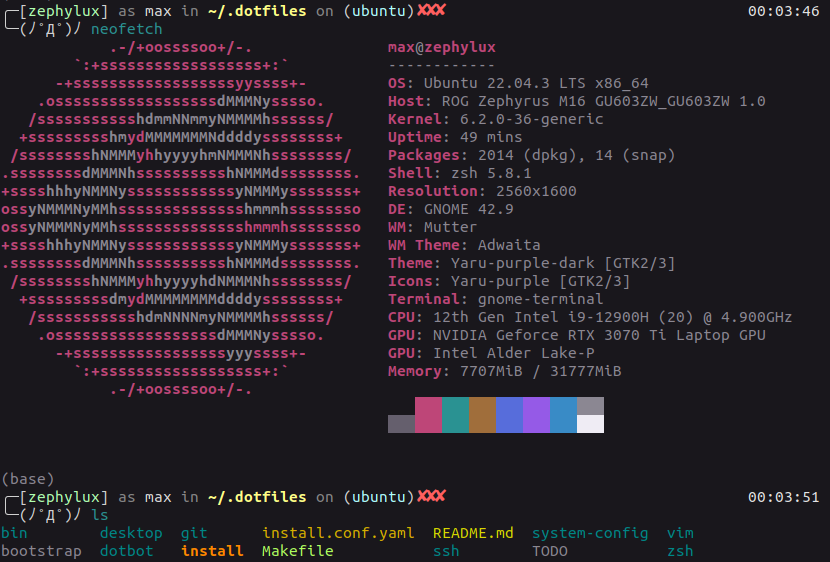
Dotfiles for Ubuntu desktop, servers/containers, and Android. → Setup instructions
If you plan on cloning / forking this repo, be aware that all config is tailored to me (e.g. paths, usernames, ...) and make sure to change .gitconfig to your name and email. But if you're starting from scratch anyway (which I recommend, in order to become fammiliar with the functionality bit by bit). Since these dotfiles are tailored specifically to me, your needs and preferences will be different and I would recommend you just copy the bits and pieces you need.
dotfiles
├── bin           # custom scripts
├── desktop       # ubuntu: desktop shortcuts, icons
├── git           # git config -> ~/.gitconfig, ...
├── nix           # home-manager modules
│   └── home
│       ├── common.nix   # CLI tools (all hosts)
│       ├── desktop.nix  # GUI apps
│       ├── gnome.nix    # GNOME-specific
│       ├── x11.nix      # X11: xclip
│       ├── wayland.nix  # Wayland: wl-clipboard
│       └── hosts/       # per-machine configs
├── vim           # vim/neovim config
├── secrets       # private encrypted repo (see setup secrets)
├── zsh
│   ├── plugin-files  # plugin/theme scripts
│   ├── aliases       # shell aliases
│   ├── exports       # env vars, PATH
│   ├── functions     # custom functions
│   └── zshrc         # main config
├── flake.nix     # nix flake (home-manager hosts)
└── setup # symlinks, package installers, platform setupsPost (distro-) installation steps
sudo apt update && sudo apt full-upgrade
sudo apt autoremove && sudo apt clean
sudo apt-get update && sudo apt-get install -y git
git clone https://github.com/MaxWolf-01/dotfiles.git ~/.dotfiles
cd ~/.dotfiles && ./setup minimalRestart shell, then set host and run Home Manager:
Hosts: zephyrus (X11), xmg19 (Wayland), minimal (CLI), minimal-root (CLI as root)
echo 'export NIX_HOST="zephyrus"' >> ~/.local_exports
source ~/.local_exports
nix run home-manager/master -- switch --flake ~/.dotfiles#$NIX_HOST
gh auth login -w -s admin:public_key
After first run, use hmswitch to apply changes.
Additional setup:
./setup cli
./setup ubuntu
./setup secrets
./setup functions are idempotent. Export your gnome keyboard shortcuts via ./bin/keybindings.pl before ./setup ubuntu to avoid overwriting them.
Setup (Server/Container)
apt-get update && apt-get install -y git
git clone --depth 1 https://github.com/MaxWolf-01/dotfiles.git ~/.dotfiles
cd ~/.dotfiles && ./setup minimal
Restart shell, then:
# use minimal-root if running as root, minimal otherwise
echo 'export NIX_HOST="minimal-root"' >> ~/.local_exports && source ~/.local_exports
nix run home-manager/master -- switch --flake ~/.dotfiles#$NIX_HOST
gh auth login -w -s admin:public_key
GitHub SSH key setup (optional)
./setup sshkeys
gh ssh-key add ~/.ssh/id_ed25519.pub -t "$(hostname)-dotfiles-$(date +%F)"
ssh -T git@github.com || true
git -C ~/.dotfiles remote set-url origin git@github.com:MaxWolf-01/dotfiles.gitDownload and install termux apk from f-droid, then:
export DEBIAN_FRONTEND=noninteractive
termux-setup-storage
pkg update && pkg upgrade && pkg install git gh python && gh auth login
cd /data/data/com.termux/files/home && git clone --depth 1 https://github.com/MaxWolf-01/dotfiles.git
mv dotfiles .dotfiles && cd ~/.dotfiles && ./install && ./setup android
Don't worry about warnings from termux-setup-storage about deleting all your data. Should be fine.
~/storage/shared in your termux home directory is symlinked /storage/emulated/0 (where downloads folder etc. are on Android).
./setup android will install essential packages and sets up Obsidian:
An "obsidian" folder will be created in the android home directory.
To automatically commit, pull and push, run sync.
Other aliases for android specifically are in zsh/android.
Scripts for pushing conflicts to deal with them in an IDE and fixing occasional corrupt git objects are in bin.
Functions
o(open file explorer or the file given as argument)mcd(make directory and cd into it)targz(create a .tar.gz archive, usingzopfli,pigzorgzipfor compression)extract(extracts archived files / mounts disk images)fs(determine size of a file or total size of a directory)lsfs(list n largest files and folder in a directory, recursively; smallest if n is negative; n defaults to 10)gz(compare original and gzipped file size)tre(treis a shorthand fortreewith hidden files and color enabled, ignoring the.gitdirectory, listing directories first.)- `newsshpwd`` (change the ssh passphrase of given key)
- `numel`` (number of elements in folder)
archive_md(archive websites as markdown using dhravya/markdowner- and many more ... (see functions / aliases in zsh folder)
Various scripts, such as gnome keyboard shortcut backup/restore, laptop battery limiter, backup scripts, nightlight toggle shortcuts, ...
Plugins
- fzf - fuzzy finder for commands (Ctrl + R) and files (Ctrl + T), (Alt + C) to cd
into selected dir. Examples:
vim <Ctrl + T>ORvim **<tab>(trigger**can be changed in exports)git switch $(git branch -a | fzf)
- Zap plugin manger
- Zsh-syntax-highlighting
- Zsh-autosuggestions
- Zoxide with custom autocd integration - just type directory names to jump (e.g.
Dow->~/Downloads, from anywhere) - ...
- Jovial Theme
- Zsh
- Nix/Home Manager
- Various functions, aliases and scripts from other great dotfiles repos (see top of functions / the respective scripts)
- More resources on dotfiles: