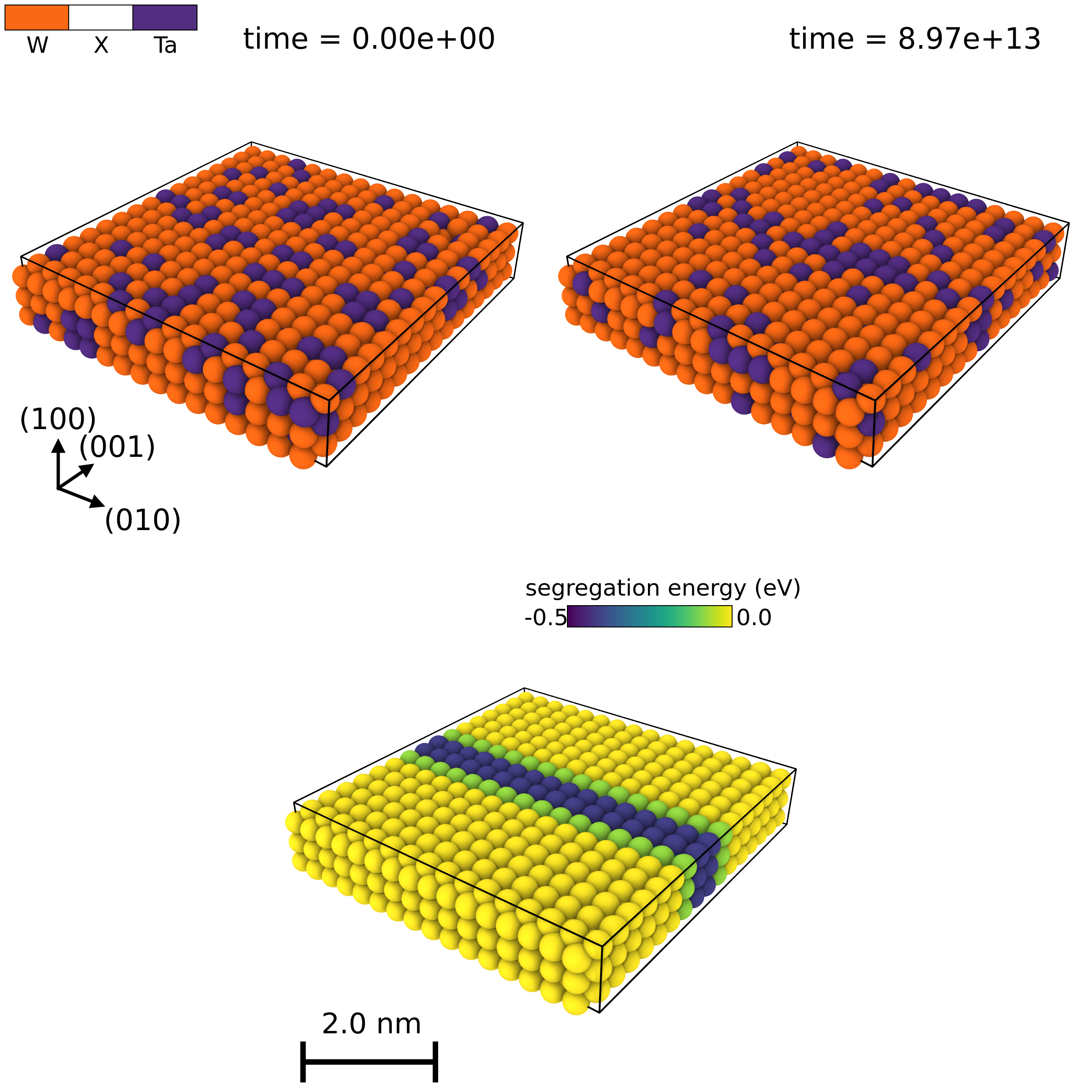
The OVITO python API is a bit unintuitive. But, once you figure it out, it is super powerful.
Below are some examples of some very pretty figures you can make without having to pay for OVITO pro.
If you run into this error when trying to render an image with OVITO inside of an HPC environment:
qt.qpa.xcb: could not connect to display localhost:24.0
qt.qpa.plugin: From 6.5.0, xcb-cursor0 or libxcb-cursor0 is needed to load the Qt xcb platform plugin.
qt.qpa.plugin: Could not load the Qt platform plugin "xcb" in "" even though it was found.
This application failed to start because no Qt platform plugin could be initialized. Reinstalling the application may fix this problem.

Available platform plugins are: eglfs, linuxfb, minimal, minimalegl, offscreen, vkkhrdisplay, vnc, wayland-egl, wayland, xcb.

Aborted (core dumped)
there is a very easy fix that is quite difficult to find. Namely, setting the following environment variable:
import os
os.environ["OVITO_GUI_MODE"] = "1"
and running using the X virtual framebuffer:
xvfb-run python script.pyOnce you know this, you have quite a powerful tool on your hands, creating pretty (and, arguably more importantly, reproducible) figures.
We can create multipanel figures by rendering singular images into PIL.Image objects (from the pillow library), and then pasting the images together.
We can generate the top left panel by reading in some configuration (included in the repo), and adding some overlays, namely one for the color legend, one for the coordinate tripod, and one for the time label. We can also define a custom modifier that changes particle colors
import os
os.environ["OVITO_GUI_MODE"] = "1"
from tempfile import TemporaryDirectory
from typing import Mapping, Callable
from functools import wraps

from ovito.io import import_file
from ovito.vis import (
    Viewport,
    ColorLegendOverlay,
    CoordinateTripodOverlay,
    TextLabelOverlay,
    TachyonRenderer,
    PythonViewportOverlay,
    ViewportOverlayInterface
)
from ovito.modifiers import ExpressionSelectionModifier, DeleteSelectedModifier, ColorCodingModifier
from ovito.qt_compat import QtCore, QtGui
from ovito.data import DataCollection
from ovito.traits import Color
from traits.api import Range
from PIL import Image

COLORS: dict[str, tuple[float, float, float]] = {
    "Ta": (82 / 255, 45 / 255, 128 / 255),
    "W": (249 / 255, 104 / 255, 21 / 255)
}

def change_colors(color_map: Mapping[str, tuple[float, float, float]]) -> Callable[[int, DataCollection], None]:

    """
    modifier that changes particle colors
    """

    @wraps(change_colors)
    def wrapper(frame: int, data: DataCollection) -> None:

        types = data.particles_.particle_types_
        for element, color in color_map.items():
            types.type_by_name_(element).color = color

    return wrapper


def get_initial_image() -> Image:

    # read in initial frame and get rid of the "X" particles, which represent vacancies
    initial = import_file("kmc-trajectory/0.xyz")
    x_id = initial.compute().particles.particle_types.type_by_name("X").id
    initial.modifiers.append(ExpressionSelectionModifier(expression=f"ParticleType=={x_id:.0f}"))
    initial.modifiers.append(DeleteSelectedModifier())

    # change the colors, and add to scene
    initial.modifiers.append(change_colors(color_map=COLORS))
    initial.add_to_scene()

    # initialize a viewport, and add three overlays
    vp = Viewport(
        type=Viewport.Type.Perspective,
        camera_up=(1.0, 0.0, 0.0),
        camera_dir=(-0.5, -0.5, 0.66),
        camera_pos=(75.0, 90.0, -60.0)
    )
    vp.overlays.append(
        ColorLegendOverlay(
            property="particles/Particle Type",
            title=" ",
            border_enabled=True,
            alignment=QtCore.Qt.AlignmentFlag.AlignLeft | QtCore.Qt.AlignmentFlag.AlignTop,
            font_size=0.15,
            legend_size=0.35
        )
    )
    vp.overlays.append(
        CoordinateTripodOverlay(
            axis1_color=(0.0, 0.0, 0.0),
            axis1_label="(100)",
            axis2_color=(0.0, 0.0, 0.0),
            axis2_label="(010)",
            axis3_color=(0.0, 0.0, 0.0),
            axis3_label="(001)",
            size=0.1
        )
    )
    vp.overlays.append(
        TextLabelOverlay(
            text="time = [time]".ljust(20, " "),
            format_string="%.2e",
            alignment=QtCore.Qt.AlignmentFlag.AlignRight | QtCore.Qt.AlignmentFlag.AlignTop,
            text_color=(0, 0, 0),
            font_size=0.04,
            offset_x=0.05
        )
    )
    vp.zoom_all((1200, 1200))

    # render to a temporary file, and then read that temporary file as a PIL.Image object
    with TemporaryDirectory() as tmpdir:
        filename = f"{tmpdir}/out.png"
        vp.render_image(size=(1200, 1200), filename=filename, renderer=TachyonRenderer())
        img = Image.open(filename)

    initial.remove_from_scene()
    return img
The code for the top right panel is very similar, except excluding two of the overlays. The code for the bottom panel is slightly different, with a custom viewport overlay for the scale bar:
class ScaleBarOverlay(ViewportOverlayInterface):

    # Adjustable user parameters:

    # World-space length of the scale bar:
    length = Range(value=2.0, low=0.0, label='Length (nm)')

    # Screen-space height of the scale bar:
    height = Range(value=0.05, low=0.0, high=0.2, label='Height')

    # Bar color:
    bar_color = Color(default=(0.0, 0.0, 0.0), label='Bar color')

    # Text color:
    text_color = Color(default=(0.0, 0.0, 0.0), label='Text color')

    def render(self, canvas: ViewportOverlayInterface.Canvas, data: DataCollection, **kwargs):
        # Compute the center coordinates of the simulation cell.
        center = data.cell @ (0.5, 0.5, 0.5, 1.0)

        # Compute length of bar in screen space - as a fraction of the canvas height.
        screen_length = canvas.project_length(center, self.length)
        screen_length *= 10 * canvas.logical_size[1] / canvas.logical_size[0]

        # Base position
        x0, y0 = 0.05, 0.05
        bar_thickness = self.height * 0.2  # relative thickness of main line
        tick_height = self.height * 1.5

        # Make a 1×1 image of the chosen color
        image = QtGui.QImage(1, 1, canvas.preferred_qimage_format)
        image.fill(QtGui.QColor.fromRgbF(*self.bar_color))

        # Draw main horizontal bar
        canvas.draw_image(
            image,
            pos=(x0, y0),
            size=(screen_length, bar_thickness),
            anchor="south west"
        )

        # Draw left tick
        canvas.draw_image(
            image,
            pos=(x0, y0 - 0.5 * (tick_height - bar_thickness)),
            size=(bar_thickness, tick_height),
            anchor="south west"
        )

        # Draw right tick
        canvas.draw_image(
            image,
            pos=(x0 + screen_length - bar_thickness, y0 - 0.5 * (tick_height - bar_thickness)),
            size=(bar_thickness, tick_height),
            anchor="south west"
        )

        # Draw text label centered below
        canvas.draw_text(
            f"{self.length:.1f} nm",
            pos=(x0 + 0.5 * screen_length, y0 + 0.6 * tick_height),
            font_size=0.75 * self.height,
            anchor="south",
            color=self.text_color
        )

def get_segregation_profile() -> Image:

    frame = import_file("kmc-trajectory/1000.xyz")
    x_id = frame.compute().particles.particle_types.type_by_name("X").id
    frame.modifiers.append(ExpressionSelectionModifier(expression=f"ParticleType=={x_id:.0f}"))
    frame.modifiers.append(DeleteSelectedModifier())
    seg_modifier = ColorCodingModifier(
        property="segregation_energy",
        gradient=ColorCodingModifier.Viridis()
    )
    frame.modifiers.append(seg_modifier)
    frame.add_to_scene()
    vp = Viewport(
        type=Viewport.Type.Perspective,
        camera_up=(1.0, 0.0, 0.0),
        camera_dir=(-0.5, -0.5, 0.66),
        camera_pos=(75.0, 90.0, -60.0)
    )
    vp.overlays.append(
        ColorLegendOverlay(
            title="segregation energy (eV)",
            alignment=QtCore.Qt.AlignmentFlag.AlignRight | QtCore.Qt.AlignmentFlag.AlignTop,
            modifier=seg_modifier,
            offset_y=-0.1,
            offset_x=-0.15,
            border_enabled=True,
            label_size=1.0,
            font_size=0.1,
            format_string="%.1f"
        )
    )
    vp.overlays.append(
        PythonViewportOverlay(
            delegate=ScaleBarOverlay()
        )
    )

    vp.zoom_all((1200, 1200))
    with TemporaryDirectory() as tmpdir:
        filename = f"{tmpdir}/out.png"
        vp.render_image(
            size=(1200, 1200),
            filename=filename,
            renderer=TachyonRenderer()
        )
        img = Image.open(filename)

    frame.remove_from_scene()
    return img
Here, this could be any particle-dependent property, rather than segregation_energy. We also render all of these using the Tachyon renderer, which makes things prettier in my opinion. We can then render all three of these, and combine them into one image:
def main():

    seg = get_segregation_profile()
    initial = get_initial_image()
    final = get_final_image()

    img = Image.new("RGB", (2400, 2400), color="white")
    img.paste(initial, (0, 0))
    img.paste(final, (1200, 0))
    img.paste(seg, (600, 1200))
    img.save("figures/segregation.png")

if __name__ == "__main__":

    main()
The full standalone script is here, generating the figure below: