Hestia is a simple file manipulation service, it allows you to upload, download, delete and list files via a REST API.
This project intends to be a reliable and simple solution for small scale file manipulation and avoid the need to setup a full fledged cloud storage service.
- Inter-server communication, since it's an api key based authentication, the key should be kept secret and not exposed to the client side.
- It is intended to be used with small/constrained file sizes, the file you'll try to manipulate will be loaded into memory and then sent to the server. For large files, it's recommended to use a more robust solution like AWS S3, Google Cloud Storage or Azure Blob Storage.
To run this project, you will need to add the following environment variables:
API_KEY, a random secret key that will be used to authenticate the requests.BASE_DIRECTORY, the base directory where the files will be stored.PUBLIC_DIRECTORY, the directory where publicly accessible files will be stored (required for v2).JWT_SECRET, the secret used to sign JWT tokens (required for v2).JWT_ISSUER, the issuer claim for JWT tokens (required for v2).JWT_AUDIENCE, the audience claim for JWT tokens (required for v2).JWT_REALM, the realm used in JWT authentication challenges (required for v2).
⚠️ V1 is deprecated. V1 uses one-time tokens for authentication, which are tied to a specific file path. Please use V2 for new integrations.
All protected requests must have the Authorization header with the value of a one-time-token generated by the server.
Since the API key is a secret, it should not be exposed to the client side, so the server will generate a one-time-token that will be used to authenticate the requests.
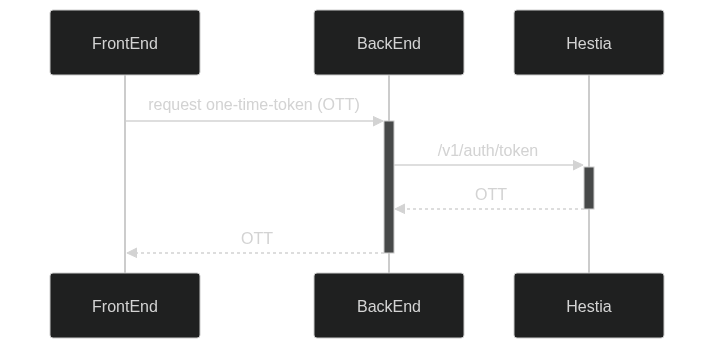
Generates a one-time-token that will be used to authenticate the requests.
| Name | Type | Description |
|---|---|---|
fileName |
string |
The name of the file that will be manipulated. |
path |
string |
The path of the file that will be manipulated. |
| Name | Type | Description |
|---|---|---|
Authorization |
string |
The API key. |
Content-Type |
string |
application/json. |
Accept |
string |
application/json. |
{
    "token": "..."
}
⚠️ Token expiration time: 5 minutes.
Uploads a file to the server (base64-encoded).
| Name | Type | Description |
|---|---|---|
Authorization |
string |
The one-time-token. |
Content-Type |
string |
application/json. |
Accept |
string |
application/json. |
{
    "fileName": "example.txt",
    "path": "/",
    "content": "base64-encoded-file"
}{
"fileName": "example.txt",
"path": "/"
}Uploads a file to the server using multipart form data.
| Name | Type | Description |
|---|---|---|
Authorization |
string |
The one-time-token. |
Content-Type |
string |
multipart/form-data. |
| Name | Type | Description |
|---|---|---|
fileName |
string |
The name of the file to be uploaded. |
path |
string |
The path where the file will be stored. |
file |
file |
The file to upload. |
{
    "fileName": "example.txt",
    "path": "/"
}Downloads a file from the server.
| Name | Type | Description |
|---|---|---|
fileName |
string |
The name of the file that will be downloaded. |
path |
string |
The path of the file that will be downloaded. |
| Name | Type | Description |
|---|---|---|
Authorization |
string |
The one-time-token. |
Content-Type |
string |
application/json. |
Accept |
string |
application/json or application/octet-stream |
If the Accept header is application/json:
{
"fileName": "example.txt",
"content": "base64-encoded-file"
}If the Accept header is application/octet-stream: stream the file.
Downloads a file from the server, usually used to embed the file in an <img>, <audio>, <video> or <iframe> tag.
| Name | Type | Description |
|---|---|---|
fileName |
string |
The name of the file that will be downloaded. |
path |
string |
The path of the file that will be downloaded. |
token |
string |
The one-time-token. |
download |
string |
Download filename (via Content-Disposition ) |
Deletes a file from the server.
| Name | Type | Description |
|---|---|---|
fileName |
string |
The name of the file that will be deleted. |
path |
string |
The path of the file that will be deleted. |
recursive |
boolean |
If true, deletes all files in the path. |
path is required, but fileName is optional. If fileName is not provided, it'll try to delete the whole path specified in path
recursive is optional, if true, it'll delete recursively all files in the path. (even nested directories)
| Name | Type | Description |
|---|---|---|
Authorization |
string |
The one-time-token. |
Content-Type |
string |
application/json. |
Accept |
string |
application/json. |
V2 uses JWT Bearer tokens for authentication on protected endpoints, replacing the per-file one-time tokens used in V1.
Generates a JWT token that will be used to authenticate the requests.
| Name | Type | Description |
|---|---|---|
lifeTime |
integer |
The lifetime of the token in seconds. |
| Name | Type | Description |
|---|---|---|
Authorization |
string |
The API key. |
Content-Type |
string |
application/json. |
Accept |
string |
application/json. |
{
"token": "..."
}All file manipulation endpoints (except /v2/file/embed and /v2/file/public) require a valid JWT Bearer token in the Authorization header:
Authorization: Bearer <jwt-token>
Uploads a file to the server (base64-encoded).
| Name | Type | Description |
|---|---|---|
Authorization |
string |
Bearer <jwt-token>. |
Content-Type |
string |
application/json. |
Accept |
string |
application/json. |
{
"fileName": "example.txt",
"path": "/",
"content": "base64-encoded-file",
"public": false
}public is optional (defaults to false). If true, the file is stored in the PUBLIC_DIRECTORY and accessible without authentication via /v2/file/public.
{
    "fileName": "example.txt",
    "path": "/"
}Uploads a file to the server using multipart form data.
| Name | Type | Description |
|---|---|---|
Authorization |
string |
Bearer <jwt-token>. |
Content-Type |
string |
multipart/form-data. |
| Name | Type | Description |
|---|---|---|
fileName |
string |
The name of the file to be uploaded. |
path |
string |
The path where the file will be stored. |
file |
file |
The file to upload. |
public |
boolean |
If true, store in the public directory. Defaults to false. |
{
"fileName": "example.txt",
"path": "/"
}Downloads a file from the server.
| Name | Type | Description |
|---|---|---|
fileName |
string |
The name of the file that will be downloaded. |
path |
string |
The path of the file that will be downloaded. |
| Name | Type | Description |
|---|---|---|
Authorization |
string |
Bearer <jwt-token>. |
Content-Type |
string |
application/json. |
Accept |
string |
application/json or application/octet-stream |
If the Accept header is application/json:
{
    "fileName": "example.txt",
    "content": "base64-encoded-file"
}
If the Accept header is application/octet-stream: stream the file.
Downloads a file from the server using a one-time token, usually used to embed the file in an <img>, <audio>, <video> or <iframe> tag. This endpoint does not require a JWT token.
| Name | Type | Description |
|---|---|---|
fileName |
string |
The name of the file that will be downloaded. |
path |
string |
The path of the file that will be downloaded. |
token |
string |
The one-time-token (or Authorization: <one-time-token> header as fallback). |
download |
string |
Download filename (via Content-Disposition ) |
Serves files from the public directory without authentication. Responses for images (jpg, jpeg, png, gif) and PDFs are cached for 30 days via Cache-Control: max-age headers.
| Name | Type | Description |
|---|---|---|
path |
string |
The path to the file within the PUBLIC_DIRECTORY. |
Deletes a file or directory from the server.
| Name | Type | Description |
|---|---|---|
path |
string |
The path of the file or directory that will be deleted. Required. |
fileName |
string |
The name of the file that will be deleted. |
recursive |
boolean |
If true, deletes all files in the path recursively. |
public |
boolean |
If true, delete from the public directory. Defaults to false. |
path is required, but fileName is optional. If fileName is not provided, it'll try to delete the whole directory specified in path.
recursive is optional, if true, it'll delete recursively all files in the path (even nested directories).
| Name | Type | Description |
|---|---|---|
Authorization |
string |
Bearer <jwt-token>. |
Content-Type |
string |
application/json. |
Accept |
string |
application/json. |