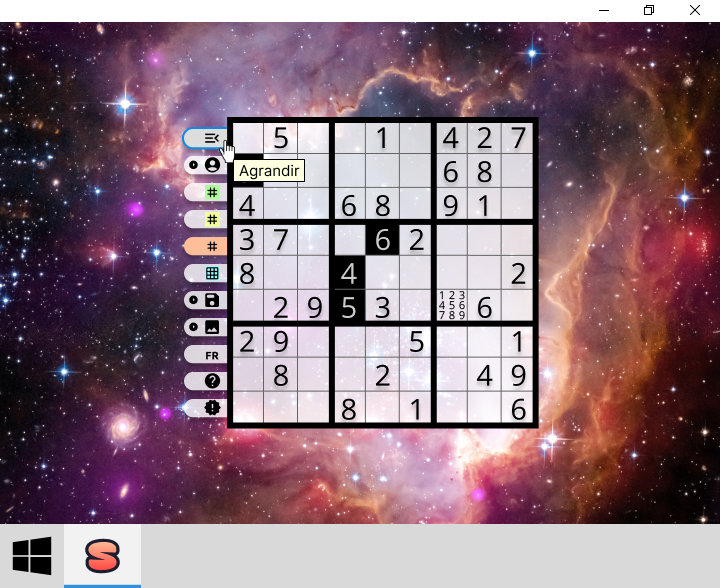
Dive into the world of Sudoku with a game that offers:
- 🧩 Play challenging 9x9 puzzles: Enjoy grids ranging from beginner to expert levels.
- 🤖️ Solve any 9x9 Sudoku grid: Let the game solve your puzzles or input custom ones.
- ✨ Create profiles: Save progress and manage personalized profiles for each player.
- 💾 Save anytime: Effortlessly continue your puzzle-solving journey.
Challenge your mind and enjoy hours of logical fun with SudokuFX!







- System requirements
- Installation
- Use
- Examples
- Update
- Uninstallation
- Documentation
- Security
- Project
- Contributing
- Code of Conduct
- Contributors
- Licence
- Operating System: Windows 10/11, macOS 11 (Big Sur) or later, Ubuntu 20.04 LTS (64-bit)
- Processor: Dual-core 2.0 GHz (Intel x86_64 or Apple Silicon ARM64)
- Memory: 4 GB RAM
- Storage: 1 GB free disk space
- Audio: Sound card (integrated or dedicated)
- Display: 1024 × 768 pixels
- Other: Java JRE (included in MSI/DEB/DMG versions)
- Processor: Quad-core 2.5 GHz or higher (Intel x86_64 or Apple Silicon ARM64)
- Memory: 8 GB RAM
- Storage: 2 GB free disk space (SSD recommended)
- Display: 1920 × 1080 pixels
- Audio: Stereo audio system for optimal experience



-
Windows
- Application with Java Runtime Environment (JRE) included
- Download and install the latest Windows version of the MSI file, available in Assets.
- The MSI file does not have a code signing certificate, Microsoft Defender SmartScreen can inform you of this during installation; to continue the installation click on additional information, then Run anyway.
- Application without Java Runtime Environment (JRE) included
- The latest Adoptium Temurin JRE must be installed on your machine with the corresponding JAVA_HOME environment variable set
- Download, unzip, and keep all the files together, from the latest Windows version of the ZIP file, available in Assets.
- Application with Java Runtime Environment (JRE) included
-
Linux (Debian-based distributions)
- Application with Java Runtime Environment (JRE) included
- Download and install the latest Linux version of the DEB file, available in Assets.
- Run
sudo apt install ./sudokufx-jvm_v.v.v_amd64.deb
- Application without Java Runtime Environment (JRE) included
- The latest Adoptium Temurin JRE must be installed on your machine with the corresponding JAVA_HOME environment variable set
- Download, untar, and keep all the files together, from the latest Linux version of the TAR file, available in Assets.
- Application with Java Runtime Environment (JRE) included
-
MacOS
- Application with Java Runtime Environment (JRE) included
- Download and install the latest MacOS version of the DMG file, available in Assets.
- Application without Java Runtime Environment (JRE) included
- The latest Adoptium Temurin JRE must be installed on your machine with the corresponding JAVA_HOME environment variable set
- Download, unzip, and keep all the files together, from the latest MacOS version of the ZIP file, available in Assets.
- Application with Java Runtime Environment (JRE) included
To ensure the integrity of downloaded assets, import the GPG public key with gpg --import sudokufx-public-key.asc, then verify the files, e.g., the MSI file, using gpg --verify SudokuFX_JVM-v.v.v.msi.asc SudokuFX_JVM-v.v.v.msi. For more information, refer to the GnuPG Manual.
- Application with Java Runtime Environment (JRE) included: Launch SudokuFX from the Start Menu after installing the MSI file.
- Application without Java Runtime Environment (JRE) included: Run from the extracted ZIP folder:
./SudokuFX-v.v.v.bat
- Application with Java Runtime Environment (JRE) included: Launch from the applications menu or run from the terminal in the folder where the DEB file was installed:
/opt/sudokufx-jvm/bin/SudokuFX-JVM
- Application without Java Runtime Environment (JRE) included: Navigate to the extracted TAR folder and run:
./SudokuFX-v.v.v.sh
- Application with Java Runtime Environment (JRE) included: Launch from the Applications folder or Launchpad after installing the DMG file.
- Application without Java Runtime Environment (JRE) included: Navigate to the extracted ZIP folder and run:
./SudokuFX-v.v.v.sh
- Select difficulty: Choose from Easy, Medium, or Difficult levels to start a new game.
- Fill the grid: Click on any empty cell and enter numbers 1-9.
- Check progress: The game automatically validates your entries.
- Save and load:
- Progress is automatically saved for the current player, so ongoing games are preserved.
- You can also switch between players and resume previously saved games.
- Multiple difficulty levels: From beginner-friendly to difficult challenges.
- Auto save: Your progress is automatically saved.
- Clean interface: Modern, intuitive design.
- Cross-platform: Works seamlessly on Windows, Linux, and MacOS.
If you encounter any issues:
- Game won't start: Ensure you have the correct Java version if using the non-JRE version.
- Performance issues: Try closing other applications to free up system resources.
- Display problems: Check your system's display scaling settings.
- Save and load issues: Verify that SudokuFX has write permissions to your user directory.
For additional help, check the application logs or file an issue on GitHub.
-
Windows
- Application with Java Runtime Environment (JRE) included (from MSI file)
- Application without Java Runtime Environment (JRE) included (ZIP file with the .bat file and the JAR)
- Delete your old unzipped folder from the ZIP file, and follow the installation instructions
-
Linux
- Application with Java Runtime Environment (JRE) included (from .deb file)
- Application without Java Runtime Environment (JRE) included (TAR file with the .sh file and the JAR)
- Delete your old untarred folder from the TAR, and follow the installation instructions
-
MacOS
- Application with Java Runtime Environment (JRE) included (from .dmg file)
- Application without Java Runtime Environment (JRE) included (ZIP file with the .sh file and the JAR)
- Delete your old unzipped folder from the ZIP file, and follow the installation instructions
-
Windows
- Application with Java Runtime Environment (JRE) included (from MSI file)
- Uninstall from the Control Panel (for programs)
- In the search box on the taskbar, type Control Panel and select it from the results.
- Select Programs > Programs and Features.
- Press and hold (or right-click) on the program you want to remove and select Uninstall or * Uninstall/Change*. Then follow the directions on the screen.
- Uninstall from the Control Panel (for programs)
- Application without Java Runtime Environment (JRE) included (ZIP file with the .bat file and the JAR)
- Delete your unzipped folder from SudokuFX-v.v.v_windows.zip
- Application with Java Runtime Environment (JRE) included (from MSI file)
-
Linux
- Application with Java Runtime Environment (JRE) included (from .deb file)
- Run
sudo apt purge sudokufx-jvm
- Run
- Application without Java Runtime Environment (JRE) included (TAR file with the .sh file and the JAR)
- Delete your untarred folder from SudokuFX-v.v.v_linux.tar.gz
- Application with Java Runtime Environment (JRE) included (from .deb file)
-
MacOS
- Application with Java Runtime Environment (JRE) included (from .dmg file)
- Drag the application to the Trash
- Application without Java Runtime Environment (JRE) included (ZIP file with the .sh file and the JAR)
- Delete your unzipped folder from SudokuFX-v.v.v_macos.zip
- Application with Java Runtime Environment (JRE) included (from .dmg file)
Important
To completely remove your application data and logs, delete the following folder (this action is irreversible):
Cross-platform desktop application developed in Java using JavaFX, Spring Boot, HSQLDB, Maven, and SonarCloud, following the Model-View-ViewModel-Coordinator (MVVM-C) architecture.
.
├── benchmark           // performance and load testing utilities
├── common              // shared utilities, annotations, enums, exceptions, interfaces
│   ├── annotation      // custom annotations
│   ├── enums           // shared enums and constants
│   ├── exception       // common exception classes
│   ├── interfaces      // reusable interfaces
│   │   └── mapper      // data mapping interfaces
│   └── util            // general utility classes
│       └── sudoku      // sudoku-related utilities
├── config              // application configuration (database, OS settings)
│   ├── database        // database configurations
│   └── os              // operating system specific configs
├── dto                 // data transfer objects
│   └── github          // github-specific DTOs
├── model               // domain/business models
├── navigation          // navigation management for the Coordinator
├── repository          // data access layer
├── service             // business services and logic
│   ├── business        // core business services
│   ├── external        // integration with external APIs or systems
│   └── ui              // services interacting with the UI (audio, file processing, etc.)
├── view                // UI views and components
│   ├── main            // MainView
│   └── component       // reusable UI components
│   │   ├── list        // list components
│   │   └── toaster     // toaster notifications
│   └── util            // utilities for bindings and factories
└── viewmodel           // view models for MVVM pattern
    └── state           // state holders (observable state for ViewModels, e.g., PlayerStateHolder)
Important
For the application to work properly, the following application properties must be set at the JVM level:
- app.name: This property specifies the name of the application.
- app.version: Specifies the application version in stable SemVer format with numeric MAJOR, MINOR, and PATCH only (e.g. 1.2.3; not 1.2.3-beta.1 or 1.2.3+build.5).
- app.organization: Specifies the organization responsible for the application.
- app.license: Specifies the license under which the application is distributed.
- Java LTS (e.g. 25)
- JavaFX
- WiX Toolset v3.11
- Dependencies:
- Development
- javafx-controls
- javafx-fxml
- commons-lang3 (utility classes for strings, objects, numbers, etc.)
- DTOs
- MapStruct
- SGBDR & SPRING BOOT
- HSQLDB
- Spring boot
- Starter
- Gluon Ignite with Spring
- Starter data JPA
- Starter validation
- flyway (database migration)
- passay (generate and validate secrets)
- datasource-proxy-spring-boot-starter (intercepts and logs SQL queries for debugging and performance analysis)
- Logs
- logback from Spring Boot
- Build dependencies:
- spotless-maven-plugin (ensures consistent code formatting across the project)
- maven-checkstyle-plugin (static code analysis to enforce code style rules)
- maven-compiler-plugin
- annotationProcessorPaths:
- MapStruct processor (for code generation)
- annotationProcessorPaths:
- maven-enforcer-plugin (to define the minimum Maven version)
- javafx-maven-plugin
- spring-boot-maven-plugin (create the uber JAR)
- exec-maven-plugin (for scripts generating the packages)
- jmh (for temporary performance evaluation)
- Test dependencies:
- spring boot starter test (JUnit, Mockito, Hamcrest)
- surefire
- jacoco
- testfx-junit5 (ex.:FxRobot to execute actions within the UI, or custom Hamcrest matchers org.testfx.matcher.*.)
- Development
- Download and install the LTS version of the Adoptium Temurin JDK Downloads
- Download and install WiX Toolset v3.11 (in order to package the application)
- Activate .NET framework 3.5.1 (Control Panel > Programs > Programs and Features > Turn Windows features on or off)
- Launch wix311.exe
- Configured the necessary environment variables
- JDK
- name:JAVA_HOME
- value LTS (e.g. 25):C:\Program Files\Eclipse Adoptium\jdk-25.0.1
- WiX
- name:WIX
- value:C:\Program Files (x86)\WiX Toolset v3.11\
- JDK
- IntelliJ IDEA
- Clone the repository
- Select the project's JDK
- File > Project Structure > SDK > Add SDK from disk (select the JDK)
- Run Maven configurations (in the top right corner)
- SudoMain.java is the main class
- Maven run configurations are saved as project files in .idea/runConfigurations
- Temporary performance evaluation with Java Microbenchmark Harness (JMH):
- Comment out
<excludeGroupIds>org.openjdk.jmh</excludeGroupIds>and<exclude>fr/softsf/sudokufx/benchmark/**/*.java</exclude>in thepom.xml - Run
mvn cleanand execute the[Jmh init.]configuration - Manage your benchmark tests in the
fr.softsf.sudokufx.benchmarkpackage - Once benchmarking is complete, uncomment
<excludeGroupIds>org.openjdk.jmh</excludeGroupIds>and<exclude>fr/softsf/sudokufx/benchmark/**/*.java</exclude>in thepom.xml
- Comment out
- Temporary performance evaluation with Java Microbenchmark Harness (JMH):
-
Use the following IntelliJ Run Configurations to debug the application via a suspended JVM:
- Run Configuration:
SudokuFX [debug]Launches the application using Maven with JDWP enabled on port5005, usingsuspend=yto pause execution until a debugger is attached- Command:
clean javafx:run -Pdev -f pom.xml - Environment variable:
JAVA_TOOL_OPTIONS=-agentlib:jdwp=transport=dt_socket,server=y,suspend=y,address=*:5005 - JVM starts and waits for debugger connection
- Command:
- Run Configuration:
Debug JavaFX MavenAttaches IntelliJ's debugger to the suspended JVM on port5005- Configuration type: Remote JVM Debug
- Host:
localhost, Port:5005, Transport:Socket
- Run Configuration:
-
Debug workflow:
- Add breakpoints in the source code
- Run
SudokuFX [debug](Run mode) to start the JVM in suspended state - Immediately launch
Debug JavaFX Maven(Debug mode) to attach and resume execution - Application starts with breakpoints active
-
Install VisualVM and the following plugins:
- VisualVM-MBeans
Enables real-time monitoring of JMX-exposed metrics (e.g., internal HikariCP connection pool metrics) via the MBeans tab
- Add
config.setRegisterMbeans(true)in HikariCP configuration orconfig.properties - Plugin adds a new MBeans tab
- Add
- VisualGC
Visualizes JVM memory regions and garbage collection activity; useful for diagnosing memory usage and detecting leaks
- Plugin adds a new Visual GC tab
- VisualVM-MBeans
Enables real-time monitoring of JMX-exposed metrics (e.g., internal HikariCP connection pool metrics) via the MBeans tab
-
Use the dedicated Maven profile
visualvm-monitoringto launch the application with JMX and GC logging enabled- Profile declared in
pom.xml - Run Configuration:
SudokuFX run with VisualVM Monitoring- Command:
clean javafx:run -Pvisualvm-monitoring -f pom.xml - Enables VisualVM sampling and MBeans access via JMX (
localhost:9010) - In VisualVM, Add JMX Connection for localhost:9010 in order to access full JMX metrics, otherwise only a local jvmstat connection is available.
- Command:
- Profile declared in
Detecting classloader leaks, Metaspace growth, and heap retention patterns in JVM applications. Each command is paired with actionable indicators to support reproducible analysis.
Run Configuration: SudokuFX run with VisualVM Monitoring
| Component | Commands | Purpose | Diagnostic Indicators |
|---|---|---|---|
| 🧠 Native Memory | jcmd <pid> VM.native_memory summarywith -XX:MaxMetaspaceSize=128m (adjust as needed) |
Monitor off-heap growth and Metaspace usage under constrained conditions | Off-Heap Leak: Sustained increase in Internal or Unknown regionsMetaspace Growth: Continued increase in committed size and class count after application has reached steady state |
| 📦 Classloaders | jcmd <pid> GC.run THEN jmap -clstats <pid> (requires full JDK)with -XX:MaxMetaspaceSize=128m (adjust as needed) |
Trigger GC and validate loader retention under constrained Metaspace | Leak Evidence: Loader count remains stable (e.g., 80) after forced GC Metaspace Pressure: Class count per loader remains high despite GC OOM Trigger: OutOfMemoryError: Metaspace occurs earlier if loaders are retained |
| 🧮 Heap Objects | jcmd <pid> GC.class_histogram OR jmap -histo:live <pid> | head -50 (requires full JDK) |
Identify dominant heap objects and retention | Dominant heap objects: 32Mo domain object (e.g. Model.Grid) |
We welcome all contributions to SudokuFX — whether it's bug fixes, new features, documentation, or ideas.
Please read our Contributing Guide to get started. It includes setup instructions, coding standards, commit conventions, and more.
We are committed to fostering a welcoming and respectful community. Please read our Code of Conduct before participating.