I learned how to make inventory system on different projects that haven't been launched yet. This little example allow me to show off my skills.
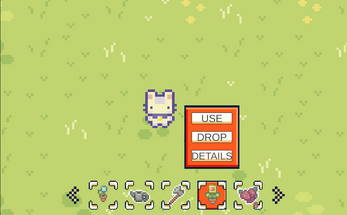
This inventory is a scroll menu in which you can loop through the items by clicking on the little arrows.
Clicking on an item shows options to interact with this item: use, drop or details.
In this example, using an item only shows a comment. Practical effect can easily be implemented in a project. For example, increasing player health.
Dropping an item generates a new object in front of the player and deletes the item in the inventory (or reduces it's number if there's more than one).
Details button activates a window that displays information on the item. This information can be easily edited on the item script.
You can try it on Itch.
To make this tool example, I used the assets from Cup Noodle and the UIs from "Complete GUI Essential Pack Free Version"