Releases: KennyProgrammer/Force
Force-2025.b1.dbg (Preview 1)

✅ Latest Preview
Overview
Since every next release of Force is definetly large, so i cannot predict when i will release it, i will go with previews for that release witch are compiled in Debug, so someone can test it, before actuall release. This previews can be multiple times reuploaded, if something major happens it will next preview up to actuall release. This type of releases can be downloaded only via Nave.

Changes List:
- Fully completed Undo-Redo system.
- Add Undo-Redo commands for script fields.
- Improve AssetManager and Importers API.
- Improve Scripting and fix multiple crashes.
- Rework Project System and format. Nave now can create projects by using this system. Sadly because this wiil not work for older versions. But with this system Nave can create projects for all next versions.
- Projects now be created only with minimum build tools or Visual Studio installed. Force now better searching for this tools.
- Update scene format to 1004. Add beta support for recovering from older scene versions.
- Rework Assets Previewing from Browser and Preview panels, fix multiple crashes.
- Migrate from C++17 to C++20.
- Release Nave 1.0.5.
Other Changes
Bug Fixes
- (F/C) #0316: Fix bug in Application first frame when timer is not fully initialized and give delta time with too large value and thats currupts other variables. (Catch in ExampleApplication).
- (F/E) #0315: Fix some crashes with editor on reloading.
- (F/E) #0314: Fix bug when pressed ctrl + clicks should select/deselect but it also starts to rename (cuz double-click) in browser and explorer.
- (F/E) #0313: Fix bug in Browser when we can open asset when shift/alt/ctrl pressd.
- (F/E) #0312: Fix bug in Browser table entry desel-sel first thumbnail + not sel on full row (on was on selected button)
- (F/M) #0311: Fix bugs with MoveAsset(): Copy, Move operations, and rework WriteExtFile(), ReadExtFile(), CreateAsset with template.
- (F/S) #0310: Fix bug with renaming project, a static buffer cause a crash.
- (F/E) #0309: Fix some bugs with opening/closing in DialogStartup.
- (F/E) #0308: Fix incurrect base dialog opening and closing, because callbacks OnOpenCallback, OnCloseCallback sometimes was not called.
- (F/A) #0307: Fixed crash when user delete Assets project directory.
- (F/G) #0306: Win32: Fix crash when closing Force by Debug Console.
- (F/C) #0305: Fix new Paste (master command) witch are not working.
- (F/E) #0304: Fix bug with incurrent behviour of select asset (the same as Explorer).
- (F/E) #0303: Fix incurrect behaviour in Explorer with select asset (and constantness and C++20).
- (F/P) #0302: Fix multiple bugs with project loading.
- (F/S) #0301: Fix bug that ScriptEngine data was saved to old file.
- (F/E) #0300: Fix bug with wrong Undo-Redo button action in MenuBar.
- (F/S) #0299: Fix bug that ScriptEditor was not recompile script engine after save script them.
- (F/M) #0298: Fix bug during moving folder asset to Backup.
- (F/C) #0297: Fix CommandUR_RenameScene, CommandUR_ActivateScene, CommandUR_SetAsEditableScene, CommandUR_AddRemoveGameObject/s with sceneUID, instead of Scene
- (F/C) #0296: Fix CommandUR_OpenScene, CommandUR_ActivateScene, CommandUR_SetAsEditableScene when trying to undo/redo in play/simulate mode, it not possible.
- (F/C) #0295: Fix CommandURData_OpenScene, CommandURData_ActivateScene with open/close in multicontext, and deactivation states.
- (F/G) #0294: Win32: Fix bug that WorkerDialogThread sometimes shows loading dialog after hide. Need more testing.
- (F/C) #0293: Fix bug in CreateProject witch cause crash in Inspector, Explorer while trying get component from wrapper of GameObject, witch scene was deleted.
- (F/C) #0292: Fix a lot of problems with SaveScene, SaveSceneAs, SaveProject + appearing multiple times the same action dialogs while saving scene from different state of execution.
- (F/C) #0291: Fix SaveScene command witch are clear the current scene UID while saving renamed scene.
- (F/K) #0290: Fix huge CPU usage when dialog windows are opened. Add vSync to Present/SwapBuffers in ImGui implementation.
- (F/G) #0289: Fix bugs with EditorCamera scroll events.
- (F/E) #0288: Fix some bugs in Explorer when scene is not active but we can use commands on it,
- (F/C) #0287: Fix bug where Click+Shift UR_SelectDeselectGameObject was not recorded.
- (F/C) #0286: Fix bug that UR commands not works currectly in simulate mode, and when go from simulate to edit.
- (F/C) #0285: Fix incurrect Undo-Redo recording while selecting, deselecting objects by using Rect tool.
Force-0.4.0
✅ Latest Release
Overview
Finally 0.4.0 is out.
So about 1228 commits since 0.3.10 has been made. Also because i have a limited time one little thing with Undo-Redo system i not completed fully yet. But basically:
- New engine UI and Icons.
- Dialog loading screen.
- New panels and dialogs UI and functionality.
- New Command and Undo-Redo Commands system.
- New Scripting v5.0 system.
- Particle System.
- Font Assets and Text Rendering.
- Half-done UI Sprites Rendering.
- Editor multithreading operations.
- New Assets Browser, Explorer, Inspector, etc.
- New Preferences UI and configurations.
- New Asset Manager and Importers API.
- Streaming Audios (now works better that old Buffered Audios)
- Audio Reloading.
- Saving/Loading Editor Layouts
- New Scene Toolbar.
- Game Panel.
- Assets Database Panel.
- Global Search Panel.
- Multi-View Scene Rendering.
- Renaming Projects
- Holding Not-Unicode Projects
- Asset Importer Dialog.
- Focus To Object.
- New Edit Tools. (Pan, Rect, Universe)
- Ray Selection.
- Selection Multiple Objects.
- New Undo-Redo System.
- And More!

Editor
UI and Style
What i was talking about before. While working on Text Rendering, and all that rendering stuff i find a way to make Editor look a lot nices. So Editor and Nave applications now not have a platform toolbar on top of the window and all dialogs, so it let me draw a custom one, that fits to Editor style.
Write new UI library for Force. (It still based on ImGui). By this i mean that all panels, widgets , buttons now have new UI. Style now is very minimalistic as for this days its good. So it last updates with UI, in future i will not touch UI and styling. All examples of it demonstrated in this post below.

New Dialogs
Dialogs also no longer have a platform toolbar. So many dialogs was recreated help user a lot more that it was before. Startup Dialog was add to MenuBar, and now you can close it and still working in engine, i.e its no longer shutdown editor and no have Exit button.


Asset Imporer Dialog
This dialog was add to help user restore missing assets or reimport it from the scene during opening.

Loading Dialogs
Loading dialogs is a new feature of Force that shows when user project is creating, loading. But further more it appears now when some operation take too much time to process, such a preview a large asset, or importing too many assets.
Commands API
The big part of this update is new Commands API, which is completed and over 1000 editor raw code commands turns into 200 easy to use commands. Main reason to do this was to not duplicate code twice or more times. Force can execute commands a few different ways specific for that command. Basically now three ways of execute commands: Normal, Queue and Global.
-
Normal executes immediately after was called like normal function.
-
Queue (or commands in queue) can be execute on end of current frame, or on next frame, or even skip few frames and then call.
-
Global its commands that executes once every frame, but process only if specific request for that command is enabled and no other waiting state are block it.
Undo-Redo Commands API
New Undo-Redo system was add to Force. Now all changes with components, game objects can be recored, redone and undone. Few commands still now completed but this system perfectly works on 90℅.

Scripting
Many improvements was made with scripting, now recompile scripts and build it a lot easier. Also a lot of scripting API was added, and a some error and warning messages. Now scripts automatically rebuilds when script was created, removed, changed, moved or renamed.
List of added C# API:
- AABB
- AABB2D
- Application
- Asset
- AssetManager
- AudioEngine
- AutoValidate
- Font
- Intersection
- Language
- LanguageManager
- Matrix4f
- Matrix3f
- Object
- Particle
- ParticleSystem
- Quaternion
- Ray
- Rect
- Resources
- Text
- And a lot changes in existing API.
Force Scripting Debugger (Beta)
Was attempt to add debugger to debug C# code from Visual Studio. Extension to Visual Studio already exist and you can install it in future, but debugger is not connecting to Mono for some reasons on my PC.

Creating Projects and Recompiling Scripts with Unicode symbols
Before 0.4.0 user can create projects with russian symbols but it lead to crash. Also script engine not even runs Force Build Manager. Now it fixed, not on 100%, but al least it works for me. Since Force is initially russian Game Engine it should support that kinda of stuff, but with Windows it really hard to implement because Windows Console and Power Shell not executing properly commands when passing paths that contains not Unicode characters.


Script Compilation Errors in Console
Now errors about compiling the script are now passed to the console.

Script Editor
Added a new mini script editor right inside Force. So that if you need to change a variable quickly, do not open the IDE or notepad.

Audio
The AudioSource, AudioClip expands their C# API. Add AudioEngine API to C#.
Streaming Audios
Now Force support streaming audios. This is critically important for games, because when user loads audio that playing at background like some in game track without streaming it will take a lot of RAM. But with streaming all audio data streams piece by piece around 2048-8096 Kb or 2-8 Mb or even smaller. Plus this process happens on the other Audio thread witch not affect on Force performance.


New Audio Playback UI
With new Audio playback UI user now can move playback back or forward.

Particle System
Particle system was introduced in Force. From that i can say is one of very stable feature on current day. ParticleSystem component was also add in C# API.


Font Rendering
One of the main features of this update is Font Rendering. It introduce new **...
Force-0.3.10
Overview
This is another small and last ❄️ christmas ❄️Force pre-release in this year.
Editor
The most visible changes that happens with this pre release it was UI and Editor Viewport UI, including new tools and Toolbar setting up.

Pan Tool
New tool was introduces it is Pan. This tool allows move camera using mouse on XY axis. This tool is will more useful and powerful when all 2D workflow was done.

Rect Tool (Beta)
Another new gizmo tool is Rect tool. This tool will very usefull to modify the 2D/UI sprites and game objects. Now it is in beta state so also allows modify object Z axis, soon it will removed.
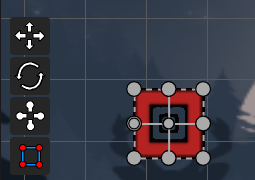
Updated Toolbar
Toolbar also have some changes. First is that all buttons that hang out before in scene preview was moved to Toolbar where Play button was placed.

New two settings was added to Toolbar. One is Editor Camera Properties, that was done to allow use change the properties of camera and setup it has you want.
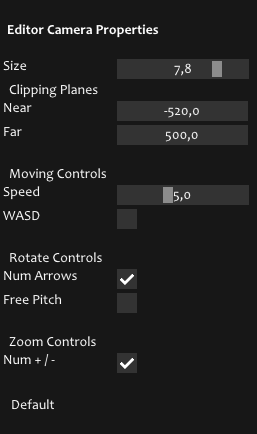
And second property is Workspace Properties. This property allows to set up editor workspace how you wanna.
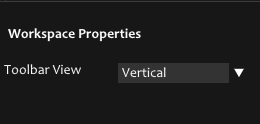
Tooltips Update
Rework the tooltips and add it almost in every place that is possible, to show and help user with some parameters in components and properties in general, like every program do.
Core
Multiple Windows Handling
Window system in Force was slightly reworked, and support creating multiple windows in the applications. This already has a usage - Logo Screen.
Logo Screen
Add logo screen when editor and engine is loading. For other custom applications this logo screen will be disabled, so user can enable it and attach custom image on it in ApplicationWindowSpecification.
Other Changes
Other changes is not necessary. A lot changes happens in editor UI since last official release. And of course a lot of bugs is fixed, see Force-Log.md or Force-Bugs.md.
Bug-Fixes:
0.3.10:
- Fixed bugs with sending transform to undo and show scene modified.
- Fixed bug with zooming when object selected and when gizmo is using.
- Fixed couples bugs with gizmo ui buttons, incorrect camera switching, blocking alt, editor view gizmos, now not user cannot drag object immediately when another is selected.
- Fixed couples bugs with project system reopening project, and physics colliders.
- Fixed bug that when user in not scene/project state when click on play, scene not display current mess.
- Fixed bug when rename scene, somehow gets buffers overflow when name is bigger that requested, for example when scene is --NotSerializebleScene--.
- Fixed incorrect style with white theme with borders on the window.
- Fix bug with deselecting objects when move explorer panel.
- Fix bug with crashing in Assets Browser when size is too small of the window on Y.
- Fix bug with object selection when clicking on Toolbar.
- Fix bug that audio and camera sprites process invalid selection object ID.
- Camera Background is not serialized.
- Glitching when selection area renders with collier's area.
- std::exception (Incorrect user profile symbols).
Force-0.3.9
Overview
Finally it's time again for another pre-release of Force. It was probably the longest and most difficult pre-release of all that came before. Since Force has changed and grown cordially lately, in the capabilities and amount of code, I decided after the release of 0.3.5 to work on its optimization and fix various kinds of errors and unfinished fitches, which have already accumulated a lot.
Therefore, from the user side, he does not contains any there coordinated visual changes (although there are some), but rather focuses more on flexibility and stability.
This pre-release is divided into 3 categories of changes:
- One of them is its Сore, which has been almost completely redesigned.
- The second is the modification and correction of errors in the Editor itself.
- And the third is this stability and a completely redesigned Scripting System that corrects one of the most global errors is a memory leaking.
Also with this pre-release, the first version of the launcher, Force Nave, was supposed to be released. But since I didn't have time to finish it completely in the prescribed time, it will be released in the next upcoming releases.
So let's get started.
Core
Application System
Rewrite the Force Application system, now creating and handling application with Force is a lot easier that was before. Add more information about Application that sorted nices now in specifications, specific for user, build, and other various kinda of scenarios.
Also now Force can reload Application on the fly. That feature is allows dynamically switch between windowed and fullscreen mode, and switch the rendering API, that implemented in Editor already.
And Application now can create and load users, that defines the information about current application session, but still sometimes buggy yet.
And finally, the entire main application cycle has been completely redesigned and has several states, that allows redraw some content during current frame for several visual effects.
Element System
Elements that holds Editor and Runtime stuff, also have few new additions. One of them is that some events with loading, opening projects, or compiling scripts now happens after main frame ended and some of it use different threads.
Scripting System
Most important changes

The most of big updates for the scripting system, is that all the script C# core library that used for writing scripts now stores in different module file - ForceCSCore.dll that links with user ForceCS.dll where all user scripts are stored for each project. And so now all the source code for scripting are hidden, but all details about each class and method user can find in pre-documented files in the project itself or in the Force Scripting API documentation.
Scripts instantiates now only in runtime. Before it was like when attach script it already instantiate it in Edit Mode.
Improve Build Script Engine, now its builds on different thread and you can still working in Editor without waiting.

Rework the rebuild scripts in runtime, add new options in to Preferences -> Editor -> Rebuild Scripts In Play Mode.

Fix a freaking hold bunch of memory leaks with Mono Runtime. So now Editor should not grows in memory when user uses script in their project in runtime.
Now Force detect status of build script project from MSBuild, and print correspond messages.
C# Scene Manager
Adds scene manager API to C# scripts with new Scene, SceneManager classes. That allows to user create different scenes in runtime, load, unload it, switch between different target playing scenes, playing scenes and so on.
Extended C# Physics
Adds AABB, PhysicsShape2D, PhysicsShape2DType, Physics2DSettings, Transform2D, and expand Collider2D and Rigidbody2D classes. In general now user can more control on physics from scripts.
Editor
New Dialog System
Maybe the most big visual update of this pre-release is new Dialog System. By this i mean that im completely rework on all dialogs in the Force. For example: Creation, Opening projects & scenes, Settings (that now called Preferences), Preset selection dialog window and so on. Now creating projects, scripts, prefabs, scenes is a lot easily and what is more, it is stability and not crashes as it was before.
New Create Project Dialog

New Create Script, Prefab, Scene Dialog

Also now Force has kinda of startup screen or Project Configuration on startup, that allows to you create, open or open recent opened project right there.
Project Configuration Dialog

Editor UI
The editor's UI has also undergone some changes. Now all UI are displayed correctly with all components in the inspector and so on.

Status bar also have few changes. Now it actually shows that scene or project was changed, saved, or for example that scripts are building right now.

Asset Manager & New Assets Browser

Asset Manager itself and Project Browser (now called Assets Browser) was fixed and slightly redesigned. Was added new section of Asset Manager is relationship between relative and full paths, reason it because i already build application to final executable and because path was fullpath it breaks game when its game folder moves to another directory.
Most important fixes that i've made its with moving assets to another directory was incorrect, sometimes lead to crash, fixed copying, pasting,
deleting, and creating assets because of the same reason.
Physics
A lot improvements comes to Physics Engine. Fixed incorrect controlling physics variable, creating and destroying bodies in play and simulation modes, and also incorrect displaying colliders.

Runtime
Implement the full runtime, that allows build and play the game outside the Editor in the executable application. But now that feature available only for me and feature developers.

Rendering
Fixed some bugs with graphics and rendering, with rendering camera, resizing window and game viewport. Also add raw implementation of 3D render engine, but not included in the Editor for now.
Other Changes
Other changes is not necessary. A lot changes happens in editor UI since last official release. And of course a lot of bugs is fixed, see Force-Log.md or Force-Bugs.md.
Bug-Fixes:
0.3.9:
- Now Application update loop is updates by running flag not by window request.
- Fix that audio/sounds sources not currently delete and that cause crash at the end.
- Fix lot of bugs with freeing resources when application is shutdowns.
- Fix bug with OpenGL frame, when ImGui was detached is not render anything.
- Fix bug with DirectX 11/10 with incorrect primitive topology when ImGui was detached.
- Fix bug that when we in multi context mode and create object on different "editable" scene it create object on first in list.
- GLFW: Fix Force input not call pull event.
- PlatformLoader: GLFW not create the graphics context.
- Rename MoveAssetToDirectory to MoveAsset, and MoveAssetToDirectory1 to MoveAssetItem, and MoveAssetFolderToDirectory1 to MoveAssetFolder.
- Remove BrowserItemType, fully replaced by AssetType.
- SubItem renamed to HierarchyNodeRecursive.
- Fixed bug to not allow go back on SubBarPanel if directory tree has identical folders.
- Rewrite behaviour of DrawThumbnail.
- Create OpenAsset function and rename OpenItem/Directory to OpenAssetItem and OpenAssetFolder.
- Group the asset manipulation code.
- Rewrite Drag & Drop Files/Folder API.
- MoveAsset, with behaviours for file (MoveAssetItem) and folder (MoveAssetFolder) is updated to relative path and using FileSystem::CopyFile/CopyFolder.
- Fix PasteAsset + with additional checks and changes few small thing.
- Fixed start dragging. Add delta to resolution of 5 px to start drag.
- Remove strange possibleCopy variable that was do nothing.
- Remove unused selectedThumbnailInFrame variable.
- Add new folder icon.
- Fix bug that max scrolled area with button + image, but not include text.
- Rename DrawThumbnailWithInputText to DrawThumbnailEdit.
- Remove AssetCreationData and AssetModificationState_NewAsset.
- Rewrite beh...