Automatically mount, reconnect, and manage network drives (SMB) – directly from your macOS menu bar.
Version 1.0 – developed by Kevin Tobler 🌐 www.kevintobler.ch
- 1.0
- 💾 Auto-mount saved network shares at login
- 🔁 Auto-Reconnect after connection loss or sleep/wake events
- 🧩 Integrated helper tool with full macOS authorization support
- 🧠 Smart background service for mount status monitoring
- 🖥️ Modern SwiftUI menu bar interface with status indicators
- 🧭 Protocol support: SMB
- ⚙️ Secure Keychain storage for credentials
- 📊 Real-time mount status logging
- 🧠 Auto-Reconnect on network loss or after system sleep
- 🔒 Keychain Integration – credentials are stored securely
- ⚙️ Helper Tool – handles system-level mount/unmount tasks
- 💡 Status Monitoring – shows mount state in the menu bar
- 💾 Auto-Mount at Login – keep all shares ready automatically
- 🔔 Notifications when a connection is lost or restored
- 🧩 SwiftUI Interface optimized for macOS Sonoma 14.6+
- 🌙 Sleep/Wake Detection for stable mounts
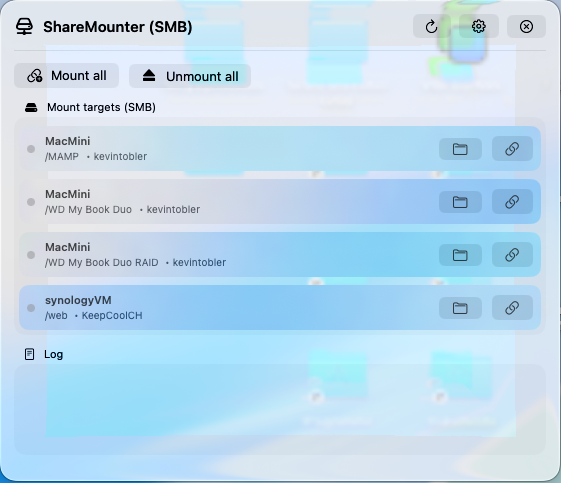
- Add your network targets (SMB)
- Credentials are stored securely in the macOS Keychain
- The app’s Helper Tool performs privileged mount/unmount operations
- A background monitor automatically reconnects lost mounts
- The menu bar icon shows live status for all connections
- Download the latest ShareMounter.app release
- Move ShareMounter.app to your Applications folder
- Launch the app and grant helper tool permissions
- Add your network drives and credentials
- Done — your shares will mount automatically!
🧱 Requires macOS 14.6 Sonoma or newer
- Installed on first launch
- Runs with system privileges for mounting/unmounting
- Logs all operations
- Automatically restarted on update or crash
Kevin Tobler
🌐 www.kevintobler.ch
This project is licensed under the MIT License – feel free to use, modify, and distribute.