Simple and secure file sharing via drag & drop – with temporary links or via email, password protection, and expiration settings.
Version 3.0 – developed by Kevin Tobler 🌐 www.kevintobler.ch – 🌐 github.com/KeepCoolCH/DropzoneFileSharing – 🌐 hub.docker.com/keepcoolch/dropzonefilesharing
Use Dropzone File Sharing: 🔗 https://dropzonefilesharing.com
- 3.0
- 👤 New User Upload Mode (user_upload)
- Introduces an optional multi-user upload workflow. Users can upload files but have no access to admin functions
- When
user_uploadmode is enabled, the Admin Panel now displays which user uploaded each file in the upload list - Perfect for teams, client areas or project-based uploads
- Password protection, expiration times, link creation and download continue to work as usual
- 🧩 Admin Panel Extensions (User Management)
- Added a complete User Management module (create and delete users, reset user passwords)
- User accounts are stored in a dedicated JSON file inside the inc/ directory
- The admin account’s username and password can also be changed
- 🧩 helpers.php improvements and extensions
- The default configuration is now automatically completed and merged with any missing keys when config.php is loaded
- Ensures older installations or partially modified config files always remain compatible with new features
- Prevents missing-key errors and keeps updates seamless
- 👤 New User Upload Mode (user_upload)
- 2.9
- 👁️ Added a new “Show Download Page” toggle (
show_dp) in the configuration - 🔗 Lets you choose whether users see a download page (file info and download-button) or a direct file download after clicking the link
- 🛠️ Fully integrated into the Admin Panel configuration and stored in the main
config.phpfile
- 👁️ Added a new “Show Download Page” toggle (
- 2.8
- 📧 Added support for a separate SMTP FROM address (
SMTP_FROM_ADDRESS) so the visible sender can differ from the SMTP login (same domain required) - 🛠️ Reworked SMTP sending to be RFC-compliant (adds
Date,Message-ID,MIME-Version, multiparttext/plain+text/html, UTF-8 encoded subject) for better compatibility with spam filters - 🖥️ Admin Panel extended with a new field to configure the SMTP FROM address, which is stored in the
.envfile - 🗂️ Improved Docker support for persistent configuration: the entire
incdirectory (including.env,.admin.json, config.php, translation files) can now be mounted from the host - 💾 Upload directory can now also be mounted externally via
DROPZONE_UPLOAD_DIR, making all uploaded files persistent and safe across container updates or reinstallation - 📦 When mounting an empty
incdirectory, Dropzone automatically initializes it with the default files from the image, ensuring a clean setup when the container is recreated - 🔄 This means both all settings (SMTP, admin login, configuration options) and all uploaded files are preserved even if the container is removed and recreated
- 📧 Added support for a separate SMTP FROM address (
- 2.7
- 📧 Added optional Admin email notifications for new uploads
- 📝 Admin email address configuration directly in the Admin Panel
- ⚙️ Added new toggle Admin Notify in configuration settings
- 2.6
- 📊 Download tracking added (download counter + last download timestamp)
- 👁️ Display of “Downloads” and “Last Download” directly in the Admin Panel
- 2.5
- ⚙️ Improved Admin Panel with configuration and email settings
- 🧭 Clearer navigation and visual refinements in the Admin Panel
- 📱 Fully responsive redesign of the Admin Panel for mobile devices
- 🔍 Integrated search function for uploads
- 2.4
- ⚙️ Added Admin Panel with password-protected setup
- 📎 Manage Uploads (change expiration time, change password)
- 📥 Download Uploads directly from the Admin Panel
- 🧹 Delete Uploads directly from the Admin Panel
- 2.3
- 🔒 Security improvements
- 🗑️ When the user manually cancels the upload, reloads the page, or closes the browser, temporary files are cleaned up and the entry is removed from the JSON file
- 2.2
- 🔒 Security improvements
- 💾 Check for sufficient disk space before upload (error message if too little free space)
- 2.1
- 📧 The time period for which the file is valid is included in the email to the recipient
- 2.0
- 📘 Completely reworked chunk upload
⚠️ No more errors when uploading very large files- 🐞 Other bug fixes
- 1.9
- 📘 New logo, colors and file list
- 📱 Responsive design for phones
- 1.8
- 📧 Option to send files via email or just copy the download link
- 1.7
- 📧 Share a unique download link directly to the recipient’s email inbox (multiple recipients supported)
- 📂 Drag & drop upload for files or entire folders
- 🔐 Optional password protection for each upload
- ⏳ Set link expiration (1h, 3h, 6h, 12h, 1–30 days or keep forever)
- 🔁 One-time or reusable download links
- 📎 Automatically creates a ZIP archive for folder uploads
- 🗣️ Multilingual (German, English, French & Italian)
- ✨ No database required – pure PHP
- 🚫 No filesize limit using chunks
- ✅ Upload with Progress Bar
- ⚙️ Integrated Admin Panel with configuration and email settings
- 🔍 Search uploads with filename, filesize, date or email
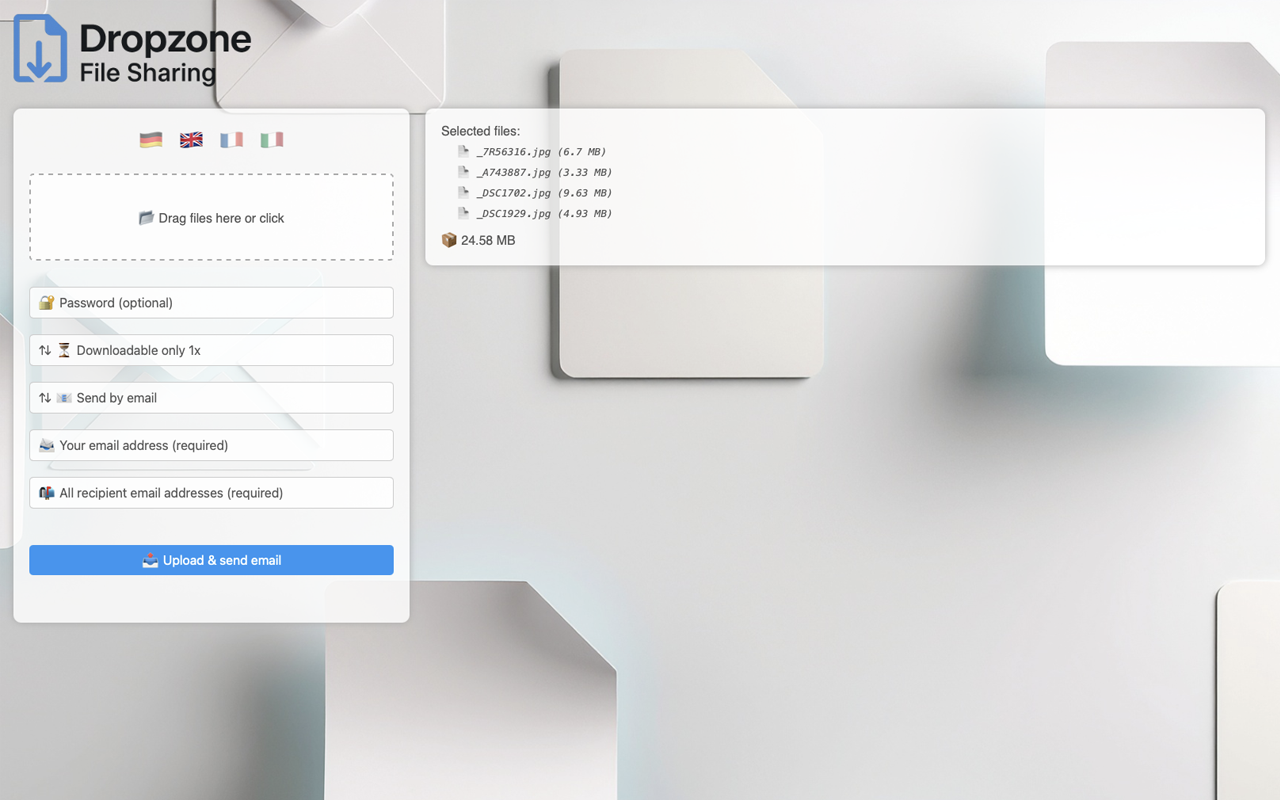
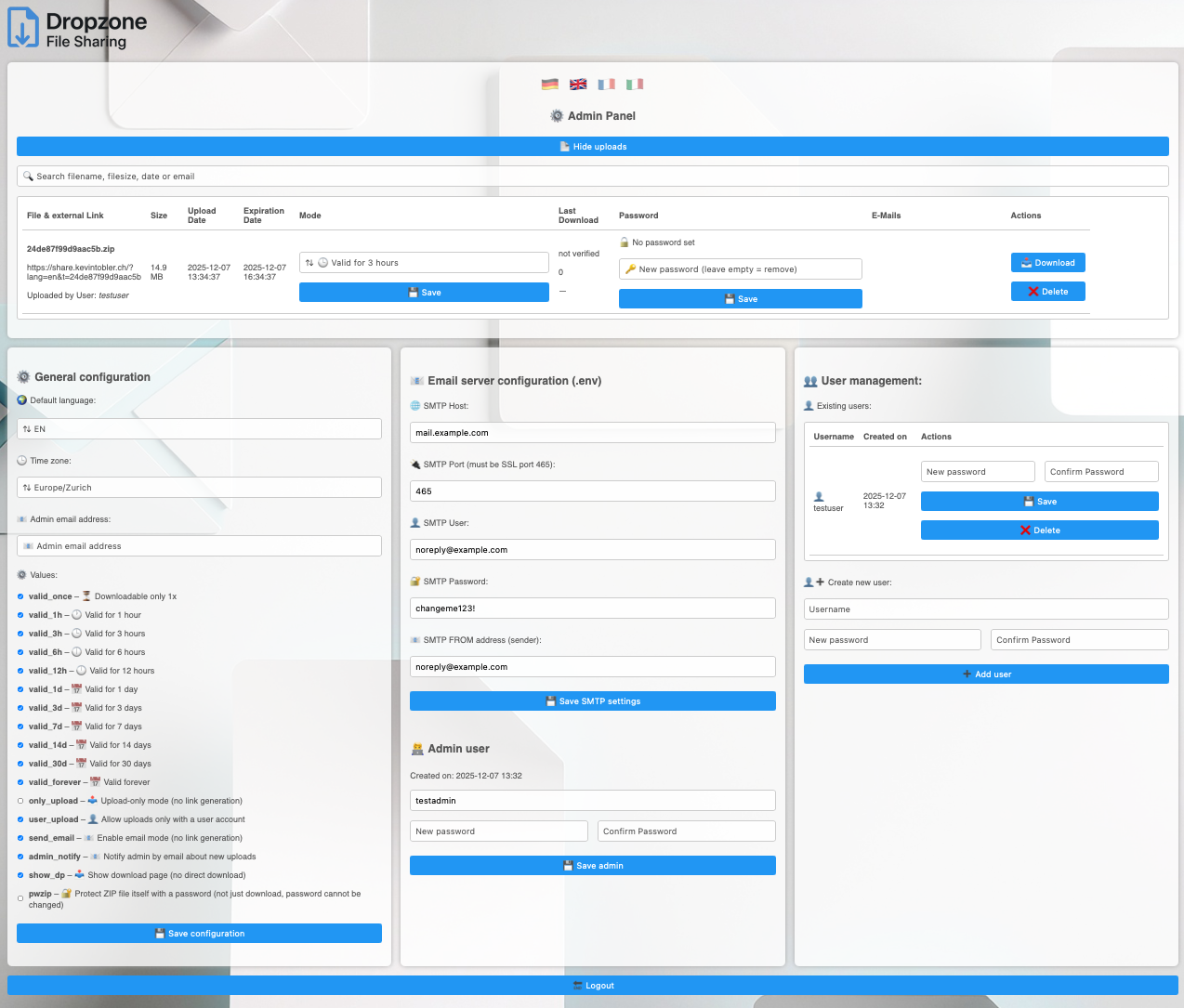
Dropzone File Sharing V.3.0 is available as a Docker image:
docker pull keepcoolch/dropzonefilesharing:latestStart the container:
docker run -d \
  --name dropzonefilesharing \
  --restart=unless-stopped \
  -p 8080:80 \
  --dns 1.1.1.1 \
  --dns 8.8.8.8 \
  keepcoolch/dropzonefilesharing:latest
Then open: 👉 http://localhost:8080
Uploads, settings, JSON files etc. are stored inside the container.
You can store all uploads outside the container (persistent on your host system). This is useful for:
- keeping uploads and configuration when recreating/updating the container
- mounting external storage
1 Environment variable - Tell Dropzone where uploads should be stored inside the container:
-e DROPZONE_UPLOAD_DIR=/data/uploads2 Volume mount - Map the directories to a folder on your host (Mac, Linux, NAS):
-v ~/dropzone/uploads:/data/uploads
-v ~/dropzone/inc:/var/www/html/inc
Full docker run example:
docker run -d \
  --name dropzonefilesharing \
  --restart unless-stopped \
  -p 8080:80 \
  --dns 1.1.1.1 \
  --dns 8.8.8.8 \
  -e DROPZONE_UPLOAD_DIR=/data/uploads \
  -v ~/dropzone/uploads:/data/uploads \
  -v ~/dropzone/inc:/var/www/html/inc \
  keepcoolch/dropzonefilesharing:latest
Full docker-compose.yml example:
services:
  dropzonefilesharing:
    image: keepcoolch/dropzonefilesharing:latest
    container_name: dropzonefilesharing
    restart: unless-stopped
    ports:
      - "8080:80"
    environment:
      DROPZONE_UPLOAD_DIR: "/data/uploads"
    volumes:
      - ~/dropzone/uploads:/data/uploads
      - ~/dropzone/inc:/var/www/html/inc
    dns:
      - 1.1.1.1
      - 8.8.8.8
Run docker compose:
docker compose up -d- Upload all files to your web server
- Open the application in your browser
- Access
/admin.phpto create your admin credentials - Choose your desired configuration values in the Admin Panel
- When
send_emailoradmin_notifyis set to active, make shure to define theSMTP server,SMTP port,SMTP username,SMTP passwordandSMTP From Adressin the Admin Panel
⚠️ Requires PHP 7.4 or higher. No database needed.
The Admin Panel provides a secure management interface for your Dropzone File Sharing installation.
- First-time access via
/admin.phptriggers Admin Setup (username + password creation) - Credentials are stored securely (hashed) in
.admin.jsonand secured with.htaccess - After setup, login via the Admin Login form in
/admin.php - Setup your desired configuration values and when
send_emailoradmin_notifyis set to active, make shure to define theSMTP server,SMTP port,SMTP username,SMTP passwordandSMTP From Adress
Default language is German ?lang=de. Use ?lang=en to switch to English, ?lang=fr to switch to French, ?lang=it to switch to Italian or click on the flag:
https://example.com/index.php?lang=de
https://example.com/index.php?lang=en
https://example.com/index.php?lang=fr
https://example.com/index.php?lang=it
You can configure the following options in the Admin Panel:
- Choose default language (e.g. 'de', 'en', 'fr' or 'it')
- Set the timezone according to your preference
- Control link expiration options
- Enable/Disable
only_uploadmode without generating a link - Enable/Disable
user_uploadmode so that only authenticated users are allowed to upload files, preventing anonymous uploads. - Enable/Disable
send_emailmode (⚠️ make sure to define theSMTP server,SMTP port,SMTP username,SMTP passwordandSMTP From Adress). - Enable/Disable
admin_notifymode for upload notifications (⚠️ make sure to define theSMTP server,SMTP port,SMTP username,SMTP passwordandSMTP From Adress). - Enable/Disable
show_dpmode to control whether users see the download page. If deactivated, users are redirected to an instant direct download without viewing the download page. - Enable/Disable
pwzipmode for password protection of the zip file itself. If deactivated, only the download is password-protected, not the ZIP file (⚠️ ZIP password cannot be modified).
- Each upload can be protected with a custom password
- Option to allow only a single download or multiple downloads
- Files are automatically deleted after the expiration time
- Passwords are never stored in plain text
When uploading a folder, the tool detects it and automatically creates a ZIP file from its contents to simplify sharing.
Kevin Tobler
🌐 www.kevintobler.ch
This project is licensed under the MIT License – feel free to use, modify, and distribute.