Fast, lightweight, modular - speech recognition for gaming





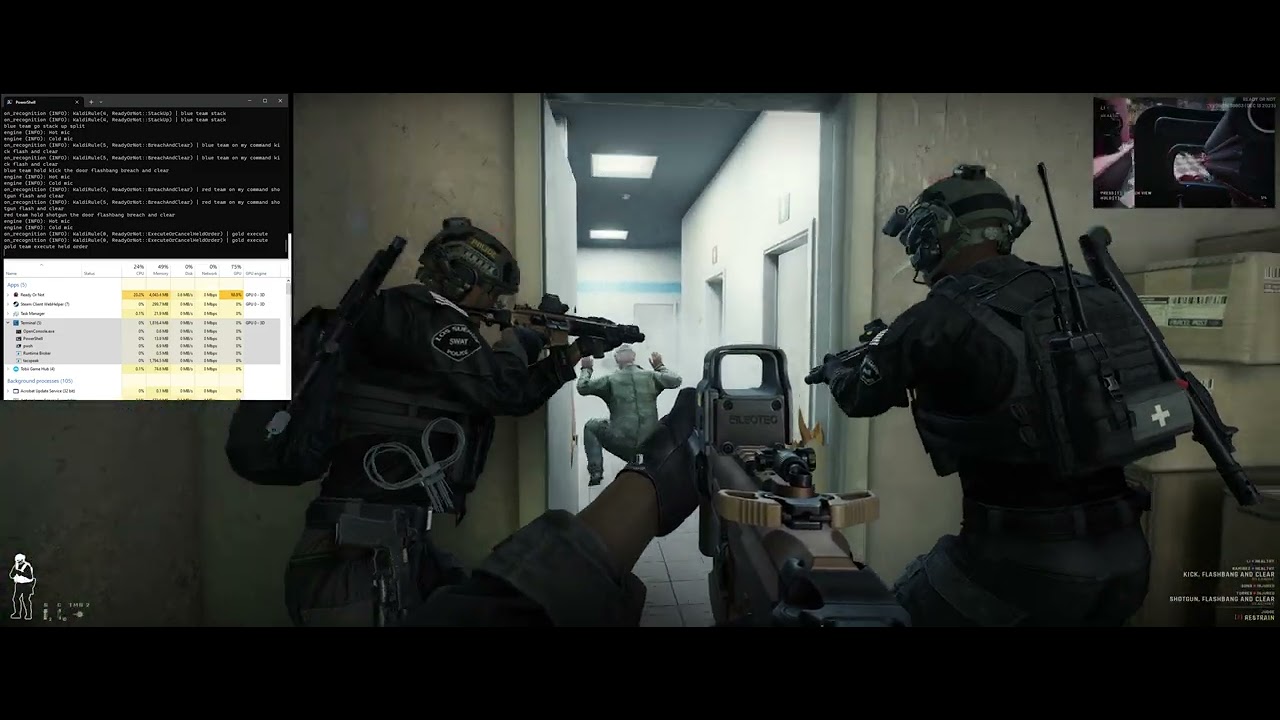
Tacspeak has been designed specifically for recognising speech commands while playing games, particularly system resource and FPS hungry games!
Fast - typically on the order of 10-50ms, from detected speech end (VAD) to action.
Lightweight - it runs on CPU, with ~2GB RAM.
Modular - you can build your own set of voice commands for additional games, or modify existing ones.
Open source - you can modify any part of Tacspeak for yourself, and/or contribute back to the project and help build it as part of the community.
Tacspeak is built atop the excellent Dragonfly speech recognition framework for Python.
- Note: Tacspeak uses a modified version of Dragonfly located at jwebmeister/dragonfly.
- Please see the Dragonfly docs for information on building grammars and rules (i.e. voice commands).
- Please also see the existing examples of Tacspeak grammar modules.
Also built atop the excellent Kaldi Active Grammar, which provides the Kaldi (also excellent) engine backend and model for Dragonfly.
- OS: Windows 10/11, 64-bit
- ~2GB+ disk space for model plus temporary storage and cache.
- ~2GB+ RAM.
- Only supports English language speech recognition, as provided via Kaldi Active Grammar.
- Download and install Microsoft Visual C++ Redistributable
- Download the latest release, including both (they are separate downloads and/or releases):
- the Tacspeak application .zip (includes .exe)
- a pre-trained Kaldi model .zip (includes kaldi_model folder).
- Extract the Tacspeak application .zip into a folder, and extract the Kaldi model .zip into the same folder. Check the following files exists:
./tacspeak.exe./tacspeak/user_settings.py./tacspeak/grammar/_readyornot.py./kaldi_model/Dictation.fst- if not you need to download and extract the pre-trained model
- Run the executable
Tacspeak/tacspeak.exe:)
Run tacspeak.exe (or python ./cli.py) and it will...
- load
./tacspeak/user_settings.py - load all modules
./tacspeak/grammar/_*.py - start the speech engine
- begin listening for commands, but it will...
- wait for a matching app context (defined in the
grammarmodules), then activate those relevant modules. - wait for the
listen_keyto be activated if it's specified, and depending onlisten_key_toggle(toggle mode).
- wait for a matching app context (defined in the
Also:
- You may need to "Run as administrator"
tacspeak.exe - Review and adjust
./tacspeak/user_settings.pyto your liking.- see example ./tacspeak/user_settings.py
- Review and adjust any module settings in
./tacspeak/grammar/_*.py, e.g. keybindings.- see example ./tacspeak/grammar/_readyornot.py
- (Note: you will need to restart Tacspeak for changes to take effect.)
Please use caution and your own discretion when installing or using any third-party files, specifically *.py files. Don't install or use files from untrustworthy sources.
Tacspeak automatically loads (and executes) ./tacspeak/user_settings.py and all modules ./tacspeak/grammar/_*.py, regardless of what code it contains.
It is highly recommended to review and adjust ./tacspeak/user_settings.py to your liking.
Open ./tacspeak/user_settings.py in a text editor, change the settings, then save and overwrite the file. There are comments in the file explaining most of the important settings.
For example, you might want to change these:
listen_key=0x050x05= mouse thumb button 1.0x10= Shift key.- See here for more info.
listen_key_toggle=-1- Recommended is
0or-1. 0for toggle mode off, listen only while key is pressed; must release key for the command to be recognised.1for toggle mode on, key press toggles listening on/off; must toggle off for the command to be recognised.2for global toggle mode on, key press toggles listening on/off, but it uses Voice Activity Detector (VAD) to detect end of speech and recognise commands so you don't have to toggle off to recognise commands.-1for toggle mode off + priority, listen only while key is pressed, except always listen for priority grammar ("freeze!") even when key is not pressed.Nonealways listening; similar to global toggle on, uses Voice Activity Detector (VAD) to detect end of speech and recognise commands.
- Recommended is
vad_padding_end_ms=250- change this if you use VAD and find it's too quick or slow to identify the figure out you've stopped speaking and that it should try to recognise the command.
input_device_index=None- should use default microphone (as set within Windows Sound Settings), but should be able to change the index (number) to select a different input device.
It is likely you will want to modify or customise some of the existing Tacspeak grammar modules (if not also add your own!), which you can do by editing the ./tacspeak/grammar/_*.py file corresponding to the application you're interested in.
As an example, in the Ready or Not module you can change ingame_key_bindings to align the Tacspeak module with your in-game keybindings.
You could also change the words and/or sentences used for recognising speech commands, for example, adding "smoke it out" as an alternative to "breach and clear".
Additional notes:
- Please see the existing examples of Tacspeak grammar modules.
- Please see the Dragonfly docs for information on building grammars, rules, and actions (i.e. voice commands).
- Note: Tacspeak uses a modified version of Dragonfly located at jwebmeister/dragonfly. Review the source and/or commits of the fork to understand its differences to the original project and the corresponding docs.
See kaldi_model/README.md for more information.
Things to check or try first:
- Is Microsoft Visual C++ Redistributable installed?
- Have the Tacspeak application and model files been extracted into the correct locations? Check the following files exists:
./tacspeak.exe./tacspeak/user_settings.py./tacspeak/grammar/_readyornot.py./kaldi_model/Dictation.fst- if not you need to download and extract the pre-trained model
- Have you tried "Run as administrator" on
tacspeak.exe? - Is the correct microphone set as the default in Windows Sound Settings?
- Are you pressing the
listen_key(by default it is mouse thumb button), and does it show "Hot mic" in the console? - Are you running ReadyOrNot and have the window focused (i.e. you're not alt-tabbed to another window)?
- Are you pressing the
listen_key(default is mouse thumb button), speaking, then releasing after you finish speaking? - Check the key bindings in
./tacspeak/grammar/_readyornot.py. It's set for default game keybindings. - Check the ".tacspeak.log" file for any useful error messages to narrow it down.
- Try reinstalling (extracting from .zips) everything, including the model, don't change anything in
./tacspeak/user_settings.pyor./tacspeak/grammar/_readyornot.pykeep it all default, try runningtacspeak.exe. - For Tacspeak version ≥0.1.1, run
./tacspeak.exe --print_mic_listin Powershell or command prompt.- This will list all of the audio devices found on your system, and can be useful for figuring out the correct index number for the
input_device_indexsetting in./tacspeak/user_settings.py. - A far easier option to try first is to set the correct default recording device in Windows Sound Settings.
- This will list all of the audio devices found on your system, and can be useful for figuring out the correct index number for the
- The underlying model that Tacspeak currently uses is based on "16-bit Signed Integer PCM 1-channel 16kHz" audio. Tacspeak tries to convert the incoming audio from your device to this format, but if it's too much for a single CPU core to convert in real-time it may fall over.
- I've had no issues using Tacspeak with a 48kHz, 16-bit, 2-channel microphone array and also using a Rode AI-1 and Podmic at 48kHz, 24-bit, 1-channel.
- If, for example, your device is recording at 144kHz, or something a single core on your CPU can't handle, it will likely display errors in the console.
- Microsoft Visual C++ Redistributable installed
- Python 3.11 installed
- Clone this repo into a folder, e.g.
Tacspeak/. - Download a pre-trained Kaldi model .zip from the latest release and extract into the cloned project folder, e.g.
Tacspeak/kaldi_model/after extraction. - Open the
Tacspeak/folder in PowerShell (or equivalent). - Strongly recommended to use a virtual environment, e.g.
- create within
Tacspeakfolder:python -m venv "./.venv" - activate within
Tacspeakfolder:./.venv/Scripts/Activate.ps1
- create within
- Install required packages via pip
pip install -r requirements.txt
- Done! Should now be able to run Tacspeak via
python ./cli.py
- Microsoft Visual C++ Redistributable installed
- Python 3.11 installed
- A compatible compiler for cx_freeze installed,
- Only tested Visual Studio 2022, MSVC
- Clone this repo into a folder, e.g.
Tacspeak/. - Download a pre-trained Kaldi model .zip from the latest release and extract into the cloned project folder, e.g.
Tacspeak/kaldi_model/. - Open the
Tacspeak/folder in PowerShell (or equivalent). - Strongly recommended to use a virtual environment, e.g.
- create within
Tacspeakfolder:python -m venv "./.venv" - activate within
Tacspeakfolder:./.venv/Scripts/Activate.ps1
- create within
- Install required packages via pip
pip install -r requirements.txt
- Build via setup.py
python setup.py build
I built Tacspeak because I was fed-up with how poorly accurate the Windows Speech Recognition engine was with my voice, even after training. No other alternatives I tested (there were many) fit exactly what I wanted from speech recognition while gaming.
What I learned from my research and testing:
- most state-of-the-art Automatic Speech Recognition (ASR) systems are not fit for the purpose of speech command recognition while gaming. They:
- take too long, e.g. 1-3 seconds.
- take too much memory, e.g. 2-4 GB of VRAM (textures pop-in in-game).
- take too much CPU/GPU processing power.
- are designed for wider applications beyond speech command recognition, e.g. free-form dictation.
- there are decades-old ASR's that are fit-for-purpose, but their tool and build chains were too unwieldy.
- on paper, the Windows Speech Recognition engine should be perfect for my use-case, it just hates me (and everyone else).
- I needed a customisable speech recognition framework to fit my specific use-case.
Tacspeak isn't perfect, but it is a very strong option, precisely because it can be so highly customised to your specific commands, for your specific application.
Issues, suggestions, and feature requests are welcome.
Pull requests are considered, but be warned the project structure is in flux and there may be breaking changes to come.
We'd also like some (TBD) quality testing be done on grammar modules before they're brought into the project. If you can help define what we mean by "some (TBD) quality testing"... well, trailblazers are welcome!
Tacspeak uses a modified version of Dragonfly located at jwebmeister/dragonfly. This is where the heart of the beast (bugs) lives... please help slay it!
Also, be warned the project structure is in flux and there may be breaking changes there too.
You can also consider supporting the projects Tacspeak are built upon, dictation-toolbox/dragonfly and daanzu/kaldi-active-grammar.
Any and all donations are very much appreciated and help encourage development.
- Joshua Webb (@jwebmeister)
This project is licensed under the GNU Affero General Public License v3 (AGPL-3.0-or-later). See the LICENSE.txt file for details.
- Based upon and may include code from "Dragonfly" dictation-toolbox/dragonfly, under the LGPL-3.0 license.
- Based upon and may include code from "Kaldi Active Grammar" daanzu/kaldi-active-grammar, under the AGPL-3.0 license.