- Introduction
- Architectures support
- Examples
- Install and use
- Tests
- Comparison with other libraries
- Todo
- Projects which use this library
- Credits
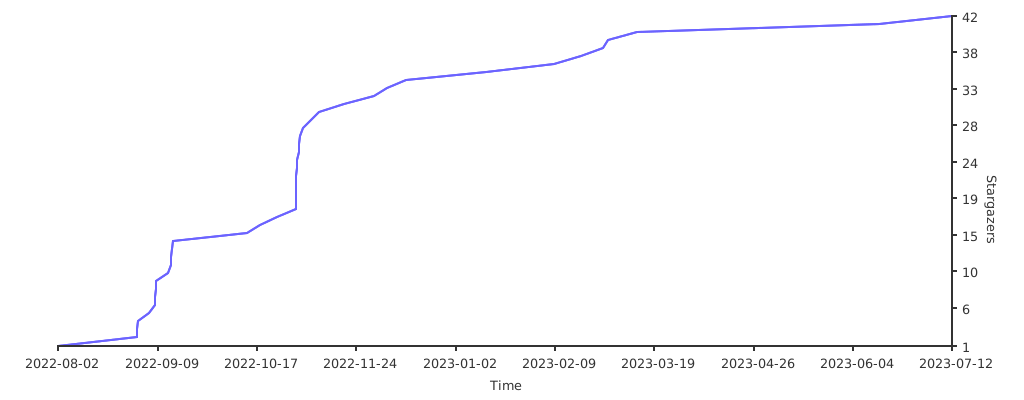
- Stargazers over time
ptc::print (py-to-cpp print) is a C++17/20 printing object inspired by the Python print function, which provides you a most comfortable way to print messages and logs to the output stream. This library is available also with vcpkg package manager.
It is constructed through the Print functor, which is a fully type- and thread-safe class with automatic memory management, implemented through an single-header library, with minimal and indispensable dependencies. It supports also the usage of ANSI escape sequences and is cross-platform.
ptc::print supports the printing of all the standard types and some non-standard ones (list here).
It is possible to choose to print using different char types (char, wchar_t...). List of supported char types can be found here.
If you want to contribute to the repository, please read this file before. If you want to propose ideas you can open a discussion.
If you plan to use this tool in one of your projects please let me know so I can link you to the Projects which use this library section.
Code documentation is generated using Doxygen and can be accessed here. Updates and news will be published at this discussion page.
The software is and will stay free, but if you want to support me with a donation it would be really appreciated!

- Linux
- Ubuntu (tested)
- Windows (release 10 or higher)
- Cygwin64 (tested)
- MSYS2 (tested)
- MinGW (tested)
- WSL (tested)
- Powershell (tested)
- MacOS
- gcc:
- C++17: 7/8/9/10/11/12
- C++20: 10/11/12
- clang:
- C++17: 5/6/7/8/9/10/11/12/13/14/15
- C++20: 9/10/11/12/13/14/15
- MSVC:
- C++17: 19 (only this one tested)
- C++20: //
To normally print messages to stdout:
#include <ptc/print.hpp>

int main()
 {
  const char* str = "bye!";

  ptc::print( "Printing to", "stdout!" );
  ptc::print();
  ptc::print( "Here I am", 123, str );
 }
Printing to stdout!
Here I am 123 bye!Print to a different output stream:
#include <ptc/print.hpp>
#include <iostream>
#include <sstream>

int main()
 {
  // stderr
  ptc::print( std::cerr, "I am the", "stderr." );

  // ostringstream
  std::ostringstream strout;
  ptc::print( strout, "Printing", "with in an", "std::ostringstream" );
  ptc::print( strout.str() );
 }
I am the stderr!
Printing with in an std::ostringstream.To write into a file:
#include <ptc/print.hpp>
#include <fstream>

int main()
 {
  std::ofstream stream( "file.txt" );
  ptc::print( stream, "You can also write in a file! ", 1, 2, 3, 4.5, 7 );
  stream.close();
 }
To change the end-line character / instruction:
#include <ptc/print.hpp>

int main()
 {
  // Change end character
  ptc::print.setEnd( " " );
  ptc::print( "This is a" );
  ptc::print( "single row." );

  // Restore previous configuration
  ptc::print.setEnd( '\n' );
  ptc::print( "These are" );
  ptc::print( "two rows." );
 }
This is a single row.
These are
two rows.To change the separator character / instruction:
#include <ptc/print.hpp>

int main()
 {
  ptc::print.setSep( "*" );
  ptc::print( "Changing", "the", "sep." );
}Changing*the*sep.To allow output stream flush (false by default) use:
ptc::print.setFlush( true );To initialize a string:
#include <ptc/print.hpp>
#include <string>

int main()
 {
  ptc::print.setEnd( "" ); // Avoid "\n" in the string initialization
  std::string msg = ptc::print( ptc::mode::str "I am a", "string." );
  ptc::print( msg );
 }
I am a string.To change the pattern among each argument of ptc::print:
#include <ptc/print.hpp>

int main()
 {
  ptc::print.setPattern( "|" );
  ptc::print( "Changing", "the", "pattern" );
}|Changing| |the| |pattern|To color the output stream of a program:
#include <ptc/print.hpp>

int main()
 {
  ptc::print( "\033[31m", "This is a red string" );
 }
this holds also for all the other ANSI escape sequences. To better manage them you can use external libraries like osmanip. The stream is automatically reset when the end of the ptc::print object is met, only if an ANSI escape sequence appears among its arguments.
With osmanip:
#include <ptc/print.hpp>
#include <osmanip/manipulators/colsty>

int main()
 {
  ptc::print( osm::feat( osm::col, "red" ), "This is a red string" );
}List of not built-int types ready for custom printing:
- C containers: C arrays, C pointers.
- C++ containers:
std::vector,std::map,std::unordered_map,std::deque,std::forward_list,std::list,std::set,std::unordered_set,std::multimap,std::multiset,std::unordered_multiset,std::unordered_multimap. - Container adaptors:
std::stack,std::priority_queue. - Other types:
std::complex,std::chrono::duration,std::tuple.
These special types printing are characterized by specific operator << overloads. These overloads are defined into the ptc namespace, therefore they will not work outside of the ptc::print objects unless you use the using namespace ptc directive (warmly discouraged).
If you need support to other particular types you can open an issue with a feature request.
For example, to print an std::vector:
#include <ptc/print.hpp>
#include <vector>

int main()
 {
  std::vector<int> vec = { 1, 2, 3 };
  ptc::print( vec );
}[1, 2, 3]Or an std::map:
#include <ptc/print.hpp>
#include <map>

int main()
 {
  std::map<int,int> map = { { 1, 1 }, { 2, 2 }, { 3, 3 } };
  ptc::print( map );
 }
[[1, 1], [2, 2], [3, 3]]To print std::chrono::duration objects:
#include <ptc/print.hpp>
#include <chrono>
using namespace std::literals::chrono_literals;

int main()
 {
  ptc::print( "Time:", 5m, 30s );
 }
Time: 5m 30sTo print pointer information use the ptc::ptr function:
#include <ptc/print.hpp>

int main()
 {
  int add = 2;
  int *pointer;
  pointer = &add;
  ptc::print( ptc::ptr( pointer ) );
 }
Value: 0x7fffc43b1d24
Address: 0x7fffc43b1cc0It works also for higher-order pointers (ex: pointer of a pointer).
Within ptc::print it is possible to print any user-defined type. For example:
#include <ptc/print.hpp>

// Define a new type
struct foo
 {
  foo( int a_, int b_ ): a(a_), b(b_) {}
  int a, b;
 };

// Overload operator << for the new type in namespace ptc in order to be available only for ptc::print.
namespace ptc
 {
  template <class T_str>
  std::basic_ostream<T_str>& operator <<( std::basic_ostream<T_str>& os, const foo& object )
   {
    os << object.a << "+" << object.b;
    return os;
   }
 }

int main()
 {
  foo object( 2, 3 );
  ptc::print( object );
}It is possible to choose a different char type with respect to the standard char used to define an std::string. A list of supported char types by the ptc::print object is the following:
char(ptc::print)wchar_t(ptc::wprint)char16_t(ptc::print16)char32_t(ptc::print32)
⚠️ MacOS operating systems don't supportchar16_tneitherchar32_t, since these types are defined in thecucharheader which is not present in XCode.
To print using wchar_t you can use the ptc::wprint function:
#include <ptc/print.hpp>

int main()
 {
  ptc::wprint( "Printing to", "std::wcout!" );
 }
Printing to std::wcout!Steps:
- Download one of the repository releases.
- Unzip the downloaded directory and
cdinto it. 3.a) Copy the ptc folder in one of your projects or in a specific path. 3.b) Or install into the system with these command:
Set the building directory:
cmake -B buildInstall:
sudo cmake --build build --target install
⚠️ sudois not required on Windows.
Prerequisites are minimal:
- g++ (like gcc, clang or MSVC) compiler.
- C++17 standard at least.
- CMake (v 3.15 at least).
- Include the header into your project:
#include <ptc/print.hpp>To get an installed version of the library:
find_package( ptcprint )then, to link it to a target:
target_link_libraries( ${TARGET} ptcprint::ptcprint )To avoid tests compilation:
set( PTCPRINT_TESTS OFF )To install with vcpkg package manager run:
vcpkg install ptc-printTo consistently increase performance improvements you can use the following preprocessor directive:
#define PTC_ENABLE_PERFORMANCE_IMPROVEMENTSat the beginning of your program. In this way, as you can see from benchmarking studies, runtime will be strongly increased in case you are printing with the default std::cout stream. Read here for more information about the benefit of this choice.
⚠️ the usage ofPTC_ENABLE_PERFORMANCE_IMPROVEMENTSmacro will propagate not only toptc::print, but also tostd::coutin general, since it is directly used insideptc::print.
⚠️ do not use in case ofptc::print16orptc::print32usage, since forchar16_tandchar32_tthere is anystd::coutcounterpart and optimization will raise an error.
If you plan to use this preprocessor directive pay attention to the following points:
- Use this in case you don't plan to use both C++ and C output stream objects together (like
std::coutandprintfin the same program). - Make sure to flush
ptc::printmanually every time you want to display something before expecting input onstd::cin, sincestd::coutandstd::cinhave been untied (see here).
These operations preserve the library quality, however some memory false-positive errors may occur when running Valgrind memcheck tool; they are due to the std::ios_base::sync_with_stdio function usage inside a generic class. This false-positive has been hidden into a Valgrind suppression file. A related discussion can be found here.
To decrease the compilation time you can use the following preprocessor directive:
#define PTC_DISABLE_STD_TYPES_PRINTINGThis operation will reduce the compilation time by 30% more or less. You can use the previous directive if you plan to not use any of the standard C++ containers (or extra types), since it basically disable the printing of non-standard types.
Tests are produced using -Wall -Wextra -pedantic flags. To run them you need some prerequisites:
- CMake (at least v3.15 is required).
- Valgrind for profiling.
- doctest for testing.
- cppcheck for testing.
To compile unit tests code:
Set the building directory:
cmake -B build Compile:
cmake --build buildTo launch all tests simultaneously:
./tests/all_tests.shOr separately:
./build/tests/unit_tests
./build/tests/system_tests
./build/tests/threading_tests
./tests/include_tests.sh
cppcheck include/ptc/print.hpp
To check the automatic memory management through Memcheck:
./tests/profiling.sh memcheck ./build/tests/system_testsTo check thread safety through Helgrind:
./tests/profiling.sh helgrind ./build/tests/system_testsTests using the PTC_ENABLE_PERFORMANCE_IMPROVEMENTS macro are automatically performed launching barely the all_tests.sh script, or alternatively specifying:
./tests/all_tests.sh macroEXTRA: to check that only the needed headers are include use this script:
./tests/IWYU.shwhich is based on include-what-you-use.
To install extra libraries used for comparison you can use the install_deps.sh script.
List of functions / objects which ptc::print is compared with:
std::coutprintffmt::printversion 9.0.0pprint.
⚠️ comparisons are performed only on the same features of each library. For example: I am not comparing the wholefmtlibformatting library to mine, but simply thefmt::printfunction.
Studies are performed with the g++ (Ubuntu 11.2.0-19ubuntu1) compiler.
Before each benchmarking study an environment set-up is performed in order to reduce the noise (i.e the standard-deviation of each data-point). In particular the following operations are performed:
- Set
scaling_governorto performance. - Disable Turboboost.
- Drop file system cache.
- Disable address space randomization.
Motivations for each choice can be found here. At the end of the final benchmarking run, old system settings are restored.
Other suggestions are more than welcome.
Benchmarking is performed using the Google Benchmark framework. The script studies/benchmarking_execution/run.sh is used to generate and analyze benchmark data. It makes use of the cpupower tool and launches two other scripts during its run:
- benchmark.cpp: is used for data generation and benchmarks measurement. The same procedure, which for
ptc::printcorresponds to printing:
ptc::print( "Testing", 123, "print", '!' );is repeated for 300.000 times and the total runtime is registered. This latter step is repeated again for 100 times and results of each iteration are averaged each other. Final mean value with the corresponding standard deviation is considered. This script is compiled with -O3 -O1 -falign-functions=32 flags.
- analysis.py: is used for data analysis and plots production, with comparison among each library benchmark results.
Real time benchmark results:

CPU time benchmark results:

Without performance optimizations ptc::print is slightly slower than the others.
To run these benchmarks you can do:
cd studies/benchmarking_execution
cmake -S. -B build
cmake --build build
./run.shExtra studies are performed using consistent improvements in the runtime, thanks to the PTC_ENABLE_PERFORMANCE_IMPROVEMENTS macro usage (see here for more information). Using this macro definition will consistently speed-up the ptc::print object, as you can see from the following plots.
To run these benchmarks you can do:
./run.sh macroReal time benchmark results with macro usage:

CPU time benchmark results with macro usage:

std::cout is omitted since some of the performance improvements are directly applied also to it.
With performance optimizations ptc::print is much faster than the others.
Compilation time studies are performed using the studies/benchmarking_compilation/run.sh script, which launches the analysis.py script during its run, which generates and analyzes benchmark data.
During its procedure, program printing the same string, which for ptc::print corresponds to:
ptc::print( "Testing", 123, "print", '!' );is created and compiled with -O3 -O1 -falign-functions=32 flags, for 100 times. The total compilation time of each run is registered and averaged. Final mean value with the corresponding standard deviation is considered:

The hight compilation time of ptc::print with respect to the other libraries is probably due to the fact that it comes from an header-only library.
To decrease the compilation time see the Compilation subsection of the Performance improvements section. With performance improvements enabled these are the results:

The same script used for compilation time benchmark studies does also executable size comparison for each of the object / function previously cited. For each of them, a small program doing the same stuff is stored into the studies/benchmarking_compilation/programs folder and is compiled with optimized building flag -O3. The size of the executable is then computed and compared in the following plot:

- Very simple signature and more similar to the
printPython function than any other know implementation:
ptc::print:
ptc::print( "I am", "very similar to Python", 123 );fmt::print:
fmt::print( "{} {} {}\n", "I am", "very similar to Python", 123 );-
Faster than all the other printing objects: in case of
PTC_ENABLE_PERFORMANCE_IMPROVEMENTSmacro usage the library increases its speed with respect to the other similar utils. See Benchmarking section. -
Possibility to change end and separator characters, like in Python:
ptc::print:
ptc::print.setSep( "*" );
ptc::print.endSep( "" );
ptc::print( "I am", "very similar to Python", 123 );
Python print:
print( "I am", "Python", 123, sep = "*", end = "" );- Much more...
- Add a specific method to reorder the printing of a nidified containers. For example:
#include <ptc/print.hpp>
#include <map>
#include <string>

int main()
 {
  std::map<int, std::string> map = { {1, "one"}, {3, "three"}, {5, "five"} };

  ptc::print( ptc::reorder( map ) );
 }
KEY VALUE
1 one
3 three
5 five- Add a method to print time in strftime-like format. For example
#include <ptc/print.hpp>
#include <chrono>
using namespace std::literals::chrono_literals;

int main()
 {
  ptc::print( 1h + 30min + 5s );
}01:30:05- Improve the printing to an external file stream. Current implementation is too slow.
- Add support to SFML types printing.
 Gianluca Bianco |
 Ted Lyngmo |
 MiiKaa3 |