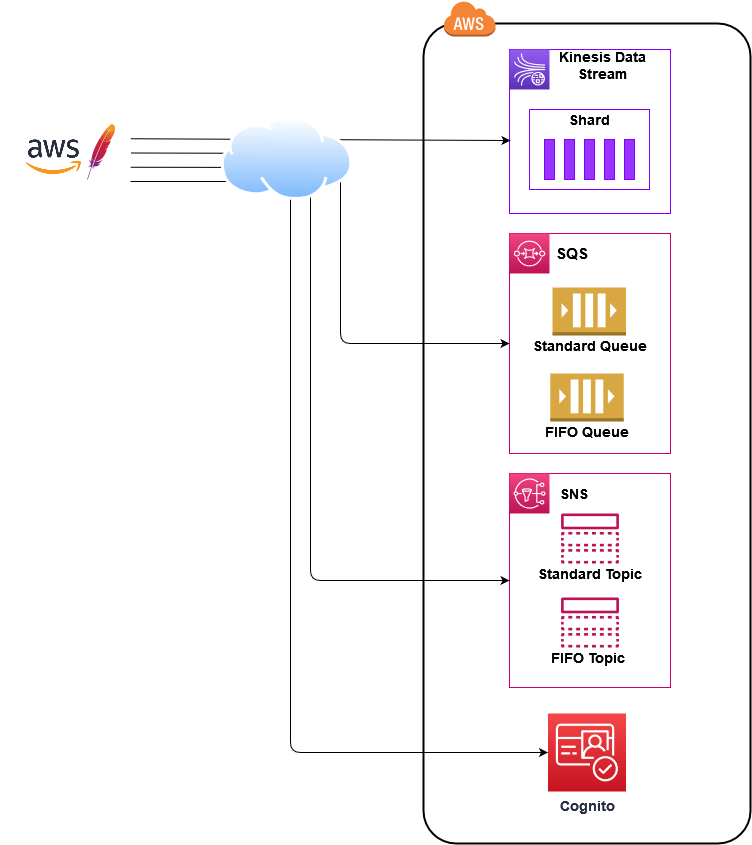
AWS Meter is a comprehensive JMeter plugin designed to execute performance tests against AWS services including Kinesis, SQS, SNS, Cognito, and EventBridge. This plugin provides specialized Java samplers for each AWS service, leveraging the AWS SDK for seamless integration and communication.
When deploying AWS services in production, you need to configure them to handle both normal and peak loads effectively. AWS Meter helps you:
- Validate service configurations under various load conditions
- Execute proof-of-concepts (POCs) to understand AWS service capabilities and boundaries
- Perform load testing to ensure your AWS infrastructure can handle expected traffic
- Identify bottlenecks before they impact your production environment
- Test locally using LocalStack for development and CI/CD pipelines
AWS Meter currently supports testing for the following services:
- 🌊 Kinesis Data Stream - Real-time data streaming
- 📬 SQS - Message queuing (Standard & FIFO)
- 📢 SNS - Push notifications (Standard & FIFO)
- 🔐 Cognito - User authentication and authorization
- 🎫 EventBridge - Event-driven architecture
All services are fully compatible with LocalStack for local development! 🐳
Before installing AWS Meter, ensure you have:
- ☕ Java 11 or higher (recommended for full compatibility)
- 🔧 Apache JMeter (latest version recommended)
- 🏗️ Gradle (optional - wrapper included)
- ☁️ Active AWS Account OR 🐳 LocalStack for local development
- 🐳 Docker (required for LocalStack)
For local development with LocalStack:
- Docker: Install Docker Desktop or Docker Engine
- LocalStack: Install via pip:
pip install localstack - awslocal CLI (optional):
pip install awscli-local

The easiest way to install AWS Meter is through the JMeter Plugins Manager:
-
Install JMeter Plugins Manager
- Download
plugins-manager.jarfrom jmeter-plugins.org - Place it in
$JMETER_HOME/lib/ext/directory
- Download
-
Restart JMeter
-
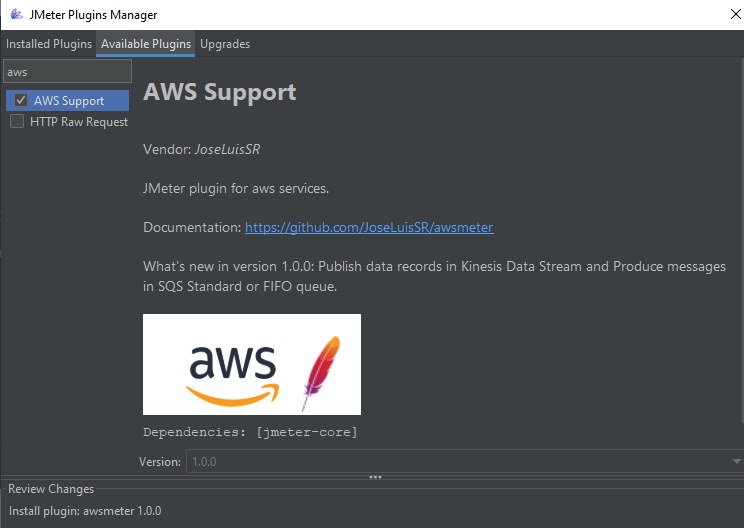
Install AWS Meter
- Navigate to Options → Plugins Manager
- Go to Available Plugins tab
- Search for "aws"
- Select AWS Meter and click Apply Changes and Restart JMeter
If you prefer to build from source:
-
Clone the repository
git clone https://github.com/JoseLuisSR/awsmeter.git cd awsmeter -
Build the JAR file
# Using Gradle wrapper (recommended)
./gradlew uberJar

# Or using system Gradle
gradle uberJar
-
Install the plugin
- Copy
awsmeter-x.y.z.jarfrombuild/libs/to$JMETER_HOME/lib/ext/ - Restart JMeter
- Copy
Set up LocalStack for local AWS service emulation:
# Install LocalStack
pip install localstack
localstack start

# Install LocalStack CLI tools (optional but recommended)
pip install awscli-local

# Verify installation
localstack --version- Create a free AWS account
- Take advantage of the 12-month free tier
- Choose your preferred AWS region
- Create an IAM user with programmatic access
- Generate access key ID and secret access key
- Important: Follow the principle of least privilege
- Create an IAM Group with appropriate policies
- Attach the user to the group
- Grant only the minimum permissions needed for your tests
Method A: Credentials File (Recommended for local development)
Create ~/.aws/credentials:
[default]
aws_access_key_id = YOUR_ACCESS_KEY_ID
aws_secret_access_key = YOUR_SECRET_ACCESS_KEY

[localstack]
aws_access_key_id = test
aws_secret_access_key = test

[profile-name]
aws_access_key_id = ANOTHER_ACCESS_KEY_ID
aws_secret_access_key = ANOTHER_SECRET_ACCESS_KEY
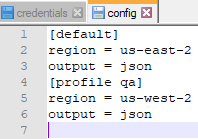
Create ~/.aws/config:
[default]
region = us-east-1
output = json

[profile localstack]
region = us-east-1
output = json
endpoint_url = http://localhost:4566

[profile profile-name]
region = eu-west-1
output = json
Method B: AWS CLI Setup
# For AWS
aws configure

# For LocalStack
awslocal configure
Method C: Environment Variables
# For AWS
export AWS_ACCESS_KEY_ID=your-access-key-id
export AWS_SECRET_ACCESS_KEY=your-secret-access-key
export AWS_DEFAULT_REGION=us-east-1

# For LocalStack
export AWS_ACCESS_KEY_ID=test
export AWS_SECRET_ACCESS_KEY=test
export AWS_DEFAULT_REGION=us-east-1
export AWS_ENDPOINT_URL=http://localhost:4566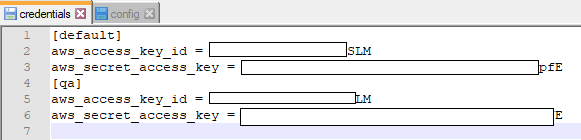
AWS Meter automatically detects and uses the most appropriate credential source:
- Explicit credentials: Provide access key and secret in JMeter parameters
- Profile-based: Use credential files with specific profiles
- LocalStack: Use test credentials with custom endpoint
For applications running in AWS with IAM roles, leave credential parameters empty:
aws_access_key_id: (empty)
aws_secret_access_key: (empty)
aws_session_token: (empty)
aws_configure_profile: default
AWS Meter will automatically use:
- ECS Task IAM Role (Amazon ECS)
- EC2 Instance Profile (Amazon EC2)
- Environment variables (AWS_ACCESS_KEY_ID, AWS_SECRET_ACCESS_KEY)
If you're new to JMeter, watch this helpful JMeter Beginners Tutorial.
- Open the example: Load
awsmeter.jmxin JMeter - Configure AWS parameters: Fill in the following Java request parameters
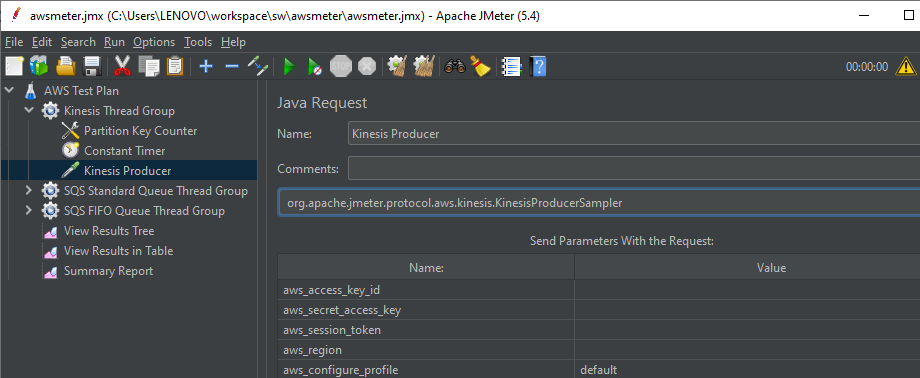
| Parameter | Description | Required | Example |
|---|---|---|---|
aws_access_key_id |
Your AWS access key ID | AKIAIOSFODNN7EXAMPLE |
|
aws_secret_access_key |
Your AWS secret access key | wJalrXUtnFEMI/K7MDENG/bPxRfiCYEXAMPLEKEY |
|
aws_session_token |
Session token for temporary credentials | ❌ | Leave empty unless using temporary credentials |
aws_region |
AWS region for your services | ✅ | us-east-1 |
aws_configure_profile |
Profile name from credentials file | ❌ | default |
aws_endpoint_custom |
Custom endpoint URL | ❌ | Leave empty for AWS |
| Parameter | Description | Required | Example |
|---|---|---|---|
aws_access_key_id |
LocalStack access key | ✅ | test |
aws_secret_access_key |
LocalStack secret key | ✅ | test |
aws_session_token |
Session token | ❌ | Leave empty |
aws_region |
AWS region | ✅ | us-east-1 |
aws_configure_profile |
Profile name | ❌ | localstack |
aws_endpoint_custom |
LocalStack endpoint | ✅ | http://localhost:4566 |
💡 Tip: Leave credential parameters empty to use credential files or IAM roles automatically.
For detailed configuration instructions for each AWS service:
- 🌊 Kinesis Data Stream
- 📬 SQS
- 📢 SNS
- 🔐 Cognito
- 🎫 EventBridge
AWS Meter follows a modular, extensible architecture that makes it easy to add support for new AWS services.
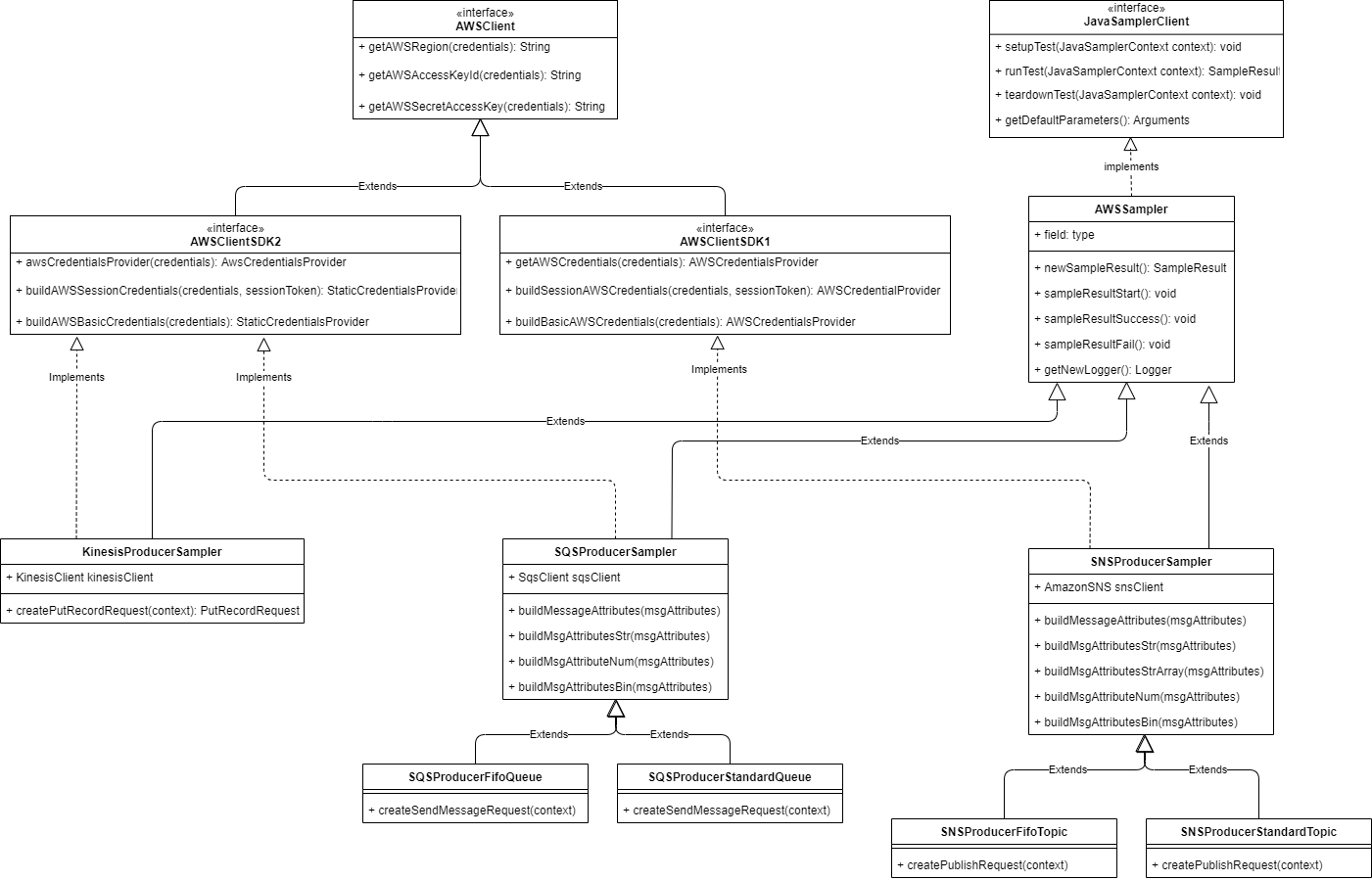
AWSSampler.java: Base class for all AWS service samplersAWSClientSDK1.java: Interface for AWS SDK v1 implementationsAWSClientSDK2.java: Interface for AWS SDK v2 implementations
Following JMeter's protocol convention:
org.apache.jmeter.protocol.aws.kinesis- Kinesis Data Stream samplersorg.apache.jmeter.protocol.aws.sqs- SQS Standard and FIFO queue samplersorg.apache.jmeter.protocol.aws.sns- SNS Standard and FIFO topic samplersorg.apache.jmeter.protocol.aws.cognito- Cognito authentication samplersorg.apache.jmeter.protocol.aws.eventbus- EventBridge samplers
To add support for a new AWS service:
- Create a new package following the naming convention
- Extend
AWSSampler.java - Implement either
AWSClientSDK1.javaorAWSClientSDK2.java - Override required methods for client creation, parameters, execution, and cleanup
Problem: Exception when using Java 8 or lower with JMeter Plugins installation
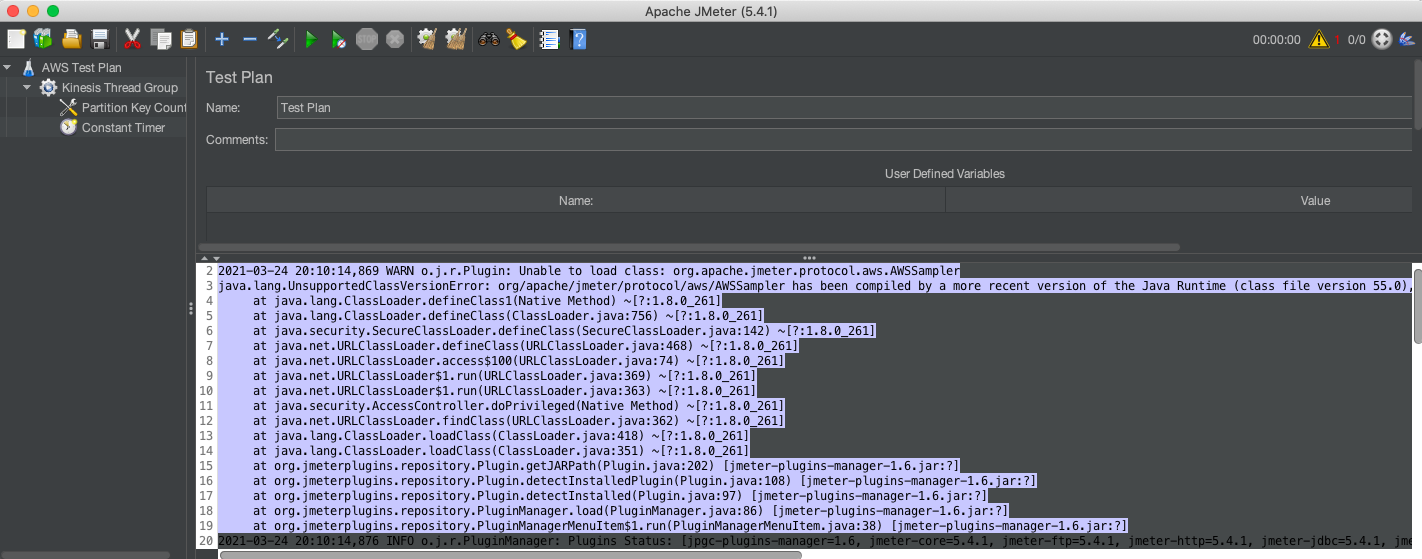
Solutions:
- Upgrade Java: Install Java 11+ and run JMeter with this version
- Manual Installation: Build from source and install manually
- Check JMeter Version: Ensure you're using a compatible JMeter version
Problem: "Unable to load AWS credentials" error
Solutions for AWS:
- Verify credential file format and location (
~/.aws/credentials) - Check IAM user permissions
- Ensure correct region configuration
- Validate access key and secret key values
Solutions for LocalStack:
- Use
test/testcredentials - Ensure LocalStack is running:
curl http://localhost:4566/_localstack/health - Verify endpoint configuration:
http://localhost:4566 - Check LocalStack logs for errors
Problem: Timeout or connection refused errors
Solutions:
- Verify AWS region matches your service location
- Check network connectivity and firewall settings
- Validate service endpoints
- Ensure IAM policies allow service access
Problem: Slow test execution or timeouts
Solutions:
- Increase JMeter heap size:
-Xms1g -Xmx4g - Adjust thread pool settings
- Optimize AWS service configurations
- Monitor AWS service limits and quotas
If you encounter issues not covered here:
- Check the GitHub Issues
- Review AWS service documentation
- Consult JMeter performance testing best practices
- Consider AWS support if using paid services
We welcome contributions to AWS Meter! Whether you're fixing bugs, adding new AWS service support, or improving documentation, your help is appreciated.
Before submitting a PR, please ensure your contribution meets these requirements:
- Minimum 95% code coverage is required for all new and modified code
- All tests must pass before PR approval
- Write comprehensive unit tests for new features
- Include integration tests when applicable
-
Fork the repository and create a feature branch
git checkout -b feature/your-awesome-feature
-
Make your changes following the existing code style
- Add new AWS service samplers in appropriate packages
- Follow the established architecture patterns
- Update documentation as needed
-
Write tests with proper coverage
# Run tests locally to ensure they pass
./gradlew clean test jacocoTestReport
-
Submit your PR with:
- Clear description of changes
- Reference to any related issues
- Screenshots/examples if applicable
Our CI pipeline automatically validates:
- ☕ Java compatibility (Java 24)
- 🧪 Test execution on Ubuntu latest
- 📊 Coverage reporting via JaCoCo
- 🛡️ Coverage enforcement (95% minimum)
- 📝 PR status updates with coverage reports
- All PRs require review by @JoseLuisSR
- Address any feedback promptly
- Keep PRs focused and reasonably sized
- Ensure compatibility with both AWS and LocalStack
Looking to contribute? Consider these areas:
- 🆕 Support for additional AWS services
- 🐛 Bug fixes and performance improvements
- 📚 Documentation enhancements
- 🧪 Test coverage improvements
- 🔧 LocalStack compatibility updates
Thank you for helping make AWS Meter better! 🙏
- 📖 AWS Documentation
- 🐳 LocalStack Documentation
- 🎯 JMeter User Manual
- 🏗️ AWS Architecture Center
- 💡 Performance Testing Best Practices
- 🔧 LocalStack Samples
Happy Testing! 🎉 If you find AWS Meter helpful, please consider giving it a ⭐ on GitHub.