Final project for course Application Development for iOS 2, taught at PEF MENDELU, graded 36/40 points (due to absence of tests)
Crown Trader is an iOS application developed in Swift that allows users to explore, track, and simulate stock trading. The project consists of two synchronized apps:
- Mobile App: Offers detailed stock information, trading simulation, news, and personalized watchlists.
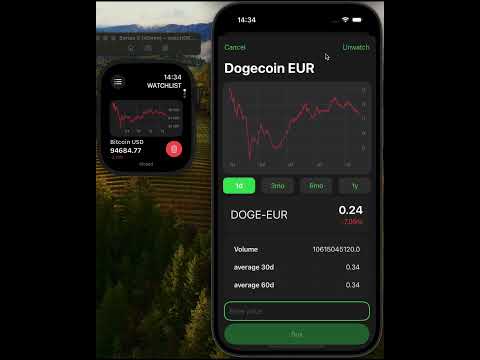
- Watch App: Provides a streamlined experience with key stock data and portfolio management directly on your wrist.
-
Main Page (Markets)
- Predefined Stocks List:
Displays a list of stocks including the stock name, symbol, current price, and the 24-hour percentage change. - Interactive Chart:
Tapping on a stock updates the chart at the top of the screen. Users can switch between different time intervals: 1 day, 3 months, 6 months, and 1 year. - Global Search:
A search bar is present on every screen (except the News screen) for quick access to stocks.
- Predefined Stocks List:
-
Stock Preview Modal
- Detailed View:
When a stock is searched and selected from the search results, a modal window is presented with:- An interactive chart with time intervals (1d, 3mo, 6mo, 1y).
- Stock details including name, symbol, volume, 24-hour percentage change, and averages for the last 30 and 60 days.
- Actions:
Options to "Watch" or "Buy" the stock are available, with the current price displayed in dollars.
- Detailed View:
-
Watchlist Screen
- Personalized Watchlist:
Displays stocks that have been added to the watchlist. - Interactive Detail:
Tapping a stock opens the Stock Preview Modal where the "Watch" option changes to "Unwatch" for removal.
- Personalized Watchlist:
-
Snaps Screen (Portfolio Simulator)
- Account Overview:
Shows profit, profit percentage, and available money to invest. - Account Actions:
- Add Money: Increase the available funds.
- Reset Account: Reset the account and portfolio.
- Trading Simulation:
Stocks purchased via the Stock Preview Modal appear in this section with details such as symbol, name, actual purchase price (with market updates), and percentage change since purchase. - Selling Stocks:
Selling stocks updates the available balance and recalculates profit.
- Account Overview:
-
News Screen
- News Feed:
Displays a list of news items with images and titles. - News Detail:
Tapping on a news item opens a preview screen showing a larger image and detailed description.
- News Feed:
- Synchronized Experience:
The Watch app synchronizes with the Mobile app, ensuring that any changes in the watchlist or portfolio are updated across both platforms. - Menu Navigation:
- Markets: Access the predefined stocks available on the Mobile App’s main page.
- Watchlist: View and manage your watchlist.
- Snaps: Manage your simulated portfolio.
- Stock Detail:
- Each stock card includes a chart, stock name, current price, and daily change.
- Action Buttons:
- Unwatch: Remove a stock from the watchlist.
- Sell: Execute a sell action for stocks in the portfolio.
- Data Persistence:
Utilizes CoreData to store stock data, user balances, and transaction history locally, providing fast offline access. - Data Fetching:
Stock information (e.g., prices, volume, percentage changes) is fetched from an external API to ensure real-time updates. - Synchronization:
Both the Mobile and Watch apps are synchronized so that any modifications (adding/removing stocks, trading actions) are reflected across both devices.
-
Exploring Stocks:
Tap on any stock on the main page to view detailed charts and market data. Use the search bar to quickly locate specific stocks. -
Managing Your Watchlist:
Add stocks to your watchlist from the Stock Preview Modal and manage them on the Watchlist screen. -
Simulated Trading:
- Purchase stocks using the available funds in your simulated portfolio.
- Monitor your investments in the Snaps screen.
- Sell stocks to update your available balance and calculate profit.
-
Staying Informed:
Browse the News screen for the latest market news and detailed articles. -
On Your Wrist:
Use the Watch app for quick access to market data, watchlist management, and portfolio updates while on the go.
-
Clone the Repository:
git clone https://github.com/JiriSuster/crowntrader.git cd crowntrader -
Open in Xcode:
- Open the project using
CrowTrader.xcodeproj.
- Open the project using
-
Build and Run:
- Select the desired scheme (Mobile or Watch app) in Xcode.
- Run on your simulator or connected device.