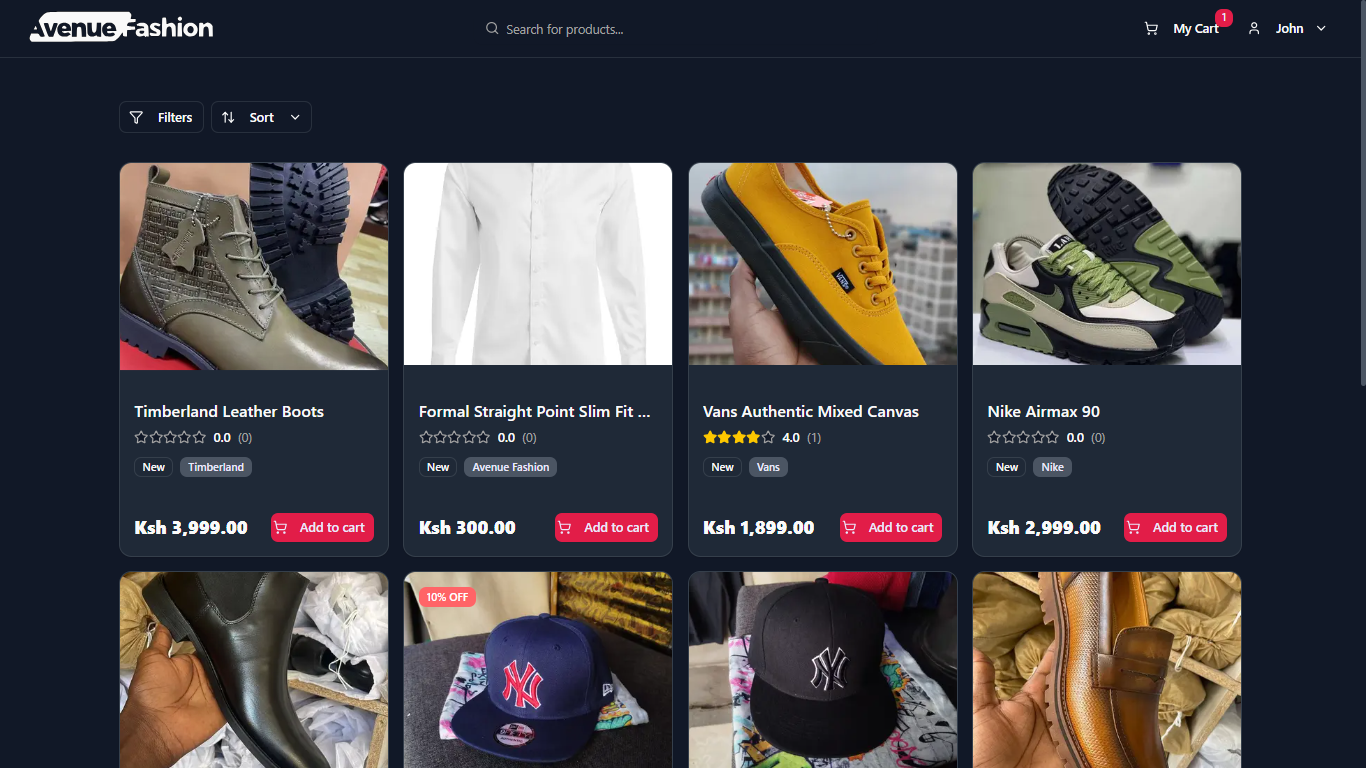
Avenue Fashion is a comprehensive, full-stack e-commerce platform built with a modern technology stack. It provides a seamless, performant shopping experience for customers and a powerful, data-driven dashboard for administrators.
This project now features a robust product variation system, a complete PWA (Progressive Web App) implementation for an app-like experience, and a real-time, event-driven push notification system to enhance user engagement.
- Project Overview
- Key Features
- Tech Stack
- Architectural Decisions
- Project Structure
- Getting Started
- Future Improvements
- Contributing
- License
This project is an end-to-end solution for a modern online fashion store. It leverages the power of Next.js 15 with the App Router, combining server-side rendering for optimal performance and SEO with a rich, interactive client-side experience. The backend logic is handled entirely within Next.js API Route Handlers, connecting to a MongoDB database via Mongoose for robust data persistence and modeling.
The application is architecturally split into two primary domains using Route Groups:
- The Storefront (
(customer)): The public-facing e-commerce site where customers can discover products, manage their cart and profile, place orders, and track their history. - The Admin Panel (
(admin)): A secure, role-protected area where administrators can view business analytics, manage the entire product catalog, process customer orders, manage user accounts, and configure site settings.
- PWA Ready: Installable as a Progressive Web App for an enhanced, native-app-like experience with offline access capabilities.
- Dynamic Product Catalog: A product grid with server-side filtering, sorting, and "load more" pagination.
- Product Variations: Customers can select product variants (e.g., size, color), with the price, images, and stock status updating dynamically.
- Global Search: Debounced, real-time search with product suggestions and a persistent search history stored in cookies.
- Optimistic UI Shopping Cart: Client-side state management for a smooth, non-blocking user experience.
- Secure Authentication: Robust sign-in/sign-up and session management powered by NextAuth.js (Auth.js v5).
- Live Payment Integration: Secure, real-time payments powered by Paystack, with options for card and M-Pesa.
- Real-Time Push Notifications: Users can opt-in to receive instant updates on order confirmation, payment success, and shipping status changes.
- Promotional Banners & Notifications: A dynamic, dismissible banner displays random voucher codes. A Vercel Cron Job automates re-engagement by sending promotional push notifications to all subscribed users every two days.
- Multi-Step Checkout: A guided checkout process with saved address selection, dynamic shipping fee calculation, and voucher application.
- Customer Dashboard: A centralized portal for users to view their profile, track order history with a visual timeline, and manage their saved addresses.
- Product Reviews & Ratings: Users can submit, view, and edit reviews for products.
- Analytics Overview: A dashboard with key metrics like total revenue, sales volume, and new customers.
- New Order Notifications: Admins receive real-time push notifications whenever a new order is placed.
- Advanced Product Management: Full CRUD functionality for both simple and variable products.
- Dynamic Variation Builder: An intuitive interface to define variation types (e.g., "Color", "Size") and generate all possible variant combinations.
- Inline Variant Editing: Admins can set unique prices, stock levels, SKUs, and upload specific images for each individual product variant.
- Order Management: View and update the fulfillment status of all customer orders, which automatically triggers a push notification to the customer.
- User Management: View all users and manage their roles (e.g., promote a user to admin).
- Voucher & Location Management: Create and manage discount codes and the hierarchy of shipping locations and fees.
This project utilizes a modern, cohesive set of tools to deliver a high-quality application.
- Framework: Next.js 15 (with App Router)
- Language: TypeScript
- Database: MongoDB with Mongoose
- Authentication: NextAuth.js (Auth.js v5)
- Payment Gateway: Paystack
- Push Notifications: Web Push API with Vercel Cron Jobs for scheduled marketing.
- Styling: Tailwind CSS
- UI Components: shadcn/ui
- Data Tables: TanStack Table v8
- Data Visualization: Recharts
- UI Notifications: Sonner (for toast messages)
- Media Management: Cloudinary
- Server Components First: The application defaults to using React Server Components (RSC) for data fetching and rendering static content, minimizing client-side JavaScript.
- Client Components for Interactivity: Components requiring user interaction are explicitly marked with
"use client". - Event-Driven Notifications: Push notifications are triggered by backend events (e.g., database writes for new orders, status changes, successful payments) rather than being coupled to the client-side UI action. This ensures reliability and separation of concerns.
- Scheduled Tasks for Marketing: Vercel Cron Jobs are used to automate re-engagement marketing, decoupling it from user activity and ensuring consistent outreach.
- Variation-Centric Product Model: A single
Productdocument contains an array ofvariants, each with its own properties. This is more efficient than creating a separate document for every variant. - Decoupled Business Logic: Critical actions like clearing a user's cart are decoupled from the initial order creation and are instead tied to a confirmed successful payment event.
- URL-driven State Management: Filterable and paginated views use URL search parameters (
?page=2) for shareable, bookmarkable state. - Centralized API Logic: All backend logic is encapsulated within Next.js API Route Handlers in the
app/api/directory.
The project follows the standard Next.js App Router structure, organized by feature and route group.
/
├── app/
│   ├── (admin)/                # Route group for the admin panel
│   ├── (customer)/             # Route group for customer-facing pages
│   ├── api/
│   │   ├── cron/               # API routes triggered by Vercel Cron Jobs
│   │   ├── notifications/      # API route for push subscription management
│   │   └── webhooks/           # Secure internal webhooks
│   └── globals.css
├── components/
│   ├── prompts/                # UI components for PWA install, cookies, notifications
│   └── ui/                     # Reusable shadcn/ui components
├── config/
│   └── marketing.ts            # Centralized marketing copy for banners and notifications
├── lib/
│   ├── data.ts                 # Centralized data fetching and mutation functions
│   ├── db.ts                   # MongoDB connection logic
│   └── notification-service.ts # Server-side logic for sending push notifications
├── models/
│   ├── PushSubscription.ts     # Mongoose schema for notification subscriptions
│   └── *.ts                    # Other Mongoose schema definitions
├── public/
│   ├── sw.js                   # The service worker for PWA and push notifications
│   └── icons/                  # PWA icons
├── types/
│   └── index.ts                # TypeScript interfaces
├── vercel.json                 # Vercel configuration, including cron jobs
└── .env.example                # Example environment variables file
Follow these instructions to get a copy of the project up and running on your local machine.
- Node.js (v18.x or later)
- npm, yarn, or pnpm
- A MongoDB instance (local or via MongoDB Atlas)
- A Paystack account.
- A Cloudinary account.
- Clone the repository:
git clone https://github.com/JhnOkall/new-avenuefashion.git cd new-avenuefashion - Install dependencies:
npm install
- Generate VAPID Keys for push notifications:
Copy the generated public and private keys to your environment file.
npx web-push generate-vapid-keys
Create a .env.local file by copying .env.example. Then, fill in the required values.
# .env.local

# MongoDB Connection String
MONGODB_URI="mongodb+srv://<user>:<password>@<cluster-url>/avenue-fashion?retryWrites=true&w=majority"

# NextAuth.js Configuration
AUTH_SECRET="your-super-secret-nextauth-secret" # Generate with: openssl rand -base64 32
AUTH_GOOGLE_ID="your-google-client-id"
AUTH_GOOGLE_SECRET="your-google-client-secret"

# Paystack & Internal Webhooks
NEXT_PUBLIC_PAYSTACK_PUBLIC_KEY="pk_test_xxxxxxxxxxxxxxxxxxxxxxxx"
AVENUE_FASHION_INTERNAL_SECRET="your-secret-for-internal-webhooks"

# Cloudinary Configuration
NEXT_PUBLIC_CLOUDINARY_CLOUD_NAME="your-cloud-name"
NEXT_PUBLIC_CLOUDINARY_UPLOAD_PRESET="your-unsigned-upload-preset"

# VAPID Keys for Push Notifications (from `npx web-push generate-vapid-keys`)
NEXT_PUBLIC_VAPID_PUBLIC_KEY="your-generated-public-key"
VAPID_PRIVATE_KEY="your-generated-private-key"

# Vercel Cron Job Security
CRON_SECRET="your-strong-random-cron-secret"

# Public URL of the application
NEXT_PUBLIC_APP_URL="http://localhost:3000"- Start the development server:
npm run dev
- Open your browser: Navigate to http://localhost:3000 to see the application.
[x]Product Variations & PWA/Notifications: Implemented.[ ]Robust Form Validation: Integratereact-hook-formandzodfor schema-based validation on all forms.[ ]Retry Logic for Payments: Implement a "Retry Payment" feature for orders with a pending payment status.[ ]Comprehensive Testing: Add a testing suite with Jest/Vitest and React Testing Library for unit tests, and Cypress/Playwright for E2E tests.[ ]Error Reporting: Integrate a service like Sentry for real-time error tracking in production.[ ]Internationalization (i18n): Add support for multiple languages and currencies.
Contributions are what make the open-source community such an amazing place to learn, inspire, and create. Any contributions you make are greatly appreciated.
- Fork the Project
- Create your Feature Branch (
git checkout -b feature/AmazingFeature) - Commit your Changes (
git commit -m 'Add some AmazingFeature') - Push to the Branch (
git push origin feature/AmazingFeature) - Open a Pull Request
This project is licensed under the MIT License.