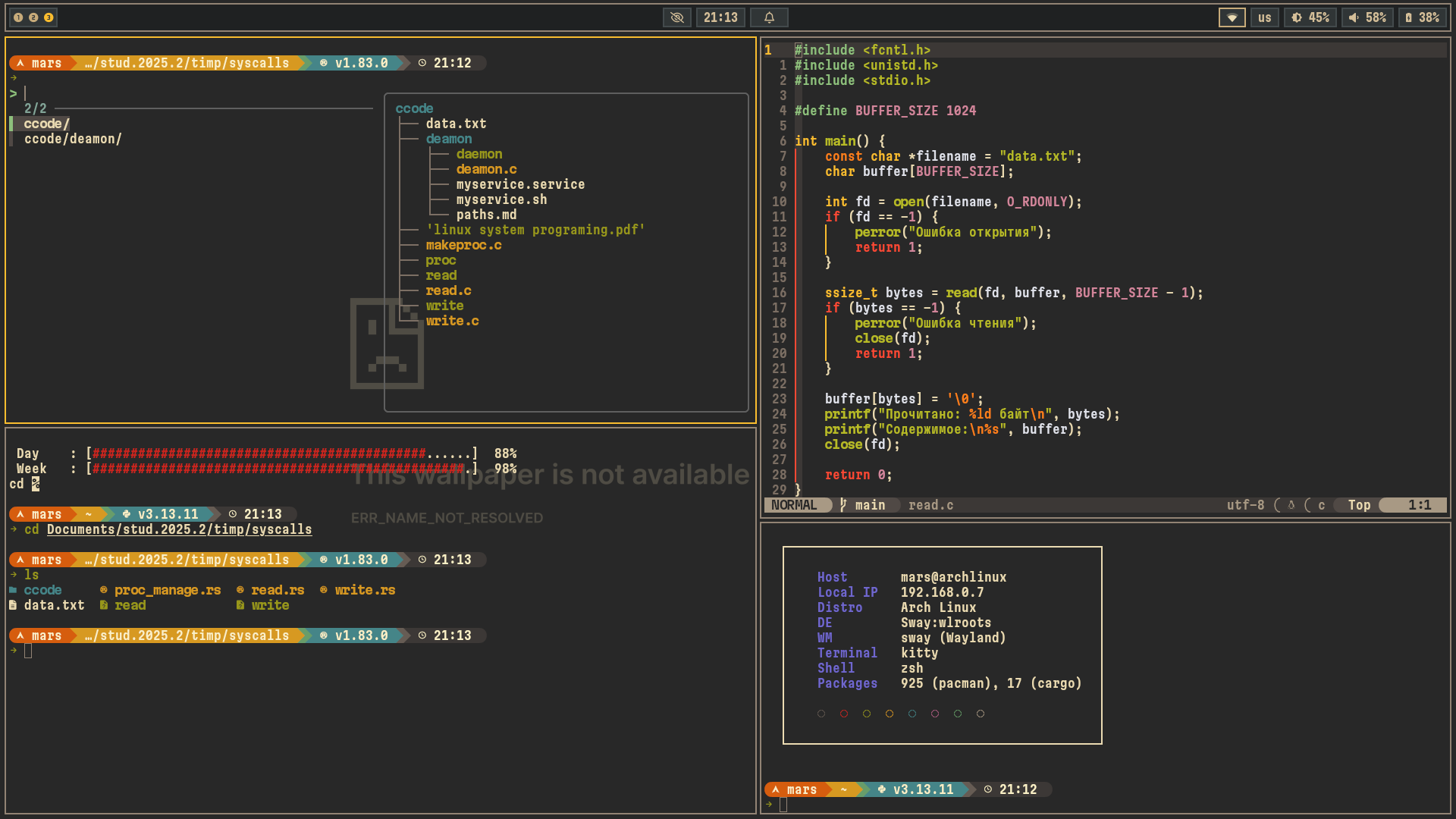
advanced dots (arch x wayland)
Note
Sway and Hyprland are configured identically - they use same keybindings, scripts and programs
The repo must be cloned into the home directory (e.g. /home/user/wayland)
wayland
.
├── config
│   ├── btop
│   │   ├── btop.conf
│   │   └── themes
│   │       └── gruv.theme
│   ├── cava
│   │   ├── config
│   │   └── shaders
│   ├── gtk-3.0
│   │   └── settings.ini
│   ├── gtk-4.0
│   │   └── settings.ini
│   ├── helix
│   │   └── config.toml
│   ├── hypr
│   │   ├── env.conf
│   │   ├── hypridle.conf
│   │   ├── hyprland.conf
│   │   ├── hyprlock.conf
│   │   └── wallpaper.conf
│   ├── kitty
│   │   └── kitty.conf
│   ├── macchina
│   │   ├── ascii.txt
│   │   ├── macchina.toml
│   │   └── themes
│   │       └── Carbon.toml
│   ├── mimeapps.list
│   ├── nvim
│   │   ├── init.lua
│   │   ├── init.vim.back
│   │   └── minimal.lua
│   ├── pacman.conf
│   ├── starship.toml
│   ├── sway
│   │   └── config
│   ├── swaylock
│   │   └── config
│   ├── swaync
│   │   ├── config.json
│   │   └── style.css
│   ├── tlp.conf
│   ├── tofi
│   │   └── config
│   ├── waybar
│   │   ├── config.jsonc
│   │   ├── style.css
│   │   └── themes
│   │       ├── 0.5
│   │       ├── block
│   │       └── cpc
│   └── wofi
│       └── style.css
├── draft.sh
├── install.sh
├── LICENSE
├── package.list
├── pacmanq.log
├── photos
├── README.md
├── scripts
│   ├── clip.sh
│   ├── hyprsys.sh
│   ├── idle_sway.sh
│   ├── screen.sh
│   ├── swaygg.sh
│   ├── swaysys.sh
│   ├── swaywall.sh
│   ├── tmux.sh
│   ├── tofi
│   │   └── wall.sh
│   ├── wall.sh
│   ├── xdg.sh
│   └── xdg_sway.sh
├── smth
│   ├── fetch.sh
│   ├── pipes.sh
│   └── rain.sh
├── themes
│   ├── gruvbox-cursor
│   │   ├── cursors
│   │   └── index.theme
│   └── gruvbox-dark
│       ├── gtk-2.0
│       ├── gtk-3.0
│       ├── gtk-4.0
│       ├── index.theme
│       └── plank
└── walls
    ├── black.jpg
    ├── nasa.png
    ├── this-wallpaper-is-not-available.png
    └── trees.jpg

43 directories, 437 files
Super + TTerminal
Super + BBrowser
Super + FFile Manager
Super + OApp Launcher
Super + Shift + GObsidian (notes)
Super + YDashboard
Super + WChange wallpaper
Super + Shift + PColor picker
Super + Shift + VClipboard (history)
Super + Shift + WScreenshot
Super + XClose window
Super + EFloat / tile
Super + Shift + FFullscreen
Super + CChange split direction
Super + NSplit horizontal
Super + MSplit vertical
Super + ZFocus previous window
Super + SShow scratchpad
Super + Shift + SSend window to scratchpad
Super + H or Super + ←Focus left
Super + L or Super + →Focus right
Super + K or Super + ↑Focus up
Super + J or Super + ↓Focus down
Super + Shift + H or Super + Shift + ←Move left
Super + Shift + L or Super + Shift + →Move right
Super + Shift + K or Super + Shift + ↑Move up
Super + Shift + J or Super + Shift + ↓Move down
Super + REnter resize mode (border turns red)
H or ←Shrink width
L or →Expand width
K or ↑Shrink height
J or ↓Expand height
Escape or EnterExit resize mode
Alt + 1 … 6Switch to workspace 1–6
Super + Shift + 1 … 6Move window to workspace 1–6
F1 — MuteToggle mute
F2 — Vol–Volume down
F3 — Vol+`Volume up
F4 — Mic muteToggle mic mute
F7 — Play/PausePlay / Pause
F8 — PrevPrevious track
F9 — NextNext track
F5 — Bright–Brightness −10%
F6 — Bright+`Brightness +10%
Super + QSystem menu (logout, reboot, lock)
Super + Shift + QLocal Recall
Power buttonSystem menu
Super + BackspaceReload config (Sway only)
Ctrl + OOpen Yazi file manager (cd on exit)
↑ / ↓History search
HomeBeginning of line
EndEnd of line
DeleteDelete char under cursor
Ctrl + →Jump word forward
Ctrl + ←Jump word backward
Esc EscAdd sudo to previous command
Ctrl + TFuzzy find files (fzf)
Alt + CFuzzy cd into directory (fzf)
Ctrl + RFuzzy search command history (fzf)
..cd ..
...cd ../..
wipLocal ip
gipPublic ip
pypython3
trash <file>Move to ~/.local/share/Trash
hg <query>Bash history grep
portsOpen ports
pathPATH
tempProc temp
yccYandex cli config
gitsShow edited and untracked git files
chrome-proxyChromium via proxy
dpiProxy
cpp <file.cpp>compile with g++ -std=c++17 and run
Ctrl + Shift + CCopy to clipboard
Ctrl + Shift + VPaste from clipboard
Ctrl + BNew window (same cwd)
Ctrl + HLaunch tmux session (script)
Ctrl + WClose window
Ctrl + Shift + LeftPrevious tab / focus window left
Ctrl + Shift + RightNext tab / focus window right
Ctrl + Shift + UpMove tab up / focus window up
Ctrl + Shift + DownMove tab down / focus window down
Alt + LeftWord jump left
Alt + RightWord jump right
Ctrl + APrefix (replaces default Ctrl + B)
Prefix + |Split pane vertically
Prefix + -Split pane horizontally
Prefix + H/J/K/LFocus pane left/down/up/right
Prefix + Shift + H/J/K/LResize pane left/down/up/right (repeatable)
Prefix + Ctrl + CNew session
Prefix + XKill session (with confirmation)
Prefix + RReload config
vBegin selection (copy mode)
yCopy selection (copy mode)