EN | RU
I recently open-sourced the program that I wrote myself and used for many years. Installation instructions have been tested on a clean Windows 10 and should be ok, but if you have any problems feel free to create a discussion or an issue. I'm also planning to upload a video with a demo of the installation process in the near future, it should help a little.
- What is ImoutoRebirth
- What does ImoutoRebirth look like
- Installation
- Internal Configuration
- ImoutoRebirth Architecture
ImoutoRebirth is a solution for organizing media files with a focus on anime images. It is inspired and deeply integrated with sites such as danbooru.donmai.us, yande.re, gelbooru.com, rule34.xxx.
I started writing it for myself many years ago because I am an avid image saver. Over time, different functions came together into a comprehensive solution, and I decided to publish it.
ImoutoRebirth will be most useful for those who love saving images (a lot of images) and then want to be able to sort through and find the ones they need, which is usually extremely challenging without tags.
Key features:
- Collections of files (images, videos, GIFs)
- Supported formats include
- jpg, jpeg, png, bmp, tiff, apng, gif, webp, jfif
- mp4, mov, webm, wmv, mov, m2ts, mpg, mpeg, mkv, f4v, flv, avi, m4v, swf
- zip as pixiv ugoira
- Background search and updating of tags for your images and metadata based on file hash from danbooru, sankaku, yande.re, gelbooru, rule34
- Local search for saved files and their tags
- Bulk tagging of files
- Display of notes from boorus on local images
- Automatic download of favorites from boorus to your collection
- Highlighting of saved images in the browser
There are two Windows desktop applications available for you.
For viewing and managing collections, and tagging. It's essentially an explorer.
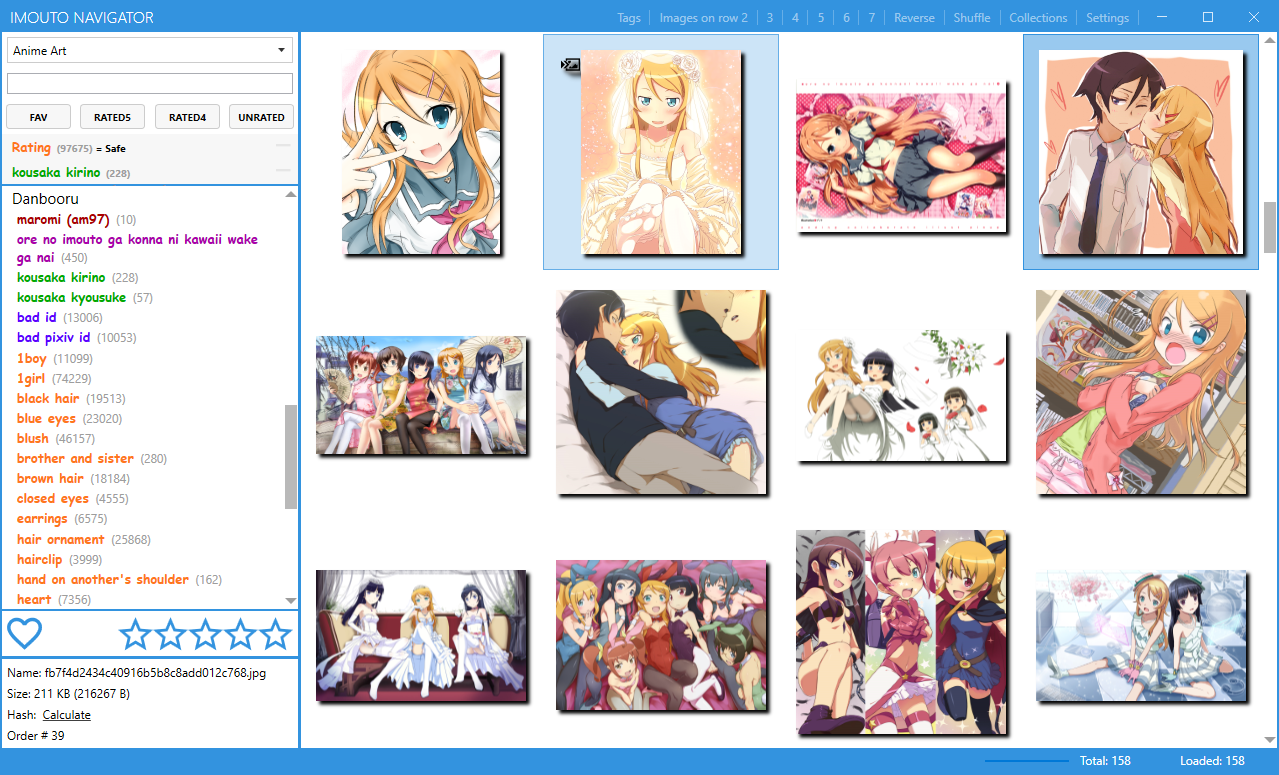
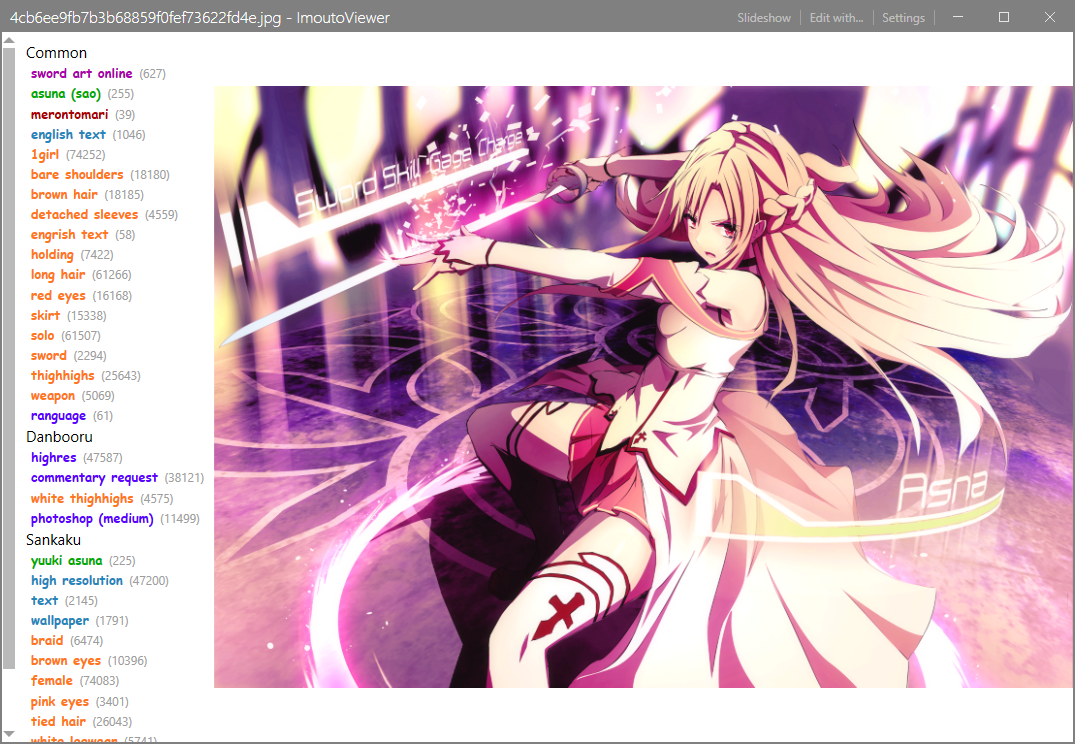
For viewing individual images. Its use is not mandatory, you can use your favorite image viewer, but Imouto Viewer allows you to read Notes from booru (usually these are translations of text in images), view and add your own tags.
The main idea of the app is that you have different collections with media that store your images/videos. After installation, you have to set up these collections in the ImoutoNavigator app. Each collection has source folders and (optionally) a destination folder. The app monitors each source folder, takes files from there, processes them, and moves them to the destination folder. After that files will be visible in the ImoutoNavigator app. Installation itself looks like this:
-
Download ImoutoRebirth.exe to any folder from the latest release
-
Run it (this is a self-extracting 7z archive), it will unpack the application
-
Run the install.cmd file to launch the installation process
-
It will check if necessary dependencies are installed and if they are not, it will install them for you later
-
Fill the accounts section for boorus and exhentai (if you're planning to save douji here), while it's not required, the app works much better with them
-
Leave everything else as default, click install and wait (installing postgres can take up to 10 minutes)
-
Optionally, you can install the Chrome or Firefox extension, which will highlight saved images and related images. Links: chrome firefox
Video guide with first launch, collection configuration, demo some features, Imouto Extensions demo: https://youtu.be/7Gnbc3296GU
Old video guide with installation and initial configuration, while obsolete still can give you some insights: https://youtu.be/rEg0WMQgmoE
Template and default values
{
  "DanbooruLogin": "",
  "DanbooruApiKey": "",
  "SankakuLogin": "",
  "SankakuPassword": "",
  "YandereLogin": "",
  "YandereApiKey": "",
  "RoomPort": "11301",
  "LilinPort": "11302",
  "KekkaiPort": "11303",
  "HarpySavePath": "",
  "HarpyFavoritesSaveJobRepeatEveryMinutes": "1",
  "KekkaiAuthToken": "",
  "LilinConnectionString": "Server=localhost;Port=5432;Database=LilinProd;User Id=postgres;Password=postgres;",
  "MeidoConnectionString": "Server=localhost;Port=5432;Database=MeidoProd;User Id=postgres;Password=postgres;",
  "RoomConnectionString": "Server=localhost;Port=5432;Database=RoomProd;User Id=postgres;Password=postgres;",
  "MassTransitConnectionString": "Server=localhost;Port=5432;Database=masstransit;User Id=postgres;Password=postgres;",
  "MeidoMetadataActualizerRepeatEveryMinutes": "5",
  "MeidoFaultToleranceRepeatEveryMinutes": "10080",
  "MeidoFaultToleranceIsEnabled": "true",
  "InstallLocation": "C:\\Program Files\\Imouto",
  "OpenSearchUri": "http://localhost:9200/",
  "ExHentaiIpbMemberId": "",
  "ExHentaiIpbPassHash": "",
  "ExHentaiIgneous": "",
  "ExHentaiUserAgent": "",
  "GelbooruApiKey": "",
  "GelbooruUserId": ""
}| Parameter | Required | Comment |
|---|---|---|
| DanbooruLogin | Optional but recommended, only if you want ImoutoRebirth to search tags for your files in danbooru | |
| DanbooruApiKey | Optional but recommended, you can find it at the end of your danbooru profile page, API Key row | |
| SankakuLogin | Optional, your sankaku login | |
| SankakuPassword | Optional, your sankaku password | |
| YandereLogin | Optional but recommended, only if you want ImoutoRebirth to search tags for your files in yandere | |
| YandereApiKey | Optional but recommended, you can find it in Profile / Settings | |
| RoomPort | * | Room service will be exposed through this port |
| LilinPort | * | Lilin service will be exposed through this port |
| KekkaiPort | * | Kekkai service will be exposed through this port |
| HarpySavePath | Optional, the service will automatically save your likes from configured boorus to this path. If you point it to one of your collection source folders, you will get liked images from booru automatically | |
| HarpyFavoritesSaveJobRepeatEveryMinutes | * | Interval in minutes, in which the service will check for new liked images |
| KekkaiAuthToken | * | Place here random string (you can generate new guid or something) |
| LilinConnectionString | * | Connection string for Lilin service to the postgres database |
| MeidoConnectionString | * | Connection string for Meido service to the postgres database |
| RoomConnectionString | * | Connection string for Room service to the postgres database |
| MassTransitConnectionString | * | Connection string for MassTransit SQL transport (replacement for rabbit mq) |
| MeidoMetadataActualizerRepeatEveryMinutes | * | Meido service will request actualization from Danbooru and Yandere in a specified interval |
| MeidoFaultToleranceRepeatEveryMinutes | * | Meido service will request tags for failed files in a specified interval |
| MeidoFaultToleranceIsEnabled | * | Meido service will repeat tag request for a failed file |
| InstallLocation | * | Installation location for ImoutoRebirth |
| OpenSearchUri | Optional, logging to open search | |
| ExHentaiIpbMemberId | Optional, ExHentai cookie ipbMemberId value | |
| ExHentaiIpbPassHash | Optional, ExHentai cookie ipbPassHash value | |
| ExHentaiIgneous | Optional, ExHentai cookie igneous value | |
| ExHentaiUserAgent | Optional, user agent to use for ExHentai requests | |
| GelbooruApiKey | Optional, your Gelbooru API key | |
| GelbooruUserId | Optional, your Gelbooru user id |
Beyond the two applications mentioned earlier, ImoutoRebirth internally consists of multiple services, each with its own function. These will be installed automatically, and no particular knowledge about them is required. However, for the inquisitive, this section describes the inner workings and purposes of different services, as well as their dependencies. If you follow the installation instructions above, these services will be automatically installed as Windows Services. The system also requires PostgreSQL to operate. You can install it independently or use the scripts provided with each release.
You can view the basic architecture and the interaction of services in greater detail in this diagram, open it with diagrams.net or draw.io.
This service is responsible for interacting with the file system. It is the one that stores your collections, moves files, checks for duplicates, calculates and compares md5 hashes. Configuring collections from Imouto Navigator calls methods specifically in it.
This service handles interactions with the outside world and collects tags and metadata. Receiving tasks asynchronously (for instance, when you save a new file), it accesses the known sites and downloads tags, notes, and metadata from them. It also manages tag updates, tracking changes that the sites typically publish as a feed. Ideally, you should always have up-to-date tags locally, just like on the websites.
This service is responsible for storing and searching tags. The results of Arachne's work and the tags you add yourself are stored here.
This coordinating service monitors the processes occurring in the system and assigns tasks to Arachne for searching or updating tags.
This mini-service downloads favs from your site accounts and stores them in the specified folder.
This API gateway proxies requests to internal services and allows you to check whether specific images are stored in the system. For example, Imouto Extensions uses it.
This service won't run or be installed in your system, as it's an updater service for the new version.
The app that you can use to browse images individually, supports local tags, notes, slideshow, fixed zoom, and more.
Chrome extension | Firefox extension, will highlight saved and related images.