
Kick Drop Miner automates watching Kick.com streams so you can keep drop timers moving without babysitting the site. The desktop app ships with a CustomTkinter UI, Selenium + undetected-chromedriver under the hood, persistent local storage, and smart handling for live/offline transitions.
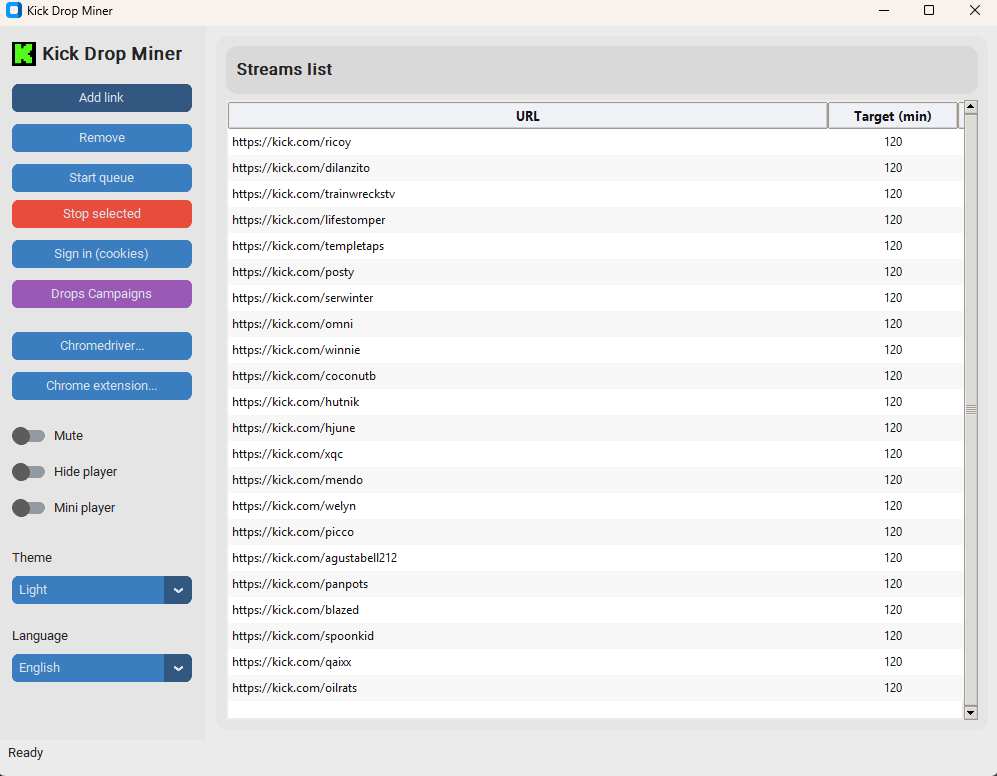
- Queue automation - stack as many live URLs as you want, give each a minute target, and let the queue skip finished entries or re-queue offline ones automatically.
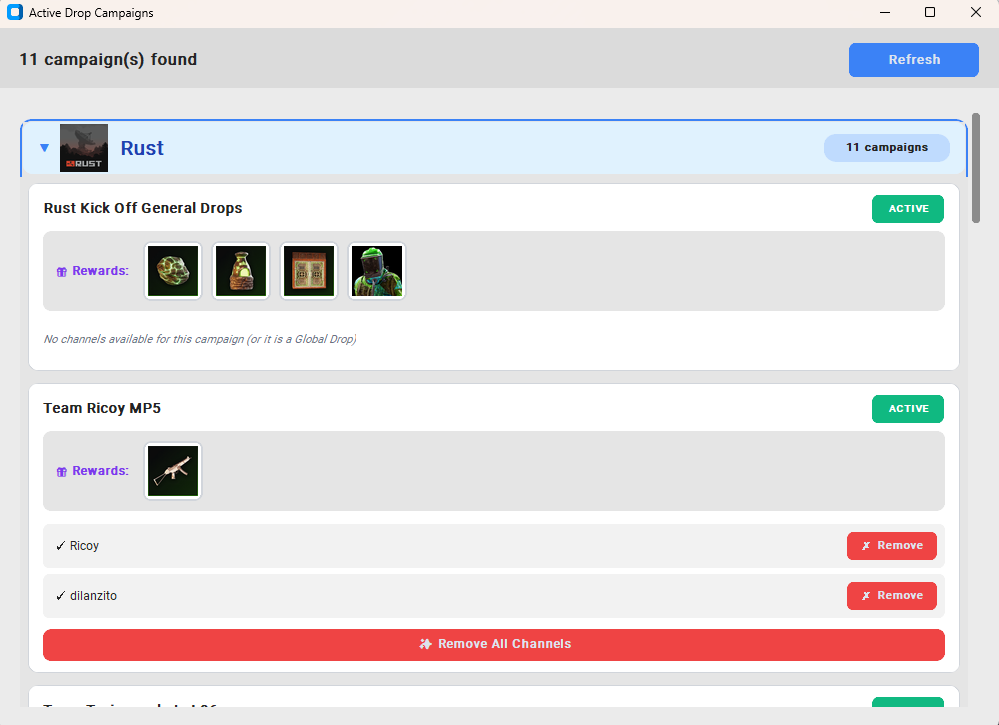
- Drop campaign browser - fetch the current Kick drop campaigns, preview the participating channels, and add any channel (or all of them) to your queue in one click.
- Cookie workflow - open a Chrome window to log in manually or import cookies directly from Chrome/Edge/Firefox via
browser_cookie3; cookies are saved per domain under./cookies/. - Playback controls - toggle mute, hide the
<video>element, pop out the always-on-top mini player, or keep the normal Chrome window visible. - Profiles that persist -
config.jsonkeeps your items, preferences, and paths, whilechrome_data/stores a reusable Chrome profile andcookies/stores auth state. - Multi-language UI - French, English, and Turkish translations are built in; the selected language and the light/dark theme are remembered.
- Windows 10/11 (Linux/macOS can work but are not the main target)
- Python 3.10+ (tested on 3.10)
- Google Chrome installed
- Internet connection so
webdriver-managercan download a matching ChromeDriver
browser_cookie3- enables the automatic cookie import flowundetected-chromedriveris already required; keep Chrome updated so the bundled driver version stays compatible- A
.crxextension or unpacked folder if you want to load a specific Chrome extension while mining
- Create and activate a virtual environment (recommended)
py -3.10 -m venv .venv
.\.venv\Scripts\activate
- Install dependencies
pip install customtkinter pillow selenium webdriver-manager undetected-chromedriver
pip install setuptools # required for users with python version 3.10+ due to distutils being deprecated.
pip install browser_cookie3  # optional but handy
- Launch
On Windows you can also double-click
python main.py
run.bat.
- Click Sign in (cookies) to launch a Chrome window that points to the selected domain (for example
kick.com). Log in, then press OK inside the app to persist the cookies tocookies/<domain>.json. - If
browser_cookie3is installed, the app can pull cookies straight from Chrome/Edge/Firefox without opening a window. This avoids extra 2FA prompts or 429 errors and is the fastest way to refresh auth. - Cookies are stored per domain and are automatically applied before a worker navigates to a stream or before the drop campaign scraper hits
kick.com.
- Press Add link, paste a Kick live URL (
https://kick.com/<channel>), and enter the desired minutes (use0for infinite watch time). - The entry appears in the table with its target, current elapsed time, and state badge.
- Use Remove to delete an entry. Removing an entry also stops its worker if it was running.
- Finished entries are kept in
config.json; you can reset them by removing thefinishedflag or by adding the URL again with a new target.
- Start queue begins processing top-to-bottom. Offline channels are tagged
Retryand revisited later to avoid wasting time. - The timer only increments while the channel is truly live. If Kick reports the stream as offline mid-watch, the worker pauses and automatically resumes once it comes back online.
- Status tags show
LIVE,PAUSED,FINISHED, orSTOP. You can stop any selected entry with Stop selected.
- Click Drops campaigns to fetch active campaigns from
https://web.kick.com/api/v1/drops/campaigns. The app spins up a tiny hidden Chrome session so it can pass Cloudflare and reuse your stored cookies. - Browse each campaign, review the rewards, and view the participating channels (with avatars if Kick provides them).
- Use Add this channel to push a single entry into your queue or Add all channels to target every eligible channel of that campaign. The helper reuses the minutes selector so you can decide how long you want to farm.
- Because the fetch happens inside Chrome, the helper inherits any authenticated state you stored for
kick.com, so you stay rate-limit friendly.
- Mute enforces muted audio (re-applied periodically so Kick cannot unmute the tab).
- Hide player removes the
<video>element while keeping playback going. With hide enabled, Chrome runs in a headless-like invisible window for the worker. - Mini player spawns a small always-on-top overlay plus a reduced Chrome window. Hide player takes precedence over the mini player, so leave Hide off if you want the overlay.
- If you load an extension (
Chrome extension...button), Chrome has to stay visible because Google disallows extensions in headless mode. The app detects this and adjusts visibility rules automatically.
config.jsonitems: queue entries{ url, minutes, finished, elapsed }chromedriver_path: optional manual overrideextension_path:.crxfile or unpacked extension directorymute,hide_player,mini_player,dark_mode,language
cookies/: JSON exports per domain (for examplecookies/kick.com.json)chrome_data/: dedicated Chrome user data directory reused by Seleniumchromedriver-win64/: downloaded drivers kept for offline reuse
- Chrome fails to launch - make sure Chrome is installed and up to date. If you use a portable build or want a pinned driver, select it via Chromedriver....
- Timer does not move - confirm that you are signed in and that the channel is really live. The timer intentionally pauses whenever Kick marks the channel offline.
- 429 / Too many requests - favor the browser cookie import flow so you hit fewer login pages. If you must log in manually, wait 10-20 minutes between attempts and keep
chrome_data/so Kick sees the same profile. - Mini player too small - disable Mini player or Hide player to restore the normal Chrome window.
- Need to re-watch a finished link - edit
config.jsonand remove thefinishedflag, or add the URL again.
- Queue entries, preferences, and translations persist between launches, so you can close the app mid-run and resume later.
- The language selector and dark/light theme toggles are inside the UI footer; they sync to
config.jsoninstantly. - Use the drops helper regularly to keep up with new campaigns and quickly repopulate your queue.
- When done, close the app and delete the folder to remove
config.json,cookies/, andchrome_data/.