A beautiful and intuitive mesh gradient generator built with Nuxt 4. Create stunning gradients for your next project with precision and style.
🌐 Live Demo: https://mesh-magic.netlify.app/
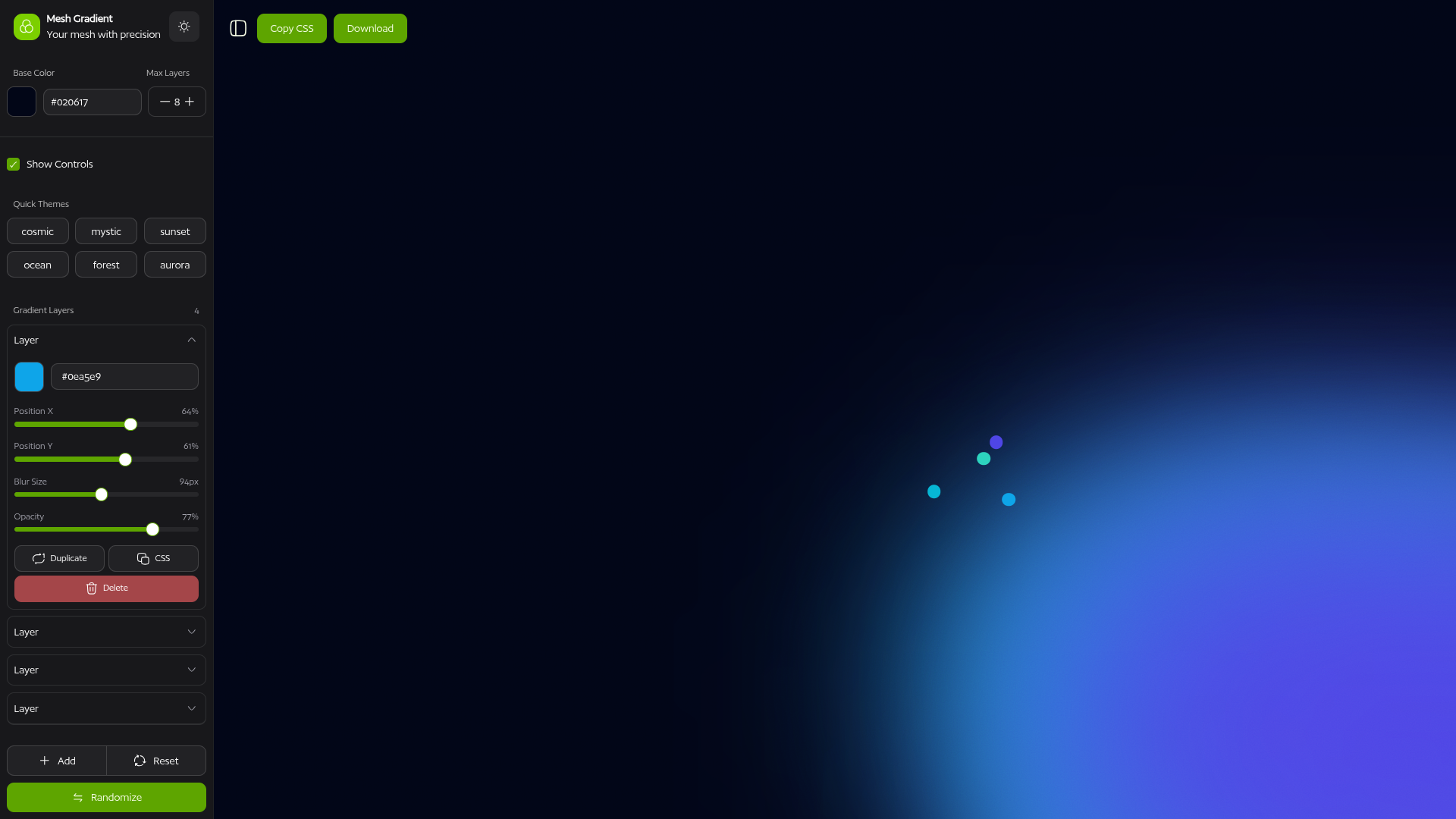
- 🎨 Interactive Gradient Editor - Create beautiful mesh gradients with a user-friendly interface
- 🎯 Precise Controls - Adjust position, blur, size, and colors with pixel-perfect precision
- 🌈 Quick Themes - Apply pre-defined color themes (Cosmic, Mystic, Sunset, Ocean, Forest, Aurora)
- 🔄 Real-time Preview - See your changes instantly as you customize
- Framework: Nuxt 4
- UI Components: shadcn-vue
- Styling: Tailwind CSS v4
- Icons: Hugeicons
- UI Primitives: reka-ui
- Animations: GSAP
Goal: Enable power users to interact faster with keyboard shortcuts.
Implementation:
- Created
useKeyboardShortcutscomposable using VueUse'suseMagicKeysandonKeyStroke - Implemented shortcuts:
?(help),Ctrl+S(save),R(randomize),Ctrl+R(reset),A(add layer),Backspace/Delete(remove layer),D(toggle dots) - Added keyboard shortcuts help dialog with categorized shortcuts
- Shortcuts automatically disabled when typing in input fields
- Cross-platform support (Ctrl for Windows/Linux, Cmd for macOS)
Goal: Allow users to revert and re-apply changes to the gradient configuration.
Steps:
- Create a
useHistory<T>composable withpast,present, andfuturestacks. - Integrate it into
useMeshGradient.ts, wrapping theconfigref. - On every significant change (add/remove layer, color change, position change), push to history.
- Expose
undo(),redo(),canUndo,canRedofrom the composable. - Wire up keyboard shortcuts (
Ctrl+Z,Ctrl+Shift+Z) and UI buttons.
Goal: Allow users to choose CSS blend modes (e.g., multiply, screen, overlay).
Steps:
- Add a
blendModefield to theLayertype. - Create a
Selectdropdown with common blend modes inLayersSection.vue. - Apply
mix-blend-modeCSS to each layer in the gradient renderer.
Goal: Animate layer positions, colors, or blur over time for a preview effect.
Steps:
- Add a "Preview Animation" toggle button.
- When enabled, use
setIntervalor GSAP to animate layer properties. - Define preset animations (e.g., "Pulse", "Drift", "Color Cycle").
- Show a timeline or duration control.
- Allow exporting CSS keyframes or a GIF/video.
Goal: Persist user-created gradients locally for later use.
Steps:
- Create a "Save" button in the sidebar.
- Serialize
configto JSON and store inlocalStoragewith a unique ID. - Create a "My Gradients" section/modal listing saved items.
- Allow loading, renaming, and deleting saved gradients.
Goal: Generate a shareable URL containing the gradient configuration.
Steps:
- Serialize
configto a JSON string. - Compress using
LZStringorpakofor URL-friendliness. - Encode to Base64 and append to the URL as a query param (e.g.,
?g=...). - On page load, detect the param, decode, and apply the config.
- Add a "Copy Share Link" button.
Goal: Provide pre-configured layer setups users can apply instantly.
Steps:
- Define template objects in a
presets.tsfile (e.g., "Sunset Glow", "Neon Burst"). - Create a "Templates" section in the sidebar with thumbnail previews.
- On click, replace or merge
config.layerswith the template's layers.
Goal: Ensure smooth rendering even with 10+ layers.
Steps:
- Debounce/throttle slider updates using VueUse's
useDebounceFn. - Use
v-memoorshallowReffor layer arrays where deep reactivity isn't needed. - Consider rendering layers to an offscreen canvas for heavy blur effects.
- Profile with Vue DevTools and Chrome Performance tab to find bottlenecks.
Goal: Allow the base/background color to be any color, including white.
Steps:
- Review
config.baseColorinitialization inuseMeshGradient.ts. - Ensure the color picker and hex input accept
#FFFFFFwithout resetting. - Test the rendering with white background to verify layer visibility.
- If layers are invisible on white, consider adding a subtle border or shadow.
- Node.js 20+ (or Bun, pnpm, yarn)
- npm, pnpm, yarn, or bun
Install dependencies:
# npm
npm install

# pnpm
pnpm install

# yarn
yarn install

# bun
bun installStart the development server:
# npm
npm run dev

# pnpm
pnpm dev

# yarn
yarn dev

# bun
bun run dev
Visit http://localhost:3000 to see your application.
Build the application for production:
# npm
npm run build

# pnpm
pnpm build

# yarn
yarn build

# bun
bun run build
Preview the production build locally:
# npm
npm run preview

# pnpm
pnpm preview

# yarn
yarn preview

# bun
bun run previewmesh-magic/
├── app/
│ ├── components/ # Vue components
│ │ ├── ui/ # UI components (shadcn-vue)
│ │ └── Mesh/ # Mesh gradient components
│ ├── composables/ # Composables (useMeshGradient, etc.)
│ ├── layouts/ # Layout components
│ ├── pages/ # Pages/routes
│ └── assets/ # Static assets and styles
├── public/ # Public static files
└── nuxt.config.ts # Nuxt configuration
This project is private and proprietary.
Built with 💚 using Nuxt 4