

Polynomial Generator is a Python package that provides a command-line interface (CLI) application and a graphical user interface (GUI) application for generating polynomial expressions. It allows users to specify variables and degrees to create custom polynomials effortlessly.
- Generate polynomial expressions with custom variables and degrees.
- Cross-platform compatibility (Linux, Mac, Windows).
- Simple and intuitive user interface.
You can install the Polynomial Generator package using pip:
pip install polynomial-generatorYou can use the CLI script to generate polynomials from the command line. Here's how to use it:
polygen -v <variables> -d <degree>Replace <variables> with a comma-separated list of variables and <degree> with the desired degree of the polynomial. If no arguments are provided, default values (x,y,z for variables and 2 for degree) will be used.
Example:
polygen -v x,y,z -d 3Output:
variables: ['x', 'y', 'z']
degree: 3
Polynomial: x^3 + x^2*y + x^2*z + x*y^2 + x*y*z + x*z^2 + y^3 + y^2*z + y*z^2 + z^3
Alternatively, you can use the generate_polynomial_expression function directly in your Python scripts. Here's how to import and use it:
from polynomial_generator import generate_polynomial_expression

variables = ['x', 'y', 'z']
degree = 2

first_term, polynomial = generate_polynomial_expression(variables, degree)

print(f"Polynomial: {first_term} --> {polynomial}")
# output: Polynomial: (x + y + z)^2 --> x^2 + x*y + x*z + y^2 + y*z + z^2After installation, you can run the Polynomial Generator GUI application using the following command:
polygenappEnter the variables and degree for your polynomial, then click "Generate" to see the result.
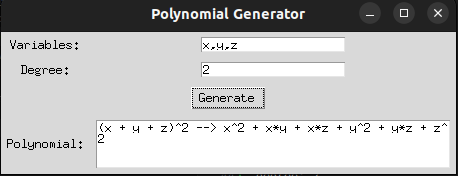
Contributions are welcome! If you'd like to contribute to this project, please follow these steps:
- Fork the repository.
- Create a new branch (
git checkout -b feature/improvement). - Make your changes.
- Commit your changes (
git commit -am 'Add new feature'). - Push to the branch (
git push origin feature/improvement). - Create a new Pull Request.
This project is licensed under the MIT License.
For any questions or feedback, feel free to contact Hermann Agossou.