Skip to content

Conversation

@BlackyHawky
Copy link
Contributor

@BlackyHawky BlackyHawky commented Jul 27, 2023

This PR is the rest of this one #16.

Currently, this includes added base and base border theme to allow full color range for user theme.

@Helium314 can you tell me if this suits you again?
If so, I'll modify the files so that the base theme no longer appears in theme variant setting.

@BlackyHawky BlackyHawky changed the title User Theme Custom Theme Jul 27, 2023
@Helium314
Copy link
Owner

Thanks, this looks really good and works nicely for theming.
Only one thing I had not noticed earlier: in the no-border base theme, there should be a space bar like in the other no-border themes, just with a white base color. The completely missing space bar looks a bit strange, and when pressing it looks much larger than for the other themes.

If so, I'll modify the files so that the base theme no longer appears in theme variant setting.

Initially I thought that would not be necessary, but actually the white theme looks really awkward. I agree that it's better to hide it from selection.

But: It may not be necessary to remove it (if it turns out to be complicated... didn't check)
I think we can replace the existing dark/light/amoled themes with colors, and put them into the theme selection list together with your new themes.
So in the end everything would be based on the new base theme (except the holo ones).
The only issue I see is with the auto-themes. Here I have rough ideas how to do it, but didn't test whether the automatic theme switch actually will work.

Then again, this idea is nothing that needs to be done now, though proabably I'll start playing with it once this PR is merged.

@BlackyHawky
Copy link
Contributor Author

Space bar in no-border base theme is now like others no-border themes 😉

I'll remove the base theme only to make sure everything is working properly. Normally, it is not complicated to remove it.

@Helium314
Copy link
Owner

Normally, it is not complicated to remove it.

Ok, I hadn't checked how to remove it.

This is almost ready, now the only things missing are the actual themes and a way to select them.
Do you want to merge the base theme, and add the themes in a separate PR, or do you want to continue here?

@BlackyHawky
Copy link
Contributor Author

Now, base theme is removed from the list of theme variants and the user theme still follows base theme.

In my opinion, everything is now finished to be merged. Let me know if it's ok for you too.

Do you want to merge the base theme, and add the themes in a separate PR, or do you want to continue here?

I will open an other PR because I am having trouble implementing my themes.
I tried several times without success because of my lack of knowledge.

Do you have any clues for me please?
Am I right in thinking that it is this part to modify?

https://github.com/Helium314/openboard/blob/dd0c8e2187ebbb286b043f87850ebd59a5d9ee74/app/src/main/java/org/dslul/openboard/inputmethod/latin/settings/Settings.java#L547-L566

Thanks in advance.

@Helium314
Copy link
Owner

Helium314 commented Jul 29, 2023

Yes, that's the idea.

You can modify it with

        if (!KeyboardTheme.getIsCustom(keyboardThemeId))
            return new Colors(keyboardThemeId, configuration.uiMode & Configuration.UI_MODE_NIGHT_MASK);
+
+        final Colors customTheme = getCustomTheme(prefs.getInt(Settings.PREF_CUSTOM_THEME_ID, 0)); // you can also use a string instead of int, maybe this is easier if you add a lot of themes
+        if (customTheme != null)
+            return customTheme;

        // we have a custom theme, which is user only (at the moment)

and define a getCustomTheme function (either in settings, or in some utility class, potentially Colors or a new one) like

    static Colors getCustomTheme(final int themeId) {
        switch (themeId) {
            // pre-define themes here
            case 1:
                return new Colors(1, 2, 3, 4, 5, 6, 7);
            case 2:
                return new Colors(Color.BLUE, Color.WHITE, Color.LTGRAY, Color.DKGRAY, Color.LTGRAY, Color.BLACK, Color.BLACK);
            case 3:
                // https://developer.android.com/reference/android/graphics/Color#parseColor(java.lang.String)
                return new Colors(
                        Color.parseColor("#aa00aa"),
                        Color.parseColor("aqua"),
                        Color.parseColor("lime"),
                        Color.parseColor("red"),
                        Color.parseColor("#1287bb"),
                        Color.parseColor("#cc3314"),
                        Color.parseColor("#ff3344")
                );
            default:
                return null;
        }
    }

[edit: you could also put the colors in resources, and provide some Context to getCustomTheme. This could even allow you to have different colors for day/night, didn't test it though (you may need to use ContextCompat.getColor or ContextThemeWrapper). Also, using system color resources like system accent or android.R.color.system_accent1_200 for Material You theming.]

Then you can use ApperaranceSettingsFragment to select the themes: set Settings.PREF_CUSTOM_THEME_ID, or however you want to call the pref, and set needsReload = true so the theme gets applied.

Here I'm not sure whether you can easily integrate the themes into the current theme selection. If you don't find a way, it's ok to just add a new preference.
With my plan to move the old themes to use Colors, I will likely remove the old theme_variant preference anyway.

@BlackyHawky
Copy link
Contributor Author

Thank you very much for your help but unfortunately I still can't integrate a predefined theme. ApperaranceSettingsFragment is too complicated for me.
I don't understand at all how to call the pref Settings.PREF_CUSTOM_THEME_ID.

Too bad; even if this part is too complicated for me, I will try to help on other topics.
I'm not going to ask you for help every time; you're not here for that and have better things to do. Anyway, thanks again.

In the meantime, what is certain is that this PR can be merged and that is the main thing.

@BlackyHawky BlackyHawky marked this pull request as ready for review July 29, 2023 15:50
@Helium314
Copy link
Owner

@BlackyHawky no problem. I will merge your PR and implement some basic way switching similar to what I wrote above.
You can still ask for help, especially in such a case where I asked you to change the PR in very a significant way.

Btw does the holo white (or holo user) theme work for you? When I started working on the colors more than a year ago, I'm sure it was ok, but now I always see holo dark, no matter what I choose.

@Helium314 Helium314 merged commit 5ca7aec into Helium314:new Jul 29, 2023
@BlackyHawky BlackyHawky deleted the Themes_v2 branch July 29, 2023 17:02
@BlackyHawky
Copy link
Contributor Author

BlackyHawky commented Jul 29, 2023

You can still ask for help, especially in such a case where I asked you to change the PR in very a significant way.

@Helium314 Thanks a lot again.

Btw does the holo white (or holo user) theme work for you? When I started working on the colors more than a year ago, I'm sure it was ok, but now I always see holo dark, no matter what I choose.

I find these themes old so I never use them. 😅
However, this seems to work for me. Am I right ?

  • Holo White // Holo Blue // Holo User
    Holo

With Holo User, we are limited on the choice of background colors and on the keyboard keys certainly due to the fact that they are defined by png. 🤔

@Helium314
Copy link
Owner

Doesn't really work, looks like for me.
I am very sure a year ago the holo white theme was actually (close to) white on my phone. Now I can't even get this when using an old version of OpenBoard, so I have no clue what broke it.

But I guess it doesn't matter too much, probably almost no one uses them.

With Holo User, we are limited on the choice of background colors and on the keyboard keys certainly due to the fact that they are defined by png.

That should not matter too much, because the colors get applied using color filters. But to work on a dark background, the filters would need to be adjusted.
Anyway, maybe I'll try doing something here if enough users complain.

@BlackyHawky BlackyHawky changed the title Custom Theme Add white base themes for use with custom themes Jul 29, 2023
@Helium314
Copy link
Owner

Helium314 commented Jul 30, 2023

I adjusted the theming stuff, now you have a "theme variant new" switch in the appearance settings.
You should be able to figure out how to add more custom themes, probably you only need to change AppearanceSettingsFragment (to select the new theme) and KeyboardThene (to set the theme name and colors).

There are still some minor issues with the adjusted themes (just search for "todo" in the commit...)
Main things are:

  • the background of more keys popup, it's the same as keyboard background but should have some contrast added
  • for some colors there is not enough contrast between pressed and non-pressed colors (barely visible)
  • the light/dark/darker/black themes should replace the old themes, but they are still a little too different

@BlackyHawky
Copy link
Contributor Author

Thank you so much! I've read your update and I can confirm that I couldn't have done it 😅

If I have time today, I'd gladly work on it again.

I'll keep you informed through a new draft PR.

Thanks again.

@BlackyHawky
Copy link
Contributor Author

BlackyHawky commented Jul 30, 2023

@Helium314 So I created 2 themes to see: Indigo and Brown.
Before your updates: 1 hour to create a theme; after your updates: 10 minutes.
I hope people will thank you for your fantastic work!

After those well-deserved compliments, I'd like to know:

@Helium314
Copy link
Owner

Why you modified this line:

I try to stay in line with the original themes as much as possible, specifically here I switched several times, still not sure which to use...

by as before ?

Transparent causes issues, as it's impossible to apply a color filter to transparent (well, it's possible, but it will remain transparent)

I did some adjustments today (before reading thsi), will commit and upload them.

@Helium314
Copy link
Owner

Also, can you upload a branch with the changes you did? Just so I can test whether I can reproduce the ugly more suggestions view on my device.

@BlackyHawky
Copy link
Contributor Author

Thanks for working on this! I decided to set the keyboardStyle to the light theme because it was the only solution I found working after removal of themeId. In the end I just wanted to have it working, instead of diving in deeper to find the actual source of the issue. But now I guess that at least the action key shape is likely related to

You could try e.g. replacing needsToKeepBackgroundAspectRatio with isAccentColoredKey, and see what changes (this will break border-theme, and maybe more, but it would be good to know whether it solves the issue for action (+popup) key.

I can now announce that these both "Todo" are 100% solved. 👍

Now both files "themes-lxx-base" and "themes-lxx-base-border" are consistent.

All my edits are here.

I can do a PR if you want to merge this solution. Of course, I leave it to you to decide.

FYI: I tried to replace needsToKeepBackgroundAspectRatio with isAccentColoredKey(key) but unfortunately it doesn't work for the enter key.

@Helium314
Copy link
Owner

It's really weird that not "properly" adding a theme causes this issue, and that isAccentColoredKey helps only in some cases...
I don't have much time for testing anything in the next ~2 weeks, but please open a PR. I'll check and most likely merge it when I have more time.

@RHJihan
Copy link
Contributor

RHJihan commented Aug 3, 2023

Shouldn't the morekeys popup be rounded?

@Helium314
Copy link
Owner

That's how it looks like in OpenBoard too

@RHJihan
Copy link
Contributor

RHJihan commented Aug 3, 2023

@Helium314
diff

@BlackyHawky
Copy link
Contributor Author

BlackyHawky commented Aug 3, 2023

Maybe you can find a better way... E.g. you could mulitply the R, G, and B values by a factor, but this will change dark colors only weakly. Or maybe you could convert the color to HSV / HSL, adjust the value / luminosity, and convert it back. Maybe also ColorUtils can help here.

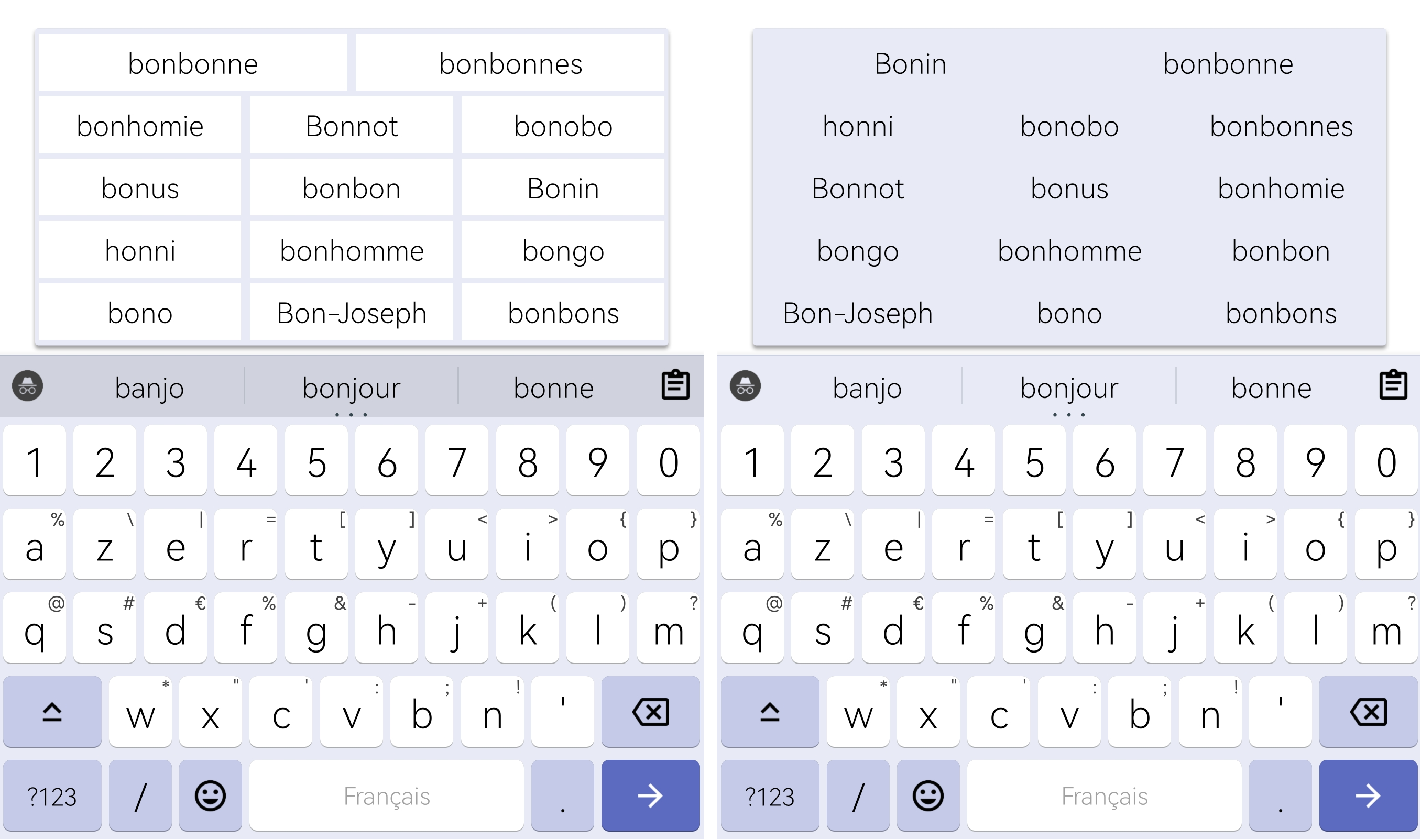
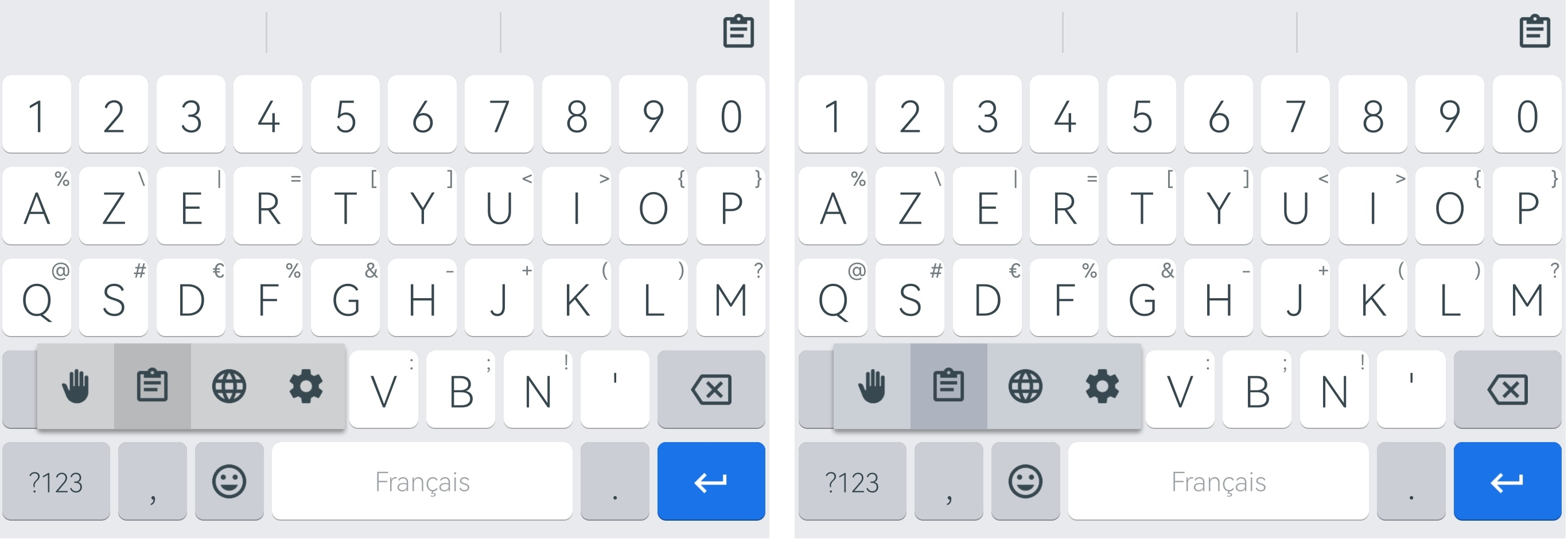
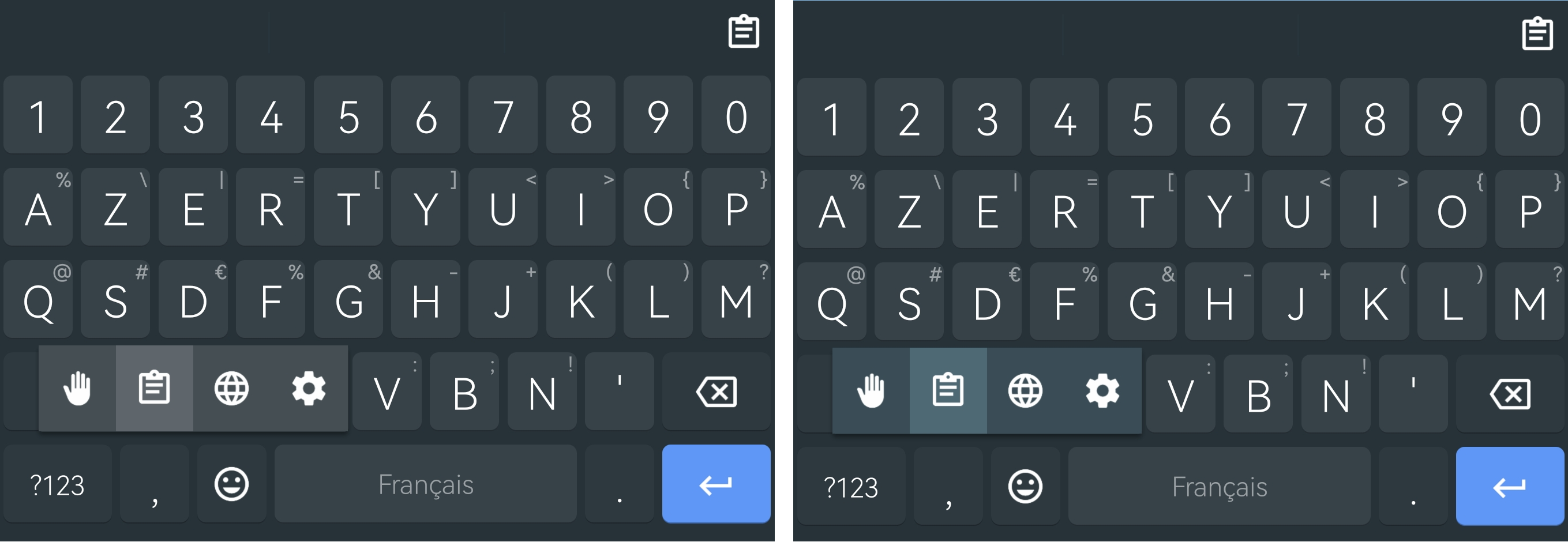
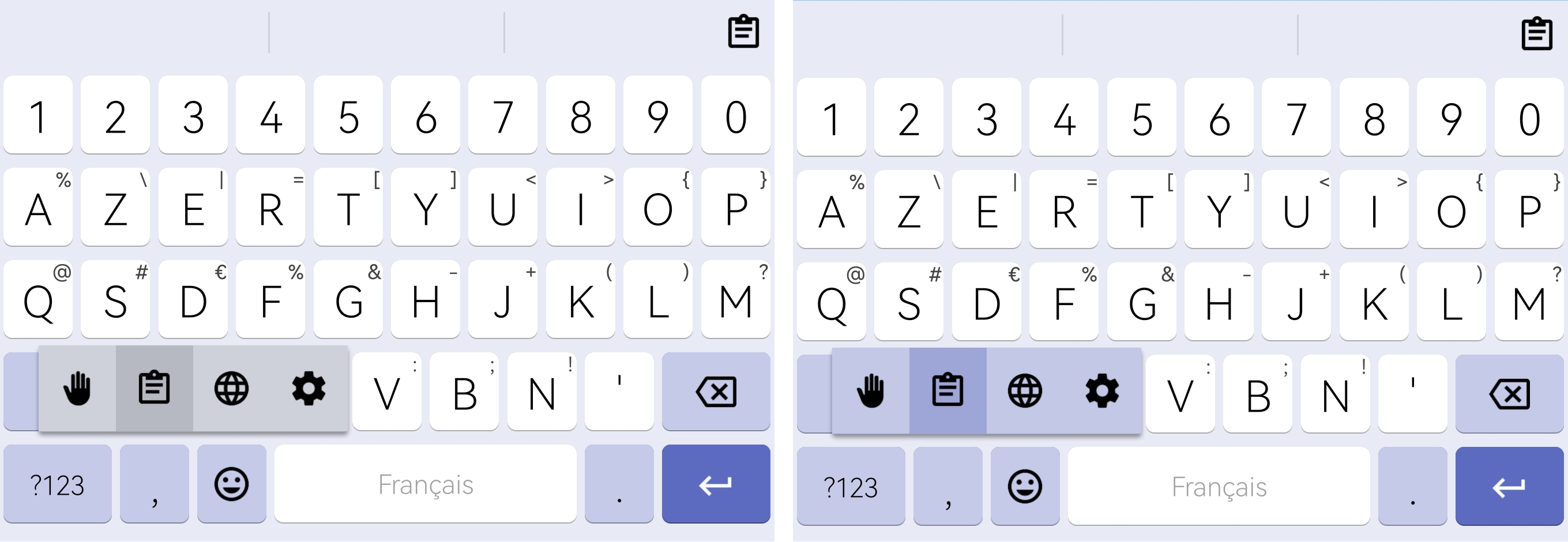
I managed to implement HSL properties to colors.
Now there is no more gray tint in the popup background and in the selection background of popup.
The colors are therefore more consistent with the color themes.

Another important thing: the default themes are not impacted and if you see a difference, it will only be very minor.

But in general, brighten and darken are not optimal. They just blend white or black into the color, which actually changes the color instead of only making it lighter or darker.

By using the HSL properties, the 2 functions below no longer use white or black to adjust the hue but use the color associated with the keyboard background and a factor to either lighten or darken the color.
https://github.com/Helium314/openboard/blob/9cc996c296c727f33a2931fb7b5b02083ea43b8c/app/src/main/java/org/dslul/openboard/inputmethod/latin/common/Colors.java#L145-L153

In my opinion, this is another good step forward on the improvement of themes.

Screenshots below: left = without HSL // right = with HSL

  • Light Theme:

  • Dark Theme: without HSL

  • Indigo Theme:

  • User Theme:

FYI: for Indigo Theme and User Theme don't take into account colors of functional key because I modified the code to be able to modify their colors but the principle is the same for the other key popups.

@Helium314 : as usual, if you want I'll create a branch so you can test it out and a new PR if you agree with this proposal.

@BlackyHawky
Copy link
Contributor Author

Shouldn't the morekeys popup be rounded?

@RHJihan It seems to me that since this commit 9d8571d, popups were no longer rounded.

Can you test this commit 47194f8 please and give me feedback?

@RHJihan
Copy link
Contributor

RHJihan commented Aug 5, 2023

@BlackyHawky, thanks. It's perfectly rounded now.

@BlackyHawky
Copy link
Contributor Author

@BlackyHawky, thanks. It's perfectly rounded now.

@RHJihan Great news! PR will be created today. 😉

@Helium314
Copy link
Owner

Thanks for noticing and fixing the rounding issue @RHJihan & @BlackyHawky . For me it makes no difference, on my tiny screen it's very hard to notice the change.

Another important thing: the default themes are not impacted and if you see a difference, it will only be very minor.

This is great (though not surprising, as they barely have a color anyway).

@Helium314 : as usual, if you want I'll create a branch so you can test it out and a new PR if you agree with this proposal.

I think you can just do a PR straight away, this definitely is a good improvement.
Contrary to your rounded corner PR though, I won't merge it straight away, as I would like to first test it when I have more time (in a week or so). Though I guess it will be fine, at least judging from the results.

@BlackyHawky
Copy link
Contributor Author

I think you can just do a PR straight away, this definitely is a good improvement. Contrary to your rounded corner PR though, I won't merge it straight away, as I would like to first test it when I have more time (in a week or so). Though I guess it will be fine, at least judging from the results.

Everything is done here: #57 👍

@RHJihan
Copy link
Contributor

RHJihan commented Aug 6, 2023

The button color for One-Handed Mode is not correct on the new themes (with no border too). This odd is mostly visible with the Dark mode.

Screenshot_20230806_094147_Keep Notes

@BlackyHawky
Copy link
Contributor Author

@Helium314 Can I do a PR so that we have the possibility to change the color of the functional keys?
I find it really unfortunate that these keys only depend on the color of the normal keys.

@Helium314
Copy link
Owner

It's somewhere on my todo list, but if you would like to do it, go ahead. They should use key text color, just like the clipboard button.

@BlackyHawky
Copy link
Contributor Author

The button color for One-Handed Mode is not correct on the new themes (with no border too). This odd is mostly visible with the Dark mode.

PR #72 created

It's somewhere on my todo list, but if you would like to do it, go ahead. They should use key text color, just like the clipboard button.

We seem to have misunderstood each other. 😅 Sorry if I misspoke.

My request concerns background of functional keys.
I know we've already discussed this but maybe you changed your mind about adding an option to change the background of the functional keys only when user-defined theme is selected. 🙏

@Helium314
Copy link
Owner

Oh, sorry.
I did not change my mind here:

Though ideally there would be a switch for all those colors, that lets the user to decide whether they want an automatically determined color or choose the color manually.
But this again is be more work, and will certainly require to change the user-color selection into a full-screen fragment to accomodate all the options.

is still the current state.
So it's ok to allow functional key color to be adjusted, but there needs to be an option (default on) to have color chosen automatically.

@RHJihan
Copy link
Contributor

RHJihan commented Aug 11, 2023

I don't know what causing this. These punctuation suggestions are appearing from my last build which includes 4705920.
The less visibility of punctuation suggestions with dark themes may be related to this PR. Word suggestions color is okay.
Device: Android 13

@BlackyHawky
Copy link
Contributor Author

BlackyHawky commented Aug 11, 2023

I don't know what causing this. These punctuation suggestions are appearing from my last build which includes 4705920. The less visibility of punctuation suggestions with dark themes may be related to this PR. Word suggestions color is okay. Device: Android 13

Punctuation marks appear only when Next-word suggestion is toggle-off in Correction settings.

@Helium314
Copy link
Owner

Not sure where the color is set here, probaly need to follow what LatinIME.setNeutralSuggestionStrip is doing.

@BlackyHawky
Copy link
Contributor Author

BlackyHawky commented Aug 11, 2023

I don't know what causing this. These punctuation suggestions are appearing from my last build which includes 4705920. The less visibility of punctuation suggestions with dark themes may be related to this PR. Word suggestions color is okay. Device: Android 13

Not sure where the color is set here, probaly need to follow what LatinIME.setNeutralSuggestionStrip is doing.

PR #75 created and problem solved 👍

However, I couldn't find the line of code to do the same thing with the 3 small dots. If anyone has any ideas.

Finally, do you think we should do the same thing with the language color on the space bar?

@Helium314
Copy link
Owner

Helium314 commented Aug 11, 2023

However, I couldn't find the line of code to do the same thing with the 3 small dots. If anyone has any ideas.

Maybe that's in some layout file
[edit: or not, suggestions_strip looks like the only candidate, and seems to contain only the part above the dots]

@Helium314
Copy link
Owner

Finally, do you think we should do the same thing with the language color on the space bar?

Which same thing do you mean?

@BlackyHawky
Copy link
Contributor Author

Maybe that's in some layout file [edit: or not, suggestions_strip looks like the only candidate, and seems to contain only the part above the dots]
[edit: or not, suggestions_strip looks like the only candidate, and seems to contain only the part above the dots]

I'm tired of looking 🤣

Which same thing do you mean?

Oops. I said something stupid. The color of the space bar text is linked to the color of the hint text so there's nothing to change. Sorry.

@Helium314
Copy link
Owner

I'm tired of looking 🤣

I know that feeling too well...

@BlackyHawky
Copy link
Contributor Author

I'm tired of looking 🤣

I know that feeling too well...

@Helium314 I did it!!! 🤣🤣🤣 (#78)

@BlackyHawky
Copy link
Contributor Author

@Helium314
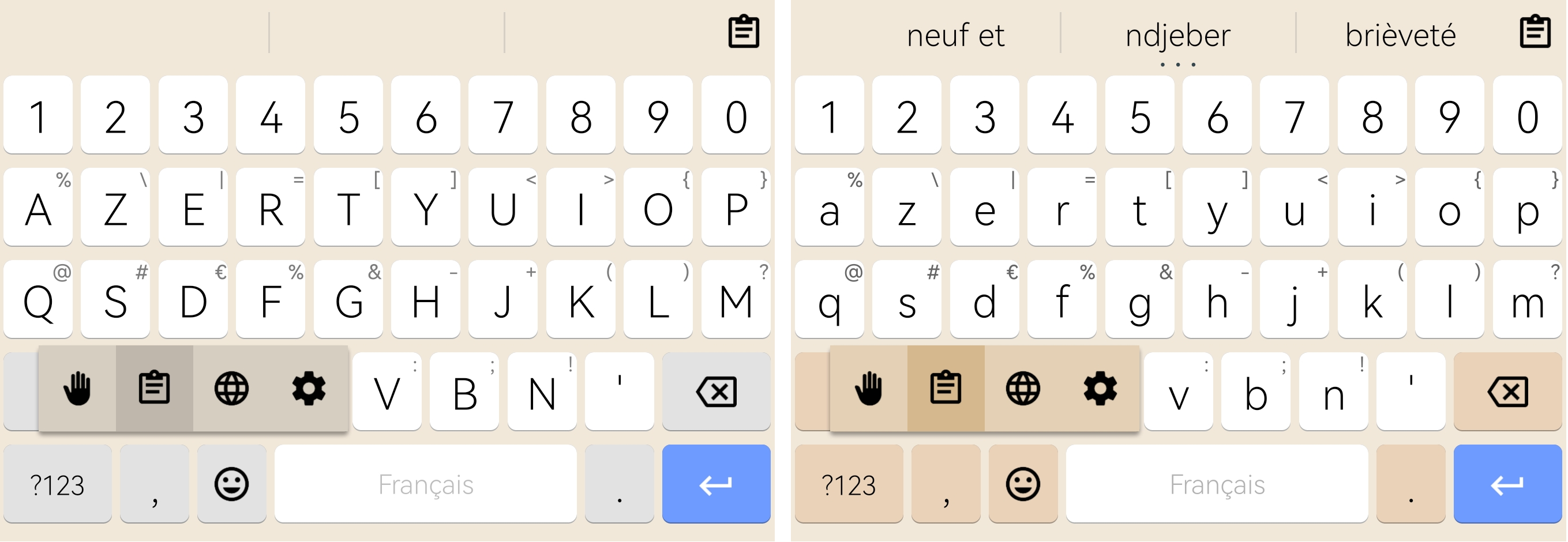
Since this commit ffa9a01, the selector no longer fills the key popup only when the "Narrow key gaps" option is enabled.
Do you have any idea where this might be coming from?

@Helium314
Copy link
Owner

Possibly I missed a place where R.fraction.config_key_horizontal_gap_holo or R.styleable.Keyboard_verticalGap is used

@BlackyHawky
Copy link
Contributor Author

I'm really unlucky today. I couldn't find anything wrong with that either.

@Helium314
Copy link
Owner

fixed in 0b718f5

@BlackyHawky
Copy link
Contributor Author

fixed in 0b718f5

Only this ? I'm really dumb...
Once again thank you.

Sign up for free to join this conversation on GitHub. Already have an account? Sign in to comment

Labels

None yet

Projects

None yet

Development

Successfully merging this pull request may close these issues.

3 participants