- Introduction to MySQL
- Characteristics of MySQL
- Applications of MySQL
- Purposes
- Advantages & Disadvantages
- Database Basics
- Joining Tables
- Inserting Updating Deleting Data
- Aggregate Functions
- Subqueries
- Views
- Stored Procedures
- Additional Topics Covered
MySQL is a widely used, open-source relational database management system (RDBMS). It enables users to
store, manage, and retrieve data efficiently in a structured format. Think of it as a digital filing
cabinet that organizes your information into tables, rows, and columns, making it easy to find and use
specific data whenever you need it.
This means that the source code is freely available, allowing anyone to modify and distribute it. This has contributed to its widespread adoption and large community of developers.
Data is stored in tables with relationships between them, enabling you to retrieve information from multiple tables at once. This makes it suitable for complex data organization and analysis.
MySQL is known for its performance and stability, even when handling large amounts of data. This makes it a popular choice for web applications and other data-intensive tasks.
MySQL can be easily scaled to accommodate growing data requirements. You can start with a small server and add more as your needs increase.
MySQL uses Structured Query Language (SQL), a standardized language for interacting with databases. This makes it relatively easy to learn and use, even for people with limited technical experience.
Many websites and web applications, such as blogs, e-commerce platforms, and social media sites, use MySQL to store user data, product information, and other website content.
Popular CMS platforms like WordPress and Drupal use MySQL to store website content and user data.
MySQL can be used to store and analyze data for various purposes, such as business intelligence, market research, and scientific research.
If you're looking for a powerful, flexible, and easy-to-use database management system, MySQL is a great option. It's a popular choice for a wide range of applications, from small personal projects to large enterprise systems.
MySQL is a popular open-source relational database management system (RDBMS) that uses SQL as its query language. Its main purposes include:
MySQL is designed to efficiently store and retrieve data. It allows users to create, modify, and query databases to manage large sets of structured information.
MySQL provides authentication and access control mechanisms, ensuring that only authorized users can access and modify the data. This is crucial for protecting sensitive information.
MySQL can handle a large amount of data and is scalable to accommodate growing datasets. It is suitable for both small-scale applications and large enterprise-level systems.
MySQL manages multiple users accessing the database simultaneously. It employs various techniques to ensure data consistency and integrity even when multiple users are making changes concurrently.
MySQL supports the definition of relationships between tables, enforcing referential integrity. This ensures that the data in the database remains accurate and consistent.
It includes features like indexing, caching, and query optimization to enhance performance. These optimizations help in executing queries faster, especially in large datasets.
MySQL is known for its reliability and uptime. It provides features like replication and clustering to ensure high availability and fault tolerance.
Being open-source, MySQL has a large and active community that contributes to its development and provides support. This community-driven approach ensures continuous improvement and a wealth of resources for users.
Understanding these aspects can help users leverage MySQL effectively for their data storage and retrieval needs, whether it's for a small project or a large-scale enterprise application.
-
Open Source: MySQL is free to use and is open-source, making it cost-effective for small businesses and individuals.
-
Community Support: It has a large and active community, providing extensive documentation, tutorials, and forums for support.
-
Scalability: MySQL can handle large amounts of data and is scalable, making it suitable for both small projects and large-scale applications.
-
Performance: With features like indexing and caching, MySQL is optimized for quick query execution, contributing to good performance.
-
Cross-Platform Compatibility: It is compatible with various operating systems, making it versatile for different environments.
-
Data Security: MySQL provides robust authentication and access control mechanisms, ensuring data security.
-
Reliability: It is known for its reliability and uptime, making it suitable for mission-critical applications.
-
Limited Functionality for Complex Transactions: While MySQL is powerful, it may have limitations for complex transactions compared to some other enterprise-level databases.
-
Lack of Advanced Features: Some advanced features available in other databases (e.g., Oracle) might be missing in MySQL.
-
Storage Engine Dependency: The choice of storage engine can impact certain features, and not all engines may be suitable for every use case.
-
Not Ideal for Large Text Handling: Handling large text fields (BLOBs, CLOBs) may not be as efficient in MySQL compared to other databases.
-
Single Master Replication: The replication mechanism in MySQL traditionally follows a single master approach, which might limit scalability in some scenarios.
-
Commercial Support: While there is a strong community, commercial support options for MySQL might not be as extensive as for some proprietary databases.
-
Complex Configuration: Some users find the initial configuration and setup of MySQL to be complex, especially for those new to database management systems.
Understanding these pros and cons can help users make informed decisions based on their specific requirements and project needs.
- USE database_name: Selects a database to work with.
- SELECT FROM table_name: Retrieves all columns and rows from a table.
- SELECT specific_columns FROM table_name: Fetches only specified columns.
- WHERE clause: Filters results based on certain conditions.
- ORDER BY clause: Sorts results in ascending or descending order.
- DISTINCT keyword: Eliminates duplicate rows.
- INNER JOIN: Combines rows from two tables based on a shared column.
- LEFT JOIN: Includes all rows from the left table, even if there's no match in the right table.
- RIGHT JOIN: Includes all rows from the right table, even if there's no match in the left table.
- UNION: Combines results from two tables, removing duplicates.
- INSERT INTO: Adds new rows to a table.
- UPDATE: Modifies existing rows.
- DELETE: Removes rows.
- SUM, COUNT, AVG, MAX, MIN: Perform calculations on groups of rows.
- GROUP BY clause: Groups rows together based on shared values.
- HAVING clause: Filters groups based on aggregate function results.
Nested SELECT statements: Used for complex filtering and data retrieval.
- Virtual tables: Simplify complex queries and hide underlying table structures.
- Reusable blocks of SQL code stored within the database.
- Date functions
- Conditional logic (IF, CASE)
- String manipulation
- NULL value handling
- USE database_name: Selects a database to work with.
- SELECT FROM table_name: Retrieves all columns and rows from a table.
- SELECT specific_columns FROM table_name: Fetches only specified columns.
- WHERE clause: Filters results based on certain conditions.
- ORDER BY clause: Sorts results in ascending or descending order.
- DISTINCT keyword: Eliminates duplicate rows.
- INNER JOIN: Combines rows from two tables based on a shared column.
- LEFT JOIN: Includes all rows from the left table, even if there's no match in the right table.
- RIGHT JOIN: Includes all rows from the right table, even if there's no match in the left table.
- UNION: Combines results from two tables, removing duplicates.
- INSERT INTO: Adds new rows to a table.
- UPDATE: Modifies existing rows.
- DELETE: Removes rows.
- SUM, COUNT, AVG, MAX, MIN: Perform calculations on groups of rows.
- GROUP BY clause: Groups rows together based on shared values.
- HAVING clause: Filters groups based on aggregate function results.
Nested SELECT statements: Used for complex filtering and data retrieval.
- Virtual tables: Simplify complex queries and hide underlying table structures.
- Reusable blocks of SQL code stored within the database.
- Date functions
- Conditional logic (IF, CASE)
- String manipulation
- NULL value handling
### How to Select Database
 USE <Dbname> || use <Dbname>
USE mydb || use mydb- First Select Database
- Select table
- Also use semicolon ; at the end of each statement
USE mydb;
SELECT * FROM customers;USE mydb;
SELECT *
FROM customers
WHERE customer_id = 5;USE mydb;
SELECT *
FROM customers
-- WHERE customer_id = 5 "--" Double Hyphen is used to comment something
ORDER BY first_name;
SELECT first_name, last_name , points FROM customers;SELECT first_name, last_name , points, points+10 FROM customers;
SELECT first_name, last_name , points, (points+10)*100 AS discount_factor FROM customers;SELECT first_name, last_name , points, (points+10)*100 AS 'Discount Factor' FROM customers;SELECT DISTINCT city FROM customers;- Make sure if you use SELECT DISTINCT first_name, city FROM customer it means both first_name and city must be distinct.
- It does not mean that only the city column should be distinct.
SELECT * FROM customers WHERE points>1500;- filter those records whose points are greater than 1500
- Also you should use these operators >,<,>=,<=,!=, <>
SELECT * FROM customers WHERE city = 'karachi'; SELECT * FROM customers WHERE city != 'karachi';
or
SELECT * FROM customers WHERE city <> 'karachi';SELECT * FROM customers WHERE birth_date > '2023-08-07';- We use AND operator it return true if both condition meets true
SELECT * FROM customers WHERE birth_date > '2023-08-07' AND points > 1500;- We use OR operator it return true if at least one condition meets true
SELECT * FROM customers WHERE birth_date > '2023-08-07' OR points > 1500;- We use NOT operator to reverse
SELECT * FROM customers WHERE NOT(birth_date > '2023-08-07' OR points > 1500);- We use OR and AND both to add multiple conditions
SELECT * FROM customers WHERE birth_date > '2023-08-07' OR (points > 1500 AND city = 'kohat');- We use IN operator, we can also use OR operator but IN operator is shorter and it works like OR operator
SELECT * FROM customers WHERE city IN ('karachi','kohat');
- We use NOT IN operator
SELECT * FROM customers WHERE city NOT IN ('karachi','kohat');- We use BETWEEN operator, note we can also use >= <= operators but BETWEEN is shorter
SELECT * FROM customers WHERE points BETWEEN 1000 AND 1500;- we use WHERE last_name LIKE 's%' it means last_name must be start with s but after s it contain any letters.
SELECT * FROM customers WHERE last_name LIKE 's%';
SELECT * FROM customers WHERE last_name LIKE 'summer%'; //start with summer ends with any letterSELECT * FROM customers WHERE last_name LIKE '%s';// start with any letter but ends with s
SELECT * FROM customers WHERE last_name LIKE '%s%';// start with any letter and ends with any letter but s letter can be any
whereSELECT * FROM customers WHERE last_name LIKE '_______s'SELECT * FROM customers WHERE last_name LIKE 'v______s'- Look we use like operator
SELECT * FROM customers WHERE first_name LIKE '%hr%'- we can also use REGEXP for more complex string patterns
SELECT * FROM customers WHERE first_name REGEXP 'hr'SELECT * FROM customers WHERE first_name LIKE '%hr%'- we can also use REGEXP for more complex string patterns SELECT * FROM customer WHERE first_name REGEXP 'hr'
### first_name must start with hr
SELECT * FROM customers WHERE first_name REGEXP '^hr'
SELECT * FROM customers WHERE first_name REGEXP 't$'SELECT * FROM customers WHERE first_name REGEXP '^ch|t$'- it means first_name must start with ch
- Or first_name must end with t
SELECT * FROM customers WHERE first_name REGEXP '[agc]t'- first_name will be at, gt, ct anywhere
SELECT * FROM customers WHERE first_name REGEXP 't[agc]'- first_name will be ta, tg, tc anywhere
SELECT * FROM customers WHERE first_name REGEXP '[a-h]t'- first_name will be at,bt,ct,dt,et,ft, gt, ht anywhere
SELECT * FROM customers WHERE phone IS NULL;- by default every column is sorted according to primary key column
SELECT * FROM customers ORDER by first_name;SELECT * FROM customers ORDER by first_name;SELECT * FROM customer ORDER by first_name, last_name;
SELECT * FROM customers ORDER by first_name DESC, last_name ASC;SELECT * FROM customers LIMIT 10;- we define offset 10 , 3
SELECT * FROM customers LIMIT 10 , 3;- Please use ORDER By Clause otherwise you got an error
SELECT * FROM orders ORDER BY RAND() LIMIT 1;
- lets we have orders table in orders table we have customer_id which is a foriegn key to customer table
- In Orders table we have orders_id, customer_id, status, comments
- In Customer table we have customer_id, first_name, last_name, birth_date, phone, address, city and state
- We want to inner join with orders table and customer table
SELECT * FROM orders INNER JOIN customerON orders.customer_id = customer.customer_id;SELECT * FROM orders o, customers c WHERE o.customer_id = c.customer_id;SELECT order_id, orders.customer_id first_name, phone, city
FROM orders
INNER JOIN customers
ON
orders.customer_id = customer.customer_id;
SELECT order_id, o.customer_id first_name, phone, city
FROM orders o
INNER JOIN customers c
ON
o.customer_id = c.customer_id;- suppose we have a Database name inventory
- In the inventory db we have products table
- this product table is associated with orders_items
- we can easily join using db.table name
select *
FROM orders_items oi
INNER JOIN inventory.products p
ON
oi.product_id = p.product_id;select oi.product_id, unit_price, name
FROM orders_items oi
INNER JOIN inventory.products p
ON
oi.product_id = p.product_id;- Suppose we have employe table we want to check who is manager in our complany
- But the best thing is manager is itself an employe of this complany
SELECT *
FROM employees m
JOIN employees e
ON
e.reports_to = m.employee_id;- only want to check the manager
SELECT
e.employee_id,
e.first_name,
m.first_name as Manager
FROM employees m
JOIN employees e
ON
e.reports_to = m.employee_id;- We have three tables orders, order_status and customer we want to join
SELECT *
FROM orders o
JOIN customers c
ON
o.customer_id = c.customer_id
JOIN order_status os
ON os.status_is = o.status;SELECT
o.order_id,
o.order_date,
c.first_name,
c.last_name,
os.name AS Status
FROM orders o
JOIN customers c
ON
o.customer_id = c.customer_id
JOIN order_status os
ON os.status_is = o.status;- Left outer join select those records which are not
- like in our example we also select those customers who don't have any order as well as who do
SELECT
c.customer_id,
c.first_name,
o.order_id
FROM customers c
LEFT JOIN orders o
ON c.customer_id = o.customer_id
ORDER BY c.customer_id
- Right outer join select those records which satisfy the condition
- like in our example we only select those customers who have orders
SELECT
c.customer_id,
c.first_name,
o.order_id
FROM customers c
LEFT JOIN orders o
ON c.customer_id = o.customer_id
ORDER BY c.customer_id - USING Clause can replace JOIN complex steps
- But it can only work when both table have same column name
SELECT
o.order_id,
c.first_name
FROM orders o
JOIN customers c
-- ON o.customer_id = c.first_name
USING (customer_id);- combine every record from first table to second table
- WE combine every record from customer table to products table
SELECT
c.first_name AS customer,
p.name AS product
FROM customers c
CROSS JOIN inventory.products p
ORDER BY c.first_name;SELECT
order_id,
order_date,
'Active' AS status
FROM orders
WHERE order_date >= '2023-11-09'
UNION
SELECT
order_id,
order_date,
'Archived' AS status
FROM orders
WHERE order_date < '2023-11-09'INSERT INTO customers (
customer_id,
first_name,
last_name,
birth_date,
phone,
address,
city,
state,
points
) VALUES (
52,
'Ahmed',
'Raheem',
NULL,
NULL,
'Azad Chaiwala Institute',
'Rawalpindi',
'Punjab',
DEFAULT
);INSERT INTO customers (
customer_id,
first_name,
last_name,
birth_date,
phone,
address,
city,
state,
points
) VALUES (
53,
'Ishaque',
'Chaiwala',
NULL,
NULL,
'Azad Chaiwala Institute',
'Rawalpindi',
'Sindh',
DEFAULT
),
(
54,
'Muhammad',
'Mowahid',
NULL,
NULL,
'Azad Chaiwala Institute',
'Rawalpindi',
'Punjab',
DEFAULT
);
INSERT INTO customers(customer_id,first_name,last_name,birth_date)
VALUES (DEFAULT,'IGI','ORIGIN','2023-12-25');

INSERT INTO orders(order_id,order_date, status,customer_id)
VALUES(DEFAULT,'2023-12-25',1,LAST_INSERT_ID());

INSERT INTO
orders_items(order_id,product_id,unit_price,quantity)
VALUES (LAST_INSERT_ID(),9,35,3);
CREATE TABLE orders_archived  AS
SELECT * FROM orders;CREATE TABLE orders_archived AS
SELECT * from orders WHERE order_date > '2023-12-01';UPDATE customers
SET first_name="Muhammad", last_name="Hashim", birth_date="2023-12-30"
WHERE customer_id = 1;UPDATE orders
SET comments = "Gold Customer"
WHERE c_id IN
(SELECT customer_id
FROM customers
WHERE points > 1800);
DELETE FROM orders
WHERE c_id = (
			SELECT customer_id
			FROM customers
			WHERE first_name = "Delano"
			 );
SELECT
MAX(salary) AS Highest,
MIN(salary) AS lowest,
AVG(salary) AS average,
SUM(salary) AS total,
COUNT(salary) AS number_of_records
FROM employees;
SELECT
client_id,
SUM(invoice_total) as total_sales
FROM invoices
GROUP BY client_id
ORDER BY total_sales DESC;SELECT
client_id,
SUM(invoice_total) as total_sales
FROM invoices
WHERE invoice_date >= '2019-07-01'
GROUP BY client_id
ORDER BY total_sales DESC;SELECT
name,
state,
city,
SUM(invoice_total) as total_sales
FROM invoices i
JOIN clients c USING(client_id)
GROUP BY state, city;
SELECT date,
pm.name,
SUM(amount) AS total_amounts
FROM payments p
JOIN payment_methods pm
ON p.payment_method = pm.payment_method_id
GROUP BY date
ORDER BY date DESC;SELECT
client_id,
COUNT(*) AS number_of_invoices,
SUM(invoice_total) as total_sales
FROM invoices
GROUP BY client_id
HAVING total_sales > 500;
SELECT
client_id,
COUNT(*) AS number_of_invoices,
SUM(invoice_total) as total_sales
FROM invoices
GROUP BY client_id
HAVING total_sales > 500 AND number_of_invoices > 5;
SELECT
client_id,
SUM(invoice_total) as total_sales
FROM invoices
GROUP BY client_id WITH ROLLUP;SELECT
state,
city,
SUM(invoice_total) as total_sales
FROM invoices i
JOIN clients c USING(client_id)
GROUP BY state, city WITH ROLLUP;- expensive than lettuce (id = 3)
- MySQL first execute innersubquery than pass it to out query
SELECT *
FROM products
WHERE unit_price > (
SELECT unit_price
FROM products
WHERE product_id = 3
);- In Sql_hr database
- find employees who earn more than average
SELECT * FROM
employees WHERE salary > (
SELECT AVG(salary)
    FROM employees
);- find that product that have never been ordered
SELECT * FROM products
WHERE product_id NOT IN (
SELECT DISTINCT product_id
FROM order_items
);- find clients without invoices
SELECT *
FROM clients
WHERE client_id NOT IN (
SELECT DISTINCT client_id
FROM invoices
);- find customer who have ordered lettuce
- select customer_id , first_name, last_name
SELECT customer_id,
first_name,
last_name
FROM customers
WHERE customer_id IN(
SELECT o.customer_id
FROM order_items oi
JOIN orders o USING (order_id)
    WHERE product_id = 3
);SELECT DISTINCT customer_id,
first_name,
last_name
FROM customers c
JOIN orders o USING(customer_id)
JOIN order_items oi USING(order_id)
WHERE oi.product_id = 3;- select invoices larger than all invoices of client 3
SELECT *
FROM invoices
WHERE invoice_total >(
SELECT MAX(invoice_total)
    FROM invoices
    WHERE client_id = 3
);SELECT *
FROM invoices
WHERE invoice_total > ALL(
SELECT invoice_total
FROM invoices
WHERE client_id = 3
);- For each employe
- calculate the avg salary for employee.office
- return the employee if salary > avg
SELECT *
FROM employees e
WHERE salary > (
	SELECT AVG(salary)
    FROM employees
    WHERE office_id = e.office_id
);
-
Select client that have an invoice
-
one method
Select *
FROM clients
WHERE client_id IN (
    select DISTINCT client_id
    FROM invoices
);- second method
SELECT *
FROM clients
INNER JOIN (
    SELECT DISTINCT client_id
    FROM invoices
) AS distinct_clients
ON clients.client_id = distinct_clients.client_id;- third method
Select *
FROM clients c
WHERE EXISTS (
    select client_id
    FROM invoices
    WHERE client_id = c.client_id
);SELECT *
FROM orders
WHERE YEAR(order_date) = YEAR(NOW());SELECT DATE_FORMAT(order_date,'%D %M %Y')
FROM orders;SELECT DATE_ADD(order_date, INTERVAL 1 YEAR)
FROM orders;SELECT
order_id,
shipper_id
FROM orders;
SELECT
order_id,
IFNULL(shipper_id,'Not Assigned') AS shipper
FROM orders;SELECT
order_id,
COALESCE(shipper_id,comments,'Not Assigned') AS shipper
FROM orders;
SELECT
order_id,
IFNULL(shipper_id,'...') AS shipperID,
COALESCE(shipper_id,comments,'Not Assigned') AS shipper
FROM orders;SELECT
order_id,
order_date,
IF(YEAR(order_date) = YEAR(NOW()), 'Active', 'Archived') AS order_status
FROM orders;SELECT
order_id,
CASE
WHEN YEAR(order_date) = YEAR(NOW()) THEN 'Active'
WHEN YEAR(order_date) = YEAR(NOW()) - 1 THEN 'Last Year'
WHEN YEAR(order_date) < YEAR(NOW()) - 1 THEN 'Archived'
ELSE 'Future'
END AS Category
FROM orders;SELECT
CONCAT(first_name,' ',last_name) AS Customer,
points,
CASE
WHEN points > 3000 THEN 'Gold Customer'
WHEN points >= 2000 THEN 'Silver Customer'
ELSE 'Bronze Customer'
END AS category
FROM customers;CREATE VIEW sales_by_client AS
SELECT
c.client_id,
c.name,
SUM(invoice_total) AS total_sales
FROM clients c
JOIN invoices i USING(client_id)
GROUP BY client_id, name;DROP VIEW invoices_with_balance;- DISTINCT
- Aggregate functions (MIN , MAX, SUM) etc
- GROUP BY / HAVING
- UNION
- If we dont have these in mention above
- than our view is Updatable view
CREATE OR REPLACE VIEW invoices_with_balance AS
	SELECT
	invoice_id,
	number,
	client_id,
	invoice_total,
	payment_total,
	invoice_total - payment_total AS balance,
	invoice_date,
	payment_date,
	due_date
	FROM invoices
    WHERE (invoice_total-payment_total) > 0;

DELETE FROM invoices_with_balance
WHERE invoice_id = 1;- prevent view as only read-only
- add WITH check OPTION;
CREATE OR REPLACE VIEW invoices_with_balance AS
	SELECT
	invoice_id,
	number,
	client_id,
	invoice_total,
	payment_total,
	invoice_total - payment_total AS balance,
	invoice_date,
	payment_date,
	due_date
	FROM invoices
    WHERE (invoice_total-payment_total) > 0
    WITH check OPTION;
DELIMITER $$
CREATE PROCEDURE get_clients()
BEGIN
	SELECT * FROM clients;
END$$
DELIMITER ;CALL get_clients()DROP Procedure IF EXISTS get_clients;CALL get_clients()DROP Procedure IF EXISTS get_clients;
### Parameters in Procedure
DROP PROCEDURE IF EXISTS get_clients_by_states;
DELIMITER $$
CREATE PROCEDURE get_clients_by_states
	(
        state CHAR(2)
	)
	BEGIN
    SELECT * FROM clients c
    WHERE c.state = state;
	END$$
DELIMITER ;

CALL get_clients_by_states('CA');
DELIMITER $$
CREATE PROCEDURE get_clients_by_default_states
	(
        state CHAR(2)
    	)
	BEGIN
    IF state IS NULL THEN
       SET state = 'CA';
    END IF;
    SELECT * FROM clients c
    WHERE c.state = state;
	END$$
DELIMITER ;


CALL get_clients_by_default_states(NULL)
DELIMITER $$
CREATE PROCEDURE get_clients_by_default_states
	(
        state CHAR(2)
        )
	BEGIN
    IF state IS NULL THEN
        select * from clients;
    ELSE
            SELECT * FROM clients c
            WHERE c.state = state;
    END IF;
	END$$
DELIMITER ;


CALL get_clients_by_default_states(NULL)
CALL get_clients_by_default_states('CA')- Write a stored procedure call get_payments
- with two Parameters
- client_id => id(5)
- payment_method_id => TINYINT(1) 0-255
DELIMITER $$
CREATE PROCEDURE get_payments
    (
        client_id INT,
        payment_method_id TINYINT(1)
    )
BEGIN
    SELECT *
    from payments p
    WHERE
    p.client_id = IFNULL(client_id, p.client_id) AND
    p.payment_method = IFNULL(payment_method_id,p.payment_method);
END$$
DELIMITER ;


CALL get_payments(NULL,NULL);
CALL get_payments(5,NULL);
CALL get_payments(5,2);
CALL get_payments(NULL,2);
DELIMITER $$
CREATE PROCEDURE make_payments
    (
        invoice_id INT,
        payment_total DECIMAL(8,2),
        payment_date DATE
    )
BEGIN
    UPDATE invoices i
    SET
    i.payment_total = payment_total,
    i.payment_date = payment_date
    WHERE i.invoice_id = invoice_id;
END$$
DELIMITER ;


CALL make_payments(2,2223.823,'2023-01-07');
DELIMITER $$
CREATE PROCEDURE make_validate_payments
    (
        invoice_id INT,
        payment_total DECIMAL(8,2),
        payment_date DATE
    )
BEGIN
	IF payment_total <= 0 THEN
    	SIGNAL SQLSTATE '22003'
        SET MESSAGE_TEXT = "Invalid Payment Amounts";
    END IF;
    UPDATE invoices i
    SET
    i.payment_total = payment_total,
    i.payment_date = payment_date
    WHERE i.invoice_id = invoice_id;
END$$
DELIMITER ;

CALL make_validate_payments(2,-2223.823,'2023-01-07');DELIMITER $$
CREATE PROCEDURE get_unpaid_invoices_for_clients
(
client_id INT
)
BEGIN
SELECT COUNT(*) ,
SUM(invoice_total)
FROM invoices i
WHERE i.client_id = client_id
AND payment_total = 0;
END$$
DELIMITER ;
CALL get_unpaid_invoices_for_clients(3);- we get this
-----------------------------------
|   COUNT(*)   SUM(invoice_total) |
|   2          286.08             |
------------------------------------ We can also recieves these values through Parameters 2, 286.08
- we can specific OUT to identify Output Parameters
- also copy this using INTO
DELIMITER $$
CREATE PROCEDURE get_unpaid_invoices_for_clients
	(
      client_id INT,
      OUT invoices_count INT,
      OUT invoices_total DECIMAL(9,2)
	)
BEGIN
	SELECT COUNT(*), SUM(invoice_total)
    INTO invoices_count, invoices_total
    FROM invoices i
    WHERE i.client_id =  client_id
    	AND payment_total = 0;
END$$
DELIMITER ;

CALL get_unpaid_invoices_for_clients(3)- we get some output Parameters in the form of variables which is hard to read
- sometime we avoid
SET @p0='3'; SET @p1=''; SET @p2='';
CALL `get_unpaid_invoices_for_clients`(@p0, @p1, @p2);
SELECT @p1 AS `invoices_count`, @p2 AS `invoices_total`;-----------------------------------
| COUNT(*) SUM(invoice_total) |
| 2 286.08 |
------------------------------------ risk_factor = invoices_total / invoices_count * 5
- these are all local variables
- we get data from table and pass these data to local variables finally we select
- local variables will die when procedure were finished
DELIMITER $$
CREATE PROCEDURE get_risk_factor()
BEGIN
    DECLARE risk_factor DECIMAL(9,2) DEFAULT 0;
    DECLARE invoices_total DECIMAL(9,2);
    DECLARE invoices_count INT;
	SELECT COUNT(*), SUM(invoice_total)
    INTO invoices_count, invoices_total
    FROM invoices;
    SET risk_factor = invoices_total / invoices_count * 5;
    SELECT risk_factor;
END$$
DELIMITER ;

CALL get_risk_factor();----------------
| risk_factor |
| 777.75 |
----------------
DELIMITER $$
CREATE FUNCTION get_risk_factor_for_client
	(
        client_id INT
	)
RETURNS INTEGER
READS SQL DATA
BEGIN
    DECLARE risk_factor DECIMAL(9,2) DEFAULT 0;
    DECLARE invoices_total DECIMAL(9,2);
    DECLARE invoices_count INT;

    SELECT COUNT(*), SUM(invoice_total)
    INTO invoices_count, invoices_total
    FROM invoices i
    WHERE i.client_id = client_id;

    SET risk_factor = invoices_total / invoices_count * 5;
    RETURN risk_factor;
END$$
DELIMITER ;

SELECT
client_id,
name,
get_risk_factor_for_client(client_id)
FROM clients;---------------------------------------------------------------------------------
| client_id name get_risk_factor_for_client(client_id) |
| 1 Vinte 803 |
| 2 Myworks NULL |
| 3 Yadel 706 |
| 4 kwidea NULL |
| 5 Topiclounge 817 |
---------------------------------------------------------------------------------DELIMITER $$
CREATE FUNCTION get_risk_factor_for_client
(
client_id INT
)
RETURNS INTEGER
READS SQL DATA
BEGIN
DECLARE risk_factor DECIMAL(9,2) DEFAULT 0;
DECLARE invoices_total DECIMAL(9,2);
DECLARE invoices_count INT;
SELECT COUNT(*), SUM(invoice_total)
INTO invoices_count, invoices_total
FROM invoices i
WHERE i.client_id = client_id;
SET risk_factor = invoices_total / invoices_count * 5;
RETURN IFNULL(risk_factor,0);
END$$
DELIMITER ;---------------------------------------------------------------------------------
| client_id name get_risk_factor_for_client(client_id) |
| 1 Vinte 803 |
| 2 Myworks 0 |
| 3 Yadel 706 |
| 4 kwidea 0 |
| 5 Topiclounge 817 |
---------------------------------------------------------------------------------- DROP FUNCTION get_unpaid_invoices_for_clients;
- A block of code that automatically get executed
- before or after an insert, Update or Delete statement
DELIMITER $$
CREATE TRIGGER payment_after_insert
	AFTER INSERT ON payments
    FOR EACH ROW
BEGIN
	UPDATE invoices
    SET payment_total = payment_total + NEW.amount
    WHERE invoice_id = NEW.invoice_id;
END $$
DELIMITER ;

INSERT INTO payments
VALUES (DEFAULT,5,3,'2023-09-01',10,1);DELIMITER $$
CREATE TRIGGER payment_after_delete
AFTER DELETE ON payments
FOR EACH ROW
BEGIN
UPDATE invoices
SET payment_total = payment_total - OLD.amount
WHERE invoice_id = OLD.invoice_id;
END $$
DELIMITER ;
DELETE FROM payments WHERE payment_id = 10;SHOW TRIGGERS;
SHOW TRIGGERS LIKE 'payments%';DROP TRIGGER IF EXISTS payment_after_insert;USE sql_invoicing;
CREATE TABLE payments_audit
(
client_id INT NOT NULL,
date DATE NOT NULL,
amount DECIMAL(9, 2) NOT NULL,
action_type VARCHAR(50) NOT NULL,
action_date DATETIME NOT NULL
);
DROP TRIGGER IF EXISTS payments_after_insert;
DELIMITER $$
CREATE TRIGGER payments_after_insert
AFTER INSERT ON payments
FOR EACH ROW
BEGIN
UPDATE invoices
SET payment_total = payment_total + NEW.amount
WHERE invoice_id = NEW.invoice_id;
INSERT INTO payments_audit
VALUES (NEW.client_id, NEW.date, NEW.amount, 'Insert', NOW());
END $$
DELIMITER ;
DROP TRIGGER IF EXISTS payments_after_delete;
DELIMITER $$
CREATE TRIGGER payments_after_delete
AFTER DELETE ON payments
FOR EACH ROW
BEGIN
UPDATE invoices
SET payment_total = payment_total - OLD.amount
WHERE invoice_id = OLD.invoice_id;
INSERT INTO payments_audit
VALUES (OLD.client_id, OLD.date, OLD.amount, 'Delete', NOW());
END $$
DELIMITER ;
INSERT INTO payments
VALUES (DEFAULT,5,3,'2023-09-01',10,1);
- A group of sql statements that
- represent a Single unit of work
START TRANSACTION;
INSERT INTO orders(customer_id,order_date,status)
VALUES(1,'2024-01-09',1);
INSERT INTO order_items()
VALUES(LAST_INSERT_ID(),1,1,1);
COMMIT;- run this script line by line in to different script box
- query box 1
START TRANSACTION;
UPDATE customers
SET points = points + 10
WHERE customer_id = 1;
COMMIT;- query box 2
START TRANSACTION;
UPDATE customers
SET points = points + 10
WHERE customer_id = 1;
COMMIT;SHOW VARIABLES LIKE 'transaction_isolation';
SET SESSION TRANSACTION ISOLATION LEVEL SERIALIZABLE;- Session 1
USE sql_store; --1
SET TRANSACTION ISOLATION LEVEL READ UNCOMMITTED; --2
select points -- 6 Read UNCOMMITTED data
FROM customers
WHERE customer_id = 1;- Session 2
Use  sql_store; -- 3
START TRANSACTION; -- 4
Update customers -- 5
SET points = 20
WHERE customer_id = 1;
COMMIT;
- Session 1
USE sql_store;
SET TRANSACTION ISOLATION LEVEL READ COMMITTED; -- 1
START TRANSACTION; -- 2
select points  FROM customers WHERE customer_id = 1; -- 3
select points  FROM customers WHERE customer_id = 1; -- 6
COMMIT; -- *- Session 2
Use  sql_store;
START TRANSACTION;
Update customers
SET points = 30 -- 4
WHERE customer_id = 1;
COMMIT; -- 5- Session 1
USE sql_store;
SET TRANSACTION ISOLATION LEVEL REPEATABLE READ; -- 1
START TRANSACTION; -- 2
select points  FROM customers WHERE customer_id = 1; -- 3
select points  FROM customers WHERE customer_id = 1; -- 5
COMMIT;- Session 2
Use  sql_store;
START TRANSACTION;
Update customers
SET points = 30
WHERE customer_id = 1;
COMMIT; -- 4- in this Isolation we see phanton Read problem
USE sql_store;
SET TRANSACTION ISOLATION LEVEL REPEATABLE READ;
START TRANSACTION; -- 1
select *  FROM customers WHERE state = 'VA'; -- we give a special discount -- 3 -- 5
COMMIT;- Session 2
Use  sql_store;
START TRANSACTION;
Update customers -- 2
SET state = 'VA'
WHERE customer_id = 1;
COMMIT; -- 4- provide Highest level of Isolation
- solve all Concurrency problems
USE sql_store;
SET TRANSACTION ISOLATION LEVEL SERIALIZABLE; -- 1
START TRANSACTION; -- 2
select *  FROM customers WHERE state = 'VA'; -- 5
COMMIT;- Session 2
Use  sql_store;
START TRANSACTION; -- 3
Update customers -- 4
SET state = 'VA'
WHERE customer_id = 3;
COMMIT; -- 6- String datatypes
- Integer datatypes
- Fixed point and Floating datatypes
- Boolean datatypes
- Enum and Set types datatypes -- we avoid to use this datatypes
- Date and Time types datatypes
- Blob datatypes --we also avoid to use binary data bcz its slow down our database backup
- JSON datatypes
-
CHAR(x) -- fixed-length like abbreviation of state 'VA'
-
VARCHAR(x) -- variable-length like storing usernames, passwords, email addresses and so on
-
Recommended
-
VARCHAR(50) for short strings like usernames and passwords
-
VARCHAR(255) for medium-length strings like addresses
-
Maximum Length
- CHAR(x)     --
- VARCHAR(x)  -- max : 65,535 characters (64KB)
- MEDIUMTEXT  -- max : 16MB              16,777,216    characters --JSON objects, CSV and short medium length book
- LONGTEXT    -- max : 4GB               4,294,967,296 characters Long Text books
- TINYTEXT    -- max : 255Bytes          255           characters
- Text -- max : 65,535 characters (64KB) - Mostly we use VARCHAR type, bcz it uses indexes to speedup queries.
- we store whole numbers that don't have decimal points.
- Maximum Length
-------------------------------------------------------------------------------------------------------------------------------------
|   Type	    Storage (Bytes)	    Minimum Value Signed	Minimum Value Unsigned	Maximum Value Signed	Maximum Value Unsigned  |
|   TINYINT 	1	                -128	                        0	                    127	                    255             |
|   SMALLINT	2	                -32768	                        0	                    32767	                65535           |
|   MEDIUMINT	3	                -8388608	                    0	                    8388607	                16777215        |
|   INT        	4	                -2147483648	                    0	                    2147483647	            4294967295      |
|   BIGINT  	8	                -2^63	                        0	                    2^63-1	                2^64-1          |
-------------------------------------------------------------------------------------------------------------------------------------- ZEROFILL
INT(4) => 0001- DECIMAL(p,s) precision,scale --> DECIMAL(9,2) => 1234567.89
- DEC, NUMERIC, FIXED are exactly same as decimal
- FLOAT 4bytes, 8bytes, DOUBLE -- used for scientific calculation and are approximately values
- BOOLEAN -- TRUE or FALSE
- BOOL -- 1 or 0
- DATE storing date without time component
- Time time for storing time value
- DATETIME 8bytes
- TIMESTAMP 4bytes (0 upto 2038) -- track of a row when inserted to last updated
- YEAR year for storing 4 digit year
- Method 1
UPDATE products
SET properties =
'
{
	"dimension" : [1,2,3],
    "weight" : 10,
    "manufacturer":{
    "name":"Ahmed"
    }
}
'
WHERE product_id = 1 ;- Method 2
UPDATE products
SET properties = JSON_OBJECT(
'weight',10,
'dimension',JSON_ARRAY(1,2,3),
'manufacturer',JSON_OBJECT('name','Abdullah')
)
WHERE product_id = 2;- Selection specific property
SELECT
product_id,
JSON_EXTRACT(properties,'$.weight')
FROM products
WHERE product_id IN (1,2) ;- Create the School database
CREATE DATABASE IF NOT EXISTS School;
USE School;- Create the Student table
CREATE TABLE IF NOT EXISTS Student (
    id INT PRIMARY KEY AUTO_INCREMENT,
    name VARCHAR(50) NOT NULL,
    course VARCHAR(20),
    age INT
);- Insert data into the Student table
INSERT INTO Student (name, course, age)
VALUES
    ('Abdullah Khokar', 'Python', 19),
    ('Ahmed Raheem', 'Python', 22),
('Mowahid Ali', 'Python', 20);- Create the Address table
CREATE TABLE IF NOT EXISTS Address (
    AddressId INT PRIMARY KEY AUTO_INCREMENT,
    Address VARCHAR(100) NOT NULL,
    StudentId INT NOT NULL UNIQUE,
    FOREIGN KEY (StudentId) REFERENCES Student(id)
    ON UPDATE CASCADE
    ON DELETE RESTRICT
);- Insert data into the Address table
INSERT INTO Address (Address, StudentId)
VALUES
    ('Satellite Town Rawalpindi', 1),
    ('Azad Chaiwala Institute', 2),
('Murree Road Faizabad', 3);CREATE DATABASE Company;
USE Company;- Create Employees Table
CREATE TABLE Employee (
    Id INT PRIMARY KEY,
    Name VARCHAR(45) NOT NULL,
    Department VARCHAR(45) NOT NULL,
    Salary FLOAT NOT NULL,
    Gender VARCHAR(45) NOT NULL,
    Age INT NOT NULL,
    City VARCHAR(45) NOT NULL
);- Populate the Employee Table with test data
INSERT INTO Employee VALUES (1001, 'John', 'IT', 35000, 'Male', 25, 'London');
INSERT INTO Employee VALUES (1002, 'Smith', 'HR', 45000, 'Female', 27, 'London');
INSERT INTO Employee VALUES (1003, 'James', 'Finance', 50000, 'Male', 28, 'London');
INSERT INTO Employee VALUES (1004, 'Mike', 'Finance', 50000, 'Male', 28, 'London');
INSERT INTO Employee VALUES (1005, 'Linda', 'HR', 75000, 'Female', 26, 'London');
INSERT INTO Employee VALUES (1006, 'Anurag', 'IT', 35000, 'Male', 25, 'Mumbai');
INSERT INTO Employee VALUES (1007, 'Priyanla', 'HR', 45000, 'Female', 27, 'Mumbai');
INSERT INTO Employee VALUES (1008, 'Sambit', 'IT', 50000, 'Male', 28, 'Mumbai');
INSERT INTO Employee VALUES (1009, 'Pranaya', 'IT', 50000, 'Male', 28, 'Mumbai');
INSERT INTO Employee VALUES (1010, 'Hina', 'HR', 75000, 'Female', 26, 'Mumbai');- Create Projects Table
CREATE TABLE Projects (
    ProjectId INT PRIMARY KEY,
    Title VARCHAR(200) NOT NULL,
    ClientId INT,
    EmployeeId INT,
    StartDate DATETIME,
    EndDate DATETIME,

    FOREIGN KEY fk_project_employee (EmployeeId) REFERENCES Employee(Id)
    ON DELETE RESTRICT
    ON UPDATE CASCADE
);- Populate the Projects Table with test data
INSERT INTO Projects VALUES (1, 'Develop e-commerce website from scratch', 1, 1003, NOW(), DATE_ADD(NOW(), INTERVAL 30 DAY));
INSERT INTO Projects VALUES (2, 'WordPress website for our company', 1, 1002, NOW(), DATE_ADD(NOW(), INTERVAL 45 DAY));
INSERT INTO Projects VALUES (3, 'Manage our company servers', 2, 1007, NOW(), DATE_ADD(NOW(), INTERVAL 45 DAY));
INSERT INTO Projects VALUES (4, 'Hosting account is not working', 3, 1009, NOW(), DATE_ADD(NOW(), INTERVAL 7 DAY));
INSERT INTO Projects VALUES (5, 'MySQL database for my desktop application', 4, 1010, NOW(), DATE_ADD(NOW(), INTERVAL 15 DAY));
INSERT INTO Projects VALUES (6, 'Develop new WordPress plugin for my business website', 2, 1003, NOW(), DATE_ADD(NOW(), INTERVAL 10 DAY));
INSERT INTO Projects VALUES (7, 'Migrate web application and database to new server', 2, 1002, NOW(), DATE_ADD(NOW(), INTERVAL 5 DAY));
INSERT INTO Projects VALUES (8, 'Android Application development', 4, 1004, NOW(), DATE_ADD(NOW(), INTERVAL 30 DAY));
INSERT INTO Projects VALUES (9, 'Hosting account is not working', 3, 1001, NOW(), DATE_ADD(NOW(), INTERVAL 7 DAY));
INSERT INTO Projects VALUES (10, 'MySQL database for my desktop application', 4, 1008, NOW(), DATE_ADD(NOW(), INTERVAL 15 DAY));
INSERT INTO Projects VALUES (11, 'Develop new WordPress plugin for my business website', 2, 1007, NOW(), DATE_ADD(NOW(), INTERVAL 10 DAY));-- Create the database CREATE DATABASE IF NOT EXISTS Library; USE Library;
-- Create the Authors table
CREATE TABLE IF NOT EXISTS Authors (
    AuthorId INT PRIMARY KEY AUTO_INCREMENT,
    Name VARCHAR(100) NOT NULL
);
-- Create the Books table
CREATE TABLE IF NOT EXISTS Books (
    BookId INT PRIMARY KEY AUTO_INCREMENT,
    Title VARCHAR(255) NOT NULL,
    ISBN VARCHAR(20) NOT NULL
);
-- Create the BookAuthors junction table
CREATE TABLE IF NOT EXISTS BookAuthors (
    BookId INT,
    AuthorId INT,
    PRIMARY KEY (BookId, AuthorId),
    FOREIGN KEY (BookId) REFERENCES Books(BookId) ON DELETE CASCADE,
    FOREIGN KEY (AuthorId) REFERENCES Authors(AuthorId) ON DELETE CASCADE
);
-- Insert data into Authors table
INSERT INTO Authors (Name) VALUES
    ('J.K. Rowling'),
    ('Stephen King'),
    ('George R.R. Martin');
-- Insert data into Books table
INSERT INTO Books (Title, ISBN) VALUES
    ('Harry Potter and the Philosopher''s Stone', '978-0747532743'),
    ('The Shining', '978-0307743657'),
    ('A Game of Thrones', '978-0553381689');
-- Insert data into BookAuthors table to represent the many-to-many relationship
INSERT INTO BookAuthors (BookId, AuthorId) VALUES
    (1, 1), -- Harry Potter and the Philosopher's Stone by J.K. Rowling
    (2, 2), -- The Shining by Stephen King
(3, 3); -- A Game of Thrones by George R.R. MartinCREATE TABLE your_table_name (
enroll_at TIMESTAMP -- when we update a record than record time will updated atomatically everytime
admission_at TIMESTAMP DEFAULT CURRENT_TIMESTAMP
);Indexes are special data structures associated with MySQL tables that significantly accelerate data retrieval operations. They function like an organized filing system, enabling the database to locate specific rows efficiently.
Relational databases store massive amounts of data, often organized into tables with numerous columns. When you execute a query that filters or retrieves data based on particular values, MySQL must scan the entire table by default. This can become extremely slow, especially for large datasets.
Indexes come to the rescue by providing a sorted and structured representation of specific columns. When a query references indexed columns, MySQL can leverage these indexes to quickly pinpoint the relevant data blocks, leading to a dramatic performance boost.
MySQL primarily employs Binary-Tree data structures to implement indexes. B-Trees are self-balancing search trees optimized for fast searches and insertions. They resemble a hierarchical index card system, where each level guides the search towards the target data:
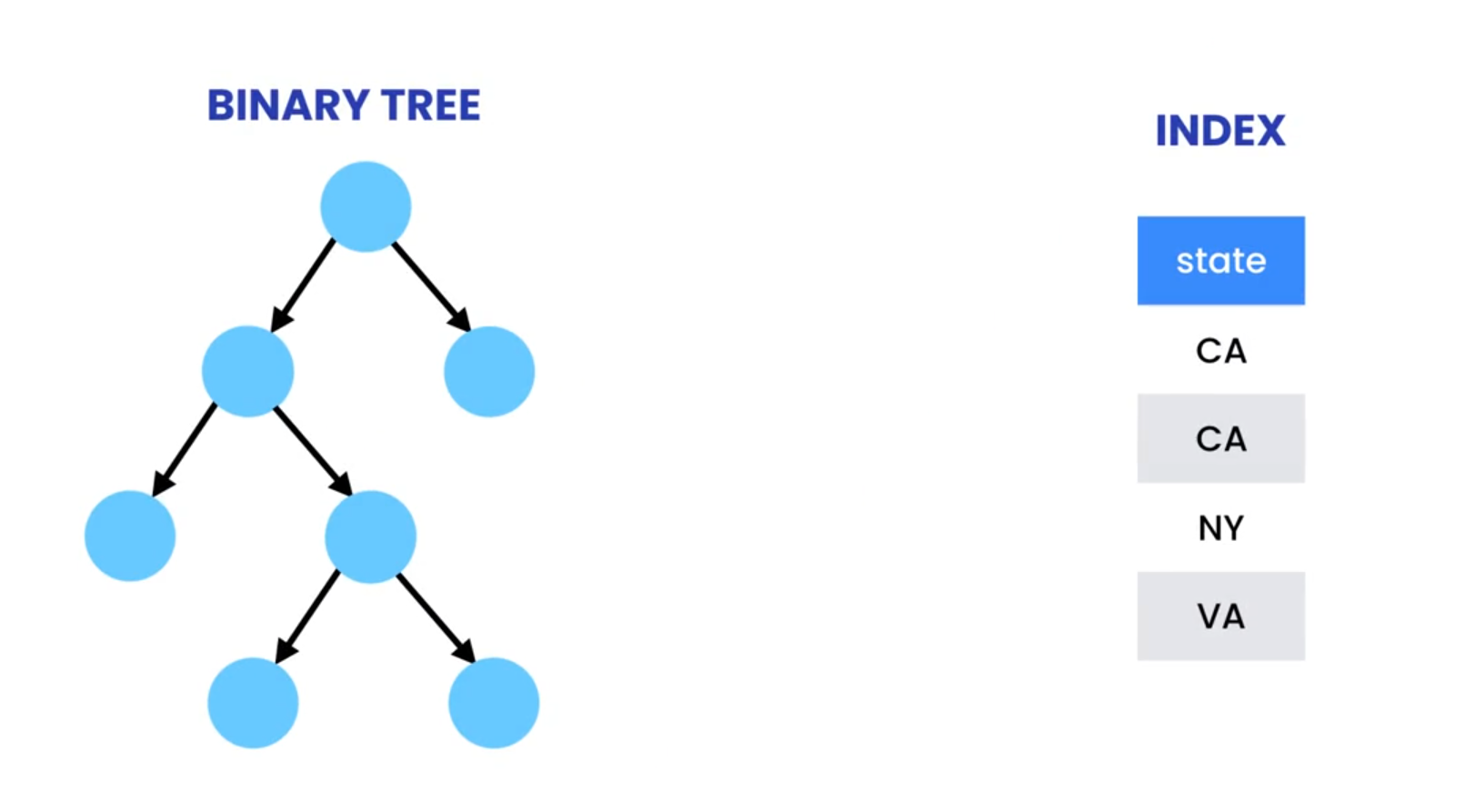
- Root Node: The topmost level, containing pointers to the most selective child nodes.
- Intermediate Nodes: Each intermediate node holds references to its child nodes, further narrowing down the search based on indexed column values.
- Leaf Nodes: The bottommost level, where actual data row pointers or the data rows themselves are stored.
- Enhanced Query Performance: Indexes significantly accelerate SELECT queries filtering or sorting based on indexed columns.
- Improved Efficiency of JOINs: Indexes can optimize JOIN operations when involved columns are indexed.
- Enforced Uniqueness (Unique Indexes): Unique indexes guarantee that no duplicate values exist in a column, ensuring data integrity.
- Faster ORDER BY Operations: Sorting operations can leverage indexes to efficiently order results based on indexed columns.
Increased Storage Space:
- Indexes require additional disk space to store the sorted data structures. This additional space can be a small percentage of the actual table size, but it's a factor to keep in mind, especially for very large tables.
- The space consumption is particularly noticeable for string-based indexes, as they need to store both the string value and its length. Slower Write Operations:
- When you perform INSERT, UPDATE, or DELETE operations, the database needs to update the indexes in addition to modifying the actual table data. This can introduce a slight performance overhead for write-heavy workloads.
Helpfull Suggestion in indexes:
- Analyze query patterns: Focus on indexing columns frequently used in WHERE clauses or ORDER BY clauses.
- Balance read vs. write performance: If your workload is mostly read-heavy, the benefits of faster queries may outweigh the slowdown for write operations.
- Monitor and adjust: As your database grows and query patterns evolve, review indexing strategies and adjust them for optimal performance.
EXPLAIN SELECT customer_id FROM customer where state = 'CA';Now look to find the customer whose state is CA, mysql reads all the records we can see using Explain keyword before select statement...
CREATE INDEX idx_state ON customer (state);
EXPLAIN SELECT customer_id FROM customer where state = 'CA';CREATE INDEX idx_state ON customers (state);
EXPLAIN SELECT customer_id FROM customer where state = 'CA';In MySQL, a prefix index is an index type that indexes only a portion of a column's values rather than the entire value. This can be particularly useful when indexing columns with long string values, such as VARCHAR or TEXT columns, where indexing the entire value might not be necessary or efficient.
By specifying a prefix length when creating an index on a column, MySQL will only index the specified number of characters from the beginning of each value in that column. This can save disk space and improve query performance, especially for columns with long values where indexing the entire value would be unnecessary.
SELECT * FROM sql_inventory.customer;
USE sql_inventory;
CREATE INDEX idx_last_name ON customer(last_name(20));
SELECT
  COUNT(DISTINCT LEFT(last_name, 1)) ,
  COUNT(DISTINCT LEFT(last_name, 5)) ,
  COUNT(DISTINCT LEFT(last_name, 10)) ,
  COUNT(DISTINCT LEFT(last_name, 20))
FROM customer;- CREATE INDEX:
- The first statement CREATE INDEX idx_last_name ON customer(last_name(20)) creates an index named idx_last_name on the last_name column of the customer table.
- The (20) part specifies that the index will only consider the first 20 characters of the last_name for indexing. This creates a prefix index.
- SELECT STATEMENT:
- The second statement is a SELECT query that retrieves three counts from the customer table.
- It uses the COUNT(DISTINCT ...) function four times to count the number of distinct values for different prefixes of the last_name column.
- Specifically, it counts:
- COUNT(DISTINCT LEFT(last_name, 1)) counts the number of distinct values considering only the first character of the last_name column.
- COUNT(DISTINCT LEFT(last_name, 5)) counts the number of distinct values considering only the first five characters of the last_name column.
- COUNT(DISTINCT LEFT(last_name, 10)) counts the number of distinct values considering only the first ten characters of the last_name column.
- COUNT(DISTINCT LEFT(last_name, 20)) The number of distinct values considering the entire last_name (up to 20 characters).
A full-text index is a special type of index used in database systems to enable efficient searching of text within large columns of textual data, such as VARCHAR or TEXT columns. Unlike traditional indexes that work well for exact matches or range queries, full-text indexes are optimized for natural language search queries where users might search for words or phrases within a text.
USE sql_blog;
SELECT * FROM posts;- Lets look we want to search 'react redux' in post and title field how can we do?
USE sql_blog;
SELECT * FROM posts
WHERE title LIKE '%react redux%' OR body LIKE '%react redux%';- Is it works? nope lets create full text indexes and then search
CREATE FULLTEXT INDEX idx_title_body ON posts (title,body);Now search react and redux
SELECT *
FROM posts
WHERE MATCH(title,body) AGAINST ('react redux');

SELECT *
FROM posts
WHERE MATCH(title,body) AGAINST ('react -redux' IN BOOLEAN MODE);

SELECT *
FROM posts
WHERE MATCH(title,body) AGAINST ('react -redux +Form' IN BOOLEAN MODE);

SELECT *
FROM posts
WHERE MATCH(title,body) AGAINST ('handling a form, IN BOOLEAN MODE');A composite index, also known as a compound index, is an index created on multiple columns in a database table. Unlike a single-column index that indexes values from a single column, a composite index indexes values from multiple columns concatenated together. This allows queries to efficiently filter, sort, and search based on combinations of values from these columns
use sql_store;
CREATE INDEX id_points ON customers(points);
SHOW INDEXES IN customers;
CREATE INDEX idx_state_points ON customers (state,points);
EXPLAIN SELECT customer_id FROM customers
WHERE state = 'CA' and points> 1000;
DROP INDEX idx_state_points ON customers;Two rules of composite indexes:
- Put the most frequently used columns first
- Put the columns with a higher cardinality first cardinality means unique values
SELECT customer_id
FROM customers WHERE state = 'CA'
AND last_name LIKE 'A%';
To Count how many unique values in each column
SELECT
COUNT(DISTINCT state),
COUNT(DISTINCT last_name)
FROM customers;
lets First we follow cardinality Rule Note cardinality rule not always work
CREATE INDEX idx_lastname_state ON customers (last_name, state); --Create index if not created
EXPLAIN SELECT customer_id
FROM customers
WHERE state = 'CA'
AND
last_name LIKE 'A%';
Now we reverse the order we put state than last_name
CREATE INDEX idx_state_lastname ON customers (state,last_name); --Create index if not created
EXPLAIN
SELECT customer_id
FROM customers
WHERE state = 'CA'
AND
last_name LIKE 'A%';
To force mysql to use different index we use
EXPLAIN
SELECT customer_id
FROM customers
USE INDEX (idex_lastname_state)
WHERE state = 'CA'
AND
last_name LIKE 'A%';EXPLAIN
SELECT customer_id
FROM customers
WHERE state = 'CA'
OR
points > 1000;How to optimize this query? lets create a separte index and than apply union
CREATE INDEX idx_points ON customers(points);Now apply again:
EXPLAIN
SELECT customer_id
FROM customers
WHERE state = 'CA'
UNION
EXPLAIN
SELECT customer_id
FROM customers
WHERE points > 1000;
Another Example:
EXPLAIN
SELECT customer_id
FROM customers
WHERE points + 10 > 2010;
This is searching FULL indexes so to fix,
EXPLAIN
SELECT customer_id
FROM customers
WHERE points > 2000;lets check the indexes and then sort by ASC
SHOW INDEXES IN customers;
EXPLAIN
SELECT customer_id
FROM customers
ORDER BY state;
SHOW STATUS LIKE 'last_query_cost';
Lets check the cost of previous query!
Now lets check first_name which is not in indexes
EXPLAIN
SELECT customer_id
FROM customers
ORDER BY first_name;
SHOW STATUS LIKE 'last_query_cost';
Why cost is so high? because first_name is not indexes, when we put a column in indexes, mysql will automatically sort it in ASC and store it parmanent. Now first_name is not in indexes so why mysql find? mysql uses filesort algorithm which is very expensive. Here's how it works:
- Query Execution: When a query is executed, MySQL first retrieves the rows that match the WHERE clause.
- Sorting: If the query has an ORDER BY clause and there's no suitable index to perform the sorting efficiently, MySQL resorts to the filesort algorithm. It sorts the result set based on the specified columns.
- Temporary File: As MySQL sorts the result set, it may need to write intermediate results to a temporary file on disk if the result set is too large to fit into memory. This temporary file is used to store portions of the result set that can't be held in memory at once.
- Merging: Once all the rows are sorted and stored in the temporary file, MySQL performs a merge operation to combine the sorted portions into a single sorted result set.
- Final Result: After merging, MySQL returns the sorted result set to the client.
EXPLAIN
SELECT customer_id
FROM customers
ORDER BY state , points DESC;
SHOW STATUS LIKE 'last_query_cost';
Why cost decreases again? because both were in indexes.
EXPLAIN
SELECT customer_id
FROM customers
ORDER BY state ,first_name, points;
SHOW STATUS LIKE 'last_query_cost';

-- --------------------------------------------------------
EXPLAIN
SELECT customer_id
FROM customers
ORDER BY state DESC , points DESC;
SHOW STATUS LIKE 'last_query_cost';-
Smaller tables perform better. Don’t store the data you don’t need. Solve today’s problems, not tomorrow’s future problems that may never happen.
-
Use the smallest data types possible. If you need to store people’s age, a TINYINT is sufficient. No need to use an INT. Saving a few bytes is not a big deal in a small table, but has a significant impact in a table with millions of records.
-
Every table must have a primary key.
-
Primary keys should be short. Prefer TINYINT to INT if you only need to store a hundred records.
-
Prefer numeric types to strings for primary keys. This makes looking up records by the primary key faster.
-
Avoid BLOBs. They increase the size of your database and have a negative impact on the performance. Store your files on disk if you can.
-
If a table has too many columns, consider splitting it into two related tables using a one-to-one relationship. This is called vertical partitioning. For example, you may have a customers table with columns for storing their address. If these columns don’t get read often, split the table into two tables (users and user_addresses).
-
In contrast, if you have several joins in your queries due to data fragmentation, you may want to consider denormalizing data. Denormalizing is the opposite of normalization. It involves duplicating a column from one table in another table (to reduce the number of joins) required.
-
Consider creating summary/cache tables for expensive queries. For example, if the query to fetch the list of forums and the number of posts in each forum is expensive, create a table called forums_summary that contains the list of forums and the number of posts in them. You can use events to regularly refresh the data in this table. You may also use triggers to update the counts every time there is a new post.
-
Full table scans are a major cause of slow queries. Use the EXPLAIN statement and look for queries with type = ALL. These are full table scans. Use indexes to optimize these queries.
-
When designing indexes, look at the columns in your WHERE clauses first. Those are the first candidates because they help narrow down the searches. Next, look at the columns used in the ORDER BY clauses. If they exist in the index, MySQL can scan your index to return ordered data without having to perform a sort operation (filesort). Finally, consider adding the columns in the SELECT clause to your indexes. This gives you a covering index that covers everything your query needs. MySQL doesn’t need to retrieve anything from your tables.
-
Prefer composite indexes to several single-column index.
-
The order of columns in indexes matter. Put the most frequently used columns and the columns with a higher cardinality first, but always take your queries into account.
-
Remove duplicate, redundant and unused indexes. Duplicate indexes are the indexes on the same set of columns with the same order. Redundant indexes are unnecessary indexes that can be replaced with the existing indexes. For example, if you have an index on columns (A, B) and create another index on column (A), the latter is redundant because the former index can help.
-
Don’t create a new index before analyzing the existing ones.
-
Isolate your columns in your queries so MySQL can use your indexes.
-
Avoid SELECT *. Most of the time, selecting all columns ignores your indexes and returns unnecessary columns you may not need. This puts an extra load on your database server.
-
Return only the rows you need. Use the LIMIT clause to limit the number of rows returned.
-
Avoid LIKE expressions with a leading wildcard (eg LIKE ‘%name’).
-
If you have a slow query that uses the OR operator, consider chopping up the query into two queries that utilize separate indexes and combine them using the UNION operator.
To create a user in MySQL, you can use the CREATE USER statement. Here's a basic example of how to
CREATE USER 'hashim'@'localhost' IDENTIFIED BY '*******';This command creates a user with the username 'username' and password 'password', and allows connections only from the local machine ('localhost'). If you want to allow connections for specific
CREATE USER hashim@codewithhashim.com IDENTIFIED BY '*********************';for subdomain
CREATE USER hashim@'%codewithhashim.com' IDENTIFIED BY '*********************';For simplicity we can sue
CREATE USER hashim IDENTIFIED BY '*******'; SELECT * FROM mysql.user; DROP USER hashim SET PASSWORD FOR hashim = '*************'; SET PASSWORD = '*************'; CREATE USER farooq IDENTIFIED BY '******'
GRANT SELECT, INSERT
ON sql_store.*
To farooqFor Admin
    GRANT ALL ON *.*
    TO farooq