Architecture
You can think of a module as an individual library, which can itself depend on other libraries.
Here you can see an incomplete diagram of the modules and their dependencies in this app:

app is a special module, which combines all other modules into the final Android application.
news, course and calendar are feature modules, i.e. each one is focused on one specific feature of the app. They can depend on each other, e.g. calendar depends on course.
core defines app-wide base classes like BaseFragment, BaseUseCase and Repository, as well as utility methods (LiveDataUtils, etc.).
The individual modules are each split into three layers:
-
presentation (UI): Handles the UI and interaction with the user. This includes
Fragment,RecyclerView.Adapter,ViewModel, etc. - domain (business): Handles the business logic. This includes simply getting some data, validating user input, and combining data from multiple repositories.
- data: Handles the fetching and persistence of data.
Each layer can only depend on the layer directly below it.
We now take a look at a concrete example: viewing a single article.

Let's start with ArticleDetailFragment. Fragments are a core component of the Android UI and instantiated by the framework. Out Fragment has two important tasks:
Inflating the layout (fragment_article_detail.xml):
override fun onCreateBinding(
    inflater: LayoutInflater,
    container: ViewGroup?,
    savedInstanceState: Bundle?
): FragmentArticleDetailBinding {
    return FragmentArticleDetailBinding.inflate(inflater, container, false).also {
        it.viewModel = viewModel
    }
}
Note:
FragmentArticleDetailBindingis created by the compiler based onfragment_article_detail.xml.
Getting the ViewModel (ArticleDetailViewModel):
override fun onCreate(savedInstanceState: Bundle?) {
    super.onCreate(savedInstanceState)
    viewModel = ViewModelProviders.of(this).get(ArticleDetailViewModel::class.java)
}
Note: When the device is rotated, all activities and fragments are destroyed and recreated. That means that all user data not persisted to internal storage would be lost. To prevent this, android has created
ViewModelProviders. These classes maintain a reference to ourViewModelwhile the fragment is recreated and return it to us afterwards.
We now take a closer look at ArticleDetailViewModel. This class currently has only one responsibility: Calling GetArticleUseCase and providing the data to our Fragment.
private val articleResult: LiveData<Result<Article>> = GetArticleUseCase("1").asLiveData()
val article: LiveData<Article> = articleResult.data
Note: You can ignore
LiveData(andObservable) for now. Just imagine there beingResult<Article>instead ofLiveData<Result<Article>>.
GetArticleUseCase("1").asLiveData() calls GetArticleUseCase with "1" as the article id (this will of course be changed to the article selected by the user later on). .asLiveData() converts an Observable to LiveData. More on that later on.
But what is Result<Article>? Result is defined in the core module and can be one of three different states which are self-explanatory:
sealed class Result<T> {
    data class Loading<T>(val data: T? = null) : Result<T>()
    data class Success<T>(val data: T) : Result<T>()
    data class Error(val exception: Throwable) : Result<Nothing>()
}
articleResult.data is an extension method that simply converts a Result to its data (if available) or null. We still need Results to e.g. show the user that an article cannot be found.
If we now take a look at fragment_article_detail.xml we will see where the article we just defined is being used:
<?xml version="1.0" encoding="utf-8"?>
<layout ...>
    <data>
        <variable
            name="viewModel"
            type="de.hpi.android.news.presentation.detail.ArticleDetailViewModel" />
    </data>

    <androidx.constraintlayout.widget.ConstraintLayout ...>

        <TextView
            android:text="@{viewModel.article.title}"
            tools:text="Test"
            ... />

    </androidx.constraintlayout.widget.ConstraintLayout>
</layout>
The <data> part declares variables that are available in this xml. These variables are provided when inflating the layout. Remember the lines
FragmentArticleDetailBinding.inflate(inflater, container, false).also {
    it.viewModel = viewModel
}
from earlier? it.viewModel is the <variable> tag of our xml, and viewModel is our instance of ArticleDetailViewModel.
The expression android:text="@{viewModel.article.title}" sets the text property of TextView to the value viewModel.article.title, i.e. the title of our article. @{...} is basically (very restricted) java code.
The attribute tools:text="Test" defines what to show in the layout preview of Android Studio (our app is not running so there is no actual data yet).
We currently have only one UseCase: GetArticleUseCase. It just defines two things:
object GetArticleUseCase : ObservableUseCase<Id, ArticleEntity>() {
    override val subscribeScheduler = Schedulers.io()

    override fun execute(params: Id): Observable<Result<ArticleEntity>> {
        return ArticleRepository.get(params)
    }
}
subscribeScheduler will either be Schedulers.io() or Schedulers.computation(), whatever fits best (this has to do with background execution and performance).
The important part is our execute function. As the name suggests this is what is being executed when the UseCase is called. The type of its parameters and return type are declared by the override: object GetArticleUseCase : ObservableUseCase<Id, ArticleEntity>() (Id is the same as String, but we use Id to indicate the meaning). In this case, execute is very simple, but it can get a lot more complex when validating user input/etc.
The entry point of our data layer is ArticleRepository. It inherits from Repository which just declares two methods:
abstract class Repository<E : Entity> {
    abstract fun get(id: Id): Observable<Result<E>>
    abstract fun getAll(): Observable<Result<List<E>>>
}
Currently, ArticleRepository only forwards those calls to RemoteArticleDataSource, but in the future this handles caching, i.e. when to use a local copy and when to make a network request.
object ArticleRepository : Repository<ArticleEntity>() {
    override fun get(id: Id): Observable<Result<ArticleEntity>> {
        return NetworkNewsDataSource.getArticle(id)
    }

    override fun getAll(): Observable<Result<List<ArticleEntity>>> {
        return NetworkNewsDataSource.getArticles()
    }
}
So let's have a look at RemoteArticleDataSource:
object RemoteArticleDataSource : RemoteDataSource<NewsServiceGrpc.NewsServiceBlockingStub>() {
    override val stub: NewsServiceGrpc.NewsServiceBlockingStub by lazy {
        val channel = ManagedChannelBuilder
            .forAddress("35.198.174.212", 80)
            .usePlaintext()
            .build()
        NewsServiceGrpc.newBlockingStub(channel)
    }

    fun getArticle(id: Id): Observable<Result<ArticleEntity>> = clientCall({
        stub.getArticle(GetArticleRequest.newBuilder().setId(id).build())
    }, ::parseArticle)

    fun getArticles(): Observable<Result<List<ArticleEntity>>> = clientCallList({
        stub.listArticles(ListArticlesRequest.getDefaultInstance())
            .articlesList
    }) { it.map(::parseArticle) }

    private fun parseArticle(article: Article): ArticleEntity = ArticleEntity(
        id = article.id,
        title = article.title,
        body = article.content
    )
}
Note:
stuband thestub.get.../stub.list...will change very soon as our server is being changed.
NewsServiceGrpc.NewsServiceBlockingStub is a class generated by our HPI Cloud server and handles the low-level network stuff. It provides us with the methods getArticle and listArticles which are defined on the server.
The method getArticle(id: Id) provied our Repository with a way to get articles. It does this by calling clientCall, which first executes the network call (stub.getArticle(...)), calls another function to map the result (the HPI Cloud News API returns Article, but we want ArticleEntity to avoid the networking overhead), handles all occuring errors and creates a Result out of this ArticleEntity.
getArticles() is basically the same, except we return a list instead of a single article.
parseArticle(article: Article) maps the Article returned by the HPI Cloud News API to our local ArticleEntity type.
And that's it! Now you know about the different layers and classes involved in displaying an article to the user.
Above I told you to ignore LiveData and Observable for now. But those are also important parts of our architecture.
Let's start by explaining Observable. Without Observable, when we return an article, the code would have to wait for the network request to complete and freeze the UI. Also, if the article changes, we would have to call our use case over and over to get the new data. Observable solves both of these problems: It combines Publishers and Subscribers. Publishers can publish data (in this case our article result) to an observable without knowing anything about the subscribers. Subscribers on the other hand subscribe to this observable without knowing the publishers. When a new item is published, all subscribers will be notified about it (i.e. a callback is invoked). This can happen zero to infinite times, and when the publisher is done, it sends a complete action to the observable (which is also delivered to all subscribers).
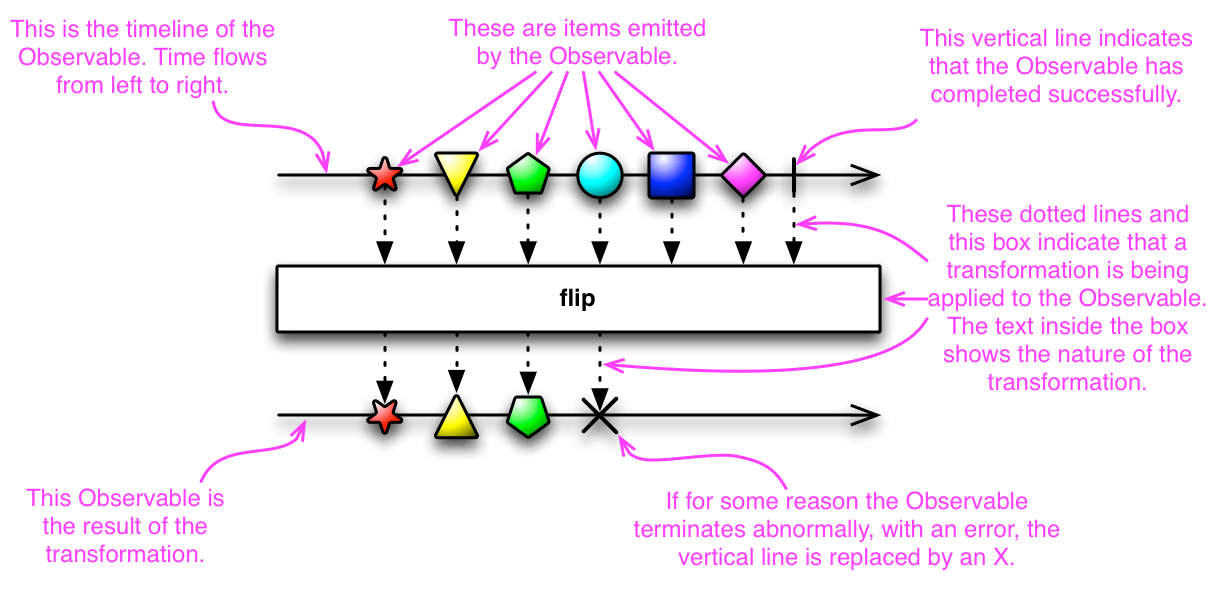
The real power of observables comes into play when using operators, e.g. mapping items asynchronously or throttling them (For example you want to display search results as soon as the user starts typing. You now throttle the keystrokes so a network request is made only every second instead of five times a second (for fast typers)).
LiveData is basically the same as Observable, except:
-
Observablehas a lot more operators and can use background threads. Therefore we use it to do processing in the lower layers. -
LiveDatais provided by Android and integrated into theFragmentlifecycle: When the user turns off the screen and therefore puts our activity/fragment into the background,LiveDatadoesn't deliver items to our view. It waits for the fragment to be running again and then only delivers the last result. -
LiveDatacan be referenced from inside the xml of our views and is handled for us - whenever a new item is published, the view is being refreshed automagically. Hence we useLiveDatafor our presentation layer.