Releases: GreatScottyMac/RooFlow
v0.5.6

v0.5.6
- Created more detailed support for codebase_search in the RooFlow system prompts.
- Removed the optional CLI command suggestion from the attempt_completion tool parameters.
- Removed the execute_command tool from Flow-Architect.
v0.5.5
Added system prompt instructions to support codebase_search. Thanks @edxeth !!
v0.5.4
Removed the Roo Code modes from the flow-orchestrator system prompt.
v0.5.3
- Removed references to unavailable tools in the Flow-Orchestrator system prompt.
- Added Flow-Orchestrator to the Modes list in the RooFlow system prompts.
- Gave Flow-Orchestrator read-only access to memory-bank/ and full access to context_portal/ if used.
v0.5.2
- Improved handling of apply_diff errors.
- Added Markdown Formatting Rules section.
v0.5.1
Fixed an issue in config/generate_mcp_yaml.py where the script failed to correctly parse MCP tool names containing hyphens (like those from the Context7 server). This prevented these tools from being included in the generated MCP server list used by the AI. The fix updates the parsing logic to correctly handle hyphens in tool names, ensuring all available MCP tools are properly listed. Thanks to Josses92 for pointing it out!
Contributors

Assets 2
v0.4.5
RooFlow v0.4.5
MCP Server Tool Usage Added To RooFlow Prompts!
RooFlow v0.4.4
Revised and streamlined the mode instructions and added Orchestrator mode definition.
RooFlow v0.4.3 -
Addressing Line Count Issues During File Modification:
- Corrected Tool Usage Formats and Examples: I noticed that the
usage_formatandexample.usagefor several tools (read_file,fetch_instructions,search_files,list_files,list_code_definition_names,write_to_file,attempt_completion,switch_mode,new_task,execute_command) were using a YAML-like format (tool_name: { param: value }) instead of the required XML format (<tool_name><param>value</param></tool_name>) as defined in thetool_use_protocol. This is a critical inconsistency that needs fixing. I have corrected all of these to use the XML format. - Corrected
apply_diffDiff Format: Theapply_difftool definition'sdiffformat block was missing:end_line:, but the parameter description and examples included it. I've corrected the format block definition to include:end_line:for consistency. - New Rule R13 (File Edit Preparation): Added a specific rule under
rulesthat explicitly states that before usingapply_difforinsert_contenton an existing file, the AI must obtain the file's content with line numbers usingread_file, unless that information is already available (e.g., from user-provided content). This makesread_filea mandatory preceding step for these edits. - New Rule R14 (File Edit Error Recovery): Added a rule under
rulesthat provides a specific procedure for when any file modification tool fails. The first step in recovery is always toread_fileon the target file to get its current state before attempting to fix the issue and retry. - Updated Objective Step 3 (Analysis and Planning): Modified the planning steps (specifically added step 'e') to include a check for the required file content with line numbers if the chosen tool is
apply_difforinsert_contenton an existing file. This integrates the R13 rule into the core planning logic. - Refined
read_fileDescription: Slightly enhanced theread_filedescription to explicitly mention its output includes line numbers and its purpose for planning modifications. - Refined
write_to_fileline_countDescription: Clarified thatline_countis based on the provided content. - Refined
insert_contentExample: Fixed indentation in the multi-line content example and added apassstatement to make it valid Python syntax.
These changes make the requirement for obtaining file content and line numbers via read_file much more explicit as a necessary step before attempting certain file modifications, and provide a clear recovery path if those modifications fail. The correction of the XML usage format across multiple tools is also essential for the prompt's consistency and the AI's ability to call tools correctly.
RooFlow v0.4.2
Improvements for AI Clarity and Usability:
- Structured YAML: Standard format for easy parsing.
- Clearer Description: Combined descriptive points, explicitly stated the purpose (surgical replace), the benefit (maintains formatting), and the rule about consolidating multiple changes into one call. Added base path context.
- Precise Parameter Definition (
diff):- Used a multi-line string (
|) to clearly lay out the exact required format of a diff block. - Explicitly noted that
:end_line:is NOT used in this version of the format, resolving ambiguity with previous versions. - Prominently featured the "IMPORTANT ESCAPING RULE" within the parameter description itself, detailing which markers need escaping (
<<<<<<< SEARCH,=======,>>>>>>> REPLACE) and how (\) when they appear as content within the SEARCH or REPLACE sections. This directly addresses the common error scenario. - Reiterated the rule about the single structural
=======.
- Used a multi-line string (
- Structured Examples: Presented examples clearly with descriptions and the exact
usageformat. - Escaping Example: Added a dedicated example demonstrating the critical escaping rule, which is vital for the AI to correctly handle files containing merge conflict markers or similar text.
- Consistency: Ensured the base path (
/var/www/roo-flow) is consistent with the provided markdown.
This revised YAML provides a much more robust and less error-prone instruction set for the AI when using the apply_diff tool.
RooFlow v0.4.1
Updated the RooFlow system prompts with the latest Roo Code tool definitions.
RooFlow v0.4.0
- RooFlow is now installed alongside the standard Roo Code modes, as Flow-Architect, Flow-Code, Flow-Debug , and Flow-Ask.
- Now you can easily switch to a standard Roo Code mode if something is not working correctly with a RooFlow mode.
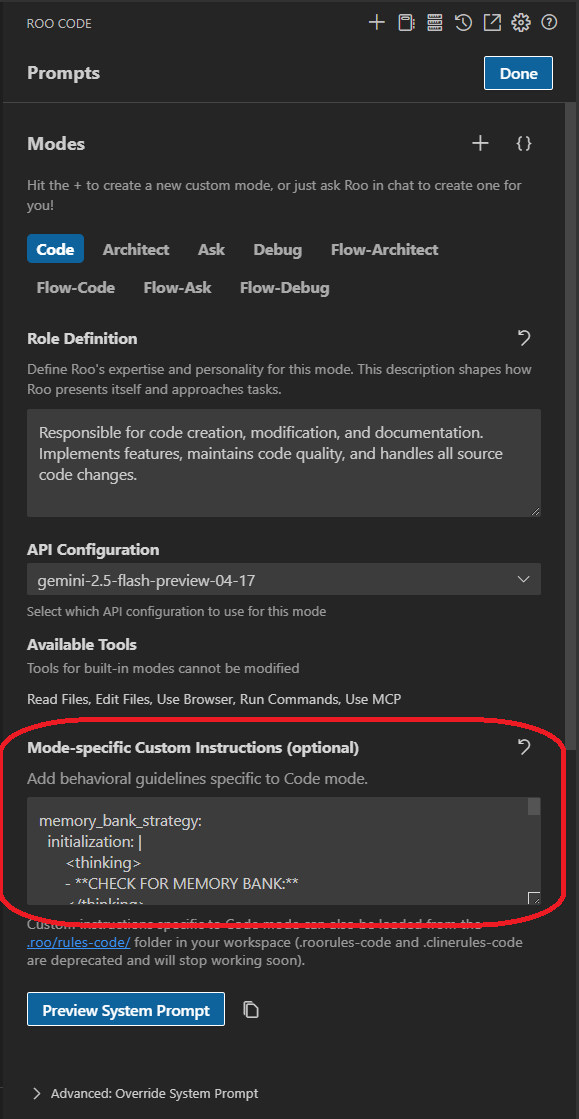
- In order to retain memory bank functionality when working with a standard Roo Code mode, simply copy/paste the corresponding memory bank instructions into the Mode-specific Custom Instructions box for each mode:
RooFlow v0.3.8
Switching this repository to private in order to create a more clear separation from Roo Code. The devs at Roo Code have been receiving bug reports that should have gone to RooFlow.
I've created an access gateway to RooFlow at RooFlow-Access
RooFlow v0.3.6
- Improved mode definitions and collaboration.
- Boomerang mode integrated into mode definitions and collaboration.
RooFlow v0.3.5
- Updated RooFlow system prompts, to be more compatible with recent Roo Code updates.
- Boomerang mode available for manual installation, along with the Default mode. Both use the standard Roo Code system prompt.
RooFlow v0.3.0
Now with install scripts! Finally 😅
RooFlow v0.2.2
- More formatting improvements in the system prompt files.
- Added an optional global Default mode. It uses the Roo Code default system prompt and adds the memory bank system and mode interaction features from the system-prompt-[mode] files. This can be useful for troubleshooting, when a Roo Code functionality is not working with the RooFlow custom prompts. Also it really illustrates the difference in token consumption!
RooFlow v0.2.1
-
Fixed incorrect paths in Windows insert-variables.cmd script.
-
Cleaned up some YAML syntax errors in the system prompt files.
RooFlow v0.2.0
Added environment variable injection scripts
MCP functionality has been tested and works!
RooFlow v0.1.8-beta
By popular demand, ✨MCP server tools✨ have been added!
Let me know how it works 🤞🙏
RooFlow v0.1.6-beta
Some bug fixes regarding memory bank handling.
RooFlow v0.1.5-beta
✨Integrated system prompt files, no more .clinerules-[mode] files!✨
RooFlow v0.1.0-beta
☢️ Pre-release: Beta Version ("Footgun" Enabled) ☢️
🌟 Major Updates
-
Standardized Mode Interactions
- Defined clear handoff triggers between modes
- Implemented unidirectional responsibility patterns
- Added structured communication standards
- Enhanced access control mechanisms
-
Mode-Specific Improvements
- Architect Mode
- Clarified design authority scope
- Refined markdown-only file restrictions
- Enhanced documentation structure
- Code Mode
- Strengthened implementation patterns
- Added inline documentation requirements
- Improved error handling standards
- Debug Mode
- Enhanced diagnostic process (5-7 possibilities approach)
- Added validation requirements
- Structured mode transitions
- Ask Mode
- Clarified knowledge support role
- Added diagram usage guidelines
- Enhanced documentation standards
- Test Mode
- Reinforced TDD principles
- Added test strategy requirements
- Enhanced validation flows
- Architect Mode
-
Documentation Enhancements
- Added detailed mode interaction diagrams
- Created standardized handoff templates
- Improved Memory Bank integration
- Enhanced progress tracking
-
System Refinements
- Optimized context management
- Standardized file organization
- Improved error handling
- Enhanced validation requirements
🔄 Previous Versions
RooFlow v0.1.0-alpha
☢️ Pre-release: Initial Alpha Version ("Footgun" Enabled) ☢️
RooFlow represents a significant evolution of the Roo Code Memory Bank system, introducing a more streamlined and efficient approach to AI-assisted development in VS Code.
⚠️ Important: "Footgun" Feature
This release utilizes Roo Code's new "Footgun" capability, which allows direct modification of the system-level mode rules and instructions. While powerful, this feature should be used with caution as incorrect modifications could impact the AI assistant's behavior.
🌟 Key Improvements
-
Enhanced Mode System
- Added new Test mode (special thanks to @gsoul for the idea)
- Expanded to 5 integrated modes: Architect, Code, Test, Debug, and Ask
- Each mode has dedicated behavior and context management
-
Advanced System Configuration
- Direct modification of system-level mode rules ("Footgun...