IronPython library for configuring ChemCharts4 visuals
To use this module, configure the following in the ScriptSync Preferences:
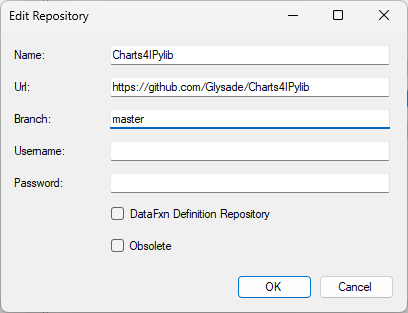
Use these values matching the image above to Copy+Paste into your ScriptSync configuration:
Name: Charts4IPylib
Url: https://github.com/Glysade/Charts4IPylib
Branch: master
After configuring ScriptSync, restart your Spotfire (Analyst) client. The library will be cloned into your %USER%\AppData\Local\Temp\ScriptSync directory.
Import the Charts4IPylib using the following IronPython:
import sys
import __builtin__
from System.IO import Path
sys.path.append(Path.Combine(Path.GetTempPath(),'ScriptSync','Charts4IPylib'))
__builtin__.Document = Document
__builtin__.Application = Application
import Charts4IPylib