Cranky is an application designed for learners who want to deepen their understanding of difficult material by combining two powerful methods: spaced repetition and visual memory palaces.
By integrating directly with your Anki application, Cranky transforms your most challenging cards into symbolic, spatially organized scenes — memory palaces that help you remember not just the answers, but the concepts and thematic relationships behind them.
Cranky brings together the best of both worlds:
- The advantages of spaced repetition, provided by Anki
- The creativity and retention benefits of visual learning, powered by symbolic scene generation
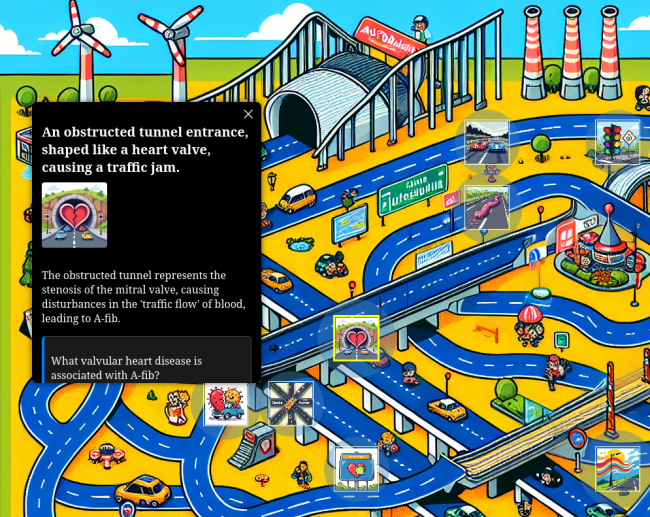
Traditional spaced repetition systems like Anki are highly effective at helping you retain isolated information. But for many learners, especially those tackling abstract, conceptual or complex material, repetition alone isn't enough.
Cranky adds structure to your knowledge, turning disconnected cards into spatial representations. With Cranky, you place your concepts into environments, stories, and visual metaphors that engage the deeper mechanisms of memory: Association, imagery and narratives.
Whether you're a medical student trying to retain a web of diagnoses and mechanisms, or a learner navigating difficult and theoretical material, Cranky provides a way to anchor abstract knowledge in something more tangible.
Therefore it is not meant to be a replacement for your flashcards, but a experience that helps you rember difficult content.
- Export Anki cards by deck, tag, or learning stats (most lapses/repetitions)
- OAuth-inspired browser login for secure authentication (no passwords handled in the add-on)
- Direct export to your Cranky dashboard, with media upload and access to past memory scenes


To install:
- Open Anki and go to Tools → Add-ons → Get Add-ons.
- Enter the add-on code provided for Cranky (or search for "Cranky Memory Palace" in the add-on browser).
- Restart Anki.
The add-on will then appear as “Cranky Memory Palace” in your Tools menu.
- Select "Cranky Memory Palace" from the Tools menu.
- Log in via your browser if prompted. The login page is secure and handled via the official Cranky web app.
- You do not need a real email address for registration. The login information is only needed for protected access to your scene dashboard.
- Select your target deck and/or tags in the anki addon, choose your export mode, and follow the prompts to start the workflow.
- When your dashboard is ready, your browser will open to show your generated memory palace and media.
- Due to LLM API calls and server load, scene creation can take several minutes, so please be patient. -
When you use Cranky, the contents of your Anki cards—including front, back, and any linked media are transmitted to and stored on a remote server for the purpose of generating symbolic memory palace scenes. As part of this process, your data may be submitted to third-party services such as OpenAI and Replicate via their respective APIs.
You should only select and submit cards containing content you are comfortable sharing with these external providers.
The application provider does not operate or control these third-party services and make no guarantees about their data handling practices. By using Cranky, you acknowledge that you do so at your own discretion and risk. The application providers accept no responsibility for any loss, misuse, or harm arising from use of this tool.
- If login does not work automatically, use the “Paste Access Token Manually” option and follow the instructions on the login page.
- If you do not see “Cranky Memory Palace” in the Tools menu after installing, restart Anki.
- All major Anki versions (2.1.50 and above, including Qt6) are supported. The add-on requires no third-party Python modules.
- Due to limited server capacity and costs of AI inference, the number of weekly scene generations per user is currently limited to 10 runs.
- The application is still under development and there might still be unexpected errors occurring. We are happy about any form of feedback which can help us improving the application.
Cranky is designed for learners who want to visualize what they know and understand what they remember.
contact: deep_intervention@posteo.de