

A full-featured YouTube Music player for the terminal. Browse your library, search, queue tracks, and control playback — all from a TUI with vim-style keybindings. Runs on Linux, macOS, and Windows.
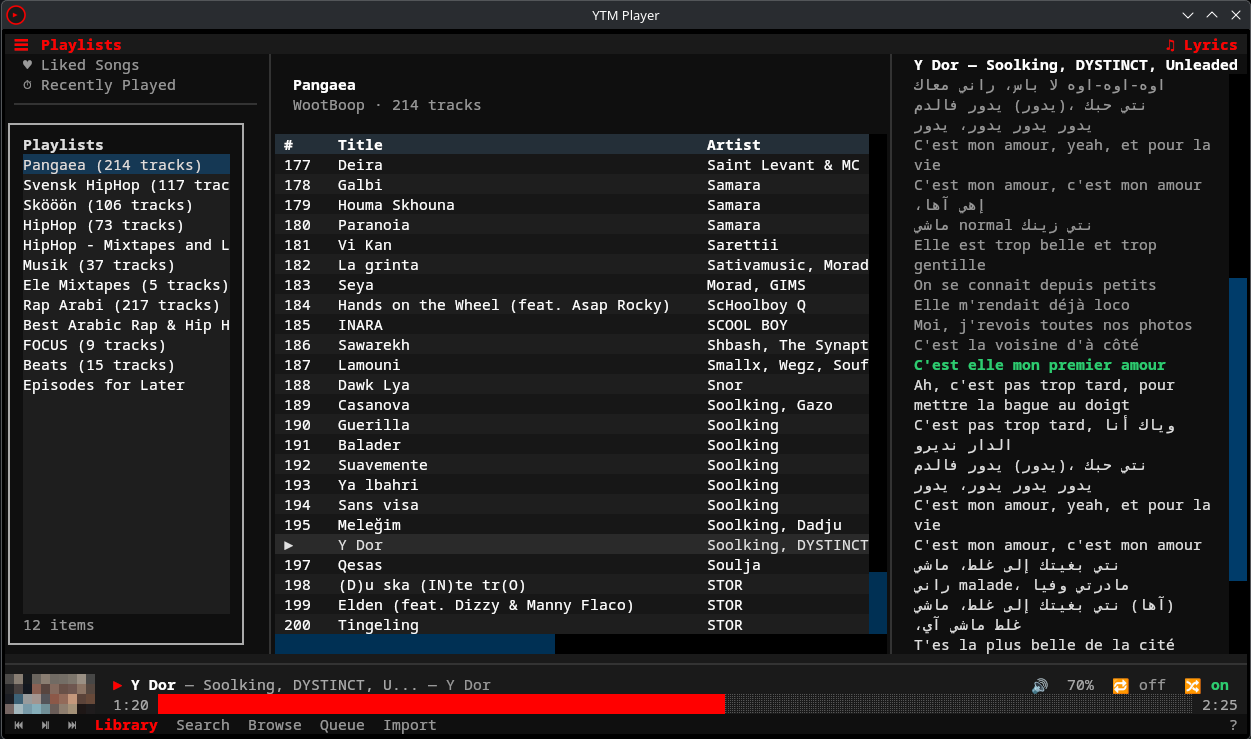
- Full playback control — play, pause, seek, volume, shuffle, repeat via mpv with gapless audio
- Persistent sidebars — playlist sidebar (left) visible across all views, synced lyrics sidebar (right) with auto-scroll, both toggleable from header bar
- 8 pages — Library, Search, Browse, Context (album/artist/playlist), Queue, Liked Songs, Recently Played, Help
- Vim-style navigation —
j/kmovement, multi-key sequences (g lfor library,g sfor search), count prefixes (5j) - Predictive search — debounced with 300ms delay, music-first mode with toggle to all results
- Spotify import — import playlists from Spotify via API or URL scraping
- History tracking — play history + search history stored in SQLite with listening stats
- Audio caching — LRU cache (1GB default) for offline-like replay of previously heard tracks
- Offline downloads — right-click any track → "Download for Offline" to save locally
- Discord Rich Presence — show what you're listening to in your Discord status
- Last.fm scrobbling — automatic scrobbling with Now Playing updates
- Album art — colored half-block rendering in the playback bar (requires Pillow)
- MPRIS integration — hardware media keys and desktop player controls via D-Bus
- CLI mode — headless subcommands for scripting (
ytm search,ytm stats,ytm history) - IPC control — control the running TUI from another terminal (
ytm play,ytm pause,ytm next) - Fully configurable — TOML config files for settings, keybindings, and theme
- Python 3.12+
- mpv — audio playback backend, must be installed system-wide
- A YouTube Music account (free or Premium)
mpv is required for audio playback. Install it with your system package manager:
# Arch / CachyOS / Manjaro
sudo pacman -S mpv

# Ubuntu / Debian
sudo apt install mpv

# Fedora
sudo dnf install mpv

# NixOS — handled by the flake (see NixOS section below)

# macOS (Homebrew)
brew install mpv

# Windows — see "Windows Setup" section below for full instructions
scoop install mpvyay -S ytm-player-gitOr with any other AUR helper. Package: ytm-player-git
pip install ytm-playerpip install ytm-playerThen run with:
py -m ytm_player
pip installon Windows does not add theytmcommand to PATH. Usepy -m ytm_playerto launch — this always works. Alternatively, install with pipx which handles PATH automatically:pipx install ytm-player
Important: Windows requires extra mpv setup — see Windows Setup below.
git clone https://github.com/peternaame-boop/ytm-player.git
cd ytm-player
python -m venv .venv
source .venv/bin/activate
pip install -e .ytm-player provides a flake.nix with two packages, a dev shell, and an overlay.
Try it without installing:
nix run github:peternaame-boop/ytm-playerAdd to your system flake (flake.nix):
{
  inputs.ytm-player.url = "github:peternaame-boop/ytm-player";

  outputs = { nixpkgs, ytm-player, ... }: {
    nixosConfigurations.myhost = nixpkgs.lib.nixosSystem {
      modules = [
        {
          nixpkgs.overlays = [ ytm-player.overlays.default ];
          environment.systemPackages = with pkgs; [
            ytm-player          # core (MPRIS + album art included)
            # ytm-player-full   # all features (Discord, Last.fm, Spotify import)
          ];
        }
      ];
    };
  };
}
Or install imperatively with nix profile:
# Core
nix profile install github:peternaame-boop/ytm-player

# All features (Discord, Last.fm, Spotify import, etc.)
nix profile install github:peternaame-boop/ytm-player#ytm-player-full
Dev shell (for contributors):
git clone https://github.com/peternaame-boop/ytm-player.git
cd ytm-player
nix develop  # drops you into a shell with all deps + dev tools
Note: If you install via
pipinstead of the flake, NixOS doesn't exposelibmpv.soin standard library paths. Add to your shell config:# Fish set -gx LD_LIBRARY_PATH /run/current-system/sw/lib $LD_LIBRARY_PATH# Bash/Zsh export LD_LIBRARY_PATH="/run/current-system/sw/lib:$LD_LIBRARY_PATH"The flake handles this automatically — no manual
LD_LIBRARY_PATHneeded.
# Spotify playlist import
pip install "ytm-player[spotify]"

# MPRIS media key support (Linux only, requires D-Bus)
pip install "ytm-player[mpris]"

# Discord Rich Presence
pip install "ytm-player[discord]"

# Last.fm scrobbling
pip install "ytm-player[lastfm]"

# All optional features
pip install "ytm-player[spotify,mpris,discord,lastfm]"

# Development tools (pytest, ruff)
pip install -e ".[dev]"If you installed via AUR, install optional dependencies with pacman/yay — not pip (pip won't work on Arch due to PEP 668):
# MPRIS media key support (Linux)
sudo pacman -S python-dbus-next

# Last.fm scrobbling
yay -S python-pylast

# Discord Rich Presence
yay -S python-pypresence

# Spotify playlist import
yay -S python-spotipy python-thefuzzOn Linux and macOS, mpv packages include the shared library that ytm-player needs. On Windows, scoop install mpv (and most other methods) only install the player executable — the libmpv-2.dll library must be downloaded separately.
Steps:
- Install mpv:
scoop install mpv(or download from mpv.io) - Install 7zip if you don't have it:
scoop install 7zip - Download the latest
mpv-dev-x86_64-*.7zfrom shinchiro's mpv builds (the file starting withmpv-dev, not justmpv) - Extract
libmpv-2.dllinto your mpv directory:
# Adjust the filename to match what you downloaded
7z e "$env:TEMP\mpv-dev-x86_64-*.7z" -o"$env:USERPROFILE\scoop\apps\mpv\current" libmpv-2.dll -y
If you installed mpv a different way, place libmpv-2.dll next to mpv.exe or anywhere on your %PATH%.
ytm-player automatically searches common install locations (scoop, chocolatey, Program Files) for the DLL.
ytm setup          # Linux / macOS
py -m ytm_player setup   # Windows
The setup wizard has two modes:
Automatic (preferred): If [yt_dlp].cookies_file is set, setup first tries that Netscape cookies file (same format as yt-dlp --cookies FILE). If not configured or invalid, it scans installed browsers (Helium, Chrome, Chromium, Brave, Firefox, Edge, Vivaldi, Opera) for YouTube Music cookies.
Manual fallback: If cookie-file + auto-detection fail (e.g. expired cookies, unsupported browser), the wizard walks you through pasting raw request headers:
- Open music.youtube.com in your browser
- Open DevTools (F12) → Network tab
- Refresh the page, filter requests by
/browse - Click a
music.youtube.comrequest - Right-click "Request Headers" → Copy
- Paste into the wizard and press Enter on an empty line
The wizard accepts multiple paste formats (Chrome alternating lines, Firefox Name: Value, terminal escape-separated).
Credentials are stored in ~/.config/ytm-player/headers_auth.json with 0o600 permissions.
⚠️ remote_componentsallows fetching external JS components (npm/GitHub). Enable it only if you trust the source and network path.
ytm                # Linux / macOS
py -m ytm_player # WindowsThese work without the TUI running:
# Search YouTube Music
ytm search "daft punk"
ytm search "bohemian rhapsody" --filter songs --json

# Listening stats
ytm stats
ytm stats --json

# Play history
ytm history
ytm history search

# Cache management
ytm cache status
ytm cache clear

# Spotify import
ytm import "https://open.spotify.com/playlist/..."Control the running TUI from another terminal via IPC:
ytm play          # Resume playback
ytm pause         # Pause playback
ytm next          # Skip to next track
ytm prev          # Previous track
ytm seek +10      # Seek forward 10 seconds
ytm seek -5       # Seek backward 5 seconds
ytm seek 1:30     # Seek to 1:30

ytm now            # Current track info (JSON)
ytm status         # Player status (JSON)
ytm queue          # Queue contents (JSON)
ytm queue add ID   # Add track by video ID
ytm queue clear # Clear queue| Key | Action |
|---|---|
space |
Play/Pause |
n |
Next track |
p |
Previous track |
+ / - |
Volume up/down |
j / k |
Move down/up |
enter |
Select/play |
g l |
Go to Library |
g s |
Go to Search |
g b |
Go to Browse |
z |
Go to Queue |
l |
Toggle lyrics sidebar |
Ctrl+e |
Toggle playlist sidebar |
g y |
Go to Liked Songs |
g r |
Go to Recently Played |
? |
Help (full keybinding reference) |
tab |
Focus next panel |
a |
Track actions menu |
/ |
Filter current list |
Ctrl+r |
Cycle repeat mode |
Ctrl+s |
Toggle shuffle |
backspace |
Go back |
q |
Quit |
| Action | Where | Effect |
|---|---|---|
| Click | Progress bar | Seek to position |
| Scroll up/down | Progress bar | Scrub forward/backward (commits after 0.6s pause) |
| Scroll up/down | Volume display | Adjust volume by 5% |
| Click | Repeat button | Cycle repeat mode (off → all → one) |
| Click | Shuffle button | Toggle shuffle on/off |
| Click | Footer buttons | Navigate pages, play/pause, prev/next |
| Right-click | Track row | Open context menu (play, queue, add to playlist, etc.) |
Custom keybindings: edit ~/.config/ytm-player/keymap.toml
Config files live in ~/.config/ytm-player/ (respects $XDG_CONFIG_HOME):
| File | Purpose |
|---|---|
config.toml |
General settings, playback, cache, UI |
keymap.toml |
Custom keybinding overrides |
theme.toml |
Color scheme customization |
headers_auth.json |
YouTube Music credentials (auto-generated) |
Open config directory in your editor:
ytm config[general]
startup_page = "library" # library, search, browse
[playback]
audio_quality = "high" # high, medium, low
default_volume = 80 # 0-100
autoplay = true
seek_step = 5 # seconds per seek
[cache]
enabled = true
max_size_mb = 1024 # 1GB default
prefetch_next = true
[yt_dlp]
cookies_file = "" # Optional: path to yt-dlp Netscape cookies.txt
remote_components = "" # Optional: ejs:npm/ejs:github (enables remote component downloads)
js_runtimes = "" # Optional: bun or bun:/path/to/bun (also node/quickjs forms)
[ui]
album_art = true
progress_style = "block" # block or line
sidebar_width = 30
col_index = 4 # 0 = auto-fill
col_title = 0 # 0 = auto-fill
col_artist = 30
col_album = 25
col_duration = 8
[notifications]
enabled = true
timeout_seconds = 5
[mpris]
enabled = true
[discord]
enabled = false # Requires pypresence
[lastfm]
enabled = false # Requires pylast
api_key = ""
api_secret = ""
session_key = ""
username = ""[colors]
background = "#0f0f0f"
foreground = "#ffffff"
primary = "#ff0000"
secondary = "#aaaaaa"
accent = "#ff4e45"
success = "#2ecc71"
warning = "#f39c12"
error = "#e74c3c"
muted_text = "#999999"
border = "#333333"
selected_item = "#2a2a2a"
progress_filled = "#ff0000"
progress_empty = "#555555"
playback_bar_bg = "#1a1a1a"Import your Spotify playlists into YouTube Music — from the TUI or CLI.
- Extract — Reads track names and artists from the Spotify playlist
- Match — Searches YouTube Music for each track using fuzzy matching (title 60% + artist 40% weighted score)
- Resolve — Tracks scoring 85%+ are auto-matched. Lower scores prompt you to pick from candidates or skip
- Create — Creates a new private playlist on your YouTube Music account with all matched tracks
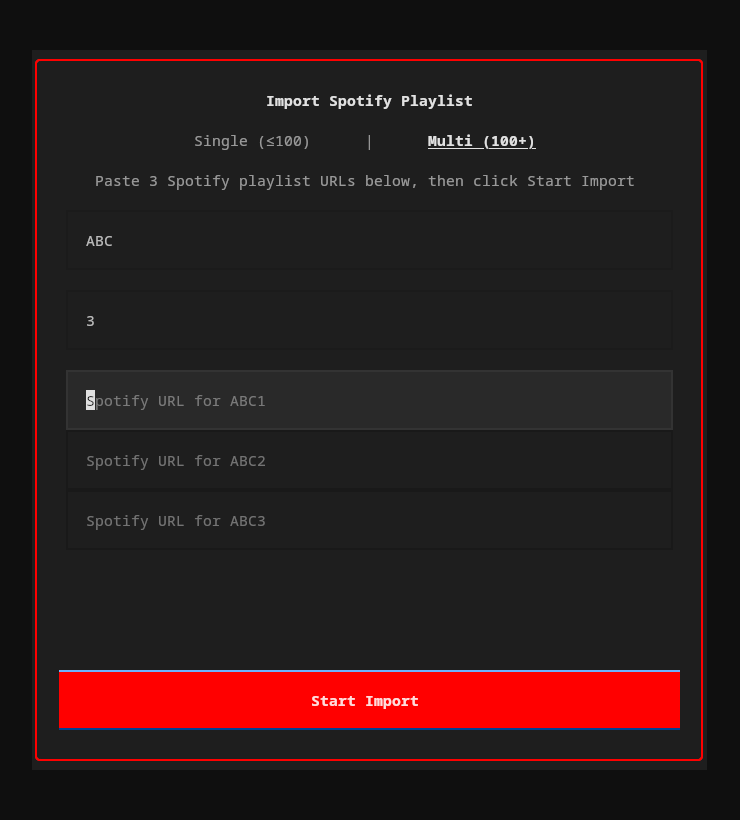
| Mode | Use case | How |
|---|---|---|
| Single (≤100 tracks) | Most playlists | Paste one Spotify URL |
| Multi (100+ tracks) | Large playlists split across parts | Enter a name + number of parts, paste a URL for each |
Click Import in the footer bar (or press the import button). A popup lets you paste URLs, choose single/multi mode, and watch progress in real-time.
ytm import "https://open.spotify.com/playlist/37i9dQZF1DXcBWIGoYBM5M"Interactive flow: fetches tracks, shows match results, lets you resolve ambiguous/missing tracks, name the playlist, then creates it.
The importer tries two approaches in order:
- Spotify Web API (full pagination, handles any playlist size) — requires a free Spotify Developer app. On first use, you'll be prompted for your
client_idandclient_secret, which are stored in~/.config/ytm-player/spotify.json - Scraper fallback (no credentials needed, limited to ~100 tracks) — used automatically if API credentials aren't configured
For playlists over 100 tracks, set up the API credentials.
src/ytm_player/
├── app/                # Main Textual application (mixin package)
│   ├── _app.py         #   Class def, __init__, compose, lifecycle
│   ├── _playback.py    #   play_track, player events, history, download
│   ├── _keys.py        #   Key handling and action dispatch
│   ├── _sidebar.py     #   Sidebar toggling and playlist sidebar events
│   ├── _navigation.py  #   Page navigation and nav stack
│   ├── _ipc.py         #   IPC command handling for CLI
│   ├── _track_actions.py  # Track selection, actions popup, radio
│   ├── _session.py     #   Session save/restore
│   └── _mpris.py       #   MPRIS/media key callbacks
├── cli.py              # Click CLI entry point
├── ipc.py              # Unix socket IPC for CLI↔TUI communication
├── config/             # Settings, keymap, theme (TOML)
├── services/           # Backend services
│   ├── auth.py         #   Browser cookie auth
│   ├── ytmusic.py      #   YouTube Music API wrapper
│   ├── player.py       #   mpv audio playback
│   ├── stream.py       #   yt-dlp stream URL resolution
│   ├── queue.py        #   Playback queue with shuffle/repeat
│   ├── history.py      #   SQLite play/search history
│   ├── cache.py        #   LRU audio file cache
│   ├── mpris.py        #   D-Bus MPRIS media controls
│   ├── download.py     #   Offline audio downloads
│   ├── discord_rpc.py  #   Discord Rich Presence
│   ├── lastfm.py       #   Last.fm scrobbling
│   └── spotify_import.py  # Spotify playlist import
├── ui/
│   ├── header_bar.py   # Top bar with sidebar toggle buttons
│   ├── playback_bar.py # Persistent bottom bar (track info, progress, controls)
│   ├── theme.py        # Theme system with CSS variable generation
│   ├── sidebars/       # Persistent playlist sidebar (left) and lyrics sidebar (right)
│   ├── pages/          # Library, Search, Browse, Context, Queue, Liked Songs, Recently Played, Help
│   ├── popups/         # Actions menu, playlist picker, Spotify import
│   └── widgets/        # TrackTable, PlaybackProgress, AlbumArt
└── utils/              # Terminal detection, formatting helpers
Stack: Textual (TUI) · ytmusicapi (API) · yt-dlp (streams/downloads) · python-mpv (playback) · aiosqlite (history/cache) · dbus-next (MPRIS) · pypresence (Discord) · pylast (Last.fm)
Ensure mpv is installed and in your $PATH:
mpv --versionIf installed but not found, check that the libmpv shared library is available:
# Arch
pacman -Qs mpv

# Ubuntu/Debian — you may need the dev package
sudo apt install libmpv-dev- Make sure you're signed in to YouTube Music Premium in your browser
- Try a different browser:
ytm setupauto-detects Chrome, Firefox, Brave, and Edge - If auto-detection fails, use the manual paste method
- Re-run
ytm setupto re-authenticate
mpv uses your system's default audio output. To change it, create ~/.config/mpv/mpv.conf:
audio-device=pulse/your-device-name
List available devices with mpv --audio-device=help.
- ytm-player now registers with macOS Now Playing when running, so media keys should target it.
- Start playback in
ytmfirst; macOS routes media keys to the active Now Playing app. - Grant Accessibility and Input Monitoring permission to your terminal app (Terminal, Ghostty, iTerm) in System Settings -> Privacy & Security.
- If Apple Music still steals keys, fully quit Music.app and press play/pause once in ytm.
Install the optional MPRIS dependency:
pip install -e ".[mpris]"Requires D-Bus (standard on most Linux desktops). Verify with:
dbus-send --session --print-reply --dest=org.freedesktop.DBus /org/freedesktop/DBus org.freedesktop.DBus.ListNames# Check cache size
ytm cache status
# Clear all cached audio
ytm cache clearOr reduce the limit in config.toml:
[cache]
max_size_mb = 512MIT — see LICENSE.
Refactor
- Decomposed
app.py(2000+ lines) into a package with 7 focused mixins — playback, navigation, keys, session, sidebar, track actions, MPRIS, IPC. Zero behavioral changes; all 370 tests pass unchanged.
New
- Lyrics transliteration — toggle ASCII transliteration of non-Latin lyrics with Ctrl+T, useful for Japanese, Korean, Arabic, Cyrillic, etc. Requires optional
anyasciipackage (thanks @Kineforce, #14) - Add to Library button — albums and playlists that aren't in your library now show a clickable
[+ Add to Library]button on their context page - Delete/remove playlist confirmation — deleting a playlist now asks for confirmation first; also supports removing non-owned playlists from your library
- Search mode toggle is now clickable — click the
Music/Alllabel to toggle (was keyboard-only before) - Page state preservation — Search, Browse, Liked Songs, and Recently Played pages now remember their state (query, results, cursor position, active tab) when navigating away and back
Fixes
- Fixed RTL text word order — restored BiDi reordering for Arabic/Hebrew track titles, artists, and lyrics (UAX #9 algorithm)
- Fixed right-click targeting wrong track — right-click now opens actions for the row under the cursor, not the previously highlighted row (thanks @glywil, PR #16)
- Fixed artist search results showing "Unknown" instead of artist name
- Fixed radio tracks crashing playback — radio API responses are now normalized before adding to queue
- Fixed browse page items not opening — capitalized
resultTypevalues and missing routing for radio/mix entries - Fixed session restore crash when saved tracks become unavailable (deleted/region-locked videos)
- Fixed actions popup crash when album field is a plain string instead of dict (thanks @glywil, PR #16)
- Fixed double-click playing a track twice (1-second debounce)
- Fixed back navigation ping-ponging between two pages
- Fixed lyrics sidebar performance — batch-mount widgets instead of mounting individually
- Fixed transliteration toggle highlight flash — forces immediate lyrics re-sync after toggle
- Transliteration toggle state now persists across restarts via session.json
- Sidebar refreshes after adding or removing playlists from library
New
- Native macOS media key and Now Playing support — hardware media keys (play/pause, next, previous) now work via Quartz event taps, and track metadata appears in macOS Control Center (thanks @Thayrov, PR #12)
Fixes
- Documented how to install optional features for AUR users — pip doesn't work on Arch due to PEP 668 (fixes #13)
Windows Fix
- Fixed mpv crash inside Textual TUI on Windows — locale was being set via the legacy
msvcrt.dllCRT, but Python 3.12+ usesucrtbase.dll, so thesetlocale(LC_NUMERIC, "C")call had no effect and mpv refused to initialize (access violation on null handle) - Fixed mpv DLL not found on Windows when installed via scoop/chocolatey — auto-locates
libmpv-2.dllin common install directories - Improved error messages for service init failures
Windows Compatibility
- Fixed crash on Windows caused by config file encoding (em-dash written as cp1252 instead of UTF-8)
- Added TCP localhost IPC for Windows (Unix sockets unavailable), with proper stale port cleanup
- Fixed PID liveness check on Windows using
OpenProcessAPI - Config now stored in
%APPDATA%\ytm-player, cache in%LOCALAPPDATA%\ytm-player - Fixed crash log path, libc detection (
msvcrt), andytm configcommand for Windows - Added
encoding="utf-8"to all file I/O (Windows defaults to cp1252) - Added clipboard support for Windows (
Set-Clipboard) and macOS (pbcopy) - Corrupted config files are backed up to
.toml.bakbefore recreating defaults
Bug Fixes
- Disabled media key listener on macOS — pynput can't intercept keys, causing previous track to open iTunes. Media keys on macOS will be implemented properly with MPRemoteCommandCenter in a future release.
- Suppressed noisy warnings on macOS startup ("dbus-next not installed", "process not trusted")
New
- Cross-platform media key support — play/pause, next, and previous media keys now work on macOS and Windows via
pynput(Linux already supported via MPRIS) - Pillow (album art) is now a default dependency — no longer requires
pip install ytm-player[images]
New
ytm setup --manual— skip browser detection, paste request headers directly (thanks @uhs-robert, #10)ytm setup --browser <name>— extract cookies from a specific browser (chrome, firefox, brave, etc.)- Theme variables
$surfaceand$textnow properly defined — fixes unstyled popups, sidebars, and scrollbars (thanks @ahloiscreamo, #6) - NixOS packaging —
flake.nixwithytm-playerandytm-player-fullpackages, dev shell, and overlay - Free-tier support — tracks without a video ID (Premium-only) are now filtered from playlists/albums/search with an "unavailable tracks hidden" notice, instead of silently failing on click
Bug Fixes
- Fixed MPRIS crash (
SignatureBodyMismatchError) when track metadata contains None values (thanks @markvincze, #9) - Fixed large playlists only loading 200-300 songs — now fetches all tracks via ytmusicapi pagination (thanks @bananarne, #5)
- Fixed search results missing
video_id— songs from search couldn't play (thanks @firedev, PR #4) - Fixed browse/charts page same missing normalization bug
- Fixed macOS
Playerinit crash — hardcodedlibc.so.6replaced with platform-aware detection (thanks @hanandewa5, PR #2) - Fixed auth validation crashing with raw tracebacks on network errors — now shows friendly message with recovery suggestion (thanks @CarterSnich #7, @Tohbuu #11)
- Rewrote auth validation to use
get_account_info()instead of monkey-patching — more reliable across platforms and ytmusicapi versions - Unplayable tracks (no video ID) now auto-skip to the next track instead of stopping playback dead
New
- yt-dlp configuration support:
cookies.txtauth,remote_components,js_runtimesvia[yt_dlp]config section (thanks @gitiy1, PR #1)
Bug Fixes
- Fixed RTL text (Arabic/Hebrew) in track table columns — added BiDi isolation (LRI/PDI) so RTL album/artist names don't bleed into adjacent columns
New
- Published to PyPI — install with
pip install ytm-playerorpipx install ytm-player
Bug Fixes
- Fixed track auto-advance stopping after song ends — three root causes: mpv end-file reason read from wrong event object, event loop reference permanently lost under thread race condition, and
CancelledErrornot caught in track-end handler - Fixed RTL text (Arabic/Hebrew) display — removed manual word-reordering that double-reversed text on terminals with native BiDi support; added Unicode directional isolation to prevent RTL titles from displacing playback bar controls
- Fixed shuffle state corrupting queue after clear, and
jump_to()desyncing the current index when shuffle is on - Fixed column resize triggering sort, and Title column not staying at user-set width
Bug Fixes
- Fixed intermittent playback stopping mid-queue — consecutive stream failures (stale yt-dlp session, network hiccup) now reset the stream resolver automatically, preventing the queue index from advancing past all remaining tracks
- Fixed playlists appearing empty after prolonged use — YTMusic API client now auto-reinitializes after 3 consecutive failures (handles expired sessions/cookies)
- Fixed misleading "Queue is empty" message when queue has tracks but playback index reached the end — now says "End of queue"
Bug Fixes
- Fixed MPRIS silently disabled on Python 3.14 —
from __future__ import annotationscaused dbus-next to reject-> Nonereturn types, disabling media keys and desktop player widgets - Fixed RTL lyrics line-wrap reading bottom-to-top — long lines are now pre-wrapped in logical order before reordering, so sentence start is on top
Bug Fixes
- Fixed play/pause doing nothing after session restore — player had no stream loaded so toggling pause was a no-op; now starts playback from the restored queue position
- Fixed MPRIS play/pause also being a no-op after session restore (same root cause)
- Fixed RTL (Hebrew, Arabic, etc.) lyrics displaying in wrong order — segment-level reordering now renders bidirectional text correctly
- Fixed lyrics sidebar crash from dict-style access on LyricLine objects — switched to attribute access
- Fixed lyrics sidebar unnecessarily reloading when reopened for the same track
Features
- Right-click on playback bar (album art or track info) now opens the track actions popup, matching right-click behavior on track tables
Features
- Synced (timestamped) lyrics — lyrics highlight and auto-scroll with the song in real time
- Click-to-seek on lyrics — click any synced lyric line to jump to that part of the song
- LRCLIB.net fallback — when YouTube Music doesn't provide synced lyrics, fetches them from LRCLIB.net (no API key needed)
- Lyrics auto-center — current lyric line stays centered in the viewport as the song plays
Bug Fixes
- Fixed crash on song change with both sidebars open — Textual's
LoadingIndicatortimer raced with widget pruning during track transitions - Fixed crash from unhandled exceptions in player event callbacks — sync callbacks dispatched via
call_soon_threadsafenow wrapped in error handlers - Wrapped
notify()and_prefetch_next_track()in_on_track_changewith try/except to prevent crashes during app transitions - Lyrics sidebar always starts closed on launch regardless of previous session state
- Fixed synced lyrics not being requested —
timestamps=Truenow passed to ytmusicapi with automatic fallback to plain text
Features
- Persistent playlist sidebar (left) — visible across all views, toggleable per-view with state memory (
Ctrl+e) - Persistent lyrics sidebar (right) — synced lyrics with auto-scroll, replaces the old full-page Lyrics view (
lto toggle) - Header bar with toggle buttons for both sidebars
- Pinned navigation items (Liked Songs, Recently Played) in the playlist sidebar
- Per-view sidebar state — sidebar visibility is remembered per page and restored on navigation
- Lyrics sidebar registers player events lazily and skips updates when hidden for performance
Removed
- Lyrics page — replaced entirely by the lyrics sidebar
- Lyrics button from footer bar — use header bar toggle or
lkey instead
Features
- Click column headers to sort — click any column header (Title, Artist, Album, Duration, #) to sort; click again to reverse
- Drag-to-resize columns — drag column header borders to adjust widths; Title column auto-fills remaining space
- Playlist sort order — requests "recently added" order from YouTube Music API when loading playlists
#column preserves original playlist position and can be clicked to reset sort order
Bug Fixes
- Fixed click-to-sort not working (ColumnKey.value vs str(ColumnKey) mismatch)
- Fixed horizontal scroll position resetting when sorting
- Fixed session restore with shuffle — queue is now populated before enabling shuffle so the saved index points at the correct track
- Fixed
jump_to_real()fallback when track not in shuffle order (was a silent no-op, now inserts into shuffle order) - Fixed crash on Python 3.14 from dbus-next annotation parsing (MPRIS gracefully disables)
- Pinned Textual dependency to
>=7.0,<8.0to protect against internal API breakage
Features
- Shuffle-aware playlist playback — double-clicking a playlist with shuffle on now starts from a random track instead of always the first
- Table sorting — sort any track list by Title (
s t), Artist (s a), Album (s A), Duration (s d), or reverse (s r) - Session resume — on startup, restores last queue position and shows the track in the footer (without auto-playing)
- Quit action (
q/Ctrl+Q) — clean exit that clears resume state; unclean exits (terminal close/kill) preserve it
Bug Fixes
- Fixed queue position desync when selecting tracks with shuffle enabled (all pages: Library, Context, Liked Songs, Recently Played)
- Fixed search mode toggle showing empty box due to Rich markup interpretation (
[Music]→Music)
Bug Fixes
- Fixed right-click on track table triggering playback instead of only opening context menu
- Fixed auto-advance bug: songs after the 2nd track would not play due to stale
_end_file_skipcounter - Fixed thread-safe skip counter — check+increment now atomic under lock
- Fixed duplicate end-file events causing track skipping (debounce guard)
- Fixed
player.play()failure leaving stale_current_trackstate - Fixed unhandled exceptions in stream resolution crashing the playback chain
- Fixed
player.play()exceptions silently stopping all playback - Fixed Browse page crash from unawaited async mount operations
- Fixed API error tracebacks polluting TUI with red stderr overlay
- Reset skip counter on mpv crash recovery
- Fixed terminal image protocol detection (
TERM_FEATURESreturning wrong protocol) - Fixed encapsulation break (cache private method called from app)
- Always-visible Lyrics button in footer bar (dimmed when no track playing, active during playback)
- Clicking the active footer page navigates back to the previous page
- Library remembers selected playlist when navigating away and back
- Click outside popups to dismiss — actions menu and Spotify import close when clicking the background
Features
- Liked Songs page (
g y) — browse and play your liked music - Recently Played page (
g r) — local history from SQLite - Download for offline — right-click any track → "Download for Offline"
- Discord Rich Presence — show what you're listening to (optional,
pip install -e ".[discord]") - Last.fm scrobbling — automatic scrobbling + Now Playing (optional,
pip install -e ".[lastfm]") - Gapless playback enabled by default
- Queue persistence across restarts (saved in session.json)
- Track change notifications wired to
[notifications]config section - New config sections:
[discord],[lastfm],[playback].gapless,[playback].api_timeout - Configurable column widths via
[ui]settings (col_index,col_title,col_artist,col_album,col_duration) - Liked Songs and Recently Played pinned in library sidebar
Security & Stability
- IPC socket security hardening (permissions, command whitelist, input validation)
- File permissions hardened to 0o600 across all config/state files
- Thread safety for queue manager (prevents race conditions)
- mpv crash detection and automatic recovery
- Auth validation distinguishes network errors from invalid credentials
- Disk-full (OSError) handling in cache and history managers
- API timeout handling (15s default, prevents TUI hangs on slow networks)
Performance
- Batch DELETE for cache eviction (replaces per-row deletes)
- Deferred cache-hit commits (every 10 hits instead of every hit)
- Reuse yt-dlp instance across stream resolves (was creating new per call)
- Concurrent Spotify import matching with ThreadPoolExecutor
- Stream URL expiry checks before playback
Testing & CI
- GitHub Actions CI pipeline (ruff lint + pytest with coverage)
- 231 tests covering queue, IPC, stream resolver, cache, history, auth, downloads, Discord RPC, Last.fm, and settings
- Initial release
- Full TUI with 7 pages (Library, Search, Browse, Context, Lyrics, Queue, Help)
- Vim-style keybindings with multi-key sequences and count prefixes
- Audio playback via mpv with shuffle, repeat, queue management
- Predictive search with music-first mode
- Spotify playlist import (API + scraper)
- Play and search history in SQLite
- Audio cache with LRU eviction (1GB default)
- Album art with colored half-block rendering
- MPRIS D-Bus integration for media key support
- Unix socket IPC for CLI↔TUI control
- CLI subcommands for headless usage
- TOML configuration for settings, keybindings, and theme