
ProVision: Bar
The best way to keep your notes organized
ProVision Bundle ProVision: Lens ProVision: Bar ProVision: Syntax


ext install fooxly.provision-bar
- Even quicker load and response times 🚀
- Easier configuration



A package by Fooxly.
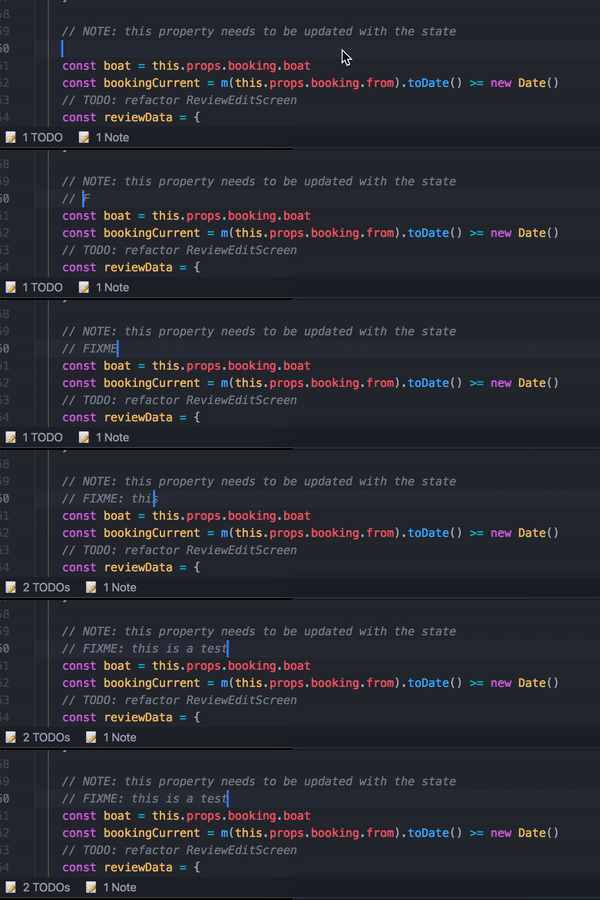
ProVision: Bar provides easy to use and highly customizable buttons to your statusbar. When opening a file it will search for the provided keywords and show you a simple overview of your notes. When clicking on a group you get an overview of all your notes in the specified group.
- Create custom keywords
- Group keywords together
- Show an overview of your notes in the statusbar
- Jump directly to a note
- View all of your notes in a long and complex file instantly
You can start using it right away! But if you want to customize it more, you can take a look at our manual via the Help: ProVision command.
Help: ProVision: Shows you the manual you are currently reading.ProVision: List All: Shows you all the notes in the current file.ProVision: List Group: Shows you all the notes in the current file from a specifc group.ProVision: Toggle Bar: Toggle the visibility of the statusbar items.
-
ProVision.keywords: The keywords will be searched for. (For setup take a look at our manual) -
ProVision.groups: Custom group appearance. (For setup take a look at our manual) -
ProVision.list.moveOnSingleResult: Instantly jump to the note when there are is only 1 result."ProVision.list.moveOnSingleResult": <true|false>
-
ProVision.bar.side: On which side of the statusbar the items should appear."ProVision.bar.side": <"left"|"right">
-
ProVision.bar.priority: The priority the items get inside the statusbar."ProVision.bar.priority": <number>
MIT © Fooxly
