
A Leaflet control that search markers/features location by custom property.
Support ajax/jsonp autocompletion and JSON data filter/remapping.
Licensed under the MIT license.
Copyright Stefano Cudini
Tested in Leaflet 0.7.x and 1.3.x
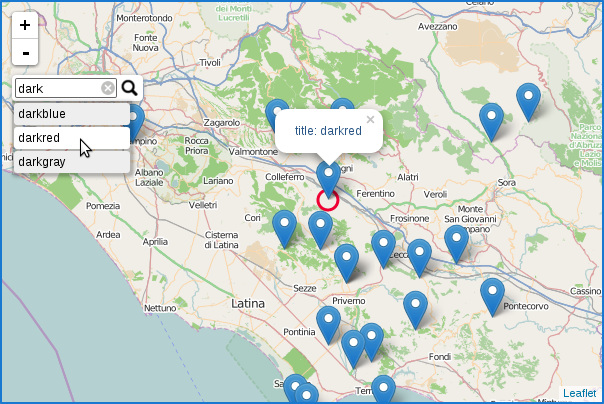
Demo:
labs.easyblog.it/maps/leaflet-search
Bug tracking:
Use Cases:
Websites that use Leaflet.Control.Search
npm install --save leaflet-search
| Option | Default | Description |
|---|---|---|
| url | '' | url for search by ajax request, ex: "search.php?q={s}". Can be function to returns string for dynamic parameter setting |
| layer | null | layer where search markers(is a L.LayerGroup) |
| sourceData | null | function to fill _recordsCache, passed searching text by first param and callback in second |
| jsonpParam | null | jsonp param name for search by jsonp service, ex: "callback" |
| propertyLoc | 'loc' | field for remapping location, using array: ['latname','lonname'] for select double fields(ex. ['lat','lon'] ) support dotted format: 'prop.subprop.title' |
| propertyName | 'title' | property in marker.options(or feature.properties for vector layer) trough filter elements in layer, |
| formatData | null | callback for reformat all data from source to indexed data object |
| filterData | null | callback for filtering data from text searched, params: textSearch, allRecords |
| moveToLocation | null | callback run on location found, params: latlng, title, map |
| buildTip | null | function to return row tip html node(or html string), receive text tooltip in first param |
| container | '' | container id to insert Search Control |
| zoom | null | default zoom level for move to location |
| minLength | 1 | minimal text length for autocomplete |
| initial | true | search elements only by initial text |
| casesensitive | false | search elements in case sensitive text |
| autoType | true | complete input with first suggested result and select this filled-in text. |
| delayType | 400 | delay while typing for show tooltip |
| tooltipLimit | -1 | limit max results to show in tooltip. -1 for no limit, 0 for no results |
| tipAutoSubmit | true | auto map panTo when click on tooltip |
| firstTipSubmit | false | auto select first result con enter click |
| autoResize | true | autoresize on input change |
| collapsed | true | collapse search control at startup |
| autoCollapse | false | collapse search control after submit(on button or on tips if enabled tipAutoSubmit) |
| autoCollapseTime | 1200 | delay for autoclosing alert and collapse after blur |
| textErr | 'Location not found' | error message |
| textCancel | 'Cancel | title in cancel button |
| textPlaceholder | 'Search' | placeholder value |
| hideMarkerOnCollapse | false | remove circle and marker on search control collapsed |
| position | 'topleft' | position in the map |
| marker | {} | custom L.Marker or false for hide |
| marker.icon | false | custom L.Icon for maker location or false for hide |
| marker.animate | true | animate a circle over location found |
| marker.circle | L.CircleMarker options | draw a circle in location found |
| Event | Data | Description |
|---|---|---|
| 'search:locationfound' | {latlng, title, layer} | fired after moved and show markerLocation |
| 'search:expanded' | {} | fired after control was expanded |
| 'search:collapsed' | {} | fired after control was collapsed |
| Method | Arguments | Description |
|---|---|---|
| setLayer() | L.LayerGroup() | set layer search at runtime |
| showAlert() | 'Text message' | show alert message |
| searchText() | 'Text searched' | search text by external code |
(require src/leaflet-search.css)
Adding the search control to the map:
var searchLayer = L.layerGroup().addTo(map);
//... adding data in searchLayer ...
map.addControl( new L.Control.Search({layer: searchLayer}) );
//searchLayer is a L.LayerGroup contains searched markers
Short way:
var searchLayer = L.geoJson().addTo(map);
//... adding data in searchLayer ...
L.map('map', { searchControl: {layer: searchLayer} });
AMD module:
require(["leaflet", "leafletSearch"],function(L, LeafletSearch) {

	//... initialize leaflet map and dataLayer ...

	map.addControl( new LeafletSearch({
		layer: dataLayer
	}) );
});Therefore the deployment require npm installed in your system.
npm install
grunt