The Statement of Purpose for this project was to make a fully functional Learning Management System with event tracking and notification to keep up to date with learning content as well as assessment items as well as having all items in one place for easy view.
The achieved functionality of the project is a full learning management system with a event tracker but the frontend lacks link linking backend for notification system to work as well as the notification system has to be modified to add notinications to a user notification list.
git clone git@github.com:FaizAther/GPR-Analytics.git
cd GPR-Analytics/code
sudo apt-get install python3
pip install virtualenv
cd Environments
virtualenv deco-env
source ./deco-env/bin/activate
pip install -r ./requirments.txt
cd ..
python3 server.pyThe database in use is SQLite. I proposed to use SQLite at the begining of the project as the benefits outweighed the cons.
With SQLite we do not need to worry about runnnig a server and managing port numbers.
SQLite offers a simple file based approach and is available by default on most linux/unix based systems.
To build the sql data base for our project all one needs to do is go to the folder Instution/Database and run
$ ./make_database.shThis should put gpr.db in the right folders for the backend to use.
If you,
$ cat make_database.shthen you will see that we are using a creation.sql and populate.sql, these files are semi handcrafted to fill the database with users and simulates a real admin creating the users and courses, as well as lecturers making announcement.
You may also observe a events.sql that populate the events of each course simulating the lecturer making lecture events and assignment items. All the data from the database gets loaded in the Instution/Run.py
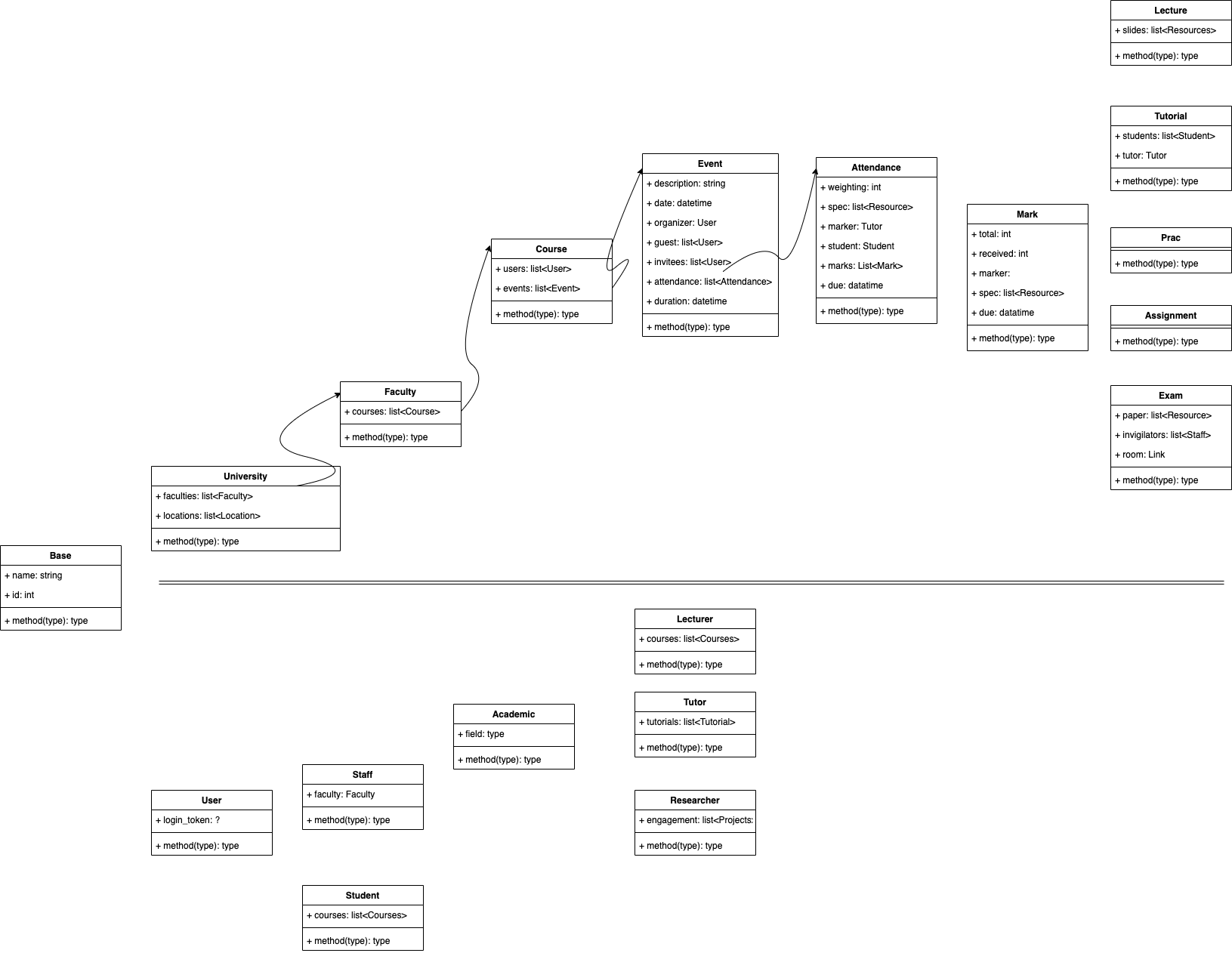
The classes follow a few adaptations of well known design patters, you may observe excessive use of the,
- singleton design pattern, When creating classes
- factor design pattern, Dynamic object instantiation
- visitor design pattern, Dispatch methods in
PretifyMe/HTMLBuilder - observer design pattern, Users reacting differently to different type of events or attendance
Another interesting abstraction you may observe is the use of a base class in Instution/Base.py. In the backend most if not all classes extend from Base.
The majority of rudimentary tasks like iterating and application are abstracted in the Base. This allows one to focus on the actual business logic of the system and leave the repetative tasks to the Base. It does take a bit of work to get the base working correctly and following the daisy chain of function call when an error is received that takes you all the way up to the Base where the actual error was. After fixing all these nighty grity issues one can easily rely on this form of abstraction.
The Base also uses aspects of functional programming to reduce need for testing and make the overall experience smooth.
Refer to Instution/Users/User.py from which all the rest of the users extend(check Instution/Users/UserType.py for all types), abstracting away common functionality like password hashing and validation. As well as a generic reactor function to the events that gets overloaded in other classes that extend this class.
The Sudo user has no login password and everything must be defined statically in code, but the admin has a login and can interact with the system through the frontend.
The Sudo user creates admin of different university/ies and admin of each university may create faculties and users and courses and set course authority and faculty deans.
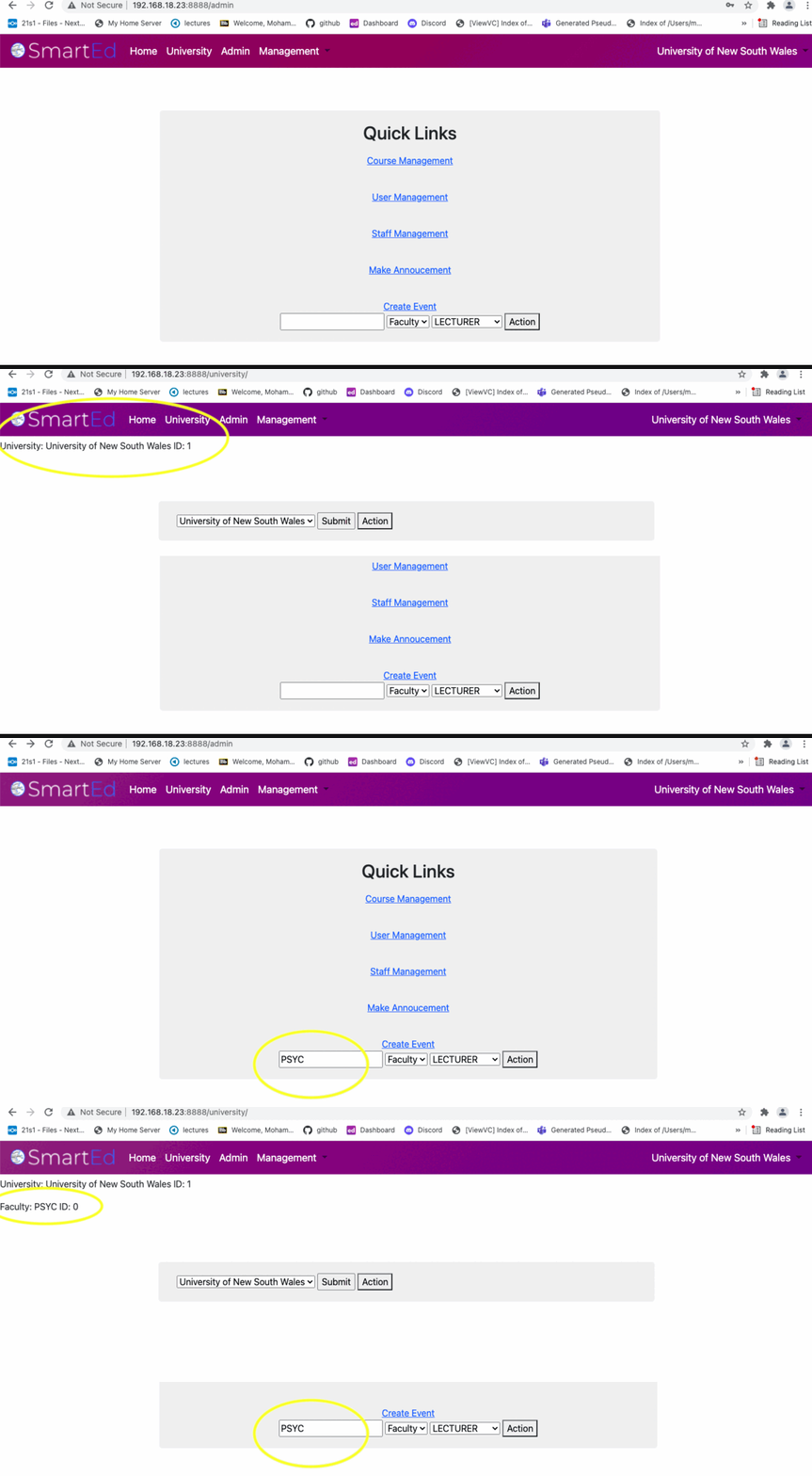
Refer to Instution/Events/Event.py from which publically accessible events like lectures, tutes and for more refer to Instution/Events/EventType.py.
For assignment items there are separate classes that follow the singleton pattern to decide and lock an invitee and marker of the attendance, using the factory pattern on a new event creation like a lecture by lecturer, an attendance object is created and locks all the enrolled students with the lecturer as the marker of that attendance and is not only available in the students in engagements but also in the lecturer engagements attributes.
A lecturer adding announcement and lecture item - Clink Here
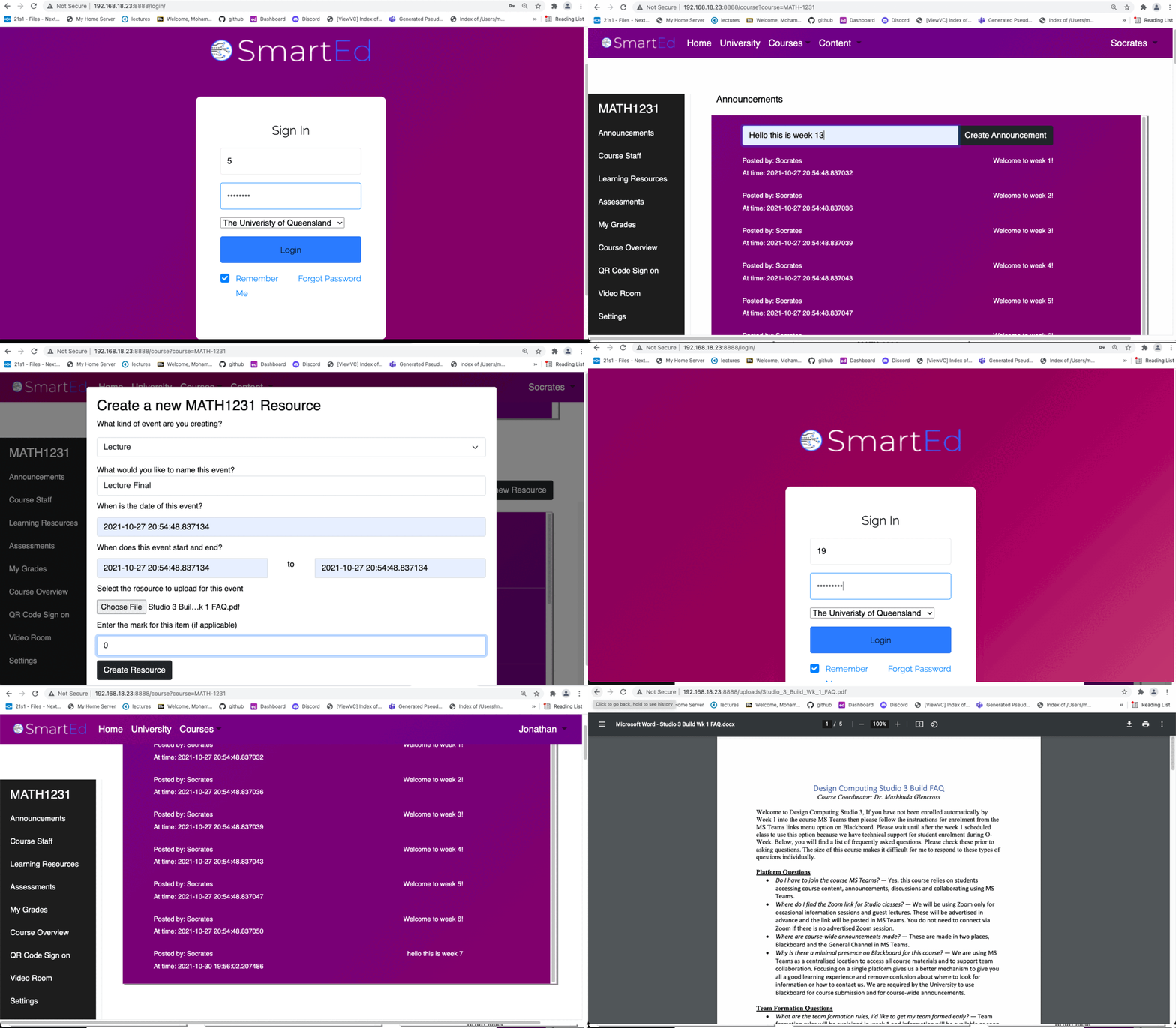
Then being viewed by a student enrolled in that course.
A lecturer adding an assignment item - Clink Here
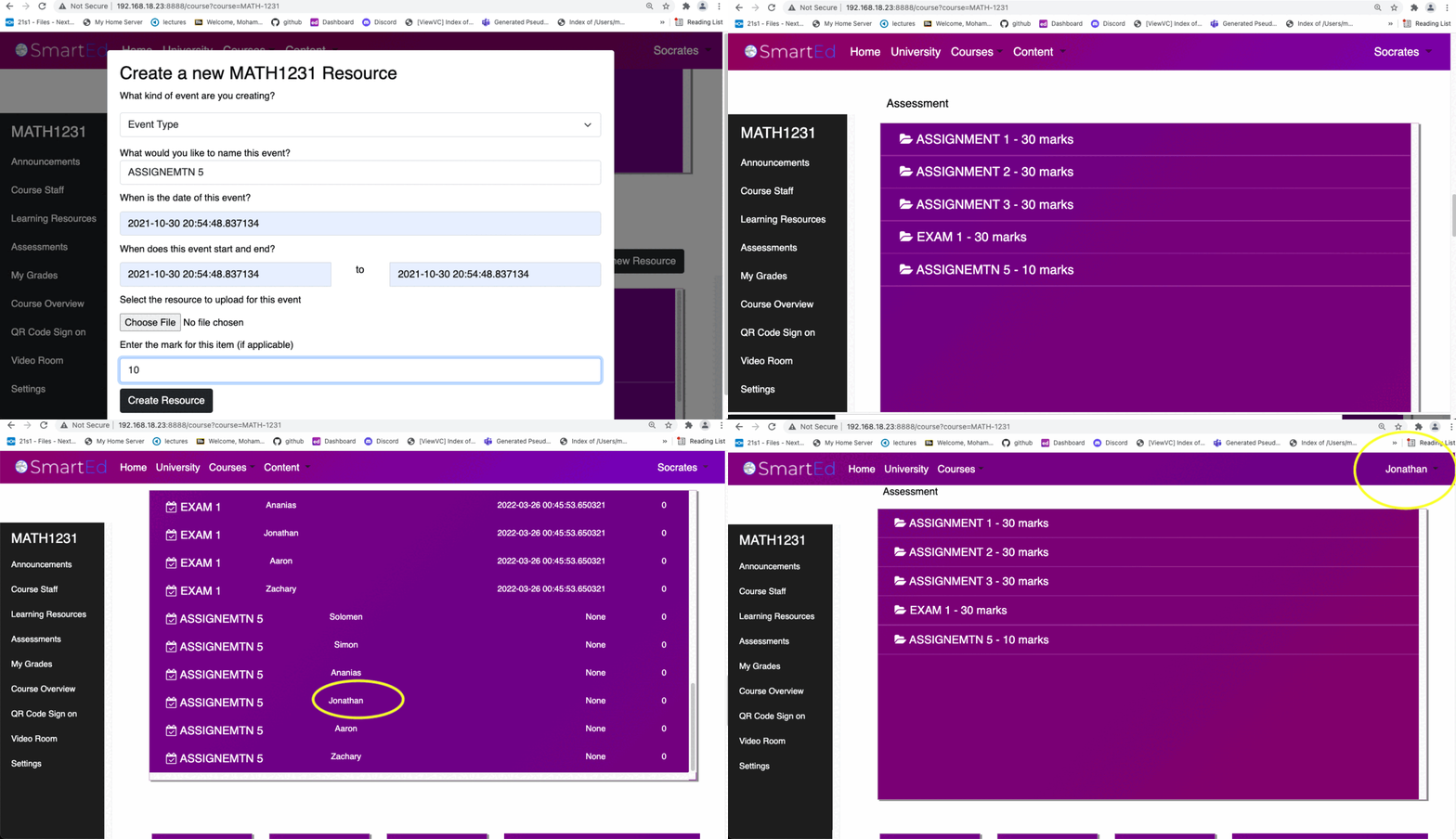
All students enrolled in this course must be marked by the lecturer so all students show up in the lecturers grade section as Assignment 5. Also there is backend functionality that shift the grader to a tutor in that course but this has not been linked with the frontend, refer to
def handle_tutor(self, user: Tutor) -> None:in Instution/Event.py. After that assignment 5 is being viewed by a student enrolled in that course.
Refer to Instution/Universities/University.py. University, Faculty and Course are pretty straight forward. The only interesting thing is that the course has a notify method that calls the update method of all users that have that course as their engagement. The update method reacts differently according to the type of the user e.g. tutor may react differently to student on update to course.
The HTTP server is running with flask and it manages all of the routing and traffic. Creates sessions and manages the user interaction.
The templates are defined in templates and all the templates extend the basic.html that has all the logic to manage displaying the nav bar and other common functionality. The routes are defined in server.py.
There is also a upload feature for resources on the classes branch of the repo but it is still in beta and may have issues time to time.
The classes were tested with whitebox testing and you see them all defined for each classes. Some of them are duds because they did not need to be tested as most if not all functionality of the parent class were being used. Another example of User testing is that the system does shows integrity when matching with it with the handcrafted database values and shows no signs of faults.
Flask Forms are used to gather and validate user input and then accessed and forwarded to the backend to take necessary actions for what was actually requested.
This section was mostly handled by my teammates. It has displays what is forwarded by the backend.
The system as it currently is only has events creation and attendance/mark displaying. It is capable of much more with a few tweaks and can be made into a fully functional tracking system that can push notification to slacking students by their tutors and much more.
The current tracker can allow lecturers to view all the students enrolled and all students they have to mark off. It can also be ported to work with tutors and has all the backend functionality to allow the lecturer to dynamically allocate the accessible items ownership to the tutors in the course. The tutors as well as the lecturers can also have buttons to nudge students and the students can have notification trays or a pokes section that gets filled when they are poked or nudged that gets emptied when they have watched a lecture or submitted the assignment they were being nufged for.
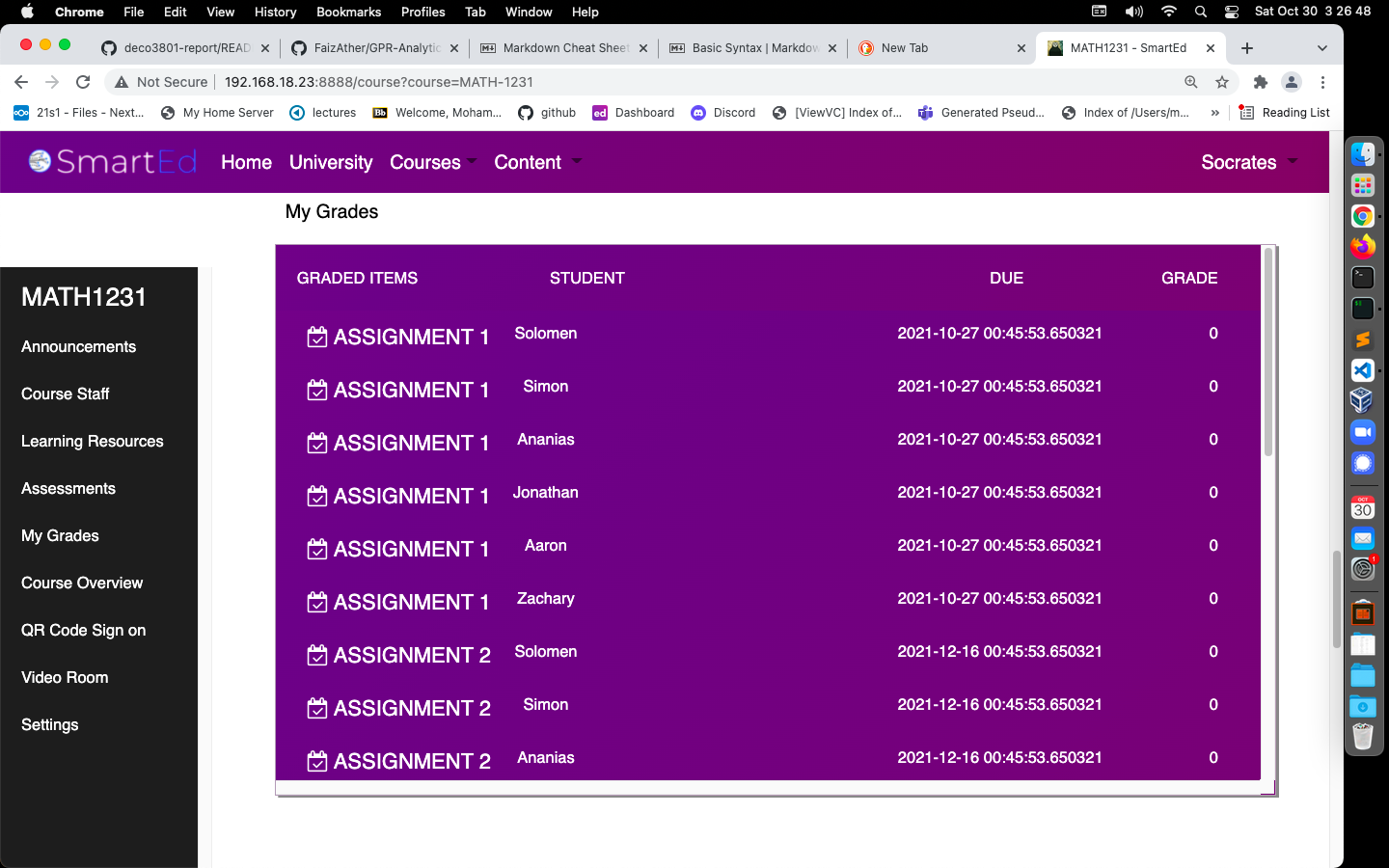
As you should see in the image below this staff view of the course shows all the students enrolled and have pending accessible items to be marked off. The buttons for the nudge should be placed have and call the necessary notify function in the backend.
The users have a update function, that is currently just printing to the screen but here it would actually call the relevant facility to add to the nudge list and keep a track of activities relating to that assignment item.
Refer to Instution/Users/User.py and all sub classes to see the update function.
There is an Instution/Items folder that has Announcement.py and Resource.py currently they are very basic, but they can be made to handle a content delivery network that can work externally to manage load.